
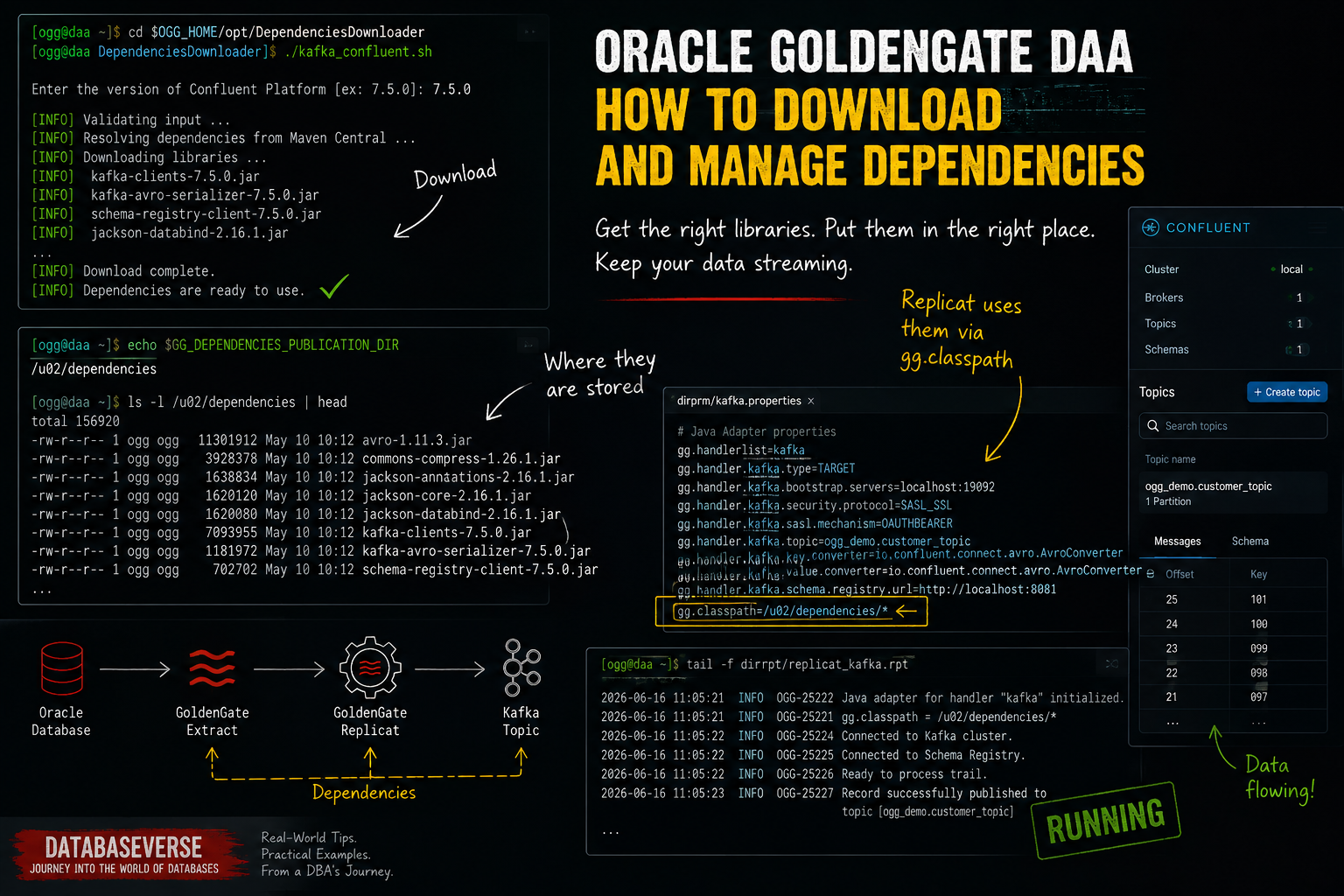
Last time, I wrote about Oracle GoldenGate Distributed Applications and Analytics (DAA), so if you have not read that blog yet, you probably should before continuing with this one. It gives a good overview of what Oracle GoldenGate DAA is and why it has become such an important piece for real-time data streaming architectures.
You can find the previous blog here: Oracle GoldenGate for Distributed Applications and Analytics: From Replication to Real-Time Data Streaming
- Introduction
- Downloading Dependencies
- Example: Downloading Kafka Confluent Dependencies
- How Do Extracts and Replicats Use These Dependencies?
- Extract or Replicat suddenly stops working after a Patch or Upgrade?
Introduction
In this blog, we are going to focus on the next step: getting started once Oracle GoldenGate DAA is already installed.
This post is mainly focused on an on-premises installation. Why? Because in OCI several things are much more straightforward and Oracle handles part of the heavy lifting for you, especially around connectivity and dependency management.
Also, keep in mind that I will not cover the installation process itself. There are already plenty of great blogs and guides explaining how to install Oracle GoldenGate.
That said, if you would like to see a full installation guide here in this awesome blog, let me know. I might end up writing one after all.
Keep in mind that, unlike Oracle GoldenGate for Oracle and most other GoldenGate products, Oracle GoldenGate DAA requires a few additional steps before it can communicate with external systems.
- Install OGG Binaries
- Create a Service Manager and ADD a Deployment
But with OGG DAA, that’s not enough. If you want to extract from or replicate to systems such as Kafka Confluent, you will need to install the appropriate dependencies.
GoldenGate for Distributed Applications and Analytics is built on top of the Java Adapter framework, which relies on external libraries to communicate with systems such as Kafka, Elasticsearch, MongoDB, and many others.
Those libraries are not always included out of the box. Instead, Oracle provides a Dependency Downloader utility that retrieves the required components from Maven repositories.
Let’s see how this works in practice.
Downloading Dependencies
I’m using a Docker image for the purpose of this demo but that does not matter. The first thing you should know is that wherever you installed the OGG DAA binaries, that location becomes your OGG_HOME.
In this DEMO:
OGG_HOME=/u01/ogg
So, let’s say we want to download the dependencies required to write to Kafka topics in a Confluent Platform environment.
To download the dependencies just to go the directory OGG_HOME/opt/DependencyDonwloader

As you can see above, there are plenty of executables, in this particular demo I will use kafka_confluent.sh

A couple of things you should know before running any executable:
- Java is required because several build processes happen behind the scenes and Maven is used for it, you can use the one available from the OGG installation
- Most of the time, the executable will ask you to provide the version you want to download.
- The VM where your OGG is installed should have access to https://repo.maven.apache.org and others repo, it depends of the “handler” you need. I suggest reviewing the .sh script, you will find useful information, I will show you an example
- You can set a proxy as well, the proxy config is in the config_proxy.sh
JAVA
As mentioned earlier, JAVA is easy to solve, because when you installed OGG there is java in the OGG_HOME you only need to do this:
export OGG_HOME=<your OGG HOME> #/u01/oggexport JAVA_HOME=$OGG_HOME/jdkexport PATH=$PATH:$JAVA_HOME/bin
In container images Oracle removes the jdk folder inside the OGG_HOME to reduce container image in the build process but JAVA is installed normally in the PATH /usr/java/jdk-17/bin/java so you don’t need to worry about it!
PROXY
If you need to use a proxy it is better to just edit the config_proxy.sh, exporting the variables before running the executable does not work, so it is easier to configure your proxy settings directly in that file.

Example: Downloading Kafka Confluent Dependencies
For the purpose of this demo, I will donwload the version 7.5.0:

IMPORTANT
By default dependencies are downloaded in the path: $OGG_HOME/opt/DependencyDonwloader/dependencies
I suggest you change this to avoid issues in the future, example:
- If you upgrade or apply any patch in your OGG using out of place and you didn’t move/copy those dependencies to the new directory you will almost certainly encounter issues when starting your processes that depends on it!
- In container images is even worse!
/u01is not a persistent volume and which makes sense but if your container or pod is recreated or terminated and you didn’t change this, after the restart, the pod will no longer have those dependencies available.
How to change this?
You need to modify the GG_DEPENDENCIES_PUBLICATION_DIR in $OGG_HOME/opt/DependencyDownloader/internal_scripts/config.sh

Just change that for the desire folder and that’s it! Example:
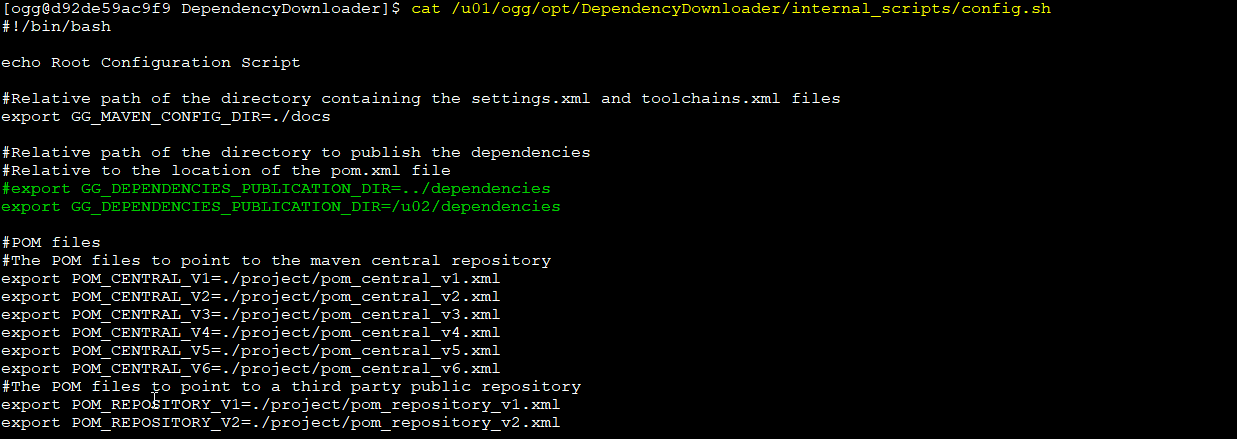
then:

as you can see below, dependencies have been downloaded in the folder specified in the config.sh:

So, in this demo that I’m using docker and /u02 is a persistent volume, so I won’t lose my dependencies if the container fails.
Note: Keep in mind that config.sh will be reset every time your container/pod is restarted, as the config.sh lives in the /u01 where binaries are installed and that volume is not persistent.
You can build a custom image to modify this or add a post script to change it when starting the pod, or any other thing … just make sure to check on this.
How Do Extracts and Replicats Use These Dependencies?
So, how does Replicat actually use these dependencies?
For the purpose of this demo, I have set up a Kafka Confluent environment with schema registry using podman as well… because you know… this blog is awesome, isn’t it?
Kafka and Schema Registry are running on ports 9092 and 8081 respectively.
The Replicat parameter file looks like this:
--- Auto generated Parameter File, do not edit ---
-- Parameter file for Kafka Connect replicat
REPLICAT RPDEMO1
--- End of auto generated Parameter File ---
MAP *.*, TARGET *.*;

There is nothing here related to dependencies. This is simply the Replicat mapping, as usual.
And this is the properties:
# ==========================================================
# Kafka Connect Handler
# ==========================================================
gg.handlerlist=kafkaconnect
gg.handler.kafkaconnect.type=kafkaconnect

# Producer / converter properties file
gg.handler.kafkaconnect.kafkaProducerConfigFile=/u02/Deployment/etc/conf/ogg/kafka-producer.properties

# ==========================================================
# Topic mapping
# ==========================================================
gg.handler.kafkaconnect.topicMappingTemplate=${toLowerCase[${tableName}]}

# Key mapping
gg.handler.kafkaconnect.keyMappingTemplate=${primaryKeys}

# ==========================================================
# Operation-style payload
# ==========================================================
gg.handler.kafkaconnect.mode=op
gg.handler.kafkaconnect.messageFormatting=op

# ==========================================================
# Metadata columns included in the emitted record
# ==========================================================
gg.handler.kafkaconnect.metaColumnsTemplate=${objectname[table]},${optype[opType]},${timestamp[opTs]},${currenttimestamp[loadTs]},${csn[operationId]},${opseqno[operationSeq]},${position[operationPos]}

# ==========================================================
# Converter format
# ==========================================================
gg.handler.kafkaconnect.converter=avro

# ==========================================================
# Optional fixed namespace
# Comment out initially if this replicat handles many unrelated tables.
# ==========================================================
# gg.handler.kafkaconnect.schemaNamespace=ogg_demo

# ==========================================================
# Classpath
# ==========================================================
gg.classpath=/u02/dependencies/kafka_confluent_7.5.0/*
The dependencies are referenced through the gg.classpath property
gg.classpath=/u02/dependencies/kafka_confluent_7.5.0/*
This is the key piece that ties everything together. Downloading the dependencies alone is not enough. Oracle GoldenGate needs to know where those JAR files are located, and that is done through the
gg.classpathproperty.
And one more important thing, I need to tell to the replicat where to connect, right? that info is in the kafka producer config file, that property is referenced here: gg.handler.kafkaconnect.kafkaProducerConfigFile
gg.handler.kafkaconnect.kafkaProducerConfigFile=/u02/Deployment/etc/conf/ogg/kafka-producer.properties
That file looks like this… in a production environment, there would typically be many additional settings.
# ==========================================================
# Kafka broker connection
# IMPORTANT: host:port, not https://host:port
# ==========================================================
bootstrap.servers=host.containers.internal:9092

# ==========================================================
# Kafka Connect converters
# REQUIRED for kafkaconnect handler + Schema Registry flow
# ==========================================================
key.converter=io.confluent.connect.avro.AvroConverter
value.converter=io.confluent.connect.avro.AvroConverter

# ==========================================================
# Schema Registry
# ==========================================================
key.converter.schema.registry.url=http://host.containers.internal:8081
value.converter.schema.registry.url=http://host.containers.internal:8081

# ==========================================================
# Schema registration behavior
# ==========================================================
key.converter.auto.register.schemas=true
value.converter.auto.register.schemas=true
These are all my containers for the demo
- Oracle26ai
- Goldengate for Oracle
- Goldengate Distributed Application and Analytics
- Kafka
- Schema Registry
- Zookeper
 podman ps
CONTAINER ID  IMAGE                                                                                      COMMAND               CREATED        STATUS                      PORTS                                           NAMES
0b758cad8f6e  container-registry.oracle.com/database/free:latest                                         /bin/bash -c $ORA...  12 months ago  Up About an hour (healthy)  0.0.0.0:1521->1521/tcp                          admiring_wiles
a97643007a6b  mad.ocir.io/frgsupyq05kv/goldengate-oracle:23.9.2.25.08                                                          4 hours ago    Up About an hour (healthy)  0.0.0.0:8080->80/tcp, 0.0.0.0:8443->443/tcp     ogg23ai_container
16ff9a6b908a  container-registry.oracle.com/goldengate/goldengate-distributed-apps-and-analytics:latest                        4 hours ago    Up About an hour (healthy)  0.0.0.0:8082->8080/tcp, 0.0.0.0:8444->8443/tcp  oggdaa_container
82012eac13dc  docker.io/confluentinc/cp-zookeeper:7.6.0                                                  /etc/confluent/do...  4 seconds ago  Up 3 seconds                0.0.0.0:2181->2181/tcp                          zookeeper
76ac774bdc8a  docker.io/confluentinc/cp-kafka:7.6.0                                                      /etc/confluent/do...  3 seconds ago  Up 3 seconds                0.0.0.0:9092->9092/tcp                          kafka
70c5311f38dc  docker.io/confluentinc/cp-schema-registry:7.6.0                                            /etc/confluent/do...  3 seconds ago  Up 2 seconds                0.0.0.0:8081->8081/tcp                          schema-registry
I don’t have any topic and schema created yet, but there is no restriction and OGG can create the topic and schema if needed and that’s exactly what we’re going to do now.
$ podman exec -it kafka kafka-topics  --bootstrap-server localhost:9092  --list
__consumer_offsets
_schemas

$ curl localhost:8081/subjects
[]
I already have:
- An Extract in my OGG for Oracle deployment fetching data from the OGG_DEMO.CUSTOMER table
- A Distribution Path sending the trails from OGG for Oracle Deployment to OGG DAA Deployment
- A Replicat running in the OGG DAA Deployment replicating to Kafka
Let’s do some DMLs and see!


Topic has been created:

And schema as well:

Extract or Replicat suddenly stops working after a Patch or Upgrade?
If your processes were working yesterday and now fail with errors such as:
ClassNotFoundExceptionNoClassDefFoundError
Check:
- Dependency directory exists
- Directory contains JAR files
- GG_DEPENDENCIES_PUBLICATION_DIR points to the correct location
- Dependencies were copied after an out-of-place upgrade
- Container restart did not remove the files
Wrapping up
Oracle GoldenGate DAA makes it remarkably easy to integrate with platforms such as Kafka, Schema Registry, Elasticsearch, MongoDB, and many others. However, unlike traditional Oracle GoldenGate deployments, the dependency layer becomes a critical part of the architecture.
Understanding where dependencies are downloaded, how Replicat uses them through the gg.classpath, and how to persist them across upgrades or container restarts can save you a significant amount of troubleshooting later.
My recommendation is simple:
- Never rely on the default dependency location in production.
- Use a dedicated persistent directory, document it as part of your deployment standards, and include it in your upgrade procedures.
Trust me, future you will be grateful.
Leave a Reply