
I was actually planning to write about how to download dependencies for GoldenGate for Distributed Application and Analytics (OGG DAA).
But then I stopped for a second.
Wait… I don’t even have a proper post explaining what this thing is.
So here we are.
Yes, this one has a bit more theory than usual… but trust me, without this, the rest just doesn’t click.
- Intro
- So, what is Oracle GoldenGate for Distributed Applications and Analytics?
- A Simple End-to-End Flow
- Handlers and Formatters: Where the Magic Happens
- Designing the Message: Format and Schema
- Conclusion
Intro
There was a time when databases were the final destination. Applications wrote data, reports consumed it, and everything more or less stayed within the same boundaries. If you needed that data somewhere else, you copied it, maybe with a nightly job, maybe with some form of replication, and that was good enough.
But that world has changed, and it is not enough anymore… is it?
Today, data is expected to move. Not just move, but flow continuously across systems. Microservices need it, analytics platforms depend on it, and event-driven architectures assume it is already in motion. Waiting hours, or even minutes, is no longer acceptable in many scenarios.
And this is where things start to get interesting… …at least for people like us… or maybe just me 😂
Because the question is no longer “How do I replicate my database?”
It becomes: “How do I turn my database into a real-time data source for everything else?”
When people think about Oracle GoldenGate, most of them are familiar with the classic use case. Oracle to Oracle, or maybe Oracle to PostgreSQL, MySQL, DB2… in short, relational to relational replication.
And that makes sense, because that is where GoldenGate built its reputation.
But what about everything else?
What about streaming changes into Kafka, feeding a data lake, or integrating with systems that are not even relational databases? What about NoSQL targets, object storage/S3, or event-driven platforms that expect data in completely different formats?
This is exactly the space where Oracle GoldenGate for Distributed Applications and Analytics comes into play.
If you come from a traditional GoldenGate background, it is easy to think of it as just another replication tool. Extract, trail, replicat, done. But that perspective misses the bigger picture.
GoldenGate is no longer just about moving data from one database to another. It is about turning transactions into events, and making those events available to systems that were never designed to talk directly to your database. Kafka, object storage, REST endpoints, analytics engines… all of them can become consumers of your database changes, in near real time.
In this post, we are going to explore how GoldenGate fits into modern distributed architectures, what changes compared to the “classic” mindset, and some of the practical lessons learned when you actually start wiring it into other platforms!
Because once you start thinking of your database as an event producer, everything else starts to look very different.
So, what is Oracle GoldenGate for Distributed Applications and Analytics?
At a practical level, Oracle GoldenGate for Distributed Applications and Analytics is focused on the delivery side of data streaming.
It does not replace GoldenGate for Oracle or other source-specific deployments. Instead, it works alongside them.
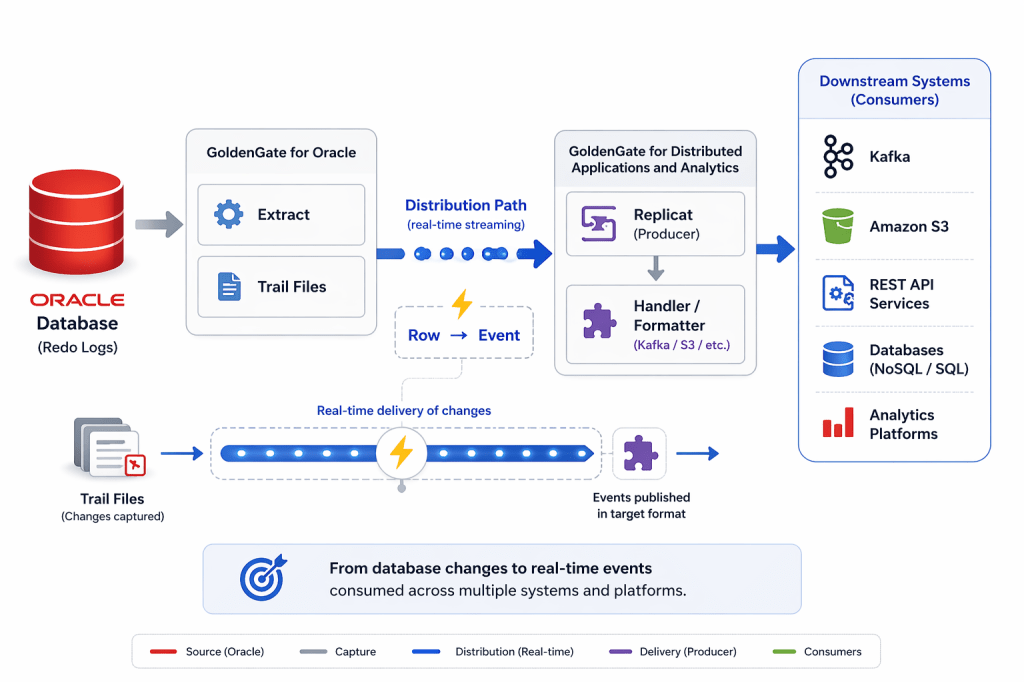
In a typical setup, one that I’m working on it right now, GoldenGate for Oracle captures changes from the database and writes them into trail files. From there, those changes can be routed through Distribution Paths to another GoldenGate deployment, where GoldenGate for Distributed Applications and Analytics for example takes over, and this is where things change!
Instead of applying those changes into another database, this deployment is designed to deliver data into modern platforms like Kafka, object storage, AWS S3, REST services, or analytics systems.
The core components are still the same, Extract, Trail, and Replicat, but their responsibility is different.
Here, Replicat is not applying rows. It is acting as a producer, transforming and publishing events in formats like JSON or Avro so that external systems can consume them.
This separation of concerns is key.
One deployment focuses on capturing changes reliably from the source system, while another focuses on distributing those changes to multiple downstream consumers.
In simple terms, GoldenGate for Distributed Applications and Analytics is the piece that connects traditional transactional systems with modern data platforms.
A Simple End-to-End Flow
Let’s make this concrete. Imagine a new order is inserted into the ORDERS table in an Oracle database.
In a traditional setup, that change just sits there until something queries it. A report, a batch job, something eventually picks it up.
Now with GoldenGate, the moment that insert happens, it starts moving.
GoldenGate for Oracle captures the change from the redo logs and writes it into a trail file. From there, it is sent through a Distribution Path to another GoldenGate deployment. That second deployment is where GoldenGate for Distributed Applications and Analytics comes into play. A Replicat reads the trail and publishes the change into another platform, let’s say Kafka.
At that point, it is no longer just a row, right? It is an event.
And that same event can now be consumed by multiple systems, microservices, analytics pipelines, data lakes, all without bothering the source database again (which, let’s be honest, it will appreciate).
As they say, a picture is worth a thousand words.
Handlers and Formatters: Where the Magic Happens
At this point, one question usually comes up.
How does GoldenGate actually deliver data to systems like Kafka, object storage, or NoSQL databases?
This is where the concept of handlers and formatters comes in.
GoldenGate for Distributed Applications and Analytics is built on top of the Java Adapter framework, which reads trail data and processes it for external targets.
Handlers define where the data goes.
Formatters define how the data looks.
For example, you might use a Kafka handler to publish messages into a topic, combined with an Avro or JSON formatter to structure the payload.
So far, so good… nothing too scary yet. But there is a detail that is easy to miss the first time you work with it.
The configuration is not defined only in the Replicat process.
Behind the scenes, there is also a properties file used by the Java layer, and that is where most of the target-specific configuration actually lives.
If you create the Replicat from the web UI, this is mostly abstracted away. You select the target, Kafka, S3, or others, and the interface guides you through the configuration, effectively managing that underlying properties setup for you.
If you use Admin Client or the REST API, the experience is different. You are much closer to the raw configuration, so in practice you may need to define or manage those properties yourself.
This is one of those things that can be confusing at first.
From the UI, it can feel like “Replicat just knows how to send data to Kafka”. In reality, there is another layer underneath making that happen.
Once you understand that split, troubleshooting and automation become much easier.
Designing the Message: Format and Schema
As we saw earlier, handlers decide where the data goes. Formatters decide how that data is represented. Whether it is JSON, Avro, XML, or another format, this is the layer that defines the structure of the event.
And this is more important than it might seem at first.
Because once that data leaves GoldenGate, it is no longer controlled by the database. It becomes part of a contract between systems.
Different consumers might read the same event. Some might expect certain fields, others might rely on specific data types, and over time, those expectations evolve.
This is where schema strategy becomes critical. You need to think about how fields are structured, how changes are introduced over time, and how different consumers interpret the same message.
In simpler terms, you are no longer just replicating data. You are defining an interface.
For example, a simple UPDATE in Oracle might be delivered as a message that includes the operation type, timestamps, and both before and after values of the row. That structure is not accidental, it is something you define and that downstream systems will depend on.
Whether the data ends up in a messaging system, object storage, or a downstream application, the structure of the message is what determines how usable that data really is.
And this is usually where things start to get a bit more… interesting.
Because designing the flow is one thing.
Designing the message is another.
Conclusion
GoldenGate has been around for a long time, and many of us got used to thinking about it as a replication tool.
But in this context, it is something else.
When you start working with GoldenGate for Distributed Applications and Analytics, the focus shifts. It is no longer just about keeping databases in sync. It is about making data available, in motion, and ready to be consumed by different systems.
And that changes how you think about it.
You start caring not only about how data is captured, but how it is delivered, how it is structured, and how other systems will use it.
Because at that point, you are not just moving data. You are enabling communication between systems.
And once you see it that way, GoldenGate becomes much more than a replication tool. It becomes part of the backbone of a real-time data platform.
Of course, once you get into real implementations, there are a lot of practical details that start to appear. Things like dependency management, handler behavior, schema evolution, and how different configurations behave depending on whether you use the UI, Admin Client, or APIs.
That is where things get really interesting.
I will cover those lessons and some real-world scenarios in a follow-up post, including how to work with dependencies and what to watch out for when integrating with external systems.
So if you are planning to go beyond the basics, stay tuned.
Because this is where GoldenGate stops being just a tool, and starts becoming part of your architecture.



 DatabaseVerse: Journey into the World of Databases
Leave a comment