

Last week I wrote about Exascale. If you missed it, you can check it out here: Exploring Oracle Exascale: Architecture, Storage Changes, and Why It Matters
Exascale is impressive in many ways, but the feature that really stands out to me is cloning. The actual commands and steps you run to clone a database haven’t changed at all. What has changed is how fast it happens and how it works behind the scenes. That difference comes entirely from the new Exascale software architecture.
If you want a solid background on how thinly provisioned databases worked before Exascale (using SPARSE diskgroups), I highly recommend Alex Blyth’s post: Exadata PDB Sparse Clones. Honestly, I couldn’t explain it better myself, so it’s well worth a read.
So what was the catch with that older approach? (and it’s not even that old). As I mentioned in my previous post, your parent PDB had to be in READ ONLY mode. That’s not ideal when you want to keep things running while creating clones.
ACFS cloning addressed that limitation by allowing the parent PDB to remain in read-write mode. Sounds good in theory, but in practice performance would degrade over time, and not just slightly. It could become a serious problem, making it less than ideal for real-world use.
- Why Exascale changes the cloning game
- Under the hood: How Exascale cloning works
- Thin Cloning a PDB Across Containers
- Thin Cloning a PDB from a Standby Database
- Thin Cloning with a Snapshot Carousel
- Going Bigger: Cloning an Entire Container Database
- Wrapping Up
Why Exascale changes the cloning game
This is where Exascale really shines. It introduces built in, space efficient snapshot and clone capabilities that are tightly integrated with Oracle Database. You don’t need a test master database to support snapshots or clones anymore, that hassle is gone
Anyway, enough theory, let’s get our hands dirty!
So, first thing first, I have a PDB called TOL01, it’s about 120GB, that will be my parent PDB. But before creating a snapshot, why we just don’t create a normal clone, a full clone of our PDB?, I want to see how long it takes, just to compare it later with the snapshot clone.
show pdbs

    CON_ID CON_NAME                       OPEN MODE  RESTRICTED
---------- ------------------------------ ---------- ----------
         2 PDB$SEED                       READ ONLY  NO
         3 PDB1                           READ WRITE NO
         4 TOL01                          READ WRITE NO


select con_id, sum(bytes)/1024/1024/1024 as size_gb from v$datafile group by con_id;

    CON_ID    SIZE_GB
---------- ----------
         1    16.8125
         2  1.7578125
         3 6.85095215
         4 120.112671

4 rows selected.
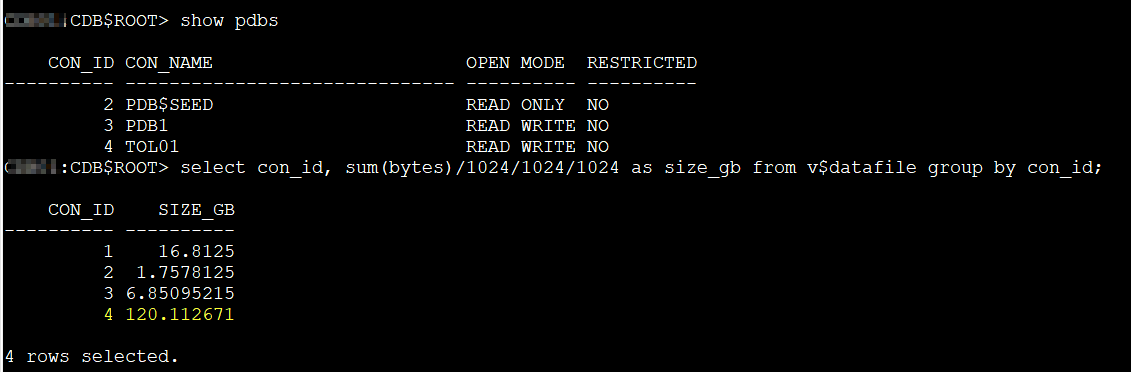
To clone locally the PDB we need to run the following command:
CREATE PLUGGABLE DATABASE pdb1_FULLCLONE FROM pdb1 KEYSTORE IDENTIFIED BY "******";
KEYSTORE IDENTIFIED BY is only required if you have TDE enabled (quite common these days)
BTW, I have a great post about cloning PDB with TDE here: Master Oracle TDE: PDB Unplug, Plug, and Clone Demos in 19c 🙂
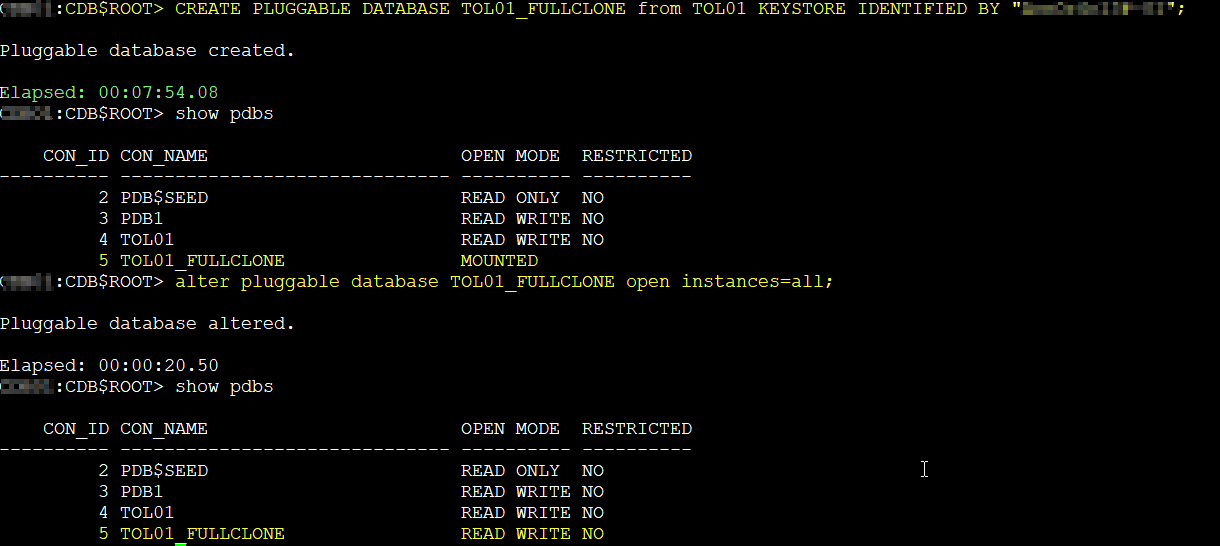
So, the full clone took 7 minutes and 54 seconds.
Now let’s create a snapshot clone. To create a snapshot we can run the following command:
CREATE PLUGGABLE DATABASE pdb1_tc1 FROM pdb1 SNAPSHOT COPY KEYSTORE IDENTIFIED BY "****";
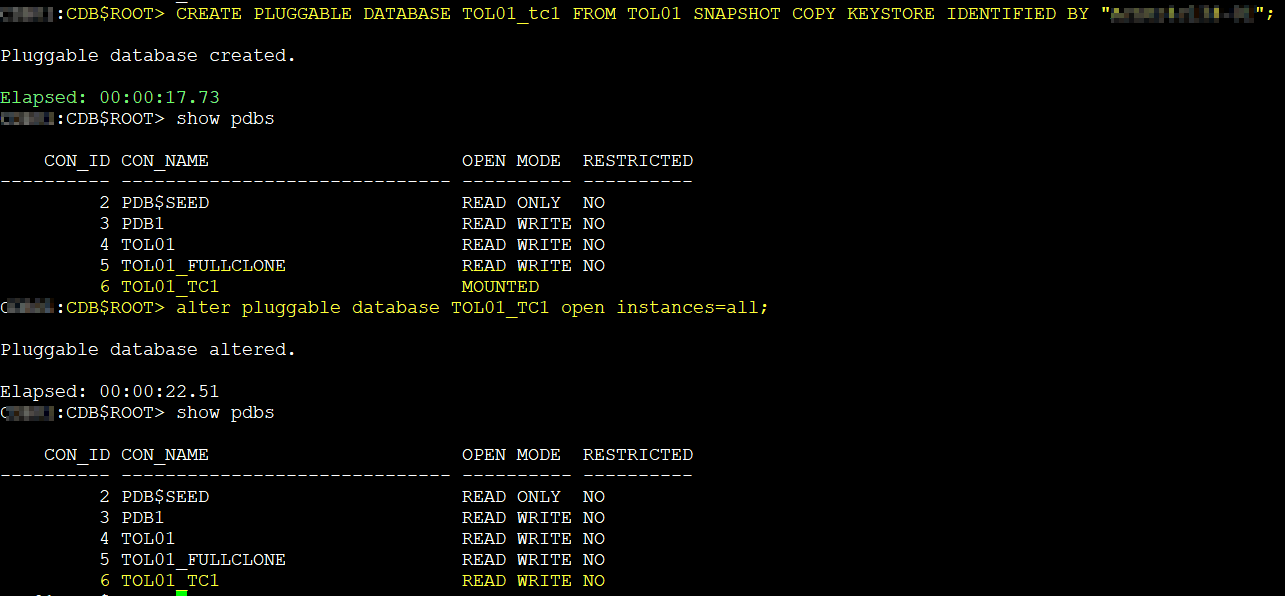
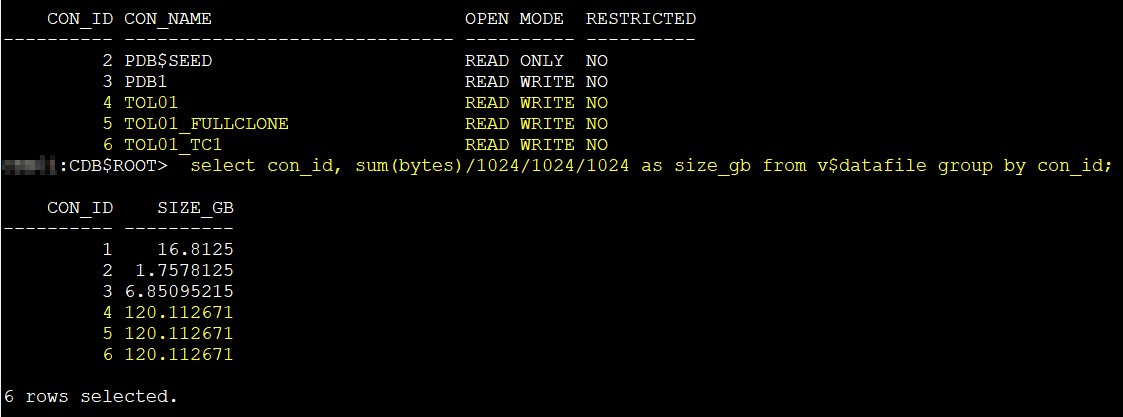
The parent PDB remained in READ WRITE mode the whole time, and the snapshot clone completed in only 17 seconds. Quite a difference, isn’t?
show pdbs

    CON_ID CON_NAME                       OPEN MODE  RESTRICTED
---------- ------------------------------ ---------- ----------
         2 PDB$SEED                       READ ONLY  NO
         3 PDB1                           READ WRITE NO
         4 TOL01                          READ WRITE NO
         5 TOL01_FULLCLONE                READ WRITE NO
         6 TOL01_TC1                      READ WRITE NO

select con_id, sum(bytes)/1024/1024/1024 as size_gb from v$datafile group by con_id;

    CON_ID    SIZE_GB
---------- ----------
         1    16.8125
         2  1.7578125
         3 6.85095215
         4 120.112671
         5 120.112671
         6 120.112671

6 rows selected.
Under the hood: How Exascale cloning works
Exascale automatically uses native snapshot and cloning mechanisms. The cloned files use redirect on write, so they initially take up virtually no space and only consume physical storage as new data is written
And it’s not just about storage. These clones behave just like any regular PDB, visible in standard views like DBA_DATA_FILES, and you can dig into Exascale specific metadata through views like V$EXA_FILE. If you want to trace the lineage you can use ESCLI lssnapshots to see how clones map back to their sources
I tried using
ESCLI lssnapshotsbut it did not work for me. I believe this might be limited in Exascale on Exadata Database Services. It could be available on-premises. I’ll update once I confirm this.
In other words, Exascale gives you the speed of sparse clones without requiring the parent to be read only, and the flexibility ACFS offered without suffering performance degradation over time (To be honest I need to test this a bit further to see if that’s for real, but let’s make that assumption)
Thin Cloning a PDB Across Containers
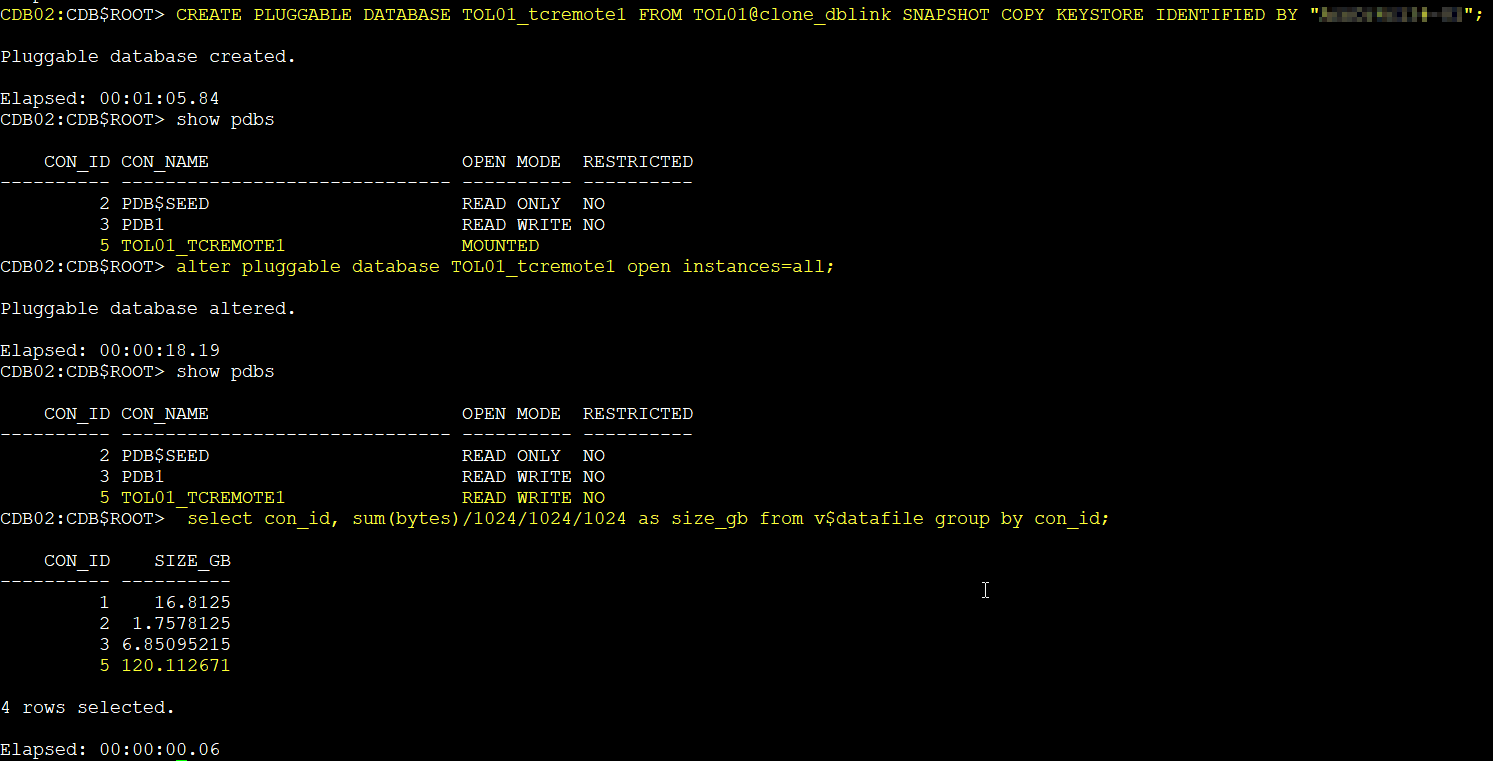
You can also create snapshot-based clones in a different container, and it is quite fast. In this case both containers are running in the same cluster.
For example, I have another CDB called CDB2. I already created a user in the source PDB TOL01 with the necessary privileges and set up the database link in my target CDB. With that in place, the thin clone works smoothly.
CREATE PLUGGABLE DATABASE pdb1c FROM pdb1@CDB1-link SNAPSHOT COPY KEYSTORE IDENTIFIED BY "****";
If you need more details about how to do this, check my earlier post: Master Oracle TDE: PDB Unplug, Plug, and Clone Demos in 19c
Thin Cloning a PDB from a Standby Database
You can also use Exascale thin cloning to clone a PDB residing on an Oracle Data Guard standby database. This is a great way to build space-efficient test and development databases without touching the primary.
To clone from a standby, you must briefly stop redo apply on the standby while creating the clone. Once complete, you can restart apply.
In this setup, the cloned PDB resides in the CDB processing the SQL command, while the source PDB remains in the standby database referenced through the database link. The key requirement is that both must use the same Exascale vault.
DGMGRL> edit database STANDBY set state='apply-off’;

SQL> CREATE PLUGGABLE DATABASE pdb1test FROM pdb1@STANDBY-link SNAPSHOT COPY;

DGMGRL> edit database STANDBY set state='apply-on’;
Note:
Regardless of whether the source PDB is a Data Guard primary or standby, if you create a thinly provisioned clone on a primary, the corresponding standby PDB data files will contain a full copy of the data, not a thin one copy of the data, even if the standby database uses Exascale storage. To avoid this, you can prevent the PDB clone from propagating to the standby database by including STANDBYS=NONE in the CREATE PLUGGABLE DATABASE SQL command.
Thin Cloning with a Snapshot Carousel
So far, we’ve seen one-off clones. But what if you want a steady stream of snapshots you can reuse? That’s where the snapshot carousel comes in.
A snapshot carousel is a rotating library of PDB snapshots. These are point in time copies of a PDB that can be created while the source is open in read only or read write mode. They are useful for cloning or recovery.
On Exascale storage, the carousel supports up to 4,096 snapshots. When the limit is reached, each new snapshot automatically replaces the oldest one.
Snapshots live in the same Exascale vault as the source data files. They use redirect on write thin provisioning, which means creating a snapshot is instantaneous and uses almost no extra space until new data is written.
From the database perspective, you can see them in BA_PDB_SNAPSHOTFILE. Exascale adds further visibility through V$EXA_FILE, and you can also trace mapping with ESCLI lssnapshots.
For example, the following command creates a snapshot carousel based on pdb1 where a new snapshot is taken every 6 hours:
alter session set container = pdb1;
ALTER PLUGGABLE DATABASE pdb1 SNAPSHOT MODE EVERY 6 hours;

To utilize a snapshot from the PDB snapshot carousel as a writable PDB, you must create a clone (snapshot copy) based on the snapshot, example:
CREATE PLUGGABLE DATABASE pdbCloneFromSnap
  FROM pdb1
  USING SNAPSHOT pdb1SnapshotN SNAPSHOT COPY;
The clone remains thinly provisioned and ready to use.
Note:
If the source is an Oracle Data Guard primary database, the snapshot metadata may appear on the standby, but the snapshots themselves are not accessible there, even after switchover or failover.
I tested this by altering my PDB to take a snapshot every 2 minutes. After a short time, I was able to pick one snapshot and create a clone from it, instantly available and thinly provisioned.
col CON_NAME for a15
col SNAPSHOT_NAME for a30
col FULL_SNAPSHOT_PATH for a150
set linesize 250
select con_id, con_name, snapshot_name, snapshot_scn, FULL_SNAPSHOT_PATH from DBA_PDB_SNAPSHOTS;

    CON_ID CON_NAME        SNAPSHOT_NAME                  SNAPSHOT_SCN FULL_SNAPSHOT_PATH
---------- --------------- ------------------------------ ------------ ------------------------------------------------------------------------------------------------------------------------------------------------------
         4 TOL01           SNAP_1383947711_1209395994         21256012 @9eBxxx/EXAXSxxxx-C8701D63xxxxxxxxF317B343B4/CDBXXXX/snapshots/pdb_1383947711/21256009/
         4 TOL01           SNAP_1383947711_1209396613         21260706 @9eBxxx/EXAXSxxxx-C8701D63xxxxxxxxF317B343B4/CDBXXXX/snapshots/pdb_1383947711/21260697/

I have picked the first snap, let’s see the result:
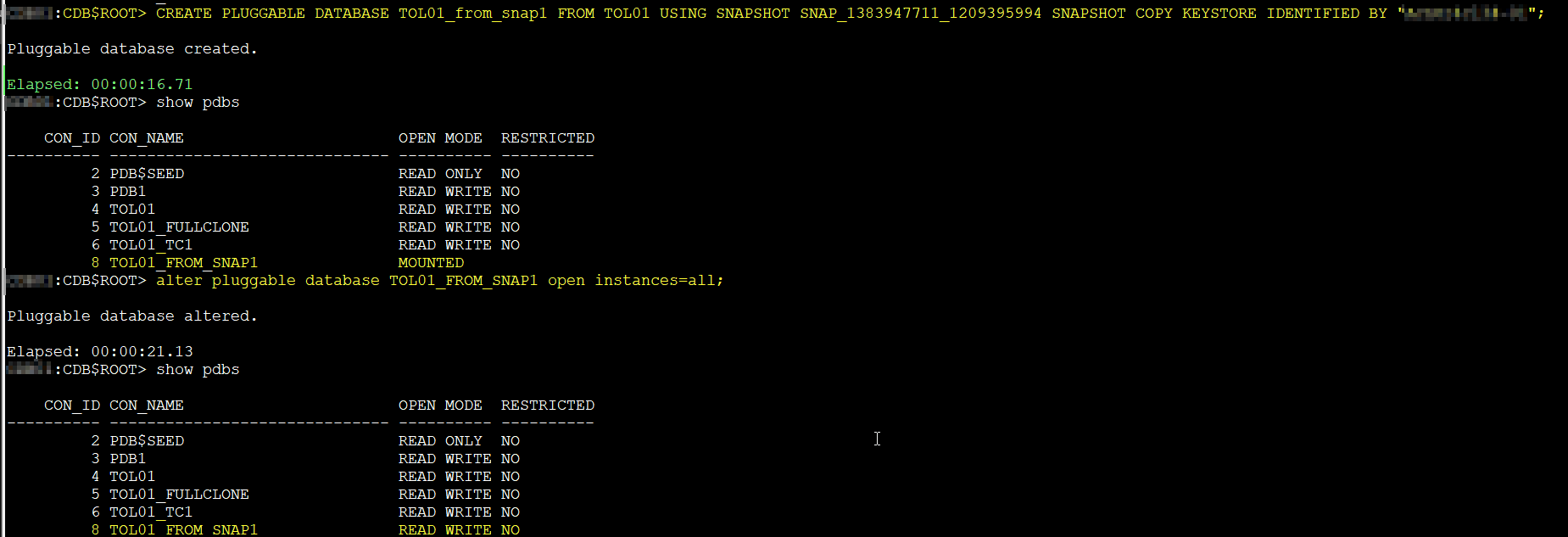
As you can see, this worked perfectly
Note: Creating a snapshot clone requires access to archived redo logs from the snapshot time to guarantee consistency across the PDB data files.
Up to now, we focused on pluggable databases. But what if you want to replicate an entire container? Exascale has you covered there too
Going Bigger: Cloning an Entire Container Database
Exascale does not just allow snapshot based cloning at the PDB level. It also supports cloning an entire container database (CDB). This operation creates a new CDB that includes all of its pluggable databases and configuration.
The process is still thinly provisioned, so the clone is created quickly and without needing the full storage footprint of the source. From the database perspective, the new CDB behaves like a fully independent environment, even though it shares unchanged blocks with the source.
This capability is particularly useful when you want to replicate a complete environment for testing, development, or migration scenarios. It gives you a ready to use copy of the whole container, not just a single PDB.
I haven’t tested CDB cloning yet, but since it involves additional tools and planning, I believe it deserves its own dedicated post, so as always… stay tuned!
Wrapping Up
Cloning in Exascale feels like a feature that has finally matured. The old trade-offs are gone. No more forcing your parent PDB into read only mode. No more suffering through ACFS performance drops. Instead, Exascale gives you instantaneous, thinly provisioned clones that are production ready and versatile.
We looked at local clones, cross-container clones, standby clones, and even the snapshot carousel. And yes, you can go as far as cloning an entire container database. Each of these opens doors for faster testing, safer development, and smoother migrations.
This post only scratches the surface. In upcoming articles I will dive deeper into cloning entire CDBs! and step by step demos you can follow . Stay tuned, there is plenty more to explore in the world of Exascale.






 DatabaseVerse: Journey into the World of Databases
Leave a reply to Ludovico Caldara Cancel reply