

Over the past few months, I’ve been working with Oracle Dynamic Scaling (ODyS) and Oracle Dynamic CPU Count (ODCC) in a customer environment on EXADB-D X9M and X11. These two tools are game changers if you want to allocate only the resources you really need and, more importantly, save some money. ODyS takes care of scaling OCPUs/ECPUs up or down based on actual demand, so your VM cluster adjusts automatically as workloads change.
ODCC was developed by Ruggero Citton from Oracle’s RAC Pack / Cloud Innovation and Solution Engineering team, and it’s been evolving steadily to support more platforms and use cases like PDBs and Grid Infrastructure 23ai.
If you’re curious about how ODyS works, I wrote a blog post on that a while ago: ExaDB-C@C/ExaDB-D – OCPUs are draining my wallet! Any tips to save some cash?
Some things have changed since then, but the core concept remains the same, so it’s still worth checking out. I’ll be writing an updated version soon, especially now that I’ve implemented ODyS in a Kubernetes-based architecture. Stay tuned for that one.
But this blog isn’t about ODyS. This one is all about ODCC.
- Oracle Dynamic CPU Count (ODCC)
- Configuration-Based Adjustment in ODCC
- Installation
- Requirements and execution
- Configuration file example and behavior
- ODCC rounding logic and percentage calculations
- Running ODCC at boot time
- Running ODCC as an HA Cluster Resource
- Best practices when using ODCC
- Enough Theory, Let’s see it in action
- Let’s add ODyS to the mix
- Wrapping Up: Why ODCC Matters
Oracle Dynamic CPU Count (ODCC)
Oracle Dynamic CPU Count (ODCC) is a handy automation utility that works side by side with Oracle Dynamic Scaling (ODyS). While ODyS as mentioned earlier takes care of scaling up or down the number of OCPUs or ECPUs in your VM cluster, ODCC makes sure your database’s cpu_count parameter keeps up with those changes. It does this automatically, using a simple configuration file where you can define fixed values or percentages of available CPUs.
cpu_countby default is set to 0, that means that the database is continuously monitoring the number of CPUs reported by the operating system and uses the current count. If you setcpu_countto a different value then this is disabling dynamic CPU reconfiguration
In environments like Oracle Exadata, where multiple databases are often consolidated on the same hardware, you can benefit of something called instance caging along with the Database Resource Manager to manage CPU distribution. This setup ensures each database gets the right share of CPU and helps maintain service levels even when things get busy (hello noisy neighbor)
ODCC takes the guesswork out of adjusting cpu_count. It keeps an eye on the host’s available CPUs and updates your databases accordingly, whether you’re running a single CDB or a bunch of PDBs. So when ODyS scales your VM cluster up or down, ODCC makes sure your database doesn’t miss a beat. It’s a small piece of automation that plays a big role in keeping performance steady and resource usage efficient.
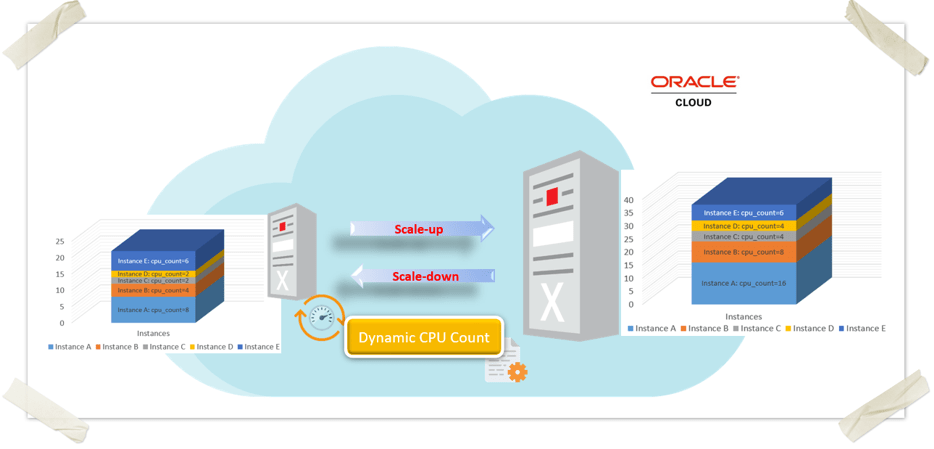
Configuration-Based Adjustment in ODCC
ODCC adjusts the cpu_count parameter based on a simple configuration file. This file lets you:
- Set fixed
cpu_countvalues for each database (CDBs/PDBs). - Define percentages of available OCPUs, making the allocation adaptive to the host’s capacity.
Support for CDBs and PDBs
ODCC fully supports multitenant databases. You can configure cpu_count at the container level (CDB) and also individually for each Pluggable Database (PDB). This ensures a flexible and efficient distribution of resources across all layers of your database architecture.
High Availability and flexible execution
ODCC offers multiple ways to run, depending on your needs and environment:
- As a standalone process or daemon on the operating system.
- As a system service using
systemd, so it starts automatically at boot time. - As a high availability (HA) cluster resource, ensuring that the process fails over to another node if needed.
Installation
ODCC is installed using an RPM package (RedHat Package Manager). You can find the appropriate RPMs for each supported OS version in the official Oracle note Doc ID 2915837.1.
To install the utility, simply download the RPM and run the following command as root, or with a user that has sudo privileges:
rpm -i dcpucount-3.0.1-X.elXX.x86_64.rpm
To upgrade an existing installation, use:
rpm -Uvh dcpucount-3.0.1-X.elXX.x86_64.rpm
Xrefers to the ODCC version number.elXXrepresents the OS version (for example,el7,el8, orel9).
After installation, the following files are created under the opt/dcpucount/ directory:
/opt/dcpucount/
├── dcpucount.bin
└── dcpucount.conf_example
0 directories, 2 files
Installation considerations
It’s a good idea to validate that ODCC is still functional after applying OS updates or infrastructure patches. If you’re planning an OS upgrade (for example, moving from OL7 to OL8), it’s recommended to uninstall the current version of ODCC before upgrading. Once the upgrade is complete, install the RPM that corresponds to the new OS version.
Requirements and execution
ODCC must be started on the node where the database instance is running. It also requires root privileges (or sudo) to function properly. This is because, under the hood, ODCC switches to the Grid Infrastructure user to retrieve database information using srvctl commands, and then switches to the Oracle user to modify the cpu_count parameter inside the database.
Running it as any other user won’t work, since these context switches are essential to gather and apply the correct settings.
Running the ODCC Process
ODCC uses a configuration file to determine the appropriate cpu_count values for each CDB and PDB. While only the config file is strictly required, it’s strongly recommended to define a log file name and path. Otherwise, logs will be written to /tmp/dcpucount.log by default.
To start the process:
/opt/dcpucount/dcpucount.bin --conf <database config file>
                             [--dryrun]
                             [--interval <seconds>]
                             [--logfile <log file name>]
                             [--logpath <log file path>]
                             [--nodaemon]
                             [--nolog]
                             [--nowait]
                             [--onetime]
                             [--overprovisioning]
                             [--debug]
Common options
--confPath to the configuration file (required).--dryrunRun in test mode without applying changes.--intervalCheck interval in seconds (default: 180).--logfileName of the log file (default:dcpucount.log).--logpathDirectory for the log file (default:/tmp).--nodaemonRun in the foreground for easier debugging.--nologSkip log file creation (not recommended).--nowaitIgnore node-to-node CPU symmetry check.--onetimeRun once and exit.--overprovisioningAllow fixedcpu_countvalues to exceed physical OCPUs.--debugEnable verbose debug output.
Configuration file example and behavior
The example below shows how ODCC behaves under different CPU availability scenarios, using a single configuration file. Let’s assume the following sequence:
- The host initially has 20 OCPUs
- A scale-down event reduces OCPUs to 10
- A scale-up event increases OCPUs to 30
Here is the corresponding ODCC configuration file:
# ---------------------------------------------------------------
# Oracle Dynamic CPU Count configuration file
# ---------------------------------------------------------------
#
# Format:
#   DB_UNIQUE_NAME:PDB_NAME:Percentage:Fixed
#
# Examples:
#   CDBA:::6                  --> Fixed CPU_COUNT=6
#   CDBA:PDBA:50:             --> PDBA gets 50% of CDBA's CPU_COUNT
#   CDBA:PDBB::2              --> Fixed CPU_COUNT=2 for PDBB
#   CDBB::15:                 --> 15% of host's OCPUs
#   CDBC::15:                 --> 15% of host's OCPUs
#   CDBD::25:                 --> 25% of host's OCPUs
#   CDBE::50:                 --> 50% of host's OCPUs
# ---------------------------------------------------------------
Here’s how cpu_count is adjusted dynamically as the available OCPUs change:
| DB_UNIQUE_NAME | PDB_NAME | Assignment Rule | OCPUs = 20 cpu_count |
OCPUs = 10 cpu_count |
OCPUs = 30 cpu_count |
|---|---|---|---|---|---|
| CDBA | – | Fixed = 6 | 6 | 6 | 6 |
| CDBA | PDBA | 50% of CDBA | 3 | 3 | 3 |
| CDBA | PDBB | Fixed = 2 | 2 | 2 | 2 |
| CDBB | – | 15% of OCPUs | 3 | 1 | 4 |
| CDBC | – | 15% of OCPUs | 3 | 1 | 4 |
| CDBD | – | 25% of OCPUs | 5 | 2 | 7 |
| CDBE | – | 50% of OCPUs | 10 | 5 | 15 |
- CDBA is set with a fixed
cpu_countof 6, so it remains constant regardless of scaling. - PDBA, defined as 50% of CDBA, will get 3 CPUs as long as CDBA stays at 6.
- PDBB always gets a fixed value of 2 CPUs.
- The rest (CDBB, CDBC, CDBD, and CDBE) are configured using percentages of the available OCPUs on the host, so their
cpu_countvalues scale dynamically with the environment.
This simple file allows ODCC to calculate and apply the correct cpu_count values automatically after each scale operation, keeping resource allocation consistent with your business logic and system capacity
ODCC rounding logic and percentage calculations
ODCC is intentionally conservative when calculating percentages. It always rounds the result to the nearest whole number. For example:
- If a database is configured to use 60% of the available CPUs, and the host currently has 8 physical CPUs, then
cpu_countwill be set to 4 (60% of 8 = 4.8, rounded to 4).
Overprovisioning handling
If the configuration file includes fixed values for cpu_count, ODCC checks whether those values are less than or equal to the number of physical CPUs on the host. If they are not, ODCC will raise an error—unless the --overprovisioning flag is used.
# Host has 16 CPUs
CDBA:::20     # Fixed CPU_COUNT = 20

# Without overprovisioning
ERROR: Fixed CPU '20' is over current host physical CPU '16', exiting...

# With --overprovisioning
WARNING: Fixed CPU '20' is over current host physical CPU '16', skipping due to '--overprovisioning' usage
This flag allows ODCC to proceed with applying the fixed value even when it exceeds available CPU capacity, although such usage should be evaluated carefully based on workload and system constraints.
Important note on PDB configuration
When configuring PDBs in ODCC, you must first define the cpu_count for the CDB, otherwise It will be ignore
For example:
CDBX:::20         # CDB gets 20 CPUs
CDBX:PDB1:80:     # PDB1 gets 80% of 20 → cpu_count = 16
CDBX:PDB2:20:     # PDB2 gets 20% of 20 → cpu_count = 4
Running ODCC at boot time
Creating a systemd Service
You can configure ODCC to start automatically at boot by creating a custom systemd service unit. The service must run as root. It’s also recommended to delay the startup by at least 5 minutes after a VM reboot to ensure that CDBs and PDBs are properly detected.
Here’s an example service definition:
# /etc/systemd/system/dcpucount.service
[Unit]
Description=Oracle Dynamic CPU Count
Wants=network-online.target local-fs.target
After=network-online.target local-fs.target

[Service]
User=root
Type=simple
Environment="PATH=/sbin:/bin:/usr/sbin:/usr/bin"
ExecStartPre=/bin/sleep 300
ExecStart=/bin/sh -c "/opt/dcpucount/dcpucount.bin <command options>"

TimeoutStartSec=300
PIDFile=/tmp/.dcpucount.pid
Restart=on-failure
RestartSec=5s

ExecStop=/bin/kill -s SIGINT $MAINPID

[Install]
WantedBy=multi-user.target
Enabling the systemd Service
Once the unit file is in place:
- Reload the systemd configuration:
systemctl daemon-reload
2. Enable the service to start automatically on boot:
systemctl enable dcpucount.service
3. Start the service:
You can also start ODCC manually as root using:
systemctl start dcpucount.service
To check the service status:
systemctl status dcpucount.service
or
/opt/dcpucount/dcpucount.bin status
Tip: Before enabling the service, run the same command manually with --nodaemon to check for any configuration errors.
Running ODCC as an HA Cluster Resource
If you prefer to run ODCC from a single node and make it highly available, you can configure it as a cluster resource using Oracle Clusterware. This is done by creating a generic_application resource.
Example:
crsctl add resource dcpucount.srv \
-type generic_application \
-attr \
"START_PROGRAM='/opt/dcpucount/dcpucount.bin --conf /opt/dcpucount/dcpucount.conf', \
STOP_PROGRAM='/opt/dcpucount/dcpucount.bin stop_resource', \
PID_FILES='/tmp/.dcpucount.pid', \
AUTO_START=always, \
START_DEPENDENCIES='hard(ora.datac1.acfsvol01.acfs)', \
STOP_DEPENDENCIES='hard(ora.datac1.acfsvol01.acfs)'"
You can manage the ODCC resource like any other cluster-managed process:
- Start:
crsctl start resource dcpucount.srv - Stop:
crsctl stop resource dcpucount.srv - Relocate to another node:
crsctl relocate resource dcpucount.srv -n node2
Note: When defining ODCC as a cluster resource, it’s often necessary to declare dependencies on database resources. If ODCC starts before the databases are available, it may skip them during startup. It will still apply changes later if the instances become available, but it’s better to ensure proper sequencing.
Best practices when using ODCC
Here are some key recommendations to ensure your ODCC setup is stable, efficient, and easy to manage:
Validate before applying
Always test your configuration file using the --dryrun option before deploying in production. This helps you catch any misconfigurations without making actual changes:
/opt/dcpucount/dcpucount.bin --conf /opt/dcpucount/dcpucount.conf --nodaemon --dryrun
Be Cautious with the Overprovisioning flag
Only use the --overprovisioning flag if you have a specific and well-understood reason to assign more CPUs than physically available. This might be acceptable for low-load databases, but can negatively impact performance if misused.
Always define the CDB First
When assigning cpu_count to PDBs, make sure the CDB’s cpu_count is defined in the configuration file. PDB allocations are based on the CDB’s value, so missing this will cause calculation errors or skipped updates.
Monitor the Logs (and avoid --nolog)
ODCC provides valuable logging. Instead of relying on the default /tmp/dcpucount.log, define a persistent log path using --logpath and --logfile. Avoid using the --nolog flag, especially in production, since it removes critical visibility into ODCC’s actions.
--logpath /acfs/logs/odcc --logfile odcc_node1.log
Use --nodaemon first to validate configs
Before enabling ODCC as a systemd service, run it manually in standalone mode with --nodaemon. This ensures your configuration is working correctly before the service is automated.
/opt/dcpucount/dcpucount.bin --conf /opt/dcpucount/dcpucount.conf --nodaemon
Delay startup in Systemd Services
When creating a systemd unit file, include a startup delay (for example, ExecStartPre=/bin/sleep 300) to give the VM and Oracle stack time to stabilize. This helps ODCC detect all running CDBs and PDBs correctly.
Note: I have found that ODCC retries fetching CDB details, but when CDBs are available is not taking into account the PDBs that belong to the CDBs
Use HA but don’t forget about the dependencies
If you configure ODCC as a cluster resource, make sure you define appropriate dependencies on your database instances. This prevents ODCC from running before the databases are available, reducing the chance of skipped updates during startup.
Enough Theory, Let’s see it in action
I hope you’re not bored yet! this is the best part of the blog. Now that we’ve covered how ODCC works in theory, let’s walk through a real-world example.
Environment: EXADB-D X11 with two RAC nodes (8 ECPUs per VM, 16 total).
We have two CDBs, each with their own PDBs:
CDB1withPDB1andPDBACDB2withPDB2andPDBB
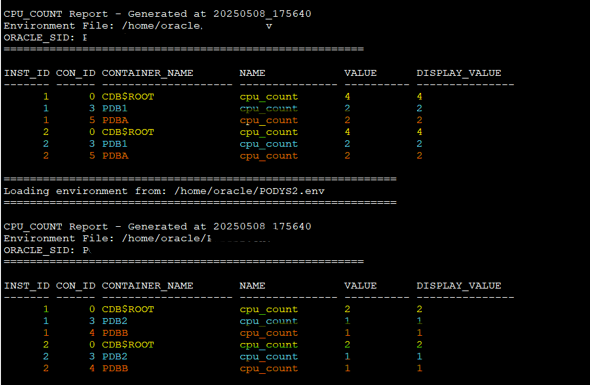
At this point, no cpu_count has been set manually, it’s still at the default value 0, which means the database picks up the number of CPUs from the host.
But wait… if I have 8 ECPUs per VM, why does CDB1 report only 4 CPUs?
Here’s the deal:
ECPUs = 2 * Physical CPUs × 2 (due to hyperthreading)
So, in our case:
8 ECPUs = 2 * (2 CPUs × 2 (hyperthreaded threads))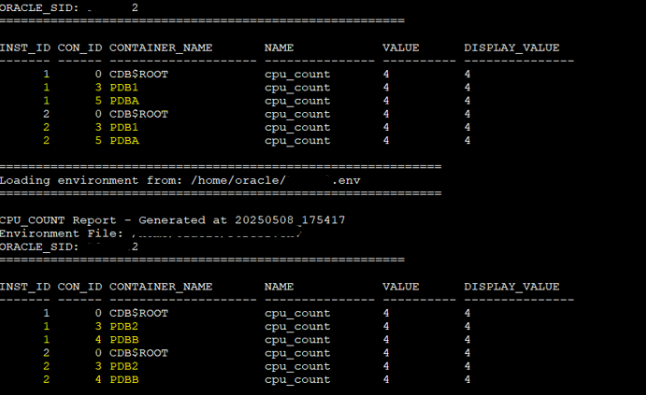
The ODCC Configuration File
This is the configuration file we’re using:
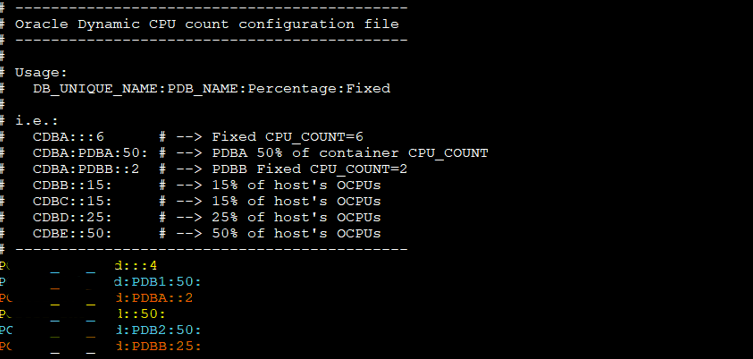
CDB1:::4           # Fixed cpu_count = 4 for CDB1
CDB1:PDB1:50:      # PDB1 gets 50% of CDB1's cpu_count
CDB1:PDBA::2       # Fixed cpu_count = 2 for PDBA
CDB2::50:          # CDB2 gets 50% of host-level OCPUs
CDB2:PDB2:50:      # PDB2 gets 50% of CDB2's cpu_count
CDB2:PDBB:25:      # PDBB gets 25% of CDB2's cpu_count
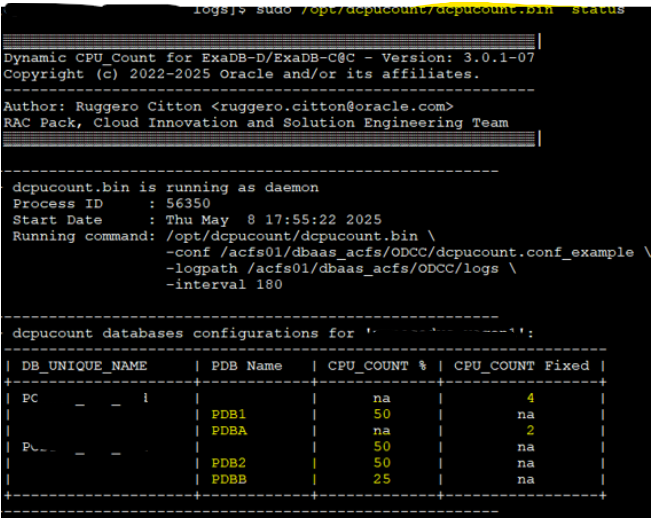
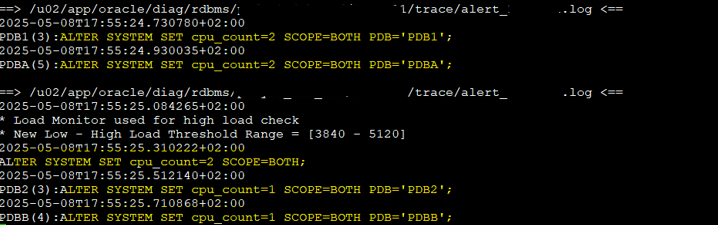
After enabling ODCC, we can check the current configuration using the status function and review the logs.
sudo /opt/dcpucount/dcpucount.bin –conf /acfs01/dbaas_acfs/ODCC/dcpucount.conf_example -logpath /acfs01/dbaas_acfs/ODCC/logs --logfile ODCC_test_${HOSTNAME} -interval 180
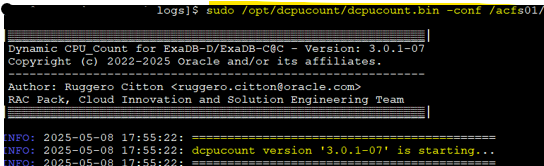
We can take a look to the config executing the status function:
What happens next?
Based on the configuration and logs:
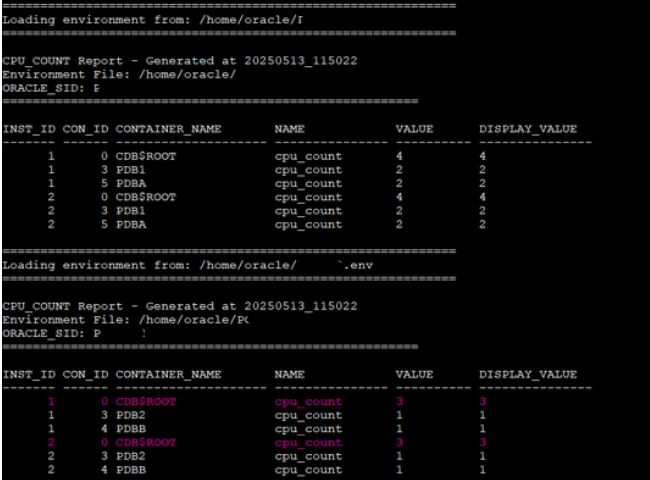
CDB1is set tocpu_count = 4(fixed), so it remains unchanged.PDB1gets 50% ofCDB1, which is2.PDBAis fixed at2.CDB2gets 50% of the host OCPUs, which results incpu_count = 2.PDB2gets 50% ofCDB2=1PDBBgets 25% ofCDB2= also1(rounded down if needed)
This setup behaves exactly as expected. It proves how well ODCC manages dynamic CPU assignment based on the defined rules.
Let’s add ODyS to the mix
That was a fixed scenario. Now, let’s combine ODCC with ODyS and watch what happens when the system scales dynamically.
I’ve started a workload using Swingbench – load generator, how to use it? to simulate load. Initially, the VM cluster has 16 ECPUs.

As load increases, ODyS triggers a scale-up. ODCC detects the change, but remember, on Exadata, scaling OCPUs/ECPUs is a sequential (serial) process. ODCC waits until all nodes reflect the new CPU count, this is default behavior, you can modify this adding the --nowait flag.
After scaling, the VM cluster now has 24 ECPUs.


So, ECPU has been increased and VM cluster has 24 now!
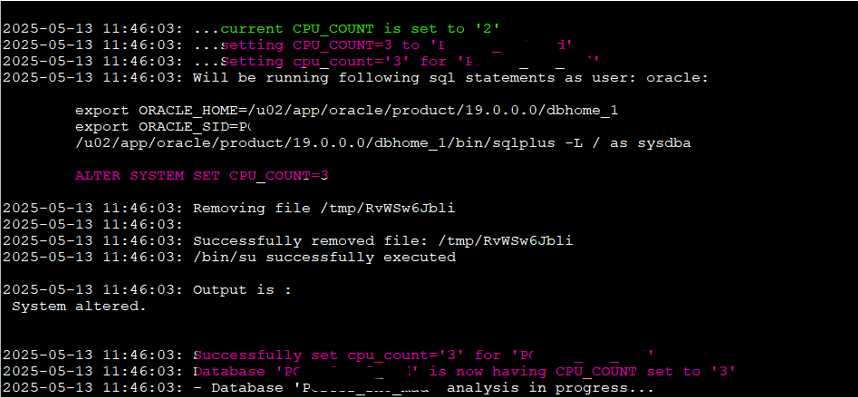
Let’s check the ODCC logs:
Updated behavior after scaling
Here’s what happened:
- CDB1 still has a fixed
cpu_count = 4, so nothing changes. - CDB2, which was set to 50% of host-level OCPUs, now gets
cpu_count = 3(50% of 6 CPUs). - PDB2 gets 50% of 3 →
1.5, rounded down to1. - PDBB gets 25% of 3 →
0.75, also rounded down to1.
This confirms ODCC’s conservative rounding logic in action. Even with more CPUs, if the percentage doesn’t result in a higher whole number, the setting remains the same.
Key Takeaways:
- Fixed values remain stable regardless of scaling.
- Percent-based configs react dynamically to host changes.
- ODCC waits for all nodes to synchronize before updating (default)
- Rounding is always to the nearest lower integer (unless it hits the minimum of 1).
ODCC adapts smoothly, exactly as designed. And when paired with ODyS, you get a full-stack, self-adjusting CPU strategy from VM cluster to database instance to individual PDBs.
Wrapping Up: Why ODCC Matters
Oracle Dynamic CPU Count (ODCC) might look like a small utility, but when paired with Oracle Dynamic Scaling (ODyS), it becomes a powerful tool for optimizing CPU allocation, controlling costs, and maintaining performance consistency. Whether you’re running ExaDB-D, ExaDB-C@C or ExaDB-XS, ODCC brings the flexibility and control that modern workloads demand especially in consolidated environments.
I want to give a quick shout-out to Ruggero Citton from Oracle for building and maintaining it. His work has made dynamic CPU tuning possible in some of the most demanding Oracle environments.
ODCC picks up where ODyS leaves off. While ODyS adjusts VM-level CPU resources, ODCC brings that logic down to the database layer, keeping cpu_count aligned without human intervention.
If you’re already using ODyS, integrating ODCC is a natural next step. And if you’re not, now’s the time to start saving those OCPU/ECPUs credits.
Have you tried ODCC in your environment? Let me know in the comments





 DatabaseVerse: Journey into the World of Databases
Leave a reply to ExaDB-D vs ExaDB-XS in OCI: Architecture, Pricing, and When to Choose Each – DatabaseVerse: Journey into the World of Databases Cancel reply