
It’s been a while since my last blog post, life and work kept me busy. But recently, I gave a webinar on Oracle 23ai Per-PDB Data Guard (DGPDB), and let’s just say… the live demo didn’t go as planned 😅
My goal was to showcase a simple PDB switchover in real-time. I had validated everything. All signs pointed to “Ready for Switchover: YES”. But then: boom! the switchover failed mid-demo. What followed was a deep dive into DGPDB_INT, password policies, and some “unexpected” DGMGRL behaviors (at least for me)
In this post, I’ll walk you through exactly what happened, how I diagnosed the issue, and what you should watch out for in your own DGPDB setups.
- The Plan: A Simple DGPDB Switchover Demo
- The First Sign of Trouble: ORA-28098
- Understanding DGPDB_INT and Password Expiration
- Fixing the Profile and Password
- Manual DGPDB Switchover Attempt
- The Hidden Danger of REMOVE PLUGGABLE DATABASE
- Recovery and Final Validation
- Final Thoughts: Lessons from the Lab
The Plan: A Simple DGPDB Switchover Demo
Everything was ready. Validations showed all green:
SHOW PLUGGABLE DATABASE PDBx AT CDBx;

VALIDATE PLUGGABLE DATABASE PDBx AT CDBx;
Output: Ready for Switchover: YES
Time to switchover… right?
The First Sign of Trouble: ORA-28098
Just as the operation began, DGMGRL threw an unexpected message:
ORA-28098: Profile limits PASSWORDLIFETIME and PASSWORDGRACETIME are not unlimited. Password will expire within X days.
Switchover partially completed:
- Old primary PDB:
READ ONLY - Standby PDB: in
MOUNTEDSTATE
Manual ALTER PLUGGABLE DATABASE X OPEN of my standby PDBA didn’t bring it to READ WRITE
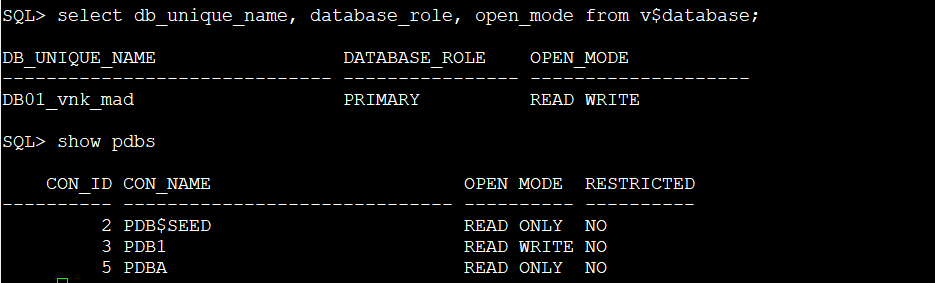
At this point, both PDBs were READ ONLY. PANIC BUTTON moment, even though this was just a lab!
I didn’t panic (although I probably should have 😅). I took a deep breath… and began investigating
This is the log from the DGBroker:

Below you can see that both PDBA in both sides are in READ ONLY/STANDBY mode:

So, I did try to finish the switchover operation manually (PLEASE BE AWARE THAT THIS IS NOT OFFICIALLY SUPPORTED, more in the conclusion) on my PDBA as follow:
SQL> alter pluggable database PDBA recover managed standby database cancel;

Pluggable database altered.

SQL> alter pluggable database PDBA close immediate instances=all
  2  ;

Pluggable database altered.

SQL> ALTER PLUGGABLE DATABASE PDBA COMMIT TO SWITCHOVER;
ALTER PLUGGABLE DATABASE PDBA COMMIT TO SWITCHOVER
*
ERROR at line 1:
ORA-11403: Data Guard site data invalid or incomplete
ORA-28098: Profile limits PASSWORD_LIFE_TIME and PASSWORD_GRACE_TIME are not unlimited, password will expire within 6 days.
Help: https://docs.oracle.com/error-help/db/ora-11403/
Same issue!
ORA-11403: Data Guard site data invalid or incomplete
ORA-28098: Profile limits PASSWORD_LIFE_TIME and PASSWORD_GRACE_TIME are not unlimited, password will expire within 6 days.
Help: https://docs.oracle.com/error-help/db/ora-11403/
Understanding DGPDB_INT and Password Expiration
Going back to basics, I decided to review the fundamentals again about DGPDB and I was taking a look about what I did to create this lab, btw you can take a look to the post here: Oracle Data guard per-PDB (DGPDB) in 23ai
Updated 21/July/2025:
You can rotate easily the DGPDB_INT account using the
EDIT CONFIGURATION PREPARE DGPDBand retry the switchover operation.
When you are preparing your PDBs in the DG CONFIG you are asked for the DGPDB_INT password, example:
DGMGRL> EDIT CONFIGURATION PREPARE DGPDB;
Enter password for DGPDB_INT account at DBTEST_mr7_fra:
Enter password for DGPDB_INT account at DB0721_5kp_fra:
And in the official doc this is also mentioned: About the DGPDB_INT User Account
About the DGPDB_INT User Account
The
DGPDB_INTuser account is used by the database server when making connections to other sites involved in the DG PDB configuration. Typically this occurs during creation and switchover of a standby PDB.When the first DG PDB is added, DGMGRL asks for the password of the
DGPDB_INTaccount. If the account is still locked at the remote site, DGMGRL unlocks it, assigns to it the password supplied, and grants the required privileges to it. The password is securely recorded using theDBMS_CREDENTIALpackage at the local site. Along with the connect identifier for the remote site, the credential and theDGPDB_INTaccount are used to make connections to the remote site when required.Before you can create a target PDB for a source PDB, the
SYSDGadministrative privilege must be granted to theDGPDB_INTuser in the source PDB. DGMGRL makes this grant as part of creating a target PDB for a given source PDB.DGMGRL revokes the SYSDG administrative privileges and locks the
DGPDB_INTaccount when appropriate.
Let’s take a look at the account, right?
I have found that the DGPDB_INT account in the CDB where my PDBA was switchover successfully to STANDBY was EXPIRED (GRACE) – Boom. There it was.
col username for a20
col account_status for a15
col profile for a20
set linesize 250
set pages 99
select username, account_status, profile, lock_date, expiry_date, last_login from dba_users where username='DGPDB_INT';

USERNAME             ACCOUNT_STATUS  PROFILE              LOCK_DATE EXPIRY_DA LAST_LOGIN
-------------------- --------------- -------------------- --------- --------- ---------------------------------------------------------------------------
DGPDB_INT            EXPIRED(GRACE)  DEFAULT                        16-JUL-25 10-JUL-25 03.02.32.000000000 PM +00:00
Fixing the Profile and Password
First, updated the DEFAULT profile (not best practice in prod, but fine for a lab):

SQL> alter profile default limit PASSWORD_REUSE_MAX UNLIMITED PASSWORD_REUSE_TIME UNLIMITED;

Profile altered.

SQL> alter user DGPDB_INT identified by "*****";

User altered.

SQL> col username for a20
col account_status for a15
col profile for a20
set linesize 250
set pages 99
select username, account_status, profile, lock_date, expiry_date, last_login from dba_users where username='DGPDB_INT';

USERNAME             ACCOUNT_STATUS  PROFILE              LOCK_DATE EXPIRY_DA LAST_LOGIN
-------------------- --------------- -------------------- --------- --------- ---------------------------------------------------------------------------
DGPDB_INT            OPEN            DEFAULT                        08-SEP-25 10-JUL-25 03.57.43.000000000 PM +00:00
Account looks good now, let’s try again!
Manual DGPDB Switchover Attempt
You can do a manual switchover of you DGPDB as follow (PLEASE BE AWARE THAT THIS IS NOT OFFICIALLY SUPPORTED, more in the conclusion)
SQL>  alter pluggable database PDBA recover managed standby database cancel;

Pluggable database altered.

SQL>  alter pluggable database PDBA close immediate instances=all;

Pluggable database altered.

SQL> ALTER PLUGGABLE DATABASE PDBA COMMIT TO SWITCHOVER;

Pluggable database altered.

SQL> alter pluggable database PDBA open read write;

Pluggable database altered.

SQL> show pdbs

    CON_ID CON_NAME                       OPEN MODE  RESTRICTED
---------- ------------------------------ ---------- ----------
         2 PDB$SEED                       READ ONLY  NO
         3 PDB2                           READ WRITE NO
         4 PDBA                           READ WRITE NO

Nice! PDBA is in READ WRITE mode, switchover has been completed now, let’s take a look to the DG config
DGMGRL for Linux: Release 23.0.0.0.0 - for Oracle Cloud and Engineered Systems on Thu Jul 10 16:15:37 2025
Version 23.6.0.24.10

Copyright (c) 1982, 2024, Oracle and/or its affiliates.  All rights reserved.

Welcome to DGMGRL, type "help" for information.
Connected to "DB01_vnk_mad"
Connected as SYSDBA.
DGMGRL> show configuration

Configuration - DB01_VNK_MAD

  Protection Mode: MaxPerformance
  Members:
  DB01_vnk_mad - Primary database
    DB02_5r2_mad - Primary database in DB02_5R2_MAD configuration

Data Guard for PDB:   Enabled in TARGET role

Configuration Status:
SUCCESS   (status updated 31 seconds ago)

DGMGRL> show all pluggable database at DB01_VNK_MAD;

PDB Name         PDB ID   Data Guard Role    Data Guard Partner

PDB1                3     None               None
PDBA                5     Primary            PDBA (con_id 4) at db02_5r2_mad

DGMGRL> show all pluggable database at DB02_5r2_mad;

PDB Name         PDB ID   Data Guard Role    Data Guard Partner

PDB2                3     None               None
PDBA                4     Physical Standby   PDBA (con_id 5) at DB01_vnk_mad

DGMGRL> show pluggable database PDBA AT DB01_VNK_MAD;

Pluggable database - PDBA at db01_vnk_mad

  Data Guard Role:     Physical Standby
  Con_ID:              5
  Source:              (unknown)

Pluggable Database Status:
ORA-16918: Standby pluggable database after previous role change is not ready.


DGMGRL> show pluggable database PDBA AT DB02_5r2_mad;

Pluggable database - PDBA at db02_5r2_mad

  Data Guard Role:     Primary
  Con_ID:              4
  Active Target:       con_id 5 at DB01_vnk_mad

Pluggable Database Status:
SUCCESS

DGMGRL> show pluggable database PDBA AT DB01_VNK_MAD;

Pluggable database - PDBA at db01_vnk_mad

  Data Guard Role:     Physical Standby
  Con_ID:              5
  Source:              con_id 4 at DB02_5r2_mad
  Transport Lag:       (unknown)
  Apply Lag:           (unknown)
  Intended State:      APPLY-ON
  Apply State:         Running
  Apply Instance:      DB01
  Average Apply Rate:  (unknown)
  Real Time Query:     ON

Pluggable Database Status:
SUCCESS
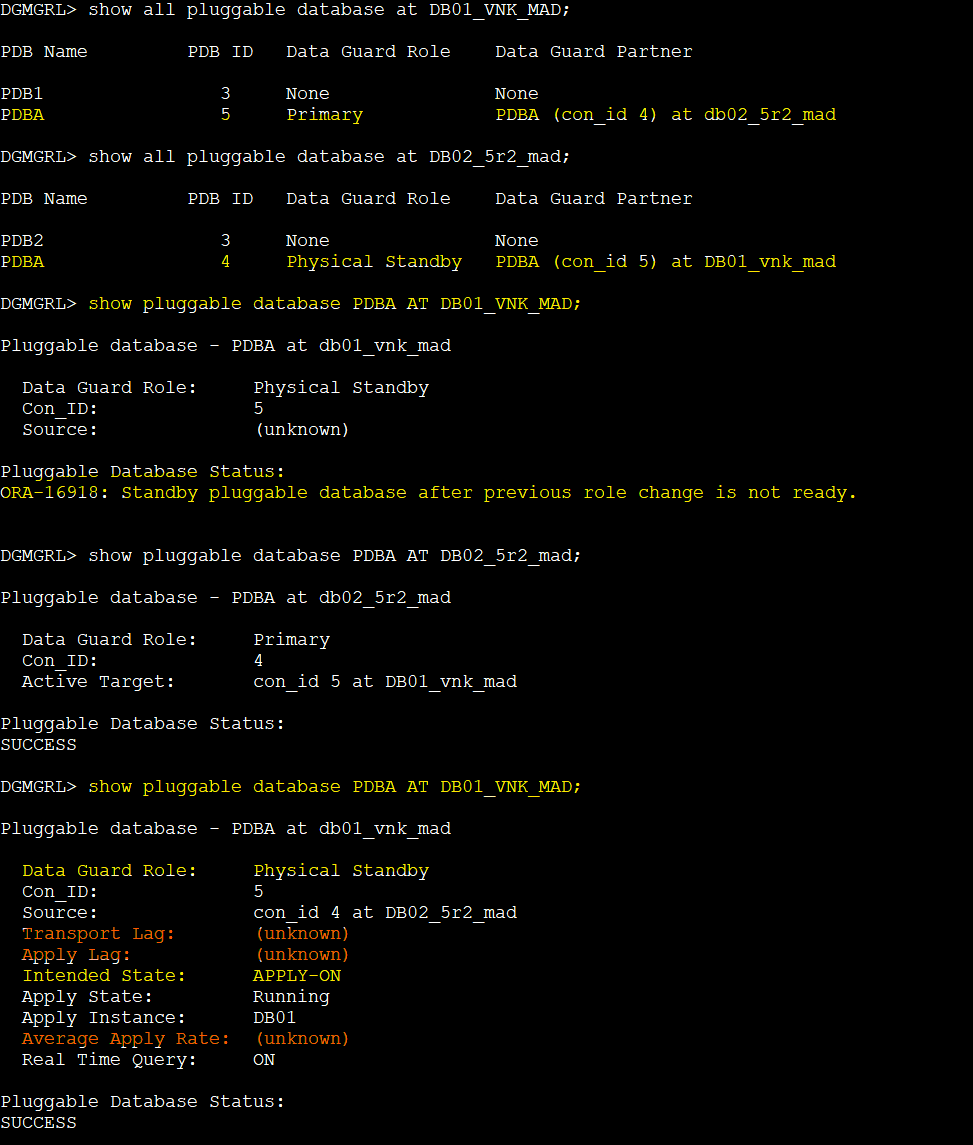
So, it seems is not 100% OK, but let’s stop and start the apply and see if we can give it a push:
DGMGRL>  edit pluggable database PDBA AT DB01_VNK_MAD set state=apply-off;
Succeeded.
DGMGRL>  edit pluggable database PDBA AT DB01_VNK_MAD set state=apply-on;
Succeeded.
DGMGRL> show pluggable database PDBA AT DB01_VNK_MAD;


Pluggable database - PDBA at db01_vnk_mad

  Data Guard Role:     Physical Standby
  Con_ID:              5
  Source:              con_id 4 at DB02_5r2_mad
  Transport Lag:       (unknown)
  Apply Lag:           (unknown)
  Intended State:      APPLY-ON
  Apply State:         Running
  Apply Instance:      DB01
  Average Apply Rate:  (unknown)
  Real Time Query:     OFF

Pluggable Database Status:
SUCCESS

DGMGRL> DGMGRL>
DGMGRL>
DGMGRL>  show pluggable database PDBA AT DB01_VNK_MAD;

Pluggable database - PDBA at db01_vnk_mad

  Data Guard Role:     Physical Standby
  Con_ID:              5
  Source:              con_id 4 at DB02_5r2_mad
  Transport Lag:       (unknown)
  Apply Lag:           (unknown)
  Intended State:      APPLY-ON
  Apply State:         Running
  Apply Instance:      DB01
  Average Apply Rate:  (unknown)
  Real Time Query:     OFF

Pluggable Database Status:
SUCCESS
Well, still not working, let’s take a look at some parameters
On the standby PDB site log_archive_config and log_archive_dest_x parameters looks ok:
SQL> show parameter log_archive_config

NAME                                 TYPE        VALUE
------------------------------------ ----------- ------------------------------
log_archive_config                   string      dg_config=(DB01_vnk_mad,DB02_5
                                                 r2_mad)
SQL> show parameter log_archive_dest_2

NAME                                 TYPE        VALUE
------------------------------------ ----------- ------------------------------
log_archive_dest_2                   string      service="DB02_5R2_MAD", ASYNC
                                                 NOAFFIRM delay=0 optional comp
                                                 ression=disable max_failure=0
                                                 reopen=300 db_unique_name="DB0
                                                 2_5r2_mad" net_timeout=30, val
                                                 id_for=(online_logfile,all_rol
                                                 es)
On the primary PDB site we have a problem!
SQL> show parameter log_archive_config

NAME                                 TYPE        VALUE
------------------------------------ ----------- ------------------------------
log_archive_config                   string      dg_config=(DB02_5r2_mad)
SQL> show parameter log_archive_dest_2

NAME                                 TYPE        VALUE
------------------------------------ ----------- ------------------------------
log_archive_dest_2                   string
Parameters has been not set, looks like DGBroker modified this in the middle of the Switchover when it failed but since operation did not completed well, then we have an inconsistency. Let’s try to fix this
There are “I think” two ways, you can set the parameter manually doing a ALTER SYSTEM SET log_archive_config = xx; and ALTER SYSTEM SET log_archive_dest_2 = xx; but I preferred to do this using the broker because DG BROKER will take care of everything for you, right? (It did not went well as I was expecting)
How do we do this using DGBROKER?
The Hidden Danger of REMOVE PLUGGABLE DATABASE
Important Warning
The REMOVE PLUGGABLE DATABASE command drop the PDB from the CDB, even if you don’t add REMOVE DATAFILES. It’s not just a config cleanup. I learned this the hard way and it nearly cost me the lab, so if you want to try this maybe you should set the parameter manually and save some time😉
IMPORTANT: DO NOT ADD the REMOVE DATAFILES, if you do so… then you will need to restore/recover the PDB and we don’t want that, we want to sync our PDBA and fix the configuration
DGMGRL> help remove

Removes a configuration or a member

Syntax:

  REMOVE CONFIGURATION [PRESERVE DESTINATIONS];

  REMOVE CONFIGURATION <configuration-name>;

  REMOVE { RECOVERY_APPLIANCE | DATABASE | FAR_SYNC | MEMBER }
    <db-unique-name> [PRESERVE DESTINATIONS];

  REMOVE PLUGGABLE DATABASE <pluggable-database-name>
    AT <target-db-unique-name> [REMOVE DATAFILES];

  REMOVE INSTANCE <instance name> [ON { DATABASE | FAR_SYNC } <db-unique-name>];

DGMGRL> REMOVE PLUGGABLE DATABASE PDBA AT DB01_vnk_mad;

Pluggable Database 'pdba' removed.
REMOVE PLUGGABLE DATABASE PDBA AT DB01_vnk_mad;
I has finished ok but it is not entirely OK. Unfortunately I was expecting the REMOVE PLUGGABLE command outcome to just remove my PDBA from the config but behind the scene this is also DROPPING the PDBA from the CDB! and this is an issue I have encountered later… lets continue so you get the whole picture
Let’s add the PDBA again to the config:
ADD PLUGGABLE DATABASE PDBA AT DB01_vnk_mad SOURCE IS PDBA AT DB02_5r2_mad PDBFILENAMECONVERT IS "'/u02/app/oracle/oradata/DB02_5r2_mad/','/u02/app/oracle/oradata/DB01_vnk_mad/'" 'keystore IDENTIFIED BY "*****"';
After adding the PDBA to the config I have taken a look to the log_archive_config and log_archive_dest_X and both looks OK now in both sides! great news!
SQL> show parameter log_archive_config

NAME                                 TYPE        VALUE
------------------------------------ ----------- ------------------------------
log_archive_config                   string      dg_config=(DB02_5r2_mad,DB01_v
                                                 nk_mad)
SQL> show parameter log_archive_dest

NAME                                 TYPE        VALUE
------------------------------------ ----------- ------------------------------
log_archive_dest                     string
log_archive_dest_1                   string      LOCATION=USE_DB_RECOVERY_FILE_
                                                 DEST VALID_FOR=(ALL_LOGFILES,A
                                                 LL_ROLES)
log_archive_dest_10                  string
log_archive_dest_11                  string
log_archive_dest_12                  string
log_archive_dest_13                  string
log_archive_dest_14                  string
log_archive_dest_15                  string
log_archive_dest_16                  string

NAME                                 TYPE        VALUE
------------------------------------ ----------- ------------------------------
log_archive_dest_17                  string
log_archive_dest_18                  string
log_archive_dest_19                  string
log_archive_dest_2                   string      service="DB01_VNK_MAD", ASYNC
                                                 NOAFFIRM delay=0 optional comp
                                                 ression=disable max_failure=0
                                                 reopen=300 db_unique_name="DB0
                                                 1_vnk_mad" net_timeout=30, val
                                                 id_for=(online_logfile,all_rol
                                                 es)
But then… recovered has failed, why?
PDBA(5):Serial Media Recovery started
PDBA(5):TT08 (PID:75853): PDBID:5 Managed Recovery starting Real Time Apply [krsm.c:15940]
2025-07-10T17:11:35.398219+00:00
Errors in file /u01/app/oracle/diag/rdbms/db01_vnk_mad/DB01/trace/DB01_dbw0_4004.trc:
ORA-01157: cannot identify/lock data file 31 - see DBWR trace file
ORA-01110: data file 31: '/u02/app/oracle/oradata/DB01_vnk_mad/DB01_VNK_MAD/33C68FDFE0F14C48E063B200000B0742/datafile/o1_mf_test_n0wy2g7d_.dbf'
ORA-27037: unable to obtain file status
Linux-x86_64 Error: 2: No such file or directory
Additional information: 7
All the references of my the PDBA datafiles has been lost and this is due to the previous command as mentioned early: REMOVE PLUGGABLE DATABASE PDBA has dropped the PDBA from the CDB… At least it kept the datafiles because I didn’t include the REMOVE DATAFILES clause… otherwise I have to restore/recover my PDB from the source
Anyway, let’s check:
SQL> col name for a120
SQL> /

     FILE# NAME
---------- ------------------------------------------------------------------------------------------------------------------------
        28 /u02/app/oracle/oradata/DB01_vnk_mad/DB01_VNK_MAD/33C68FDFE0F14C48E063B200000B0742/datafile/o1_mf_system_053nvhbg_.dbf
        29 /u02/app/oracle/oradata/DB01_vnk_mad/DB01_VNK_MAD/33C68FDFE0F14C48E063B200000B0742/datafile/o1_mf_sysaux_043nvhb9_.dbf
        30 /u02/app/oracle/oradata/DB01_vnk_mad/DB01_VNK_MAD/33C68FDFE0F14C48E063B200000B0742/datafile/o1_mf_undotbs1_063nvhbj_.dbf
        31 /u02/app/oracle/oradata/DB01_vnk_mad/DB01_VNK_MAD/33C68FDFE0F14C48E063B200000B0742/datafile/o1_mf_test_n0wy2g7d_.dbf

SQL> !
$ ls -lrt /u02/app/oracle/oradata/DB01_vnk_mad/DB01_VNK_MAD/33C68FDFE0F14C48E063B200000B0742/datafile/o1_mf_system*
-rw-r----- 1 oracle oinstall 314580992 Jul  9 16:49 /u02/app/oracle/oradata/DB01_vnk_mad/DB01_VNK_MAD/33C68FDFE0F14C48E063B200000B0742/datafile/o1_mf_system_n0ws5lkl_.dbf
As PDBA datafiles exist let’s rename the references and update them:
SQL> alter database rename file '/u02/app/oracle/oradata/DB01_vnk_mad/DB01_VNK_MAD/33C68FDFE0F14C48E063B200000B0742/datafile/o1_mf_system_053nvhbg_.dbf' to '/u02/app/oracle/oradata/DB01_vnk_mad/DB01_VNK_MAD/33C68FDFE0F14C48E063B200000B0742/datafile/o1_mf_system_n0ws5lkl_.dbf';

Database altered.

SQL> alter database rename file '/u02/app/oracle/oradata/DB01_vnk_mad/DB01_VNK_MAD/33C68FDFE0F14C48E063B200000B0742/datafile/o1_mf_sysaux_043nvhb9_.dbf' to '/u02/app/oracle/oradata/DB01_vnk_mad/DB01_VNK_MAD/33C68FDFE0F14C48E063B200000B0742/datafile/o1_mf_sysaux_n0ws5ywr_.dbf';

Database altered.

SQL> alter database rename file '/u02/app/oracle/oradata/DB01_vnk_mad/DB01_VNK_MAD/33C68FDFE0F14C48E063B200000B0742/datafile/o1_mf_undotbs1_063nvhbj_.dbf' to '/u02/app/oracle/oradata/DB01_vnk_mad/DB01_VNK_MAD/33C68FDFE0F14C48E063B200000B0742/datafile/o1_mf_undotbs1_n0ws68nc_.dbf';

Database altered.

SQL> alter database rename file '/u02/app/oracle/oradata/DB01_vnk_mad/DB01_VNK_MAD/33C68FDFE0F14C48E063B200000B0742/datafile/o1_mf_test_n0wy2g7d_.dbf' to '/u02/app/oracle/oradata/DB01_vnk_mad/DB01_VNK_MAD/33C68FDFE0F14C48E063B200000B0742/datafile/o1_mf_test_n0wy2g19_.dbf';

Database altered.

SQL> select file#, name from v$datafile;

     FILE# NAME
---------- ------------------------------------------------------------------------------------------------------------------------
        28 /u02/app/oracle/oradata/DB01_vnk_mad/DB01_VNK_MAD/33C68FDFE0F14C48E063B200000B0742/datafile/o1_mf_system_n0ws5lkl_.dbf
        29 /u02/app/oracle/oradata/DB01_vnk_mad/DB01_VNK_MAD/33C68FDFE0F14C48E063B200000B0742/datafile/o1_mf_sysaux_n0ws5ywr_.dbf
        30 /u02/app/oracle/oradata/DB01_vnk_mad/DB01_VNK_MAD/33C68FDFE0F14C48E063B200000B0742/datafile/o1_mf_undotbs1_n0ws68nc_.dbf
        31 /u02/app/oracle/oradata/DB01_vnk_mad/DB01_VNK_MAD/33C68FDFE0F14C48E063B200000B0742/datafile/o1_mf_test_n0wy2g19_.dbf

SQL> !ls -lrt /u02/app/oracle/oradata/DB01_vnk_mad/DB01_VNK_MAD/33C68FDFE0F14C48E063B200000B0742/datafile/o1_mf_system_n0ws5lkl_.dbf
-rw-r----- 1 oracle oinstall 314580992 Jul  9 16:49 /u02/app/oracle/oradata/DB01_vnk_mad/DB01_VNK_MAD/33C68FDFE0F14C48E063B200000B0742/datafile/o1_mf_system_n0ws5lkl_.dbf
Ok, it looks fine now, let’s see if we have luck!
Recovery and Final Validation
After fixing log_archive_config and log_archive_dest_x using ADD PLUGGABLE DATABASE, things aligned. I re-enabled apply:
DGMGRL> edit pluggable database PDBA AT DB01_vnk_mad set state=apply-on;
Succeeded.
DGMGRL> validate pluggable database PDBA AT DB01_vnk_mad;

  Ready for Switchover:    YES

  Data Guard Role:         Physical Standby
  Apply State:             Running
  Standby Redo Log Files:  3
  Source:                  PDBA (con_id 4) at DB02_5r2_mad

DGMGRL> show pluggable database  PDBA AT DB01_vnk_mad;

Pluggable database - PDBA at db01_vnk_mad

  Data Guard Role:     Physical Standby
  Con_ID:              5
  Source:              con_id 4 at DB02_5r2_mad
  Transport Lag:       0 seconds (computed 1 second ago)
  Apply Lag:           0 seconds (computed 1 second ago)
  Intended State:      APPLY-ON
  Apply State:         Running
  Apply Instance:      DB01
  Average Apply Rate:  2237 KByte/s
  Real Time Query:     OFF

Pluggable Database Status:
SUCCESS
PDBA(5):Serial Media Recovery started
PDBA(5):TT08 (PID:80219): PDBID:5 Managed Recovery starting Real Time Apply [krsm.c:15940]
PDBA(5):Recovery start scn 6337287, time 07/10/2025 16:13:34
2025-07-10T17:20:15.514804+00:00
PDBA(5):TT08 (PID:80219): Media Recovery Log /u03/app/oracle/fast_recovery_area/DB01_VNK_MAD/archivelog/2025_07_10/o1_mf_1_16_n6zw7y02_.arc [krd.c:10299]
PDBA(5):Recovery scanning directory /u02/app/oracle/oradata/DB01_vnk_mad/DB01_VNK_MAD/33C68FDFE0F14C48E063B200000B0742/datafile/ for any matching files
PDBA(5):Successfully added datafile 28 to media recovery
PDBA(5):Datafile #28: '/u02/app/oracle/oradata/DB01_vnk_mad/DB01_VNK_MAD/33C68FDFE0F14C48E063B200000B0742/datafile/o1_mf_system_n0ws5lkl_.dbf'
PDBA(5):Successfully added datafile 29 to media recovery
PDBA(5):Datafile #29: '/u02/app/oracle/oradata/DB01_vnk_mad/DB01_VNK_MAD/33C68FDFE0F14C48E063B200000B0742/datafile/o1_mf_sysaux_n0ws5ywr_.dbf'
PDBA(5):Successfully added datafile 30 to media recovery
PDBA(5):Datafile #30: '/u02/app/oracle/oradata/DB01_vnk_mad/DB01_VNK_MAD/33C68FDFE0F14C48E063B200000B0742/datafile/o1_mf_undotbs1_n0ws68nc_.dbf'
PDBA(5):Successfully added datafile 31 to media recovery
PDBA(5):Datafile #31: '/u02/app/oracle/oradata/DB01_vnk_mad/DB01_VNK_MAD/33C68FDFE0F14C48E063B200000B0742/datafile/o1_mf_test_n0wy2g19_.dbf'
2025-07-10T17:20:15.701376+00:00
PDBA(5):TT08 (PID:80219): Media Recovery Log /u03/app/oracle/fast_recovery_area/DB01_VNK_MAD/archivelog/2025_07_10/o1_mf_1_17_n6zw7xz0_.arc [krd.c:10299]
2025-07-10T17:20:15.746060+00:00
PDBA(5):TT08 (PID:80219): Media Recovery Log /u03/app/oracle/fast_recovery_area/DB01_VNK_MAD/archivelog/2025_07_10/o1_mf_1_18_n6zw7y16_.arc [krd.c:10299]
2025-07-10T17:20:15.889910+00:00
PDBA(5):TT08 (PID:80219): Media Recovery Log /u03/app/oracle/fast_recovery_area/DB01_VNK_MAD/archivelog/2025_07_10/o1_mf_1_19_n6zw8080_.arc [krd.c:10299]
2025-07-10T17:20:16.010818+00:00
PDBA(5):TT08 (PID:80219): Media Recovery Log /u03/app/oracle/fast_recovery_area/DB01_VNK_MAD/archivelog/2025_07_10/o1_mf_1_20_n6zwwdmm_.arc [krd.c:10299]
2025-07-10T17:20:16.129826+00:00
PDBA(5):TT08 (PID:80219): Media Recovery Log /u03/app/oracle/fast_recovery_area/DB01_VNK_MAD/archivelog/2025_07_10/o1_mf_1_21_n6zwwhj3_.arc [krd.c:10299]
2025-07-10T17:20:16.221010+00:00
PDBA(5):TT08 (PID:80219): Media Recovery Log /u03/app/oracle/fast_recovery_area/DB01_VNK_MAD/archivelog/2025_07_10/o1_mf_1_22_n6zx1l3p_.arc [krd.c:10299]
2025-07-10T17:20:16.245451+00:00
PDBA(5):TT08 (PID:80219): Media Recovery Log /u03/app/oracle/fast_recovery_area/DB01_VNK_MAD/archivelog/2025_07_10/o1_mf_1_23_n6zx1p8x_.arc [krd.c:10299]
PDBA(5):TT08 (PID:80219): Media Recovery Waiting for T-1.S-24 (in transit) [krsm.c:6424]
2025-07-10T17:20:16.273086+00:00
PDBA(5):Recovery of Foreign Standby Redo Log: Thread 1 Group 1 Seq 24 Reading mem 0
PDBA(5):  Mem# 0: /u03/app/oracle/redo/DB01_VNK_MAD/onlinelog/o1_mf_1_n0wxpmop_.log
2025-07-10T17:20:16.458490+00:00
Completed: alter pluggable database PDBA recover managed standby database disconnect
YES! It looks good now, config is OK and recover on my PDBA standby has been started without issue!
Let’s insert some data in the primary PDBA and see if this is replicated:
SQL> show pdbs

    CON_ID CON_NAME                       OPEN MODE  RESTRICTED
---------- ------------------------------ ---------- ----------
         4 PDBA                           READ WRITE NO
SQL> insert into TESTUSER.ABC values (3);

1 row created.

SQL>  insert into TESTUSER.ABC values (4);

1 row created.

SQL> commit;

Commit complete.

SQL> select * from  TESTUSER.ABC ;

        ID
----------
         1
         2
         3
         4
SQL> show pdbs

    CON_ID CON_NAME                       OPEN MODE  RESTRICTED
---------- ------------------------------ ---------- ----------
         2 PDB$SEED                       READ ONLY  NO
         3 PDB1                           READ WRITE NO
         5 PDBA                           MOUNTED
SQL> alter pluggable database PDBA open;

Pluggable database altered.

SQL>  show pdbs

    CON_ID CON_NAME                       OPEN MODE  RESTRICTED
---------- ------------------------------ ---------- ----------
         2 PDB$SEED                       READ ONLY  NO
         3 PDB1                           READ WRITE NO
         5 PDBA                           READ ONLY  NO

SQL> alter session set container = PDBA;

Session altered.

SQL> show pdbs

    CON_ID CON_NAME                       OPEN MODE  RESTRICTED
---------- ------------------------------ ---------- ----------
         5 PDBA                           READ ONLY  NO
SQL> select * from  TESTUSER.ABC ;

        ID
----------
         1
         2
         3
         4
Configuration is working as expected now.
Final Thoughts: Lessons from the Lab
Even with all validations green, unexpected failures can happen, especially with new features like DGPDB in Oracle 23ai. This session taught me:
- Always check the status of the
DGPDB_INTaccount before performing a switchover - Consider assigning
DGPDB_INTto a dedicated profile with adjustedPASSWORD_REUSE_MAXandPASSWORD_REUSE_TIMEsettings to avoid expiration issues. - If you need to refresh password for DGPDB_INT account you can run EDIT CONFIGURATION PREPARE DGPDB
- Don’t assume DGMGRL commands are harmless, some can drop entire PDBs!
- Use the DG broker only, it simplifies and automates many parts of the process
- Updated 21/July/2025:
- DGPDB is a Data Guard Broker–only feature, which means all operations must be performed through the Broker. The
ALTER PLUGGABLE DATABASEcommands I had used to resume the PDB are not documented nor supported in this context, so please avoid using them. Thanks to Ludo to update on this
- DGPDB is a Data Guard Broker–only feature, which means all operations must be performed through the Broker. The
- Updated 21/July/2025:
- I wish there were a command to only remove the DG configuration of a PDB (without dropping it). It would make recovery of the configuration from inconsistencies much easier.
Despite the failure, this was a great opportunity to learn how DGPDB works under the hood. I hope this post helps you avoid the same pitfalls.
Have you tested DGPDB in your lab or production? Did anything catch you off guard? Let me know in the comments!






 DatabaseVerse: Journey into the World of Databases
Leave a reply to Ludovico Caldara Cancel reply