

It’s almost Halloween! I have a hot topic that I’m working on, and let me tell you, there are a lot of tricks! I have a bag full of candies to give you, and I hope you find them useful! So, let’s do it!
- Introduction to Oracle Advanced Compression (ACO)
- Best Practices for Oracle Advanced Compression
- Tablespaces consideration
- Creating tables, indexes and lobs on tablespaces with default compress attributes!
- Conclusion
Introduction to Oracle Advanced Compression (ACO)
In today’s data-driven world, businesses are constantly seeking ways to manage their ever-growing datasets more efficiently while optimizing performance and reducing costs. Oracle Advanced Compression (ACO) offers a robust solution to this challenge by enabling organizations to minimize their database storage footprint and improve data processing efficiency.
Introduced as part of Oracle’s comprehensive suite of database management tools, ACO provides a flexible, transparent approach to compressing various types of data within the Oracle Database, including tables, indexes, RMAN backups, Data Guard redo, and network traffic. Unlike traditional compression methods, ACO leverages innovative algorithms designed to reduce storage requirements without sacrificing performance. This is particularly beneficial in high-transaction environments and for organizations looking to manage their storage needs dynamically while maintaining optimal database operations.
Oracle Advanced Compression goes beyond simple storage savings; it enhances the overall performance of the database by reducing I/O, network bandwidth, and backup storage. Whether for OLTP (Online Transaction Processing) systems or data warehousing, ACO plays a critical role in helping organizations tackle the dual challenge of data growth and infrastructure optimization.
Best Practices for Oracle Advanced Compression
For new tables and partitions, enabling Advanced Row Compression is a straightforward process, simply use the ROW STORE COMPRESS ADVANCED clause during the table creation process. For existing tables or partitions, there are four main methods:
- ALTER TABLE … ROW STORE COMPRESS ADVANCED – Enables compression for future DML, but does not affect existing data.
- Online Redefinition (DBMS_REDEFINITION) – Compresses existing data and enables compression for future DML. This method keeps the table online for read/write activity during migration.
- ALTER TABLE … MOVE ROW STORE COMPRESS ADVANCED – Compresses both existing and future data but requires locking during the move, blocking DML operations. Indexes must be rebuilt after the move.
- ALTER TABLE … MOVE TABLE/PARTITION/SUBPARTITION … ONLINE ROW STORE COMPRESS ADVANCED – Allows ongoing DML during the move, compresses existing and future data, and maintains indexes automatically.
Best Practices:
- Avoid compressing tables used as queues (frequent insert and delete cycles).
- Test Advanced Compression in an environment that mimics production to accurately assess its impact.
- Compression yields the best results with low cardinality (duplicate) data.
- Use Compression Advisor (DBMS_COMPRESSION package) to estimate storage savings before applying compression.
- Larger blocks don’t always lead to better compression; testing is recommended.
- Advanced LOB Compression is recommended for LOBs over 4K in size.
Advanced Row Compression works seamlessly with tablespace-level encryption, and policies for Automatic Data Optimization (ADO) can be tailored to compress or move data on demand.
Tablespaces consideration
When you create a tablespace, you can specify that all tables and indexes, or their partitions, created in a tablespace are compressed by default. If you are applying ACO and want to ensure that new objects will be compressed, this is a great approach.
Creating Tablespaces with Default Compression Attributes
When you create a tablespace, you can specify the type of table compression using the DEFAULT keyword, followed by the table compression clause, including the compression type. You can also specify the type of index compression using the DEFAULT keyword, followed by the index compression clause and the index compression type. Example
CREATE TABLESPACE ... DEFAULT ROW STORE COMPRESS ADVANCED;

--The following statement indicates that all indexes created in the tablespace are to use high level advanced index compression, unless otherwise specified

CREATE TABLESPACE ... DEFAULT INDEX COMPRESS ADVANCED HIGH ... ;
Trick or treat? – default compression attribute for tablespaces
When you create a new tablespace with compress attributes using DEFAULT ROW STORE COMPRESS ADVANCED, you are defining DEFAULT compression for tables and LOW compression for indexes; that is the default.
DEFAULT ROW STORE COMPRESS ADVANCED is equivalent to executing DEFAULT COMPRESS FOR OLTP; consider the following table:
| Table/Tablespace Level Compression | Inherited Compression for Index |
|---|---|
OLTP | ADVANCED LOW |
QUERY LOW, QUERY HIGH | ADVANCED HIGH |
ARCHIVE LOW, ARCHIVE HIGH | ADVANCED HIGH |

Let’s change it to QUERY HIGH for example:

Let’s change to DEFAULT ROW STORE COMPRESS ADVANCED, but using the equivalent command DEFAULT COMPRESS FOR OLTP:

You can define individual compression attributes for tables and/or indexes, but be careful and always double-check. For example, we have enabled compression as ADVANCED for tables, and we want to enable the compression attribute for indexes as HIGH:
ALTER TABLESPACE TBS_XX DEFAULT INDEX COMPRESS ADVANCED HIGH;

Kind of “weird,” right? It has enabled the default HIGH compression attribute for indexes, but it has disabled default compression for tables. It seems that enabling default attributes for compression should be a one-shot only. Let’s see.
So, I have found the following command that is still available for backward compatibility, and the good thing is… I can define the default compression attribute ADVANCED for tables and compress ADVANCED LOW/HIGH for indexes:
CREATE BIGFILE TABLESPACE TBS_XX DATAFILE SIZE 512m DEFAULT TABLE COMPRESS FOR ALL OPERATIONS INDEX COMPRESS ADVANCED HIGH;

So, make sure to read which level you want to use for each object based on your needs and requirements; Oracle Advanced Compression is a complex topic.
Creating tables, indexes and lobs on tablespaces with default compress attributes!
So, let’s do some interesting tests about this… I promise you. This is quite interesting, so stay focused!
This is our current setup:
- Default
COMPRESS ADVANCEDfor tables - Default
COMPRESS ADVANCED HIGHfor indexes

Let’s create a table with 3 columns and an index using the following SQL:
CREATE TABLE test.my_table1 (
    id      NUMBER PRIMARY KEY,
    v_text  VARCHAR2(30),
    v_lob   CLOB
) TABLESPACE TBS_EXAMPLE_COMP
LOB (v_lob) STORE AS (TABLESPACE TBS_EXAMPLE_COMP)
;
CREATE INDEX test.my_index1 ON test.my_table1(v_text) tablespace TBS_EXAMPLE_COMP;
As you can see above, my table has 3 columns: id, which is a NUMBER, v_text, which is a VARCHAR2(30), and finally, another interesting column that is a CLOB. Let’s create the table and index so we can see if both inherit compression from the tablespace’s default compress attribute!


As you can see above, there is an interesting output. The table has been created with ADVANCED compression enabled, as expected, since our tablespace has this attribute defined. However, when we look at the index, we can see that compression is disabled, and the LOB segments for our CLOB column, although they are SECUREFILE, have compression disabled as well. Why?
Well, I need to separate this into two different points, and we have our first trick-or-treat here!
Trick or treat? – default compression for indexes
Let’s focus in the index first… In Oracle 19c/Oracle 23ai we have a interesting database parameter: DB_INDEX_COMPRESSION_INHERITANCE that basically dictates how index creation inherits compression attributes and the values options are:
Values:
TABLESPACE:Index inheritance is based on tablespace attributes.TABLE: Index inheritance is based on table attributes.ALL: Index inheritance is based on table settings. However, if the table does not have default compression attributes, then index inheritance is based on tablespace attributes.NONE: There is no index inheritance from the table or tablespace.
So, the default value is NONE, so our index creation does not inherit attributes from our table or even our tablespace. The good thing is we can change this ONLINE, and if you are in multitenant (you should be!), you can set it at the PDB level as well. Let’s drop the table, set this parameter, and try one more time!
alter session set DB_INDEX_COMPRESSION_INHERITANCE = ALL;

Now that I have set the parameter at the session level for the purpose of this demonstration, let’s take a look again:
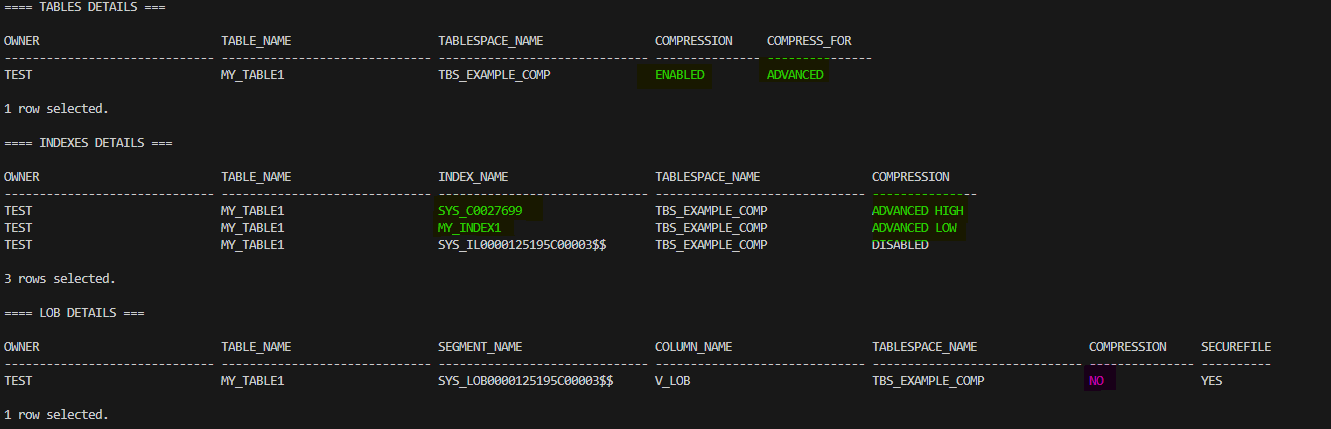
It looks promising, doesn’t it? So, setting this parameter has ensured that my index will inherit the compression attribute for the table or tablespace; however, my CLOB column that is creating a LOB segment still has compression disabled. What else can we do to ensure our LOBs are created with compression? And we have our second trick or treat from this section!
Trick or treat? – default compression for lob segments!
I haven’t mentioned yet, but please take into consideration that compression in LOBs is only possible if you are using SECUREFILE; this does not apply to basic LOBs.
The second important thing that I would like to mention is: the only way to enable compression by default on LOBs SECUREFILE is by setting a hidden parameter, at least in Oracle 19c and even Oracle 23c; this will probably be introduced as a “normal” parameter in newer versions, but the important thing here is “keep in mind to check with Oracle support before enabling this hidden parameter,” I’m doing this for the purpose of this demo!
With all the warnings said, let’s proceed with the demo. The hidden parameter is the following “_kdlxp_lobcompress,” and by default, as you have already seen, it is disabled. Let’s enable it as follows and recreate the table:
alter session set "_kdlxp_lobcompress" = TRUE ;

Now, let’s take a look to the attributes of the objects:

Compression has been enabled for our table, our indexes (ignoring the SYS_ILxxx, this is an internal index for our LOB column; there are no supported operations that we can execute on this kind of segment), and finally our SECUREFILE LOB segments has compression enabled, and it is MEDIUM!.
Note: Compression for LOBs is automatically enabled by this hidden parameter and set to MEDIUM, it does not take into consideration the compression level of the table or even the compression level set at tablespace level, just FYI!
Conclusion
In summary, Oracle Advanced Compression (ACO) provides a powerful resource for organizations looking to optimize data storage and improve performance in their database environments. By intelligently compressing tables, indexes, and LOB segments, ACO helps businesses effectively manage the growing demands of their data while reducing operational costs.
As we’ve explored, implementing best practices such as testing compression in a production-mimicking or preprod environment and understanding the intricacies of tablespace and index compression inheritance can lead to significant advantages. The insights shared regarding default compression settings and the importance of leveraging hidden parameters for LOB compression further equip database administrators with the knowledge to make informed decisions.
Ultimately, embracing Oracle Advanced Compression not only streamlines data management practices but also positions organizations to enhance their database operations, ensuring they remain competitive in an increasingly data-driven landscape.
Warning: Readers should review any plans to set a hidden parameter as “_kdlxp_lobcompress” with Oracle Support to ensure compliance and understand potential impacts.





 DatabaseVerse: Journey into the World of Databases
Leave a reply to fsarcosdb Cancel reply