

In my previous post, I talked about Vector Databases and similarity search. If you haven’t checked it, I recommend that you take a look before reading this post, as there are some introductions/concepts explained to the topics there: Understanding Vectors and Vector Databases in Oracle 23ai
Anyway, that was an introduction, but now the question is, how to build the vector data? And that is the interesting part. Then we can move forward and expand it, and see how we can use the vector data to apply similarity search.
So, I was thinking about how to explain this, and that prompted me to create a demo. It took me a while to build it as I wanted the demo to be closer to a real-world example, like movie recommendations… so let’s start with a proper introduction
- Introduction
- Vector Similarity Search
- Introduction to BERT and Its Role in Vector Similarity Search
- Vector representations or embeddings
- DEMO
- Conclusion
Introduction
In the era of big data and artificial intelligence, providing personalized recommendations has become a crucial aspect of many services, especially in the entertainment industry. In this blog, we will explore how to leverage the power of vector similarity search in Oracle 23ai to create a movie recommendation system using IMDb data. We will delve into the concepts of vector embeddings, the process of generating and storing these embeddings, and performing similarity searches to find movies that match a user’s preferences.
Vector Similarity Search
As i mentioned in my previous post, similarity search is a powerful technique used to find items that are similar to a given item based on their vector representations. These vector representations, or embeddings, are numerical encodings that capture the semantic meaning of the items. By comparing these vectors, we can determine the similarity between items.
Introduction to BERT and Its Role in Vector Similarity Search
BERT (Bidirectional Encoder Representations from Transformers) is a state-of-the-art language representation model developed by Google. BERT has revolutionized many natural language processing (NLP) tasks due to its deep understanding of context in text. It has significantly improved the performance of tasks such as question answering, text classification, and more.
Key Features of BERT:
- Bidirectional Context: Unlike traditional models that read text sequentially (left-to-right or right-to-left), BERT reads the entire sequence of words at once. This allows it to capture the context of a word based on both its preceding and succeeding words.
- Transformer Architecture: BERT is based on the Transformer architecture, which uses self-attention mechanisms to weigh the importance of each word in a sentence relative to others.
- Pre-trained and Fine-tuned: BERT is pre-trained on a large corpus of text and can be fine-tuned on specific tasks with relatively small datasets, making it highly versatile and powerful.
Vector representations or embeddings
Vector embeddings are dense vector representations of text that capture the semantic meaning of words, phrases, or entire documents. BERT generates these embeddings by transforming input text into high-dimensional vectors. These vectors can then be used to measure the similarity between different texts.
In our movie recommendation system, we use BERT to generate embeddings for:
- Movie Descriptions: Combining genres, titles, and other relevant features.
- Genres: Capturing the semantic meaning of different movie genres.
- Actors and Directors: Embedding the names to understand their semantic similarity.
Process of Generating Embeddings:
- Tokenization: The input text is tokenized into subwords or tokens that BERT can understand.
- Embedding Generation: The tokenized text is fed into the BERT model, which outputs embeddings for each token.
- Aggregation: The token embeddings are aggregated (typically by averaging) to form a single vector representing the entire input text.
DEMO
For the purpose of this demo, I have used the following tools and libraries:
- Oracle 23ai database of course!
- Python3.6 with the following modules/libraries installed:
- pandas
- cx_Oracle
- torch
- numpy
- transformers for BERT model
- IMDB datasets: IMDb Non-Commercial Datasets
- Information courtesy of
IMDb
(https://www.imdb.com).
Used with permission.
- Information courtesy of
Setup database
Creation of tablespace and schema
create bigfile tablespace demo datafile size 512m autoextend on maxsize 100g;
create user vectordemo identified by "****" default tablespace demo;
grant dba to vectordemo;
alter user vectordemo quota unlimited on demo;
Creation of tables
ALTER SESSION SET CURRENT_SCHEMA = VECTORDEMO;
CREATE TABLE Movies (
    tconst VARCHAR2(20) PRIMARY KEY,
    primaryTitle VARCHAR2(255),
    originalTitle VARCHAR2(255),
    isAdult NUMBER(1),
    startYear NUMBER(4),
    endYear NUMBER(4),
    runtimeMinutes NUMBER,
    genres VARCHAR2(255),
    averageRating NUMBER,
    numVotes NUMBER,
    feature_vector VECTOR(768)
);
CREATE TABLE Names (
    nconst VARCHAR2(20) PRIMARY KEY,
    primaryName VARCHAR2(255),
    birthYear NUMBER(4),
    deathYear NUMBER(4),
    primaryProfession VARCHAR2(255),
    feature_vector VECTOR(768)
);
CREATE TABLE Movie_Actors (
    tconst VARCHAR2(20),
    ordering NUMBER,
    nconst VARCHAR2(20),
    category VARCHAR2(255),
    characters VARCHAR2(255),
    PRIMARY KEY (tconst, ordering, nconst),
    FOREIGN KEY (tconst) REFERENCES Movies(tconst),
    FOREIGN KEY (nconst) REFERENCES Names(nconst)
);
CREATE TABLE Movie_Crew (
    tconst VARCHAR2(20),
    nconst VARCHAR2(20),
    category VARCHAR2(255),
    PRIMARY KEY (tconst, nconst, category),
    FOREIGN KEY (tconst) REFERENCES Movies(tconst),
    FOREIGN KEY (nconst) REFERENCES Names(nconst)
);
CREATE TABLE Genres (
    genre VARCHAR2(255) PRIMARY KEY,
    feature_vector VECTOR(768)
);
Setup environment
Create virtualenv on python
python3 -m venv /u01/vector_demo
source /u01/vector_demo/bin/activate
--upgrade pip
pip install --upgrade pip
--install modules
pip install torch cx_Oracle pandas transformers numpy
git lfs installation
To download the BERT model, you will need to install Git LFS. You can read the documentation from here: Git LFS Installation
--install git lfs
curl -s https://packagecloud.io/install/repositories/github/git-lfs/script.rpm.sh | sudo bash
sudo dnf install git-lfs
Download BERT model
Download the BERT model in local mode from here: https://huggingface.co/google-bert/bert-base-uncased
git clone https://huggingface.co/google-bert/bert-base-uncased
Unzip IMDB datasets
Finally, you will need to download the IMDb dataset and unzip it.
--unzipping gz file
gzip -d *
Embedding data
Python example for generating embeddings
Next, we need to process the data we want and embed the columns to a vector in order to use similarity search. This is a sampling code:
from transformers import BertTokenizer, BertModel
import torch
# Initialize BERT model and tokenizer
tokenizer = BertTokenizer.from_pretrained('bert-base-uncased')
model = BertModel.from_pretrained('bert-base-uncased')
device = torch.device("cuda" if torch.cuda.is_available() else "cpu")
model.to(device)
def get_embedding(text):
    inputs = tokenizer(text, return_tensors='pt', truncation=True, padding=True)
    inputs = {k: v.to(device) for k, v in inputs.items()}
    with torch.no_grad():
        outputs = model(**inputs)
    return outputs.last_hidden_state[:, 0, :].cpu().numpy().flatten()
From the IMDb datasets, there are many records. I have processed a subset of the data and then embedded some columns to create the vector, as mentioned before. For example, for the table MOVIE:
keywords = f"{row['genres']}, {row['startYear']}
- This line uses Python’s f-string syntax to create a single string (
keywords) that combines the values ofgenresand startYear from the current row of thetitle.basics.tsvfile. - For example, if
row['genres']is “Drama,Thriller”,row['startYear']is “1994”, thenkeywordswould be “Drama,Thriller, 1994”.
embedding = get_embedding(keywords)
- This line calls the
get_embeddingfunction, passing thekeywordsstring as an argument. - The
get_embeddingfunction uses the BERT model to generate a high-dimensional vector (embedding) that represents the semantic meaning of thekeywordsstring. - The resulting
embeddingis a numerical vector (array of floats).
embedding_str = '[' + ','.join(map(str, embedding)) + ']' # Convert to string with brackets
- The
embedding_stris then enclosed in square brackets ([and]) to match the format expected by the Oracle database’sVECTORdata type.
The main purpose of this part of the code is to create a meaningful representation (embedding) of the movie’s key features (genres and start year) using a pre-trained language model (BERT). This embedding is then stored in the database and can be used for similarity search operations to find movies that are semantically similar based on these features.
Performing Similarity Searches with Oracle 23ai
With the embeddings stored in Oracle 23ai, performing similarity searches is straightforward using the VECTOR_DISTANCE function.
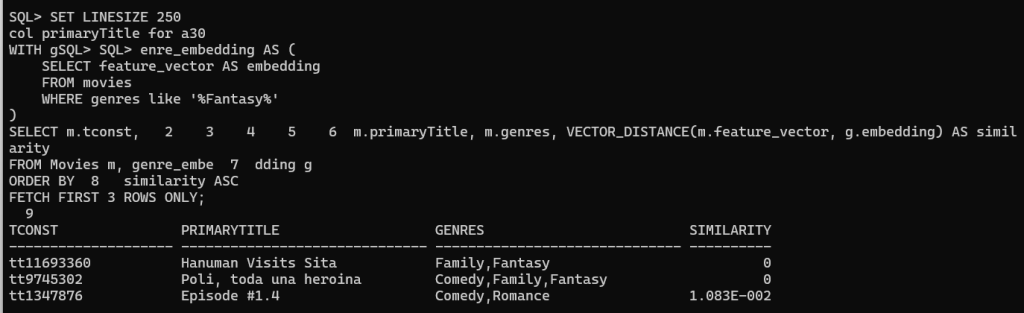
Find Movies Similar to a Specific Genre
SET LINESIZE 250
col primaryTitle for a30
WITH genre_embedding AS (
    SELECT feature_vector AS embedding
    FROM movies
    WHERE genres like '%Fantasy%'
)
SELECT m.tconst, m.primaryTitle, m.genres, VECTOR_DISTANCE(m.feature_vector, g.embedding) AS similarity
FROM Movies m, genre_embedding g
ORDER BY similarity ASC
FETCH FIRST 3 ROWS ONLY;
Find Movies Similar to Another
Taking into consideration one of the movies we got previously (Poli, toda una heroina), let’s get its vector and look for a similar one:
SET LINESIZE 250
col primaryTitle for a30
WITH movies_embedding AS (
    SELECT tconst, feature_vector AS embedding
    FROM movies
    WHERE  primaryTitle like 'Poli%'
)
SELECT m.tconst, m.primaryTitle, m.genres, m.startYear, VECTOR_DISTANCE(m.feature_vector, g.embedding) AS similarity
FROM Movies m, movies_embedding g
where m.tconst != g.tconst
ORDER BY similarity ASC
FETCH FIRST 3 ROWS ONLY;
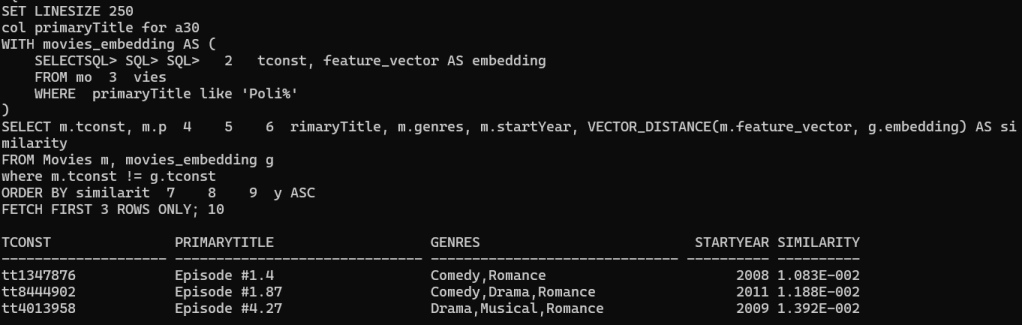
As you can see above genres from “Poli, toda una heorina” are “Comedy,Family,Fantasy” and the result set we are getting similar genres as well, we need to take into consideration STARTYEAR as well as the embedding vector took that into consideration.
Find Similar Movies Based on Director
-- Find movies similar to those directed by the specified director using vector similarity
WITH director_embedding AS (
    SELECT nconst, feature_vector AS embedding
    FROM Names
    WHERE primaryname = 'Nuno Santos'
)
SELECT m.tconst, m.primaryTitle, VECTOR_DISTANCE(m.feature_vector, d.embedding) AS similarity
FROM Movies m
JOIN Movie_Crew mc ON m.tconst = mc.tconst
JOIN director_embedding d ON mc.nconst = d.nconst
ORDER BY similarity ASC
FETCH FIRST 3 ROWS ONLY;
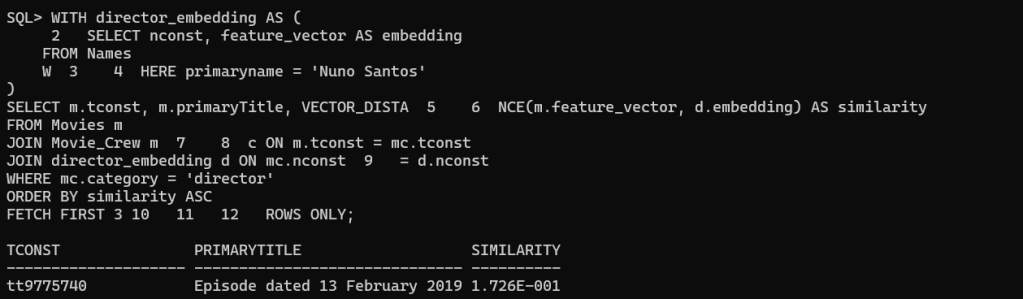
Although maybe the output is not the best one, the query is valid. In my subset of data, I don’t have different movies directed by the same director. Anyway, the idea is to see the example below that can be very helpful with a good set of data if you have it.
There are many other examples of how to use similarity search. The important part is what you want to embed to build a really useful set of data that you can explore easily using similarity search, leveraging the vector_distance function available from Oracle 23ai.
Conclusion
In this detailed exploration, we have delved into the fascinating world of vector databases and similarity search, focusing on the implementation of vector similarity search in Oracle 23ai for building a movie recommendation system using IMDb data. We began by laying the groundwork with an extensive introduction to the fundamental concepts and the significance of vector similarity search in the era of big data and artificial intelligence.
Our journey continued as we uncovered the intricate process of generating vector data, particularly honing in on the role of BERT (Bidirectional Encoder Representations from Transformers) in creating dense vector representations for movie descriptions, genres, actors, directors, and more. By elucidating the key features of BERT and its ability to transform input text into high-dimensional vectors, we established the foundation for leveraging BERT in our movie recommendation system.
A pivotal component of our exploration involved a comprehensive demonstration encompassing the setup of the database environment, the generation of embeddings, and the execution of similarity searches using Oracle 23ai. The practical implementation elucidated the integration of diverse tools and libraries like Python, pandas, transformers, and more to actualize the functionality of the movie recommendation system.
Ultimately, this captivating voyage through the intricacies of vector similarity search and its applicability in real-world scenarios underscores the potential for leveraging advanced techniques to empower personalized recommendations, thereby enriching the user experience in the domain of entertainment.




 DatabaseVerse: Journey into the World of Databases
Leave a comment