

I’ve been watching the videos of the learning path about becoming an OCI Generative AI Professional from Oracle, and I have learned a few things about it. Most importantly, I was curious about trying out all I have learned.
There are a lot of stuff when we talk about Generative AI: LLM, prompting, training, decoding, hallucination, embedding models, fine tuning, chatbots, RAG, Vector Databases, Keyword search, semantic and similarity Search and more…
I have been a DBA most of the time, although I also like to code, and of course, reading about Vector Databases and Similarly Search are topics I’m really interested in, and that is what I wanted to bring here in this post.
But before talk about AI Vector Search we need to know what is a Vector and of course what the heck is a Vector Database?
- What is a Vector?
- What Is a Vector Database?
- Oracle 23ai: Unmatched Efficiency with Integrated Vector Database Capabilities
- DEMO1 – Vectors
- Insert vectors into a vector data type
- Update Vectors
- Performing DML operations on Vectors
- Tables with multiple Vectors
- Vectors components
- Create a table with a fixed number and number-format Vector
- Tables with different Vector formats
- Can we perform DDL operation on tables with Vectors columns data type?
- Compare vectors?
- DEMO2 – VECTOR_DISTANCE()
- Conclusion
What is a Vector?
A vector is a set of numbers that represents the features of an object, such as a word, a sentence, a document, an image, or a video or audio file. Vectors are necessary because it is challenging for computers to compare or search unstructured content of this type. However, comparing or searching vectors is much easier and is based on well-understood math.
What Is a Vector Database?
A vector database is any database that can natively store and manage vector embeddings and handle the unstructured data they describe, such as documents, images, video, or audio.
Oracle 23ai: Unmatched Efficiency with Integrated Vector Database Capabilities
Oracle in the 23ai has introduced this great capability, which is not only powerful but also significantly more effective because you don’t need to add a specialized Vector database, eliminating the pain of data fragmentation between multiple systems.
Key components of Oracle Vector Database include
- Vector Data Type: An innovative data type designed to store vector data directly within the Oracle Database, facilitating seamless integration.
- Vector Indexes: Specialized indexing mechanisms optimized for rapid and efficient retrieval of similar vectors, enhancing the database’s search efficiency.
- Vector Search SQL Operators: Vector databases perform vector distance operations using a query vector, these novel SQL operators are tailored for conducting intricate similarity searches on vector data, providing developers with powerful tools to explore and analyze complex datasets.
The biggest benefit of Oracle Database AI Vector Search is that semantic search on unstructured data can be combined with relational search on business data in one single system.
DEMO1 – Vectors
So, we have an Oracle 23ai Database with one PDB: ORCLPDB1, we will perform some basic operations, normal stuff:
- Create some tables with vector data type
- Basic query and DML operations on vector data types
- Create a table with a vector data type column
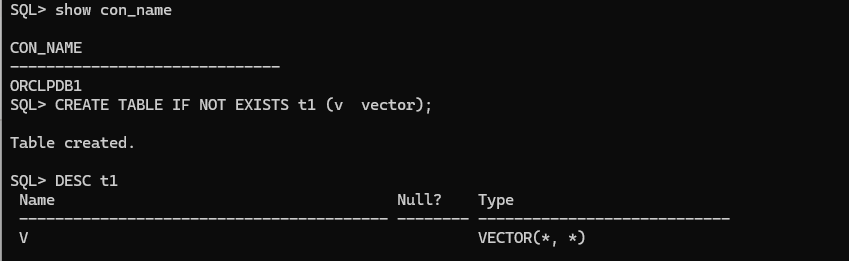
To create a table with a vector column we just need to declare the column as vector, simple as is:
CREATE TABLE IF NOT EXISTS t1 (v vector);
DESC t1
Insert vectors into a vector data type
As I mentioned early, a vector is a set of numbers that represent something, to translate this into a language is just simple that an array of numbers and those numbers can be null as well, however individual vector array elements numbers can’t be null.
- We need to separate each number with a comma
- We need to enclose the array with single quotes
We can select the table as you normally will do:
INSERT INTO t1 VALUES ('[1.1, 2.7, 3.141592653589793238]'),
                      ('[9.34, 0.0, -6.923]'),
                      ('[-2.01, 5, -25.8]'),
                      ('[-8.2, -5, -1013.6]'),
                      ('[7.3]'),
                      ('[2.9]'),
                      ('[1, 2, 3, 4, 5]') ;
commit;
SELECT * FROM T1;

Update Vectors
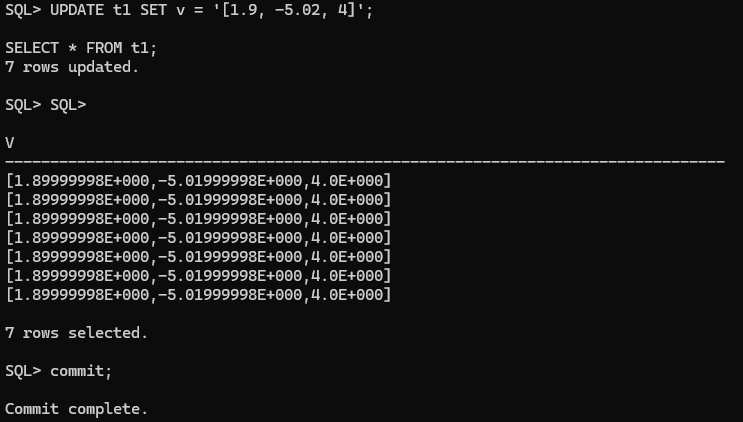
You can perform updates, again as you will normally do:
UPDATE t1 SET v = '[1.9, -5.02, 4]';
commit;
SELECT * FROM t1;
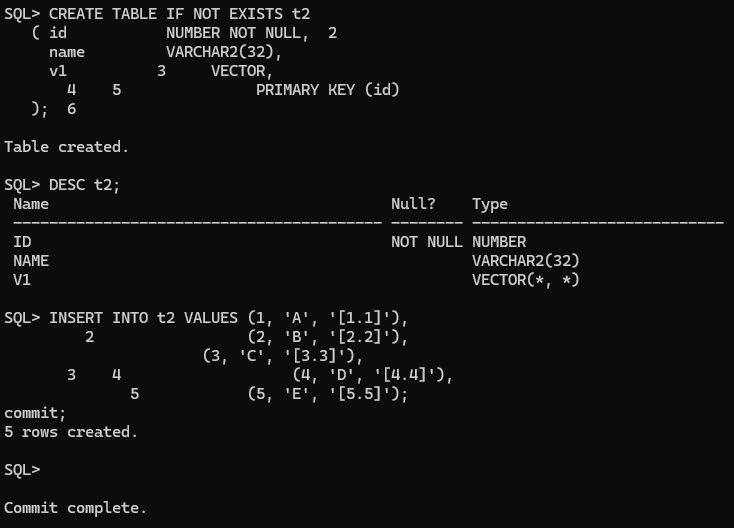
CREATE TABLE IF NOT EXISTS t2
   ( id           NUMBER NOT NULL,
     name         VARCHAR2(32),
     v1           VECTOR, PRIMARY KEY (id)
   );
DESC t2;
INSERT INTO t2 VALUES (1, 'A', '[1.1]'),
                      (2, 'B', '[2.2]'),
                      (3, 'C', '[3.3]'),
                      (4, 'D', '[4.4]'),
                      (5, 'E', '[5.5]');
commit;
SET LINESIZE 250
COL V FOR A80
SELECT * FROM t2;
Performing DML operations on Vectors
You can perform DML operations based on another column in the table. Let’s create a table and add some data to it:

Let’s update a vector column now filtering by another:
UPDATE t2 SET   v1 = '[2.9]' WHERE id = 2;
commit;
SELECT * FROM t2 WHERE id = 2;

Let’s delete some rows containing vector data in the table:
DELETE FROM  t2 WHERE  id IN (1, 3);
commit;
SELECT * FROM t2;

Tables with multiple Vectors
You can create a table with multiples vector data type, however normalized tables usually have one vector per table.
CREATE TABLE IF NOT EXISTS t3
       ( id           NUMBER NOT NULL,
         name         VARCHAR2(32),
         v1           VECTOR,
         v2           VECTOR,
         v3           VECTOR, PRIMARY KEY (id)
       );
DESC t3;

Vectors components
Vectors have two components:
- The number of dimensions
- The number format
When the number of dimensions is defined it becomes effectively a check constraint
Some examples of the number of dimensions for vector embeddings are:
- OpenAI text-embedding-ada-002 = 1536 dimensions
- Cohere Embed-English-v2.0 = 4096 dimensions
- Cohere Embed-English-Light-v2.0 = 1024 dimensions
- Cohere Embed-Multilingual-v2.0 = 768 dimensions
- open-source all-MiniLM-L6-v2 = 384 dimensions
Create a table with a fixed number and number-format Vector
First, let’s create a vector with 3 dimensions
CREATE TABLE IF NOT EXISTS t4 (v VECTOR(3, FLOAT32));
DESC t4;

Let’s do some testing now inserting data and see how controls are applied automatically:
INSERT INTO t4 VALUES ('[1.1, 2.2, 3.3]');
INSERT INTO t4 VALUES ('[1.3]');
INSERT INTO t4 VALUES ('[1.3, 2.4, 3.5, 4.1]');
INSERT INTO t4 VALUES ('[3.4, 5.6, xyz]');

As you can see above, check is internally validated and even if you try it will be rejected.
Tables with different Vector formats
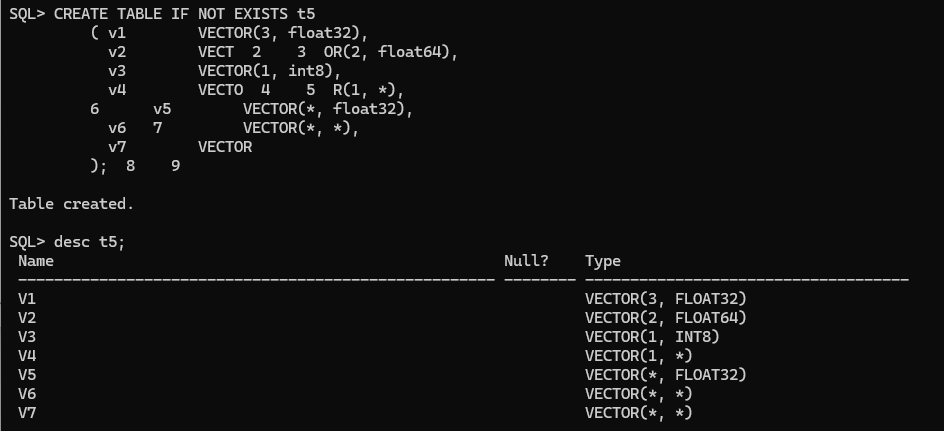
Not much to say, I believe an example is more effective, right?
CREATE TABLE IF NOT EXISTS t5
         ( v1        VECTOR(3, float32),
           v2        VECTOR(2, float64),
           v3        VECTOR(1, int8),
           v4        VECTOR(1, *),
           v5        VECTOR(*, float32),
           v6        VECTOR(*, *),
           v7        VECTOR
         );
DESC t5;
Can we perform DDL operation on tables with Vectors columns data type?
Yep!, we can alter the tables no issues so far

You can also create a table as select from another table with even a vector data type, not restrictions seems to apply ( I still need to check and validate if there are any)

Compare vectors?
Is not possible to perform comparison operation between vectors, let’s see an example:

DEMO2 – VECTOR_DISTANCE()
VECTOR_DISTANCE is the main function that you can use to calculate the distance between two vectors. VECTOR_DISTANCE takes two vectors as parameters. You can optionally specify a distance metric to calculate the distance. If you do not specify a distance metric, then the default distance metric is Cosine distance.
You can optionally use the following shorthand vector distance functions:
L1_DISTANCEL2_DISTANCECOSINE_DISTANCEINNER_PRODUCT
All the vector distance functions take two vectors as input and return the distance between them as a BINARY_DOUBLE.
To calculate the distance, we should remember the Pythagorean Theorem… yeah, I also forgot about it, but just to refresh your memory: a^2 + b^2 = c^2
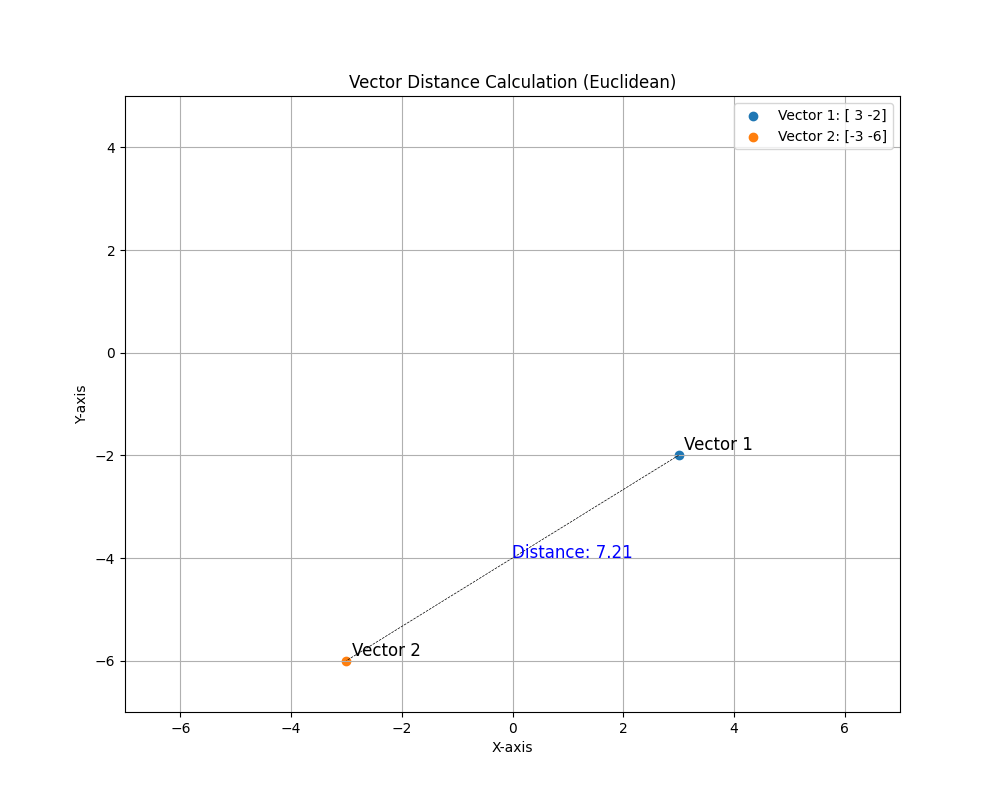
Let’s do a quick example, let’s calculate the distance between (3,-2) and (-3,-6)
(-3 - 3)^2 + (-6 - -2)^2 = c^2
(-3 - 3)^2 + (-6 + 2)^2 = c^2
(-6)^2 + (-4) ^2 = c^2
36 + 16 = c^2
52 = c^2
c = sqrt(52)
c = 7.211..
Let’s take a look and use the function in the database and see the result:
SELECT TO_NUMBER(VECTOR_DISTANCE(VECTOR('[3, -2]'),VECTOR('[-3, -6]'), EUCLIDEAN)) DISTANCE;

We can see the graph below representing those two vectors below:
- Vector 1: [3, -2]
- Vector 2: [-3, -6]
- And the distance calculated rounded to 2 decimals: 7.21
What about similarity search?
For Similarity Search, we focus on the RESULT SET (ordered by distance) between an input/query vector and the set of vectors in a vector column, rather than the specific distances. It’s the relative order of distances in the result set that matters.
How Similarity Search Works
- Vector Representation: Objects (e.g., images, documents, products) are represented as vectors in a high-dimensional space. These vectors capture the essential features of the objects.
- Similarity Metrics: Similarity is quantified using metrics such as Euclidean distance, cosine similarity, or Manhattan distance. These metrics determine how close or similar the vectors are to each other.
- Search Process:
- Query: A vector representation of the query object is created.
- Comparison: The query vector is compared to the vectors in the database using the chosen similarity metric.
- Ranking: Objects are ranked based on their similarity to the query.
- Results: The most similar objects are returned as search results.
Our first task will be to create a table and add some data on it to store vectors that map to X,Y and Z coordinates and insert the values as follows:
CREATE TABLE product_vectors (
    product_id NUMBER PRIMARY KEY,
    name VARCHAR2(100),
    vector VECTOR(3, FLOAT32)
);
INSERT INTO product_vectors (product_id, name, vector)
VALUES (1, 'Product A', '[0.2, 0.1, 0.4]');
INSERT INTO product_vectors (product_id, name, vector)
VALUES (2, 'Product B', '[0.3, 0.2, 0.5]');
INSERT INTO product_vectors (product_id, name, vector)
VALUES (3, 'Product C', '[0.4, 0.3, 0.6]');
INSERT INTO product_vectors (product_id, name, vector)
VALUES (4, 'Product D', '[0.5, 0.4, 0.7]');
COMMIT;

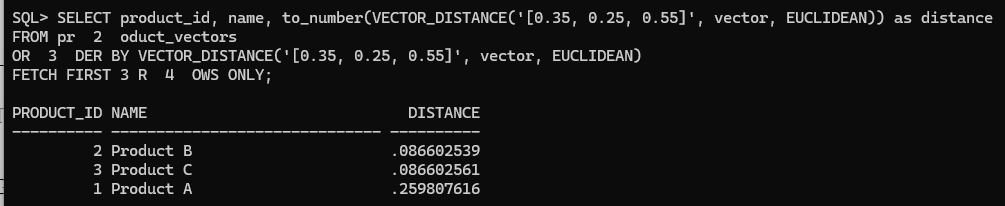
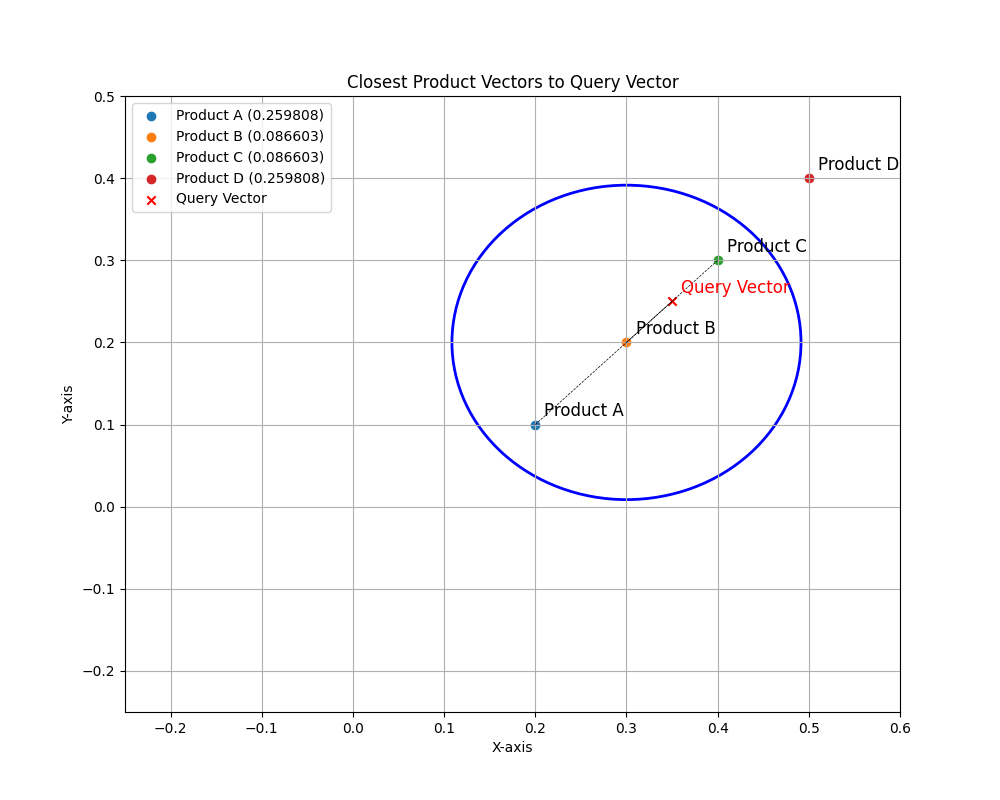
So, now with the data we want to search the product_ID with the least distance to the query vector (0.35, 0.25, 0.55) for example, again as I mentioned early for Similarity Search we do not care about the actual distance, instead we care about the IDs of the rows with the least (or closest) distance to the target we want to search for.
In this example product_ID 2 is the closest following by 3 and 1:
SELECT product_id, name, to_number(VECTOR_DISTANCE('[0.35, 0.25, 0.55]', vector, EUCLIDEAN)) as distance
FROM product_vectors
ORDER BY VECTOR_DISTANCE('[0.35, 0.25, 0.55]', vector, EUCLIDEAN)
FETCH FIRST 3 ROWS ONLY;
Great, isn’t it?
Real-World Examples
- E-commerce and Retail:
- Product Recommendations: Similarity search helps recommend products to customers based on their browsing history, purchase history, or items in their cart. For example, if a customer views a particular dress, the system can suggest similar dresses based on style, color, and pattern.
- Visual Search: Customers can upload a photo of an item they like, and the system finds similar products available for purchase.
- Media and Entertainment:
- Content Recommendation: Streaming services like Netflix or Spotify use similarity search to recommend movies, TV shows, or songs that are similar to what a user has previously watched or listened to.
- Image and Video Retrieval: Platforms like Google Images allow users to search for images similar to a given image, helping in finding related visuals or identifying objects.
- Healthcare:
- Medical Imaging: Similarity search is used to compare medical images (e.g., X-rays, MRIs) to a database of images to assist in diagnosing conditions by finding similar cases.
- Patient Data Analysis: Doctors can compare a patient’s data to historical data to find similar cases and derive insights for treatment.
- Finance:
- Fraud Detection: Financial institutions use similarity search to identify fraudulent transactions by comparing new transactions to known patterns of fraud.
- Credit Scoring: Comparing a person’s financial behavior to profiles of others with similar behaviors can help in more accurately assessing credit risk.
- Security:
- Biometric Authentication: Similarity search in biometric systems (e.g., fingerprint, facial recognition) helps in verifying an individual’s identity by comparing biometric data to a database of stored profiles.
- Anomaly Detection: Surveillance systems use similarity search to detect unusual activities by comparing real-time data to normal patterns.
- Natural Language Processing:
- Document Similarity: Identifying similar documents helps in applications like plagiarism detection, document clustering, and content recommendation.
- Semantic Search: Search engines use similarity search to understand the context and return results that are semantically similar to the query, even if the exact keywords don’t match.
- Geospatial Applications:
- Location-Based Recommendations: Services like Foursquare or Yelp recommend similar places (restaurants, parks) based on user preferences and location data.
- Navigation Systems: Comparing route vectors to find the best or most similar routes based on traffic, distance, or time.
Benefits of Similarity Search
- Personalization: Enhances user experience by providing tailored recommendations and search results.
- Efficiency: Speeds up the process of finding relevant information or items.
- Accuracy: Improves the precision of search results by considering the context and features of the query object.
- Automation: Reduces the need for manual filtering and sorting, making systems more user-friendly and efficient.
Conclusion
In this post, we explored the fascinating world of Oracle 23ai and its integrated Vector Database capabilities. We learned that vectors are essential for representing the features of various objects, making it easier for computers to compare and search unstructured content. The introduction of Vector Data Type, Vector Indexes, and Vector Search SQL Operators in Oracle 23ai’s database architecture has opened up new possibilities for efficient and seamless data management and retrieval.
We explored demos displaying basic operations on vector data types, like inserting, updating, and performing DML operations on vectors. We also learned about table structures with multiple vector data types and their components, as well as how operations and controls are applied automatically.
Furthermore, we explored the powerful VECTOR_DISTANCE function and its utility in calculating distances between vectors, as well as the concept of similarity search, where the relative order of distances in the result set is of utmost importance.
Overall, Oracle 23ai’s Vector Database capabilities offer a comprehensive and integrated solution for managing and analyzing complex datasets, combining the benefits of semantic search on unstructured data with relational search on business data within a single system. This marks a significant leap forward in the realm of AI and database technology, empowering developers and businesses to explore new frontiers in data management and analysis.




 DatabaseVerse: Journey into the World of Databases
Leave a reply to Practical Guide to Vector Similarity Search for Movie Recommendations in Oracle 23ai – DatabaseVerse: Journey into the World of Databases Cancel reply