

Oracle GoldenGate Microservices have changed the way we deploy and operate replication. Everything is exposed through HTTP APIs, from administration to runtime services. That is powerful, but it also raises a very real question early in most projects.
Do we really want to expose GoldenGate services directly to the network?
In real environments, especially in OCI, on-prem, or hybrid setups, the answer is usually no. Security teams want controlled entry points, centralized TLS management, clean firewall rules, and a way to audit who is accessing what. DBAs and architects want something predictable, easy to troubleshoot, and not tied to GoldenGate internals.
This is where a reverse proxy fits naturally.
By placing Oracle GoldenGate Microservices behind a reverse proxy such as NGINX, we gain a single, hardened entry point while keeping GoldenGate services isolated on private interfaces. The result is a cleaner security posture without complicating the GoldenGate deployment itself.
In this article, we focus on a practical and repeatable approach to installing Oracle GoldenGate Microservices behind an NGINX reverse proxy. No theory, no buzzwords, just a pattern that works well from PoC to production.
- Reference Architecture Overview
- Reverse Proxy Design Choices
- Installing and Preparing NGINX (Oracle Linux 9 / RHEL 9)
- Installing Oracle GoldenGate Microservices in Silent Mode
- Configuring NGINX to Proxy Oracle GoldenGate Microservices
- Troubleshooting 502 Bad Gateway on Oracle Linux (SELinux)
- Security Considerations and Final Notes
Reference Architecture Overview
At a high level, the architecture is intentionally simple.
GoldenGate Microservices run on a host or set of hosts with no direct external exposure. All HTTP traffic is routed through an NGINX reverse proxy that acts as the single entry point for administrators and automated clients.
The main components are:
- NGINX Reverse Proxy
Exposed to the client network. This is the only component accepting inbound HTTP or HTTPS connections. It handles TLS termination, request routing, and optionally authentication and logging. - GoldenGate Microservices Deployment
Running on private IPs. Services such as Service Manager, Administration Service, Distribution Service, and Receiver Service listen only on internal interfaces. - Clients and Automation
admiclient, browsers, CI/CD pipelines, or monitoring tools connect exclusively to NGINX, never directly to GoldenGate.
Traffic flows like this:
- A client sends an HTTPS request to NGINX.
- NGINX terminates TLS and applies routing rules.
- The request is forwarded internally to the appropriate GoldenGate service and port.
- Responses follow the same path back to the client.
This design provides several immediate benefits.
First, GoldenGate services are no longer exposed directly, reducing the attack surface.
Second, TLS certificates are managed in one place instead of per GoldenGate service.
Third, firewall rules become simpler and easier to audit.
Most importantly, this architecture does not change how GoldenGate works internally. Extracts, Replicats, Distribution, and Receiver services behave exactly the same. The reverse proxy only controls how traffic reaches them.
In the next sections, we will walk through installing GoldenGate, preparing NGINX, and wiring both together in a clean and secure way.
Reverse Proxy Design Choices
Before installing anything, it is important to be clear about what role the reverse proxy will play in front of Oracle GoldenGate Microservices. This avoids confusion later and keeps the deployment clean.
In this setup, NGINX is not a load balancer and not a GoldenGate component. It is simply the controlled entry point into the GoldenGate HTTP ecosystem.
Single Entry Point
All external access to GoldenGate goes through NGINX.
No client connects directly to GoldenGate service ports.
This includes:
- Browser access to the GoldenGate UI
- admiclient commands
- Automation and CI/CD pipelines
- Monitoring or health checks
From a network and security perspective, this means fewer open ports, fewer firewall rules, and a much smaller attack surface.
Routing Strategy
GoldenGate Microservices expose multiple HTTP services. There are two common ways to proxy them:
- Port-based routing, where each service is exposed on a different external port
- Path-based routing, where services are mapped to URL paths
For this architecture, path-based routing is preferred.
It allows:
- A single external HTTPS port
- Clear and readable URLs
- Easier integration with security controls and logging
This aligns well with how GoldenGate Microservices are designed and how Oracle documents reverse proxy setups.
TLS Termination Point
TLS is terminated at NGINX.
This means:
- Certificates are managed centrally
- GoldenGate services receive plain HTTP from a trusted internal source
- Certificate rotation does not require GoldenGate changes or restarts
End-to-end TLS is technically possible, but for most environments it adds complexity without much benefit. Centralized TLS termination keeps things simple and operationally safe.
Isolation of GoldenGate Services
GoldenGate Microservices listen only on private interfaces.
They are:
- Not exposed to public or client-facing networks
- Reachable only from the NGINX host or network segment
- Protected even if a service port is misconfigured
This isolation is one of the biggest advantages of introducing a reverse proxy in front of GoldenGate.
What this design does not change
As mentioned previously, this architecture does not change how GoldenGate works internally.
- Extracts and Replicats behave the same
- Distribution and Receiver services are unaffected
- Trail handling, checkpoints, and metadata are unchanged
NGINX only controls how HTTP requests reach GoldenGate. Nothing more.
With these design decisions defined, we can now move into the practical part, starting with installing and preparing NGINX before touching the GoldenGate binaries.
Installing and Preparing NGINX (Oracle Linux 9 / RHEL 9)
With the architecture and design choices clear, the first component to install is the reverse proxy itself. NGINX will be the only entry point to the Oracle GoldenGate Microservices deployment, so it must meet Oracle’s documented requirements.
Oracle GoldenGate 23ai requires NGINX version 1.24 or higher when used as a reverse proxy. This is enforced through the NGINX application module stream and must be validated explicitly.
Check if NGINX Is Already Installed
First, verify whether NGINX is already present on the system.
nginx -v
If NGINX is not installed, you will see a command not found error.
If it is installed, note the reported version.
If the version is 1.24 or higher, you can keep it.
If it is lower than 1.24, you must switch to a newer module stream.
In my case, the installed version was 1.20.

List Available NGINX Module Streams
On Oracle Linux 9 and RHEL 9, NGINX is delivered using application streams.
List the available streams:
dnf module list nginx
You should see output similar to:
- nginx:1.20
- nginx:1.22
- nginx:1.24

Only 1.24 or newer is supported for GoldenGate 23ai reverse proxy setups.
Reset Any Existing NGINX Module Stream
If an older stream is enabled, reset it first.
dnf module reset nginx
This ensures there are no conflicts or pinned versions.
Enable the latest NGINX Module Stream
Enable the required stream explicitly, in this demo I will enable the latest 1.26:
dnf module enable nginx:1.26
This step is critical. Without it, the system may install an older NGINX version even if newer packages exist.
Install or Upgrade NGINX
Now install NGINX (or upgrade it if already present):
dnf install nginx
If NGINX was already installed, this command will upgrade it to the version provided by the enabled module stream.
Verify the Installed Version
Confirm that the correct version is now installed:
nginx -v
You should see nginx/1.24.x or higher.

If the version is still lower, recheck the enabled module stream.
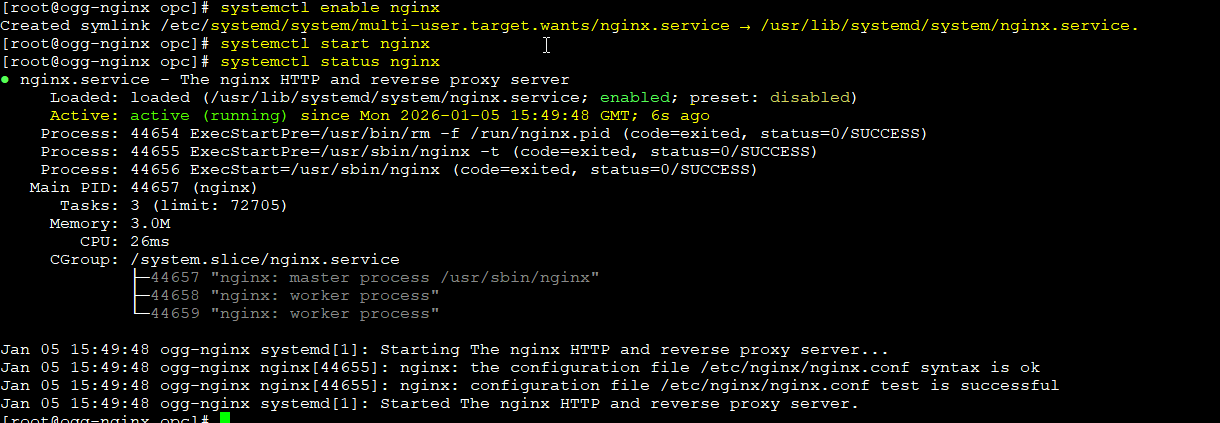
Enable and Start the NGINX Service
Enable NGINX to start at boot and start it immediately:
systemctl enable nginx
systemctl start nginx
Verify service status:
systemctl status nginx
At this point, NGINX should be running with the correct version and no errors.
Initial Validation
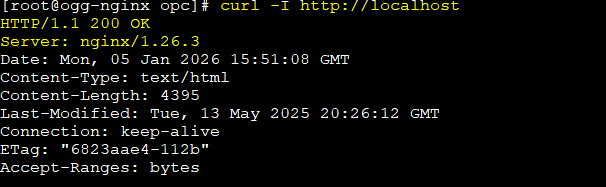
A simple HTTP test is enough to confirm basic functionality:
curl -I http://localhost
A successful HTTP response confirms that NGINX is operational.
No GoldenGate-specific configuration is required yet.
Important Note
At this stage:
- NGINX does not proxy GoldenGate traffic
- No TLS certificates are configured
- No GoldenGate services are referenced
This step is about ensuring a compliant and supported reverse proxy foundation, exactly as required by Oracle for GoldenGate 23ai.
With NGINX installed, validated, and aligned with Oracle’s requirements, we can now move on to installing Oracle GoldenGate Microservices in silent mode.
Installing Oracle GoldenGate Microservices in Silent Mode
The silent installation of Oracle GoldenGate Microservices is covered in detail in a previous article How to Install and Secure Oracle GoldenGate 23ai Using Silent Mode (Step-by-Step Guide), including the response file, installation steps, and service validation.
That process remains exactly the same when deploying GoldenGate behind a reverse proxy. The only intentional difference is how TLS is handled.
In this setup, TLS is not configured in GoldenGate. Instead, encryption is terminated at the NGINX, which acts as the single secure entry point to the platform. GoldenGate services receive traffic only from a trusted internal network and are never exposed directly.
This means that any GoldenGate-native TLS configuration used in the previous article should be skipped or disabled for this deployment.
Example:
SECURITY_ENABLED=false
TLS_1_2_ENABLED=false
TLS_1_3_ENABLED=false
SERVER_CERTIFICATE=
SERVER_CERTIFICATE_KEY_FILE=
SERVER_CA_CERTIFICATES_FILE=
CLIENT_CERTIFICATE=
CLIENT_CERTIFICATE_KEY_FILE=
CLIENT_CA_CERTIFICATES_FILE=
TLS configuration will be covered later in this article, when we configure NGINX.
Apart from this intentional difference, the GoldenGate installation itself does not change.
Configuring NGINX to Proxy Oracle GoldenGate Microservices
Once Oracle GoldenGate Microservices is installed and running internally, and NGINX is installed with a supported version, the next step is to connect both components in a clean and supportable way.
For this purpose, Oracle provides a dedicated utility that generates NGINX reverse proxy configuration tailored to GoldenGate Microservices. This utility takes care of service paths, redirects, and internal URL handling, which can otherwise be difficult to get right.
Using the Oracle-provided utility ensures that the reverse proxy configuration aligns with GoldenGate Microservices behavior and with Oracle’s documented deployment patterns.
Oracle Reverse Proxy Configuration Utility
The utility is included with the GoldenGate Microservices installation and is executed on the GoldenGate host.
Its role is to:
- Discover the GoldenGate Microservices deployment
- Generate NGINX-compatible
locationrules for each service - Ensure that UI navigation and REST APIs work correctly through the proxy
The generated output is intended to be consumed directly by NGINX.
Let’s see how it works.
First, make sure that the JRE version is 8 or higher. I will set the JAVA_HOME to the OGG directory example:
export OGG_HOME=/u01/app/ogg23ai
export JAVA_HOME=$OGG_HOME/jdk
export PATH=$PATH:$OGG_HOME:$JAVA_HOME/bin
java -version

Then you can run the tool. For example, let’s check the help.
$OGG_HOME/lib/utl/reverseproxy/ReverseProxySettings --help
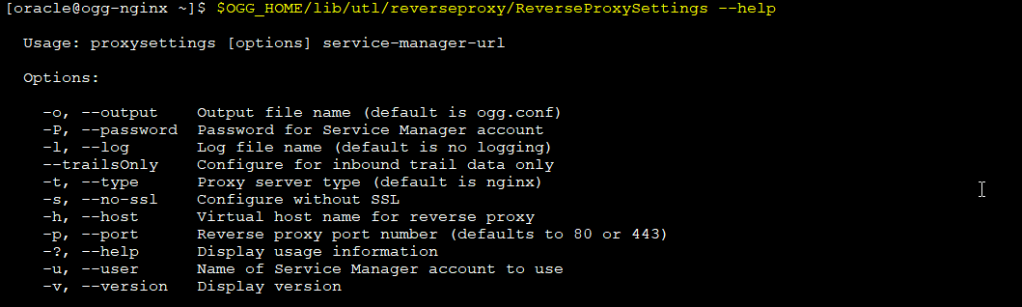
To generate the config file that NGINX will use we need to run the following command:
$OGG_HOME/lib/utl/reverseproxy/ReverseProxySettings -u adminuser -P adminpwd -o ogg.conf http://localhost:port
In my case the user is oggadmin and the service manager is running on port 9011
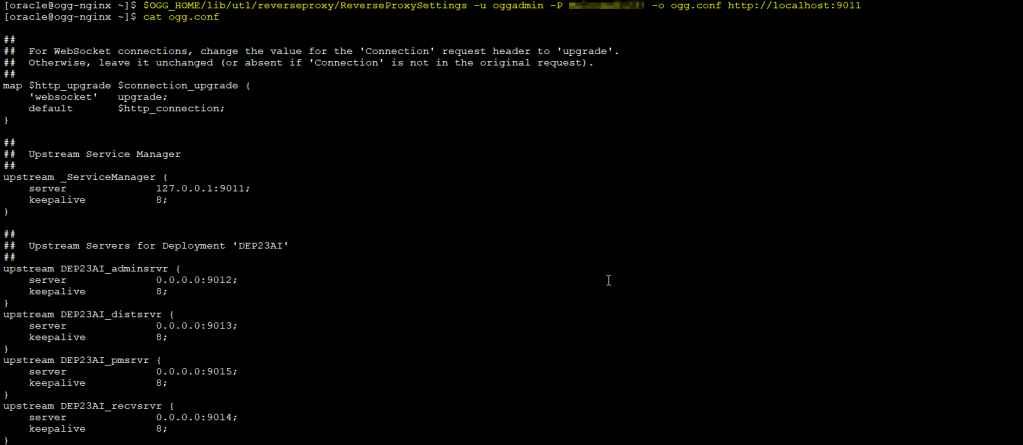
Then you need to copy the ogg.conf file generated to the /etc/nginx/conf.d directory:

I will use self-signed certificates in this demo, I have generated the certificates previously, you can check how in my previous blog: How to Install and Secure Oracle GoldenGate 23ai Using Silent Mode (Step-by-Step Guide)
With the certificates created I will copy the certificates to the /etc/nginx directory:

NGINX requires:
- A certificate file that includes the full chain
- The private key of the server
GoldenGate itself does not require any certificate configuration in this setup.
So, let’s generate it as follow:

Then update the ogg.conf file for SSL/TLS settings using the following steps:
- Find
ssl_ciphersline, replace it with the following:ssl_ciphers ECDHE-RSA-AES128-GCM-SHA256:ECDHE-RSA-AES256-GCM-SHA384:ECDHE-RSA-CHACHA20-POLY1305;
- Add another line below this line:
ssl_conf_command Ciphersuites TLS_AES_128_GCM_SHA256:TLS_AES_256_GCM_SHA384:TLS_CHACHA20_POLY1305_SHA256;
- If you are using a self-signed certificate (I have already generated the certificates), make sure that you have the private key and the certificate
pemfile copied to/etc/nginxdirectory, as shown in the following:
- Change the following lines to point to the correct file certificates location:
ssl_certificate         /etc/nginx/ogg_chain.pem;
ssl_certificate_key     /etc/nginx/ogg.key;
In this demo:
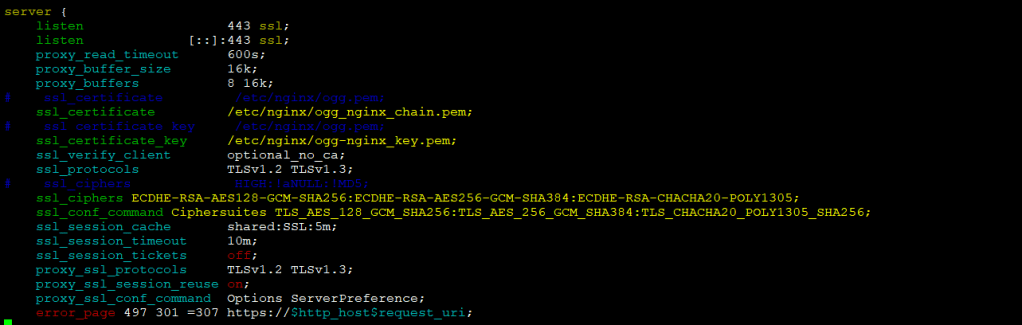
Validate the NGINX configuration:
sudo nginx -t

Restart NGINX service:
sudo systemctl restart nginx
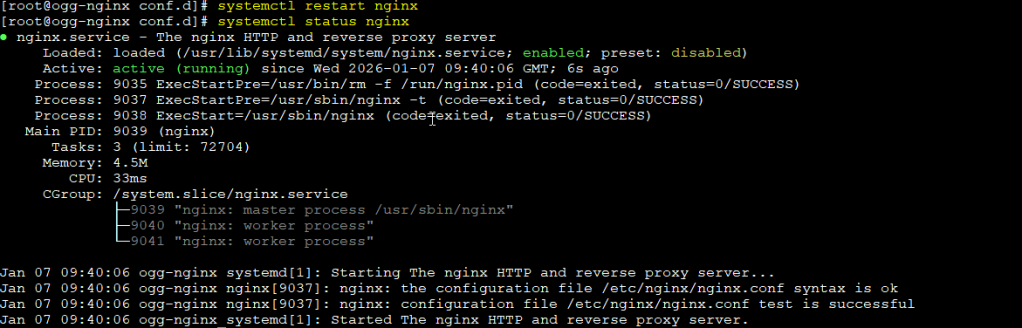
Finally, let’s try to access now using port 443 only!
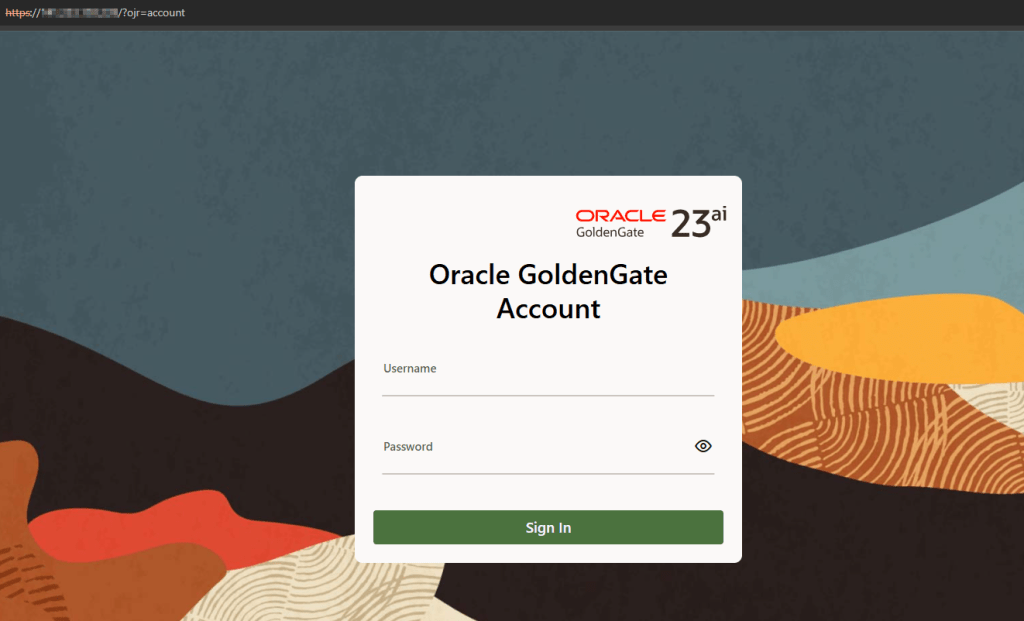
As you can see above, I didn’t have to specify any port for the services, in my case were: 9011, 9012…
Troubleshooting 502 Bad Gateway on Oracle Linux (SELinux)
If you get a 502 Bad Gateway with Permission denied in the NGINX error log on Oracle Linux usually indicates an SELinux restriction. Enabling httpd_can_network_connect allows NGINX to proxy traffic to GoldenGate services.

You can solve it running this as root user and restarting the nginx service:
setsebool -P httpd_can_network_connect 1
systemctl reload nginx
Security Considerations and Final Notes
In this architecture:
- Clients connect to NGINX over HTTPS
- NGINX presents the TLS certificate
- TLS is terminated at NGINX
- GoldenGate Microservices receive plain HTTP traffic internally
From the client perspective, GoldenGate is always accessed securely using HTTPS.
This is a standard and well-understood enterprise security pattern.
Certificate Management
TLS certificates are configured only in NGINX. This provides several advantages:
- Centralized certificate management
- Easier certificate rotation and renewal
- No need to manage certificates per GoldenGate service
- No GoldenGate restarts during certificate changes
Certificates can be issued by a public CA or an internal enterprise CA, depending on the environment.
Important Limitation: mTLS Is Not Supported
When GoldenGate Microservices are accessed through a reverse proxy, mutual TLS (mTLS) is not supported.
This means:
- Client certificate authentication cannot be enforced end-to-end
- GoldenGate services do not participate in certificate validation
- TLS is strictly between the client and the reverse proxy
This limitation is explicitly documented by Oracle and should be taken into account when designing the security model.
Additional Hardening at the NGINX Layer
Since NGINX is the security boundary, it is also the right place to apply additional controls, such as:
- Restricting access to administrative paths
- Limiting allowed HTTP methods
- Enforcing HTTPS only
- Logging and auditing access
These controls further reduce the attack surface without impacting GoldenGate configuration.
Summary
With this approach:
- All external traffic is encrypted
- GoldenGate services are never exposed directly
- TLS is centralized and easier to manage
- The deployment remains fully aligned with Oracle guidance
At this point, GoldenGate Microservices is securely accessible through NGINX and ready for operational use.
This pattern scales well from small PoCs to production deployments and aligns cleanly with Oracle’s documented GoldenGate Microservices architecture.



 DatabaseVerse: Journey into the World of Databases
Leave a comment