
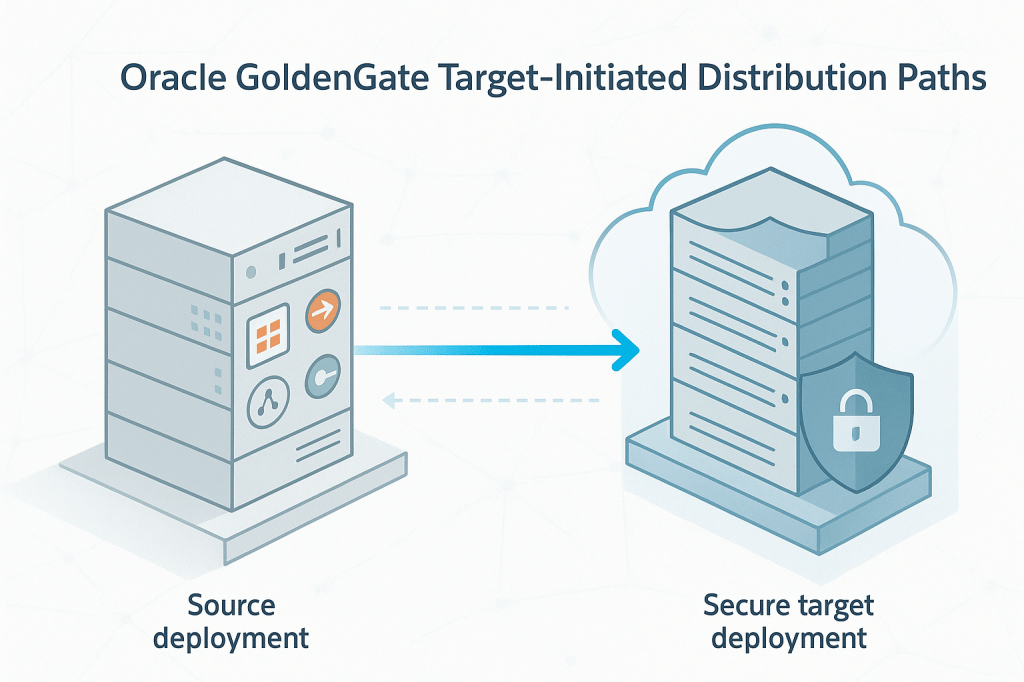
When setting up Oracle GoldenGate replication, the most common pattern is simple: a Distribution Path on the source side pushes trail files into a Receiver on the target side. I covered that configuration in detail in a previous post: How to Securely Connect Oracle GoldenGate 23/26ai Microservices Deployments Using Distribution and Receiver Services
This push-based model works perfectly as long as the network allows the source to open a connection toward the target. But in many real environments, that is not always the case.
Picture a target deployment sitting inside a more secure zone, maybe behind strict firewall rules, deep within a DMZ, or running in a cloud environment where inbound connections are restricted. In those situations, the classic “source pushes to target” model fails, because the source cannot establish the outgoing connection needed.
That is exactly where Target-Initiated Distribution Paths become useful. They flip the communication pattern: instead of the source pushing data, the target connects back to the source and pulls the trail files. This design makes GoldenGate replication possible even under tighter security and network limitations.
- What is a Target-Initiated Distribution Path?
- How It Works Behind the Scenes
- Configuring a Target-Initiated Path (Step-by-Step)
- Security Considerations and Best Practices
- Real-World Example
- Source-Initiated vs Target-Initiated: When to Use What
- Conclusion
What is a Target-Initiated Distribution Path?
A Target-Initiated Distribution Path is a distribution channel where the target deployment’s Receiver Service initiates the network connection to the source Distribution Service. Instead of pushing trail files, the target pulls them.
This capability is part of Oracle GoldenGate Microservices Architecture and is especially useful when the source cannot initiate outbound traffic. Common scenarios include:
• Replication across a DMZ
• Cloud-to-on-prem and on-prem-to-cloud topologies with outbound-only firewall rules
• Highly secure environments with strict inbound traffic controls
Because the connection originates from the target, this model respects restrictive security postures while still enabling continuous data movement.
How It Works Behind the Scenes
Here’s a simplified view of the internal behavior:
• The path is defined on the target and marked as TARGET_INITIATED.
• Metadata for the path lives on the target deployment, not on the source.
• When started, the Receiver Service opens the connection to the source Distribution Service and begins pulling trail files.
• If the connection drops, the Receiver can reconnect transparently as long as the path definition exists.
• When the path is deleted, metadata is removed, but the checkpoint file is retained so GoldenGate can make correct trail retention decisions.
• Only ws or wss protocols are supported. Classic ogg or udt protocols are not available in target-initiated mode.
In short, this feature transforms GoldenGate’s typical push model into a secure, firewall-friendly pull model.
Configuring a Target-Initiated Path (Step-by-Step)
Here’s a high-level walkthrough of how you configure a Target-Initiated Path in GoldenGate (23/26ai) through the deployment console:
1. Pre-requisites
• The source deployment must already have an Extract producing trail files.
• The target deployment must have a running Receiver Service.
• Authentication must be configured (USERIDALIAS, certificate-based).
2. Open Receiver Service and Create the Path
From the Receiver Service home page, choose Add Target-Initiated Path.
3. Path Information
Provide a Path Name and optional description, usually referencing which Extract and Replicat are involved.

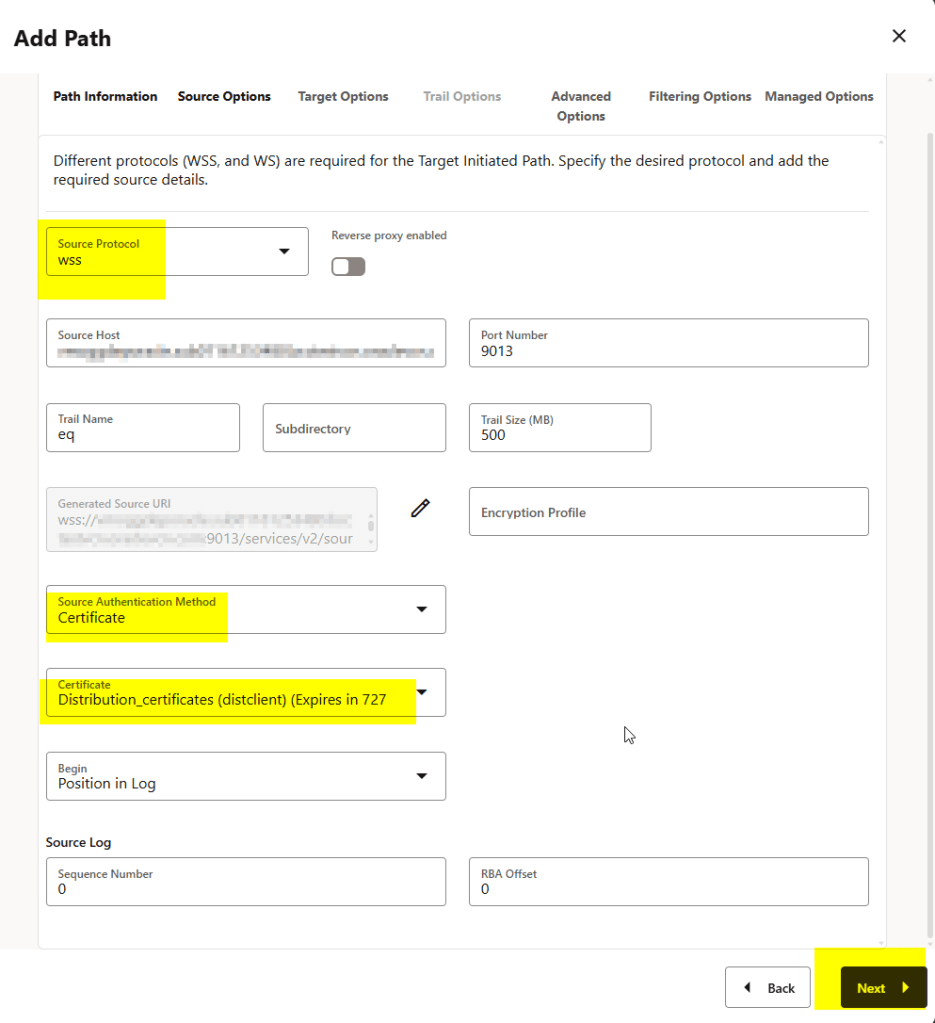
4. Source Options
This part is essential:
• Select protocol (wss in secure deployments)
• Specify the source host and port
• Enter the trail name produced by the source Extract
I’m setting up the authentication using certificate method, if you don’t know how to do that, check this blog: How to Securely Connect Oracle GoldenGate 23/26ai Microservices Deployments Using Distribution and Receiver Services
5. Target Options
You can optionally rename the trail on the target side and choose a subdirectory.
In this demo, I have changed the trail prefix to rq in my target deployment

6. Advanced Options and Filtering
These are optional, so skipping them is fine unless filtering or performance tuning is needed.
7. Managed Options
GoldenGate lets you configure autostart retries and delays. The defaults work for most environments.
8. Create and Run
Click Create and Run (or create and start later) to activate the path.
GoldenGate will immediately begin pulling trail files from the source.

Because this is configured from the target side, the source deployment doesn’t need to be aware of or initiate anything this simplifies network configuration when the target zone is more secure or restricted

and there you have it!
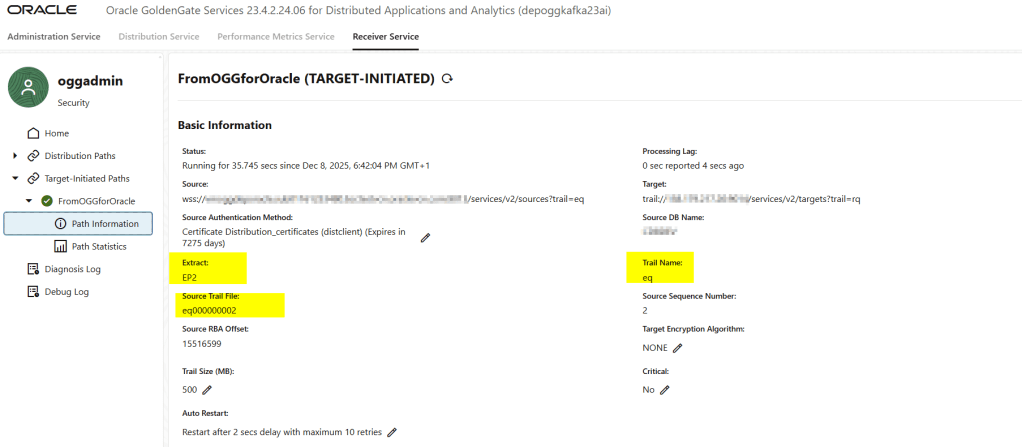
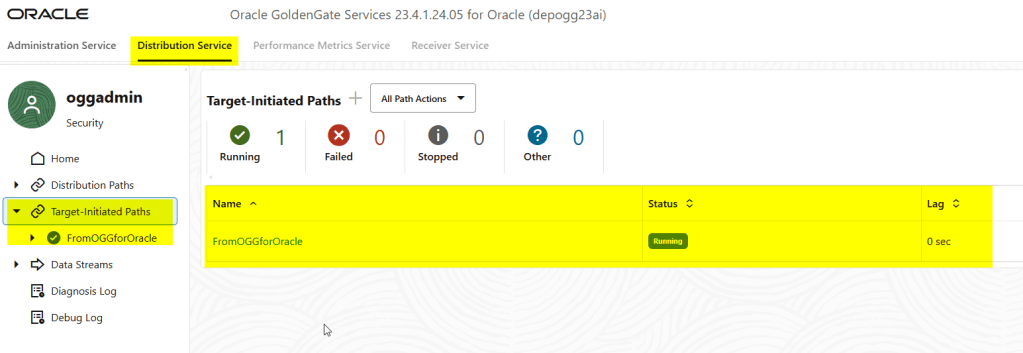
You can see it in your source deployment as well in the distribution service -> Target-initiated paths:
Security Considerations and Best Practices
Using Target-Initiated Distribution Paths gives you flexibility when dealing with firewalls or DMZ architectures, but you should pay attention to the following:
- Use secure protocols: prefer
wss(secure WebSocket) when possible, especially if either source or target is configured as a secure deployment. - Use proper authentication: depending on your deployment (cloud, on-premise, IAM-enabled), choose the right authentication method (UserIDAlias, OAuth, Certificate). Don’t rely on default or insecure setups.
- Manage trail retention carefully: even though the path metadata is removed when you stop the path, checkpoint info remains, so be deliberate when purging old trail files.
- Know the limitations: target-initiated paths don’t support all protocols (no ogg or udt), so compatibility with legacy deployments may be restricted.
Real-World Example
Consider an on-premises environment (source) replicating into a secure cloud zone (target). Inbound connections to the cloud are blocked by design.
With Target-Initiated Distribution Paths, the target Receiver Service can reach out through its allowed outbound rules, connect to the source Distribution Service, and pull the trail files. The same logic applies to DMZs or isolated corporate networks.
This design keeps the target side completely protected while still enabling real-time replication.
Source-Initiated vs Target-Initiated: When to Use What
Here is a simplified comparison:
| Scenario | Source-Initiated | Target-Initiated |
|---|---|---|
| Network allows source → target traffic | Best option | Works, but unnecessary |
| Target is behind strict firewall/DMZ | Fails | Ideal |
| Need minimal changes on target | Simple | Requires path creation |
| Security policy avoids incoming connections | Depends on rules | Ideal (pull model) |
| Require legacy OGG protocols | Supported | Not supported |
Rule of thumb:
If the source cannot initiate traffic, or if security requires a pull-only model, use target-initiated paths. Otherwise, the classic model is still simpler.
Conclusion
Target-Initiated Distribution Paths are a powerful and under-used feature in Oracle GoldenGate Microservices. They enable secure, flexible replication across firewalled networks, DMZs, cloud zones, and hybrid architectures without compromising security or requiring invasive network changes.
If your environment needs outbound-only connectivity or you want to avoid opening inbound firewall rules, this feature provides a clean and reliable solution.



 DatabaseVerse: Journey into the World of Databases
Leave a comment