
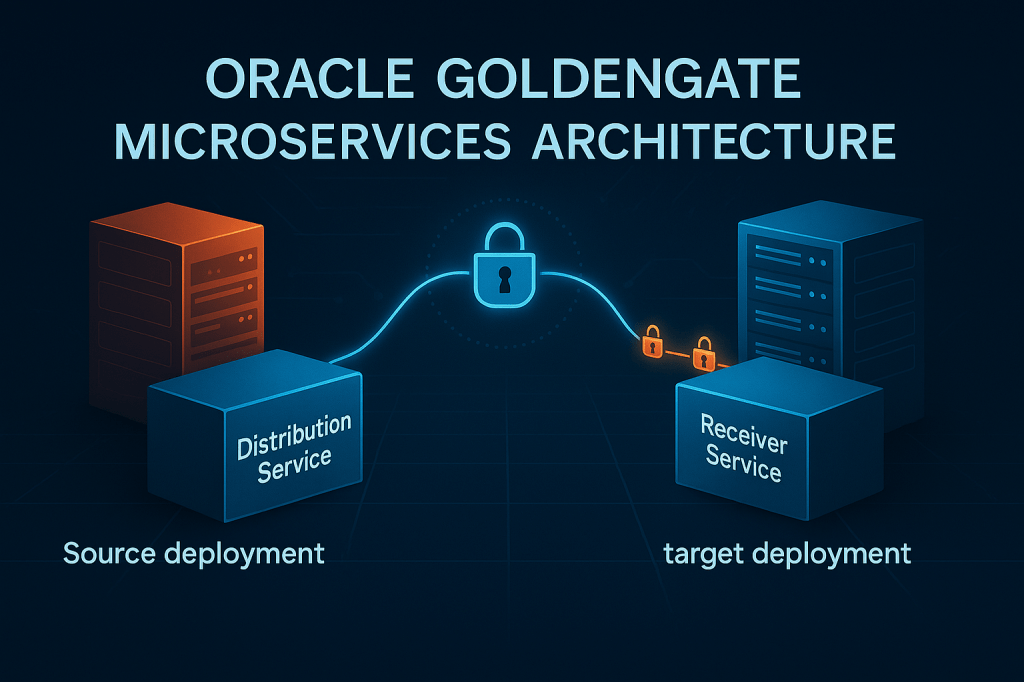
I have been working a lot with GoldenGate recently, and this is not my first time with the product. Over the years I have completed many migrations, both partial and full, and I have even suffered a bit configuring GoldenGate in bidirectional mode for a large US bank. Most of those projects were Oracle to Oracle, so the architecture was familiar and predictable.
This time the story is different. I want to show how to capture data from an Oracle Database using GoldenGate for Oracle, send the trail files to an Oracle GoldenGate for Big Data/Data and Analytics deployment, and then replicate that data onward. But instead of focusing on Extract and Replicat, this post is entirely about how to connect two GoldenGate Microservices deployments securely.
- GoldenGate Microservices Architecture in 23/26ai
- Understanding the Distribution Service
- Understanding the Receiver Service
- Hands-On Demo: Securely Connecting Two GoldenGate 23/26ai Deployments
- Option 1: USERIDALIAS Authentication (Password Based)
- Option 2: Certificate Based Authentication (TLS Client Auth)
- Wrapping Up: Best Practices for Secure GoldenGate Deployments
GoldenGate Microservices Architecture in 23/26ai
Before jumping into the demo, we need to level-set. Since GoldenGate 21c, the Classic Architecture has been deprecated, which means that GoldenGate Microservices Architecture (MA) is now the standard and only supported architecture for new GoldenGate 23/26ai deployments.
If you still run Classic, Oracle provides a procedure to migrate using the Migration Utility. But for this blog, we focus entirely on MA because it is the architecture you must use going forward.
You can check the how to here: Migrate from Classic to Microservices Architecture Using the Migration Utility
Anyways, the microservice architecture looks like this:
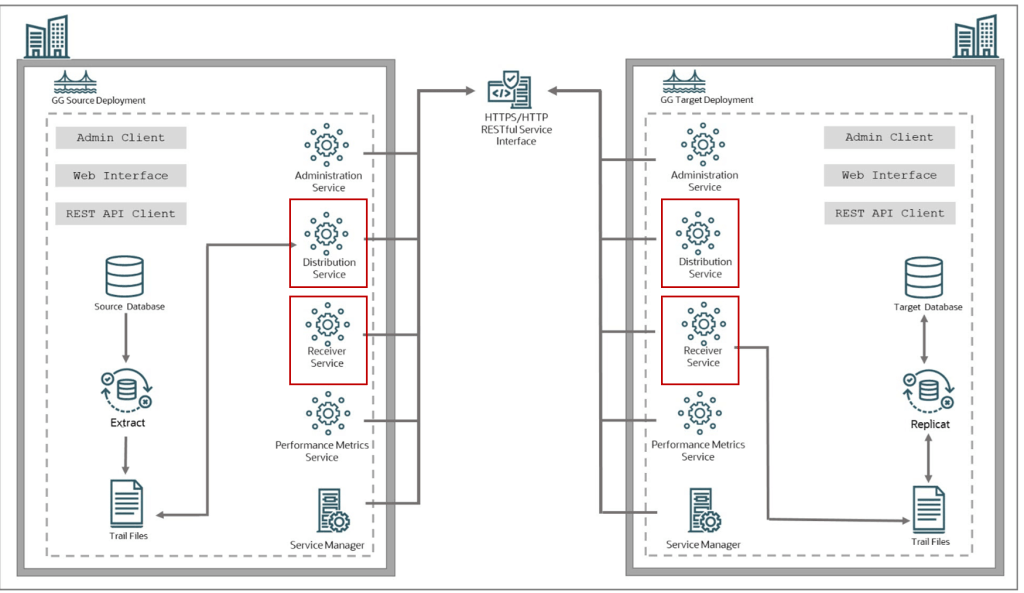
And as you can see in the above image there are two components that I have put inside a rectangle in red: Distribution Service and Receiver Service
Well, this post is about them.
Understanding the Distribution Service
The Distribution Service is responsible for shipping trail files out of a GoldenGate deployment. Think of it as the data shipper. It reads local trails and sends them to a remote deployment through the Receiver Service. This replaces the Classic Data Pump Extract, but goes far beyond it.
Key capabilities include:
• Native TLS encryption for secure data in transit
• Multiple parallel paths for scalability
• Better flow control
• REST API based management
• Improved logging and monitoring
• No need to run additional Extract processes just to transfer data
In short, Distribution Service ensures that outbound data movement is reliable, secure, and easier to scale.
Understanding the Receiver Service
The Receiver Service is the landing zone on the target deployment. It accepts inbound connections, authenticates the source, receives the trail data, and writes it into local trails for Replicat to consume.
It provides:
• Secure HTTPS or mTLS endpoints
• Fine-grained access control
• Monitoring of inbound streams
• Automatic trail file handling and retention
• Better resilience than Classic server collectors
Together, Distribution and Receiver Services form the backbone of data movement in MA.
Now that we understand the architecture and the two services involved, let’s explore how they work together and why they are so important in GoldenGate 23/26ai.
How Distribution and Receiver Services Work Together in GoldenGate Microservices Architecture
The data flow in Microservices looks like this:
- Extract captures changes and writes them to local trails.
- Distribution Service reads those trails and sends them securely.
- Receiver Service accepts the transfer and writes local target-side trails.
- Replicat reads and applies those trails to the target system.
This separation makes debugging easier and enables modern architectures such as multi-region replication, hybrid migrations, fan-out topologies, and multi-deployment integration.
Why GoldenGate Microservices Is Now the Only Supported Architecture in 23/26ai
DBAs and architects often notice improvements such as:
• Simplified networking requirements
• Scalable outbound replication via parallel Distribution Paths
• REST APIs for full automation
• Strong security with TLS 1.2 and 1.3
• Better high availability, especially in OCI GoldenGate
These are not optional advantages. Microservices is now the mandatory architecture for GoldenGate 23/26ai, and it is the only architecture supported for new deployments.
Hands-On Demo: Securely Connecting Two GoldenGate 23/26ai Deployments
Now that we covered the theory, let’s get our hands dirty. If you’ve followed my blogs for a while, you already know this is where the fun begins😊
So, this is my setup:
- OGG for Oracle
- Extract running and fetching data from an Oracle 19c RaC database
- OGG for Data and Analytics
- Replicat to a Kafka Cluster
The idea again is to extract data from an Oracle database and send it to OGG for Data and Analytics deployment so we can finally replicate it to the Kafka Cluster
My deployments were built in a secure fashion. If you want to see how to do that step by step, I have another blog post that covers installation and secure setup: How to Install and Secure Oracle GoldenGate 23ai Using Silent Mode (Step-by-Step Guide)
Before creating the path between deployments, we need to choose which authentication mechanism we want to use. GoldenGate Microservices offers three options:
- USERIDALIAS target authentication: On the target deployment, a user with Operator role is created and then the credentials of this user are added as credentials in the source Oracle GoldenGate deployment. When using the USERIDALIAS method, while creating the Distribution Path, the value of target authentication method is set to Password. The WSS (secure web socket) protocol is used for this type of distribution path.
- Certificate target authentication: In this case, the distribution path uses trusted CA certificates to access the target deployment. The target authentication method that is set up which creating the Distribution Path is Certificate. The WSS (secure web socket) protocol is used for this type of distribution path.
- OAuth target authentication: In this case, the Oracle GoldenGate user authentication is outsourced to an OAuth service such as IDCS and IAM as cloud-based identity providers and OAM as an on-premise identity provider.
In this demo I will show you the USERIDALIAS and Certificate target authentication only, unfortunately I don’t have any environment for third option but If I have access to one in the future, I will create another blog post to cover it 😊.
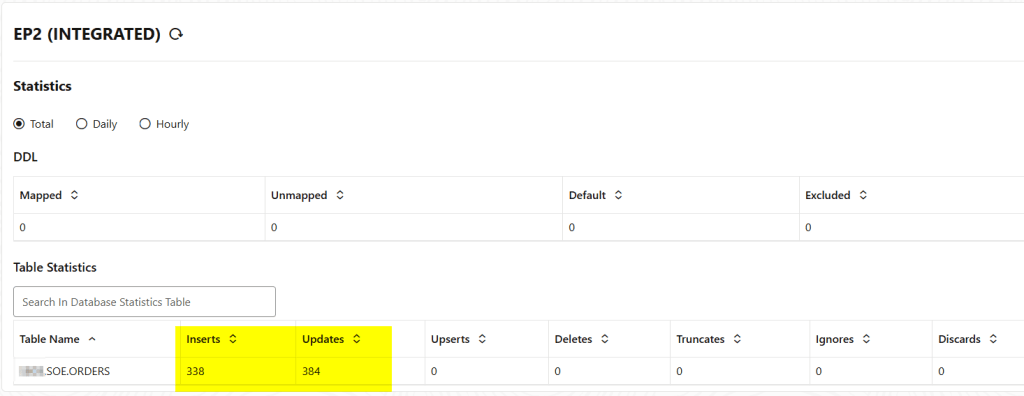
So, in my OGG for Oracle deployment I already have an extract running and fetching data from some databases:
Option 1: USERIDALIAS Authentication (Password Based)
To connect two deployments using USERIDALIAS we need to follow the steps:
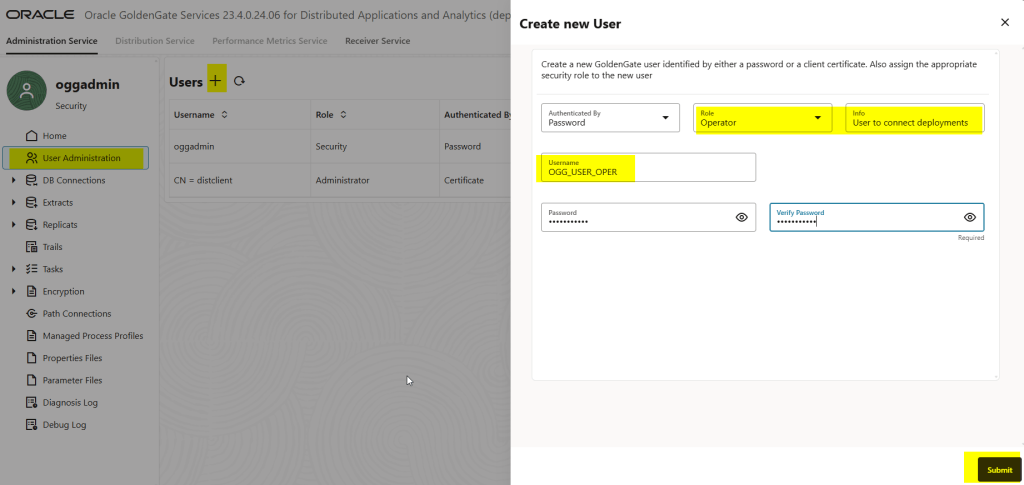
- Create an user identified with a password in the target deployment we want to connect
- Create an USERIDALIAS in the source deployment that matches the target’s user credentials in the target deployment
To create a user and password and the target deployment we just need to log in to the administration console and in the User Adminsitration add a new user, see the screenshot below:
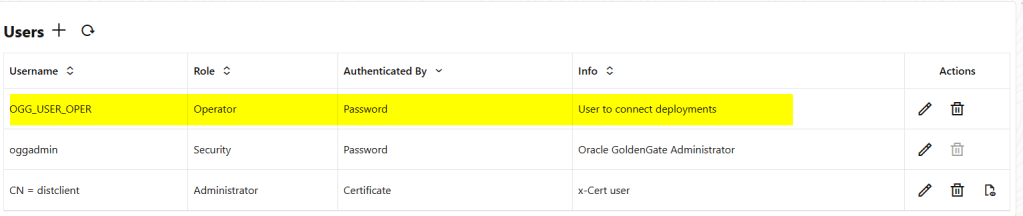
Now, we need to create an USERIDALIAS in the source deployment as follows:
In the source deployment go to Path Connections and create the ALIAS, you will need to set the same user and credentials you put in the target deployment
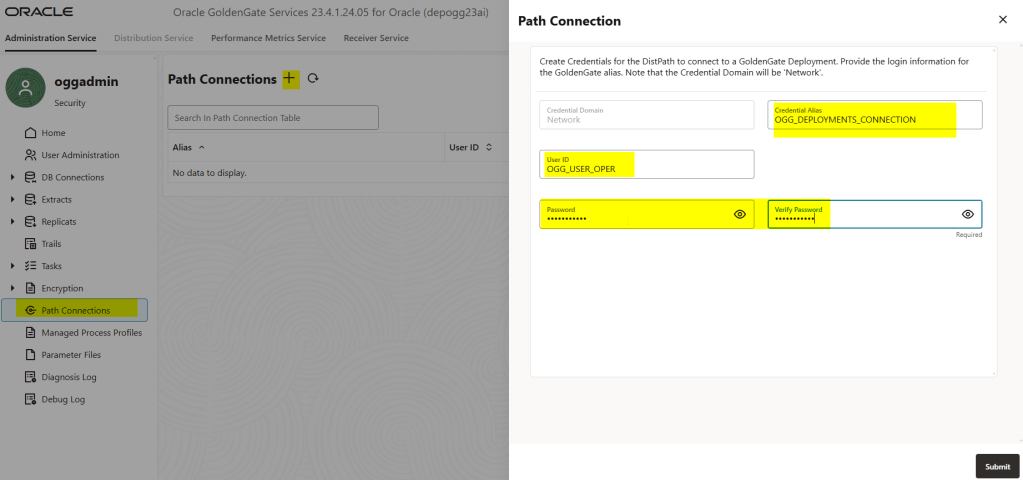
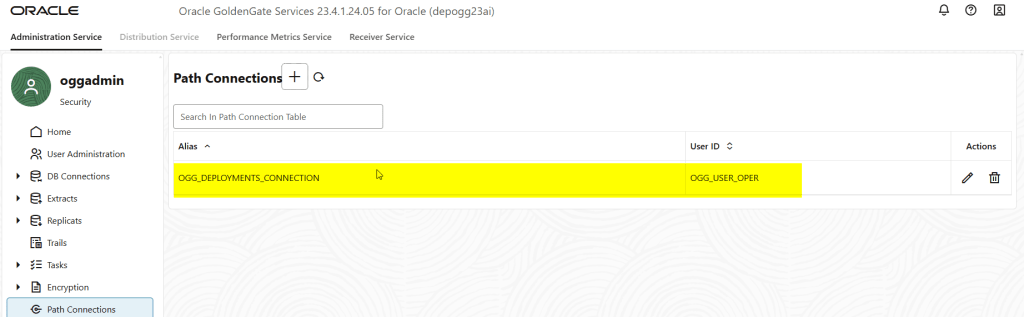
Ok, we are almost done! Now, let’s create the distribution path
To create the distribution path you will need to connect to the distribution service
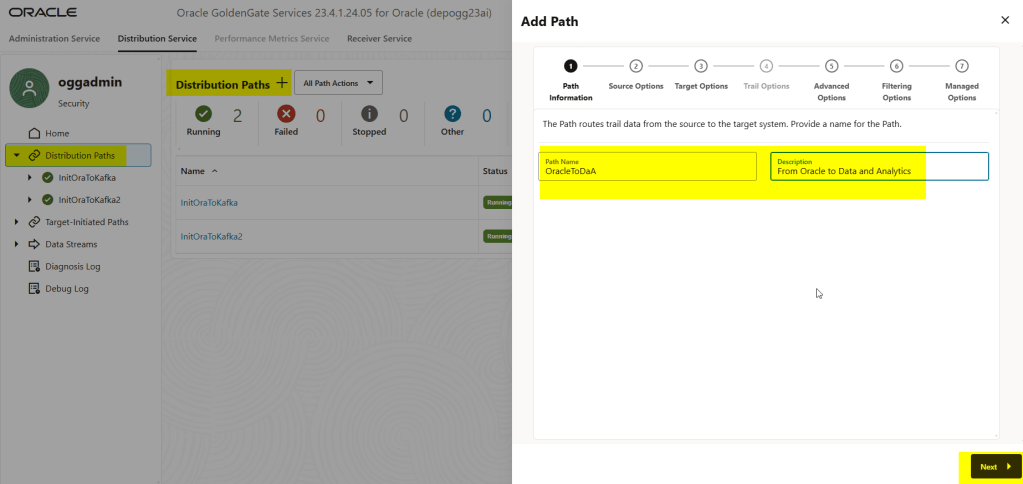
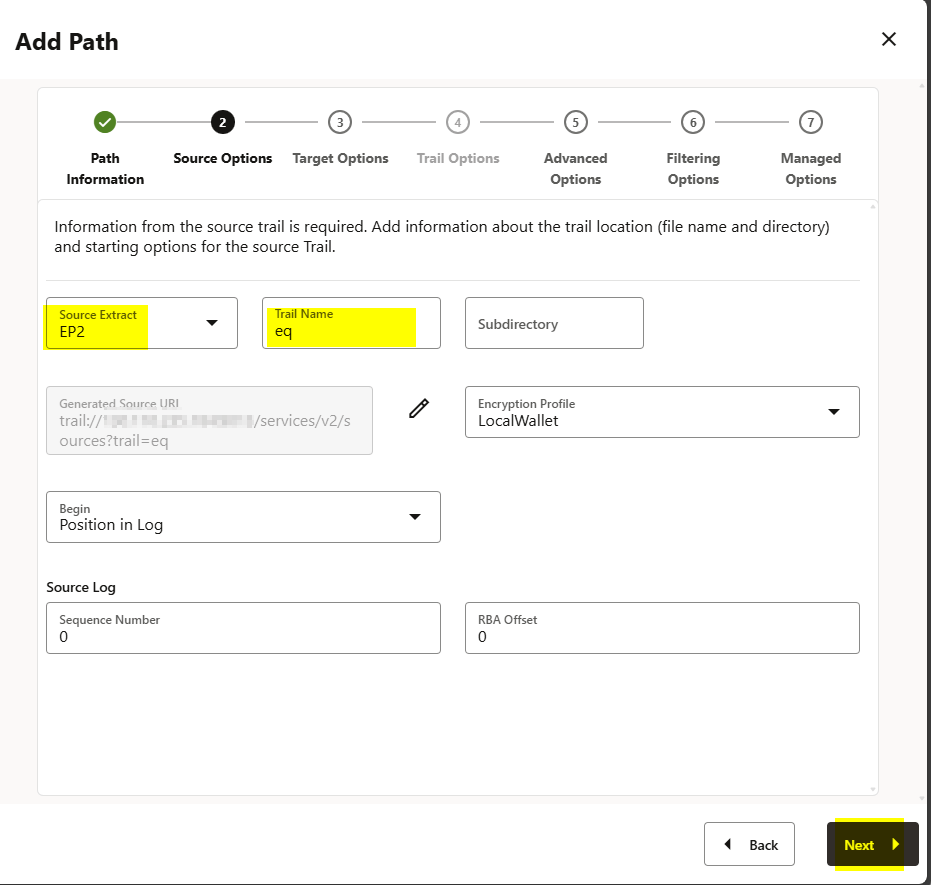
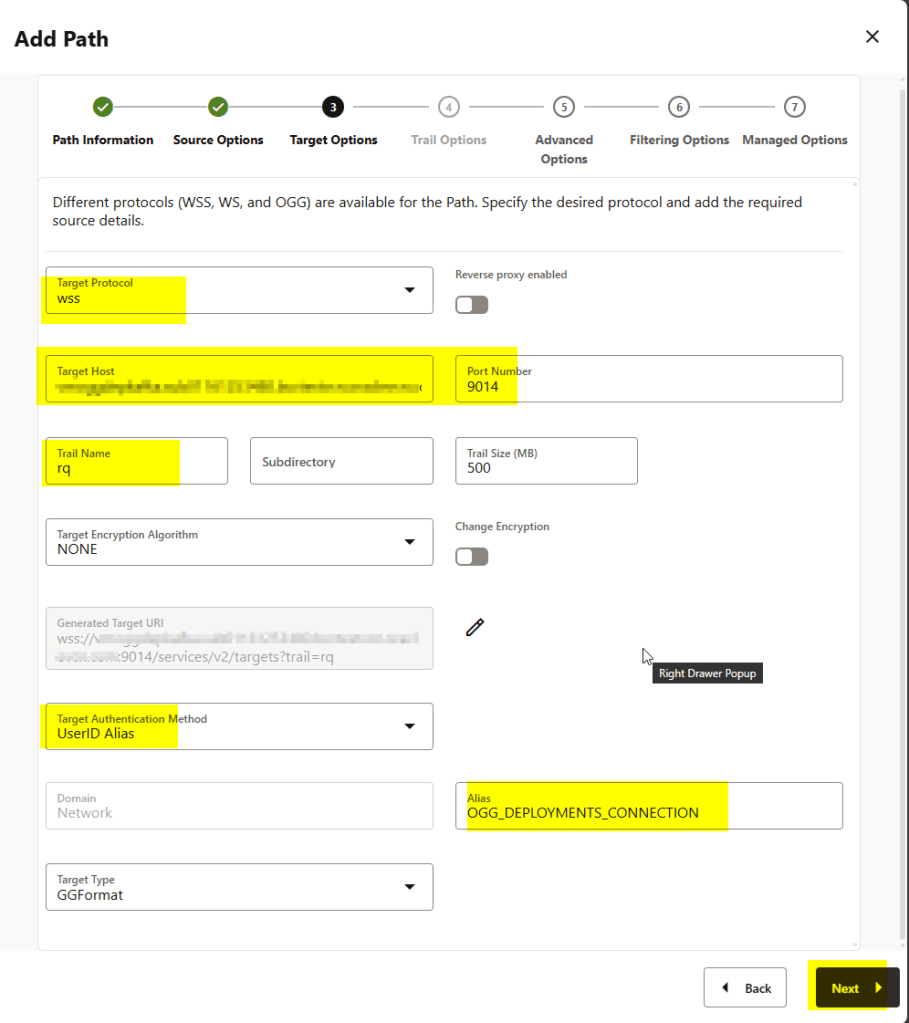
In the Advanced and Filtering options I simply clicked Next.
Finally, just click on the Create Path and Run button:
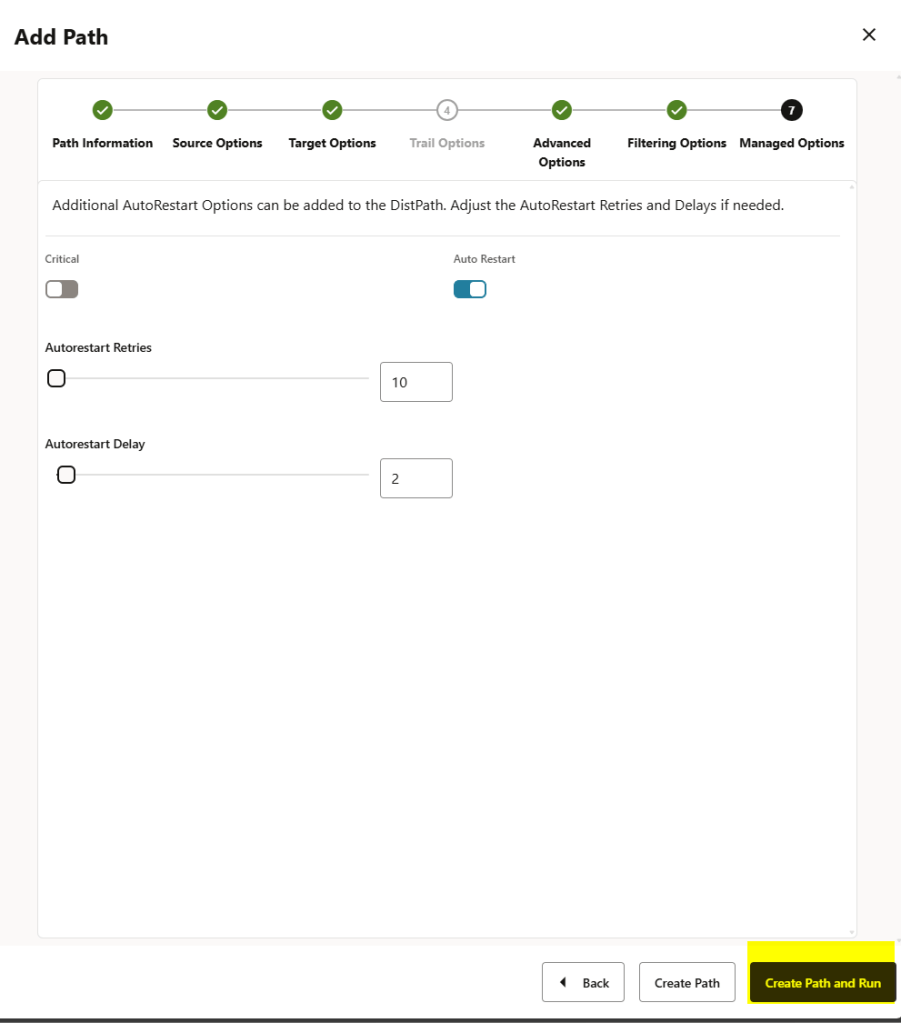
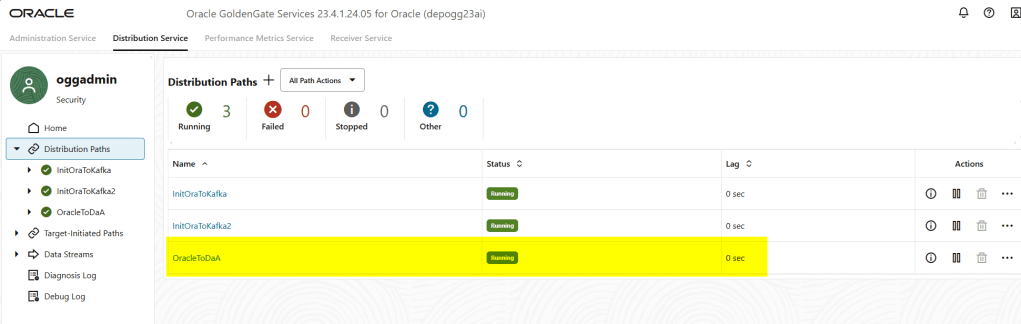
As you can see, the distribution path has been created; basically, when a Distribution Path is initiated, the USERIDALIAS information will be passed to the target. After the target verifies that the USERIDALIAS information matches the target user’s credentials, the authorization succeeds, and a network connection can be established.
We can also check more information in the Path information as follows:
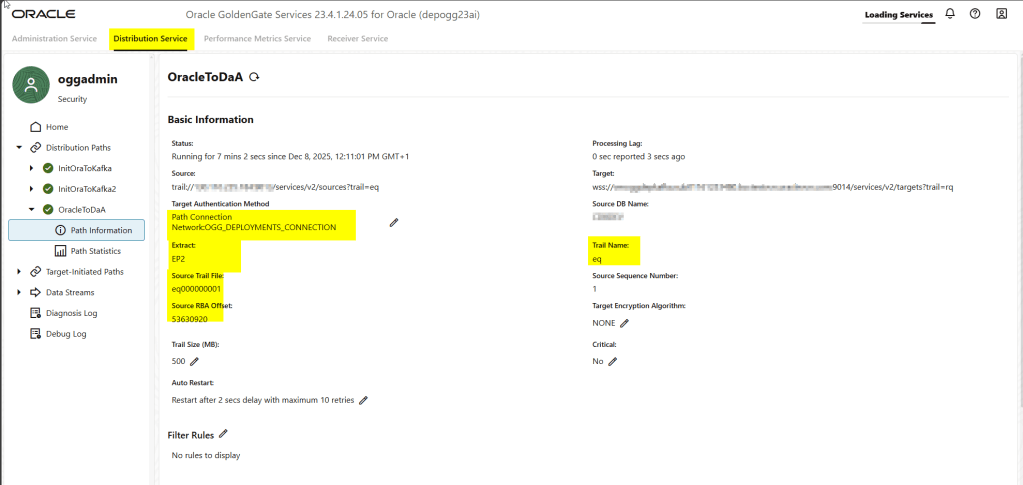
We didn’t have to create the distribution path in the Receiver Service target deployment, as this is done automatically, as you can see below:
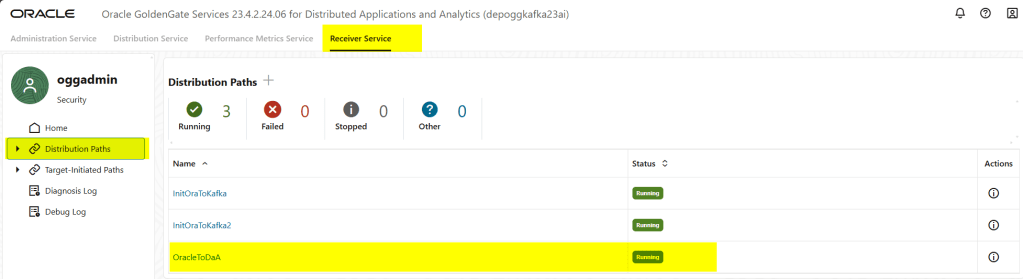
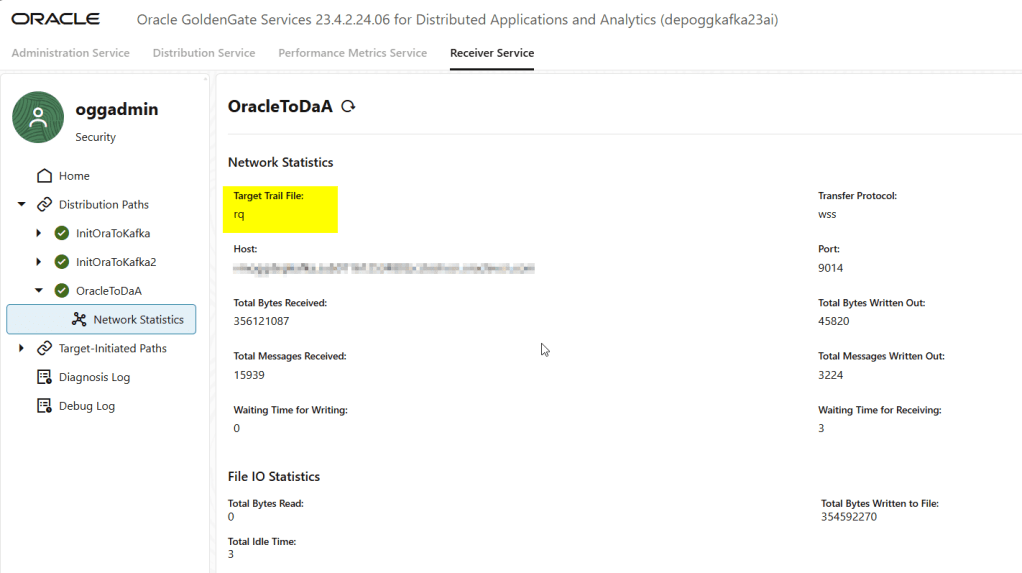
Note that in the source deployment extract, we generate a trail file called “eq2,” and when we receive that trail in the target deployment, we call it “rq.” We can use that “rq” trail file to create the replicat.
The next method offers a stronger security model and is preferred in environments with strict TLS requirements.
Option 2: Certificate Based Authentication (TLS Client Auth)
This method is straightforward. The only requirement is having the client certificates created beforehand. You can generate them and pass them in the response file when creating the deployment
#----------------------------------------------------------------------
#--
#-- DistClient Certificate
#--
#----------------------------------------------------------------------

subject="/C=US/O=OGG Development/CN=distclient"
openssl req -subj   "${subject}"                                        \
            -newkey rsa:2048 -nodes                                     \
            -keyout OGG_Certs/DistClient_key.pem                        \
            -new                                                        \
            -out    OGG_Certs/distclient.csr

openssl x509 -CAcreateserial                                            \
             -CA      OGG_Certs/RootCA_cert.pem                         \
             -CAkey   OGG_Certs/RootCA_key.pem                          \
             -req                                                       \
             -in      OGG_Certs/distclient.csr                          \
             -extfile OGG_Certs/DistClient_cert.cnf                     \
             -days    7300                                              \
             -out     OGG_Certs/DistClient_cert.pem
Then in the response file, just add the path where you have stored your certificates; you should provide the RootCA certificate as well:
#-------------------------------------------------------------------------------
# If SSL / TLS will be enabled, optionally specify the client certificate.
#-------------------------------------------------------------------------------
CLIENT_CERTIFICATE=/u01/app/ogg23ai/OGG_Certs/DistClient_cert.pem

#-------------------------------------------------------------------------------
# If importing a client certificate, specify the private key file in PKCS#8 format
# The private key file must not be encrypted
#-------------------------------------------------------------------------------
CLIENT_CERTIFICATE_KEY_FILE=/u01/app/ogg23ai/OGG_Certs/DistClient_key.pem

#-------------------------------------------------------------------------------
# If importing a client certificate, optionally specify the CA certificates file
#-------------------------------------------------------------------------------
CLIENT_CA_CERTIFICATES_FILE=/u01/app/ogg23ai/OGG_Certs/RootCA_cert.pem
Or you can add them in your deployment afterwards as follows:
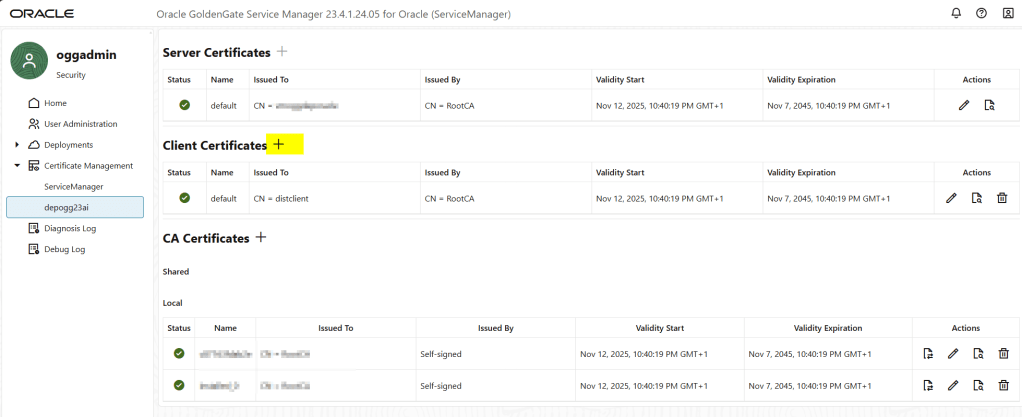
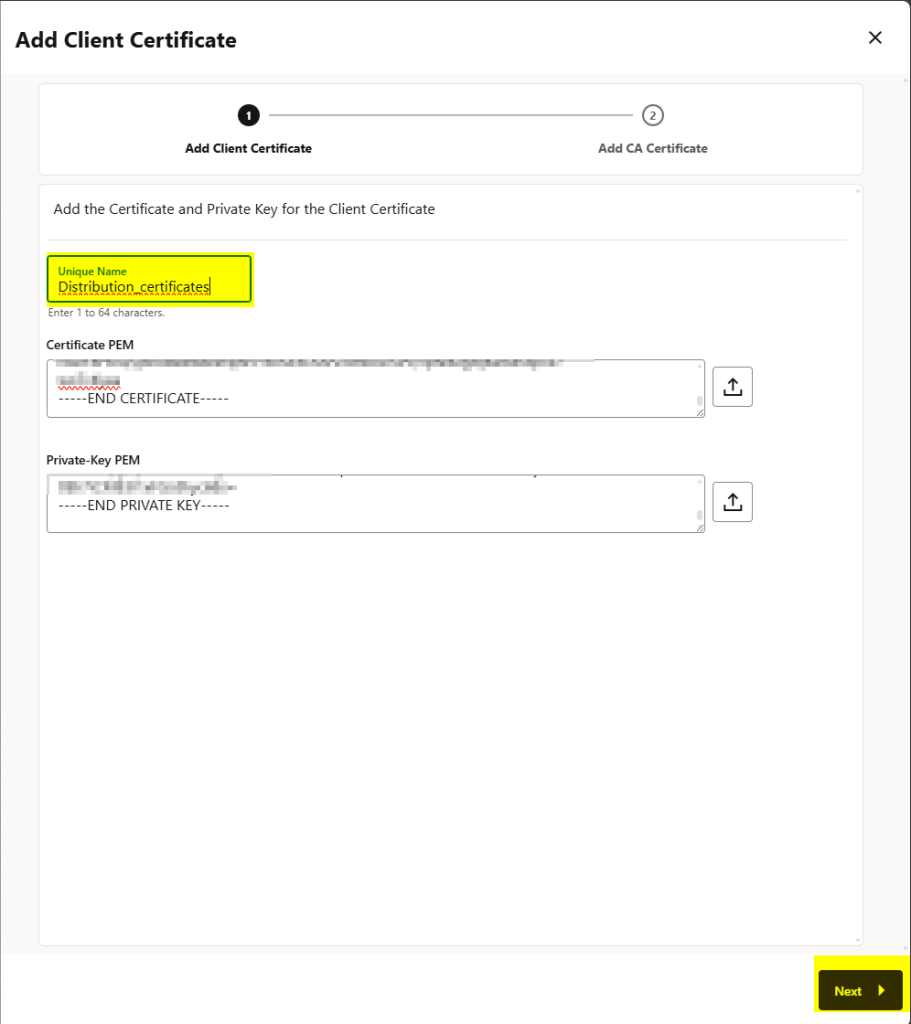
add the RootCA certificate as well and click on the ADD button before the submit:
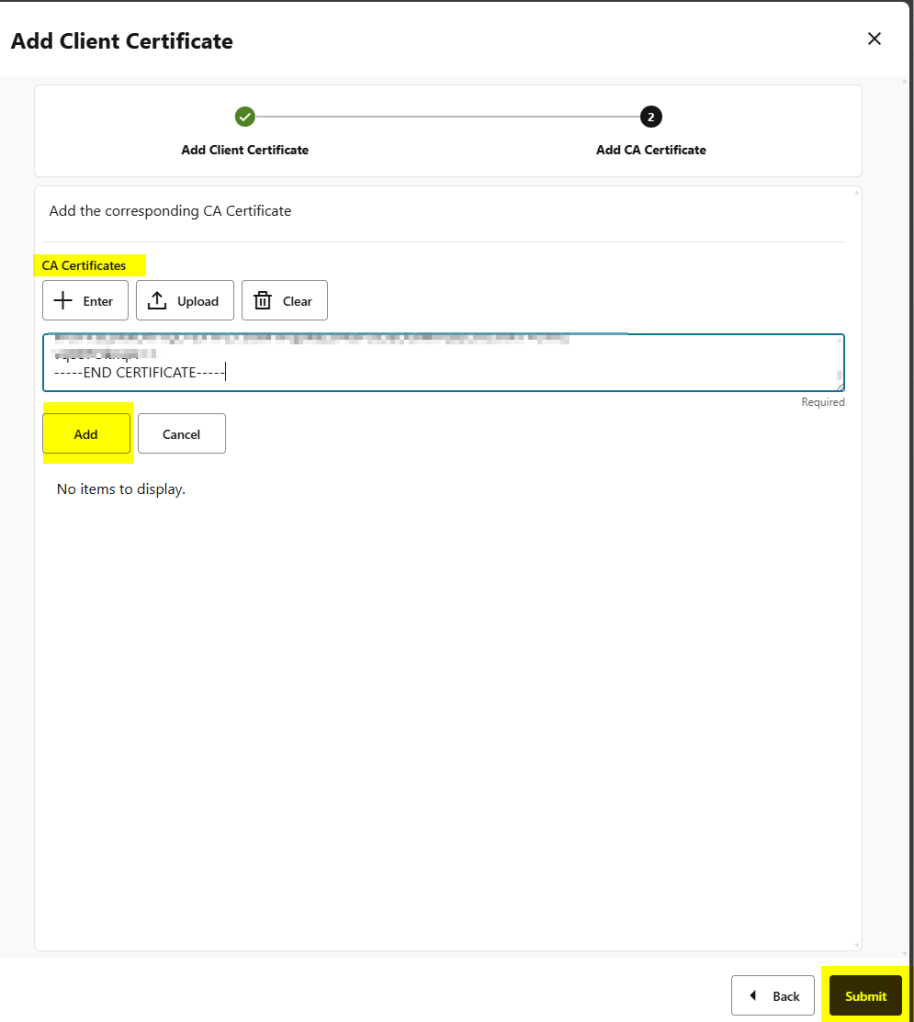
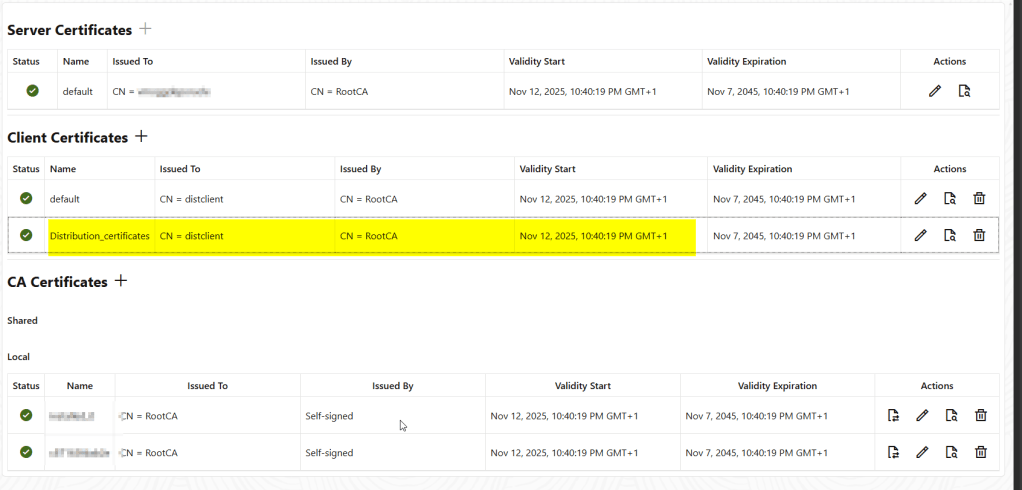
You will need to repeat this in every deployment.
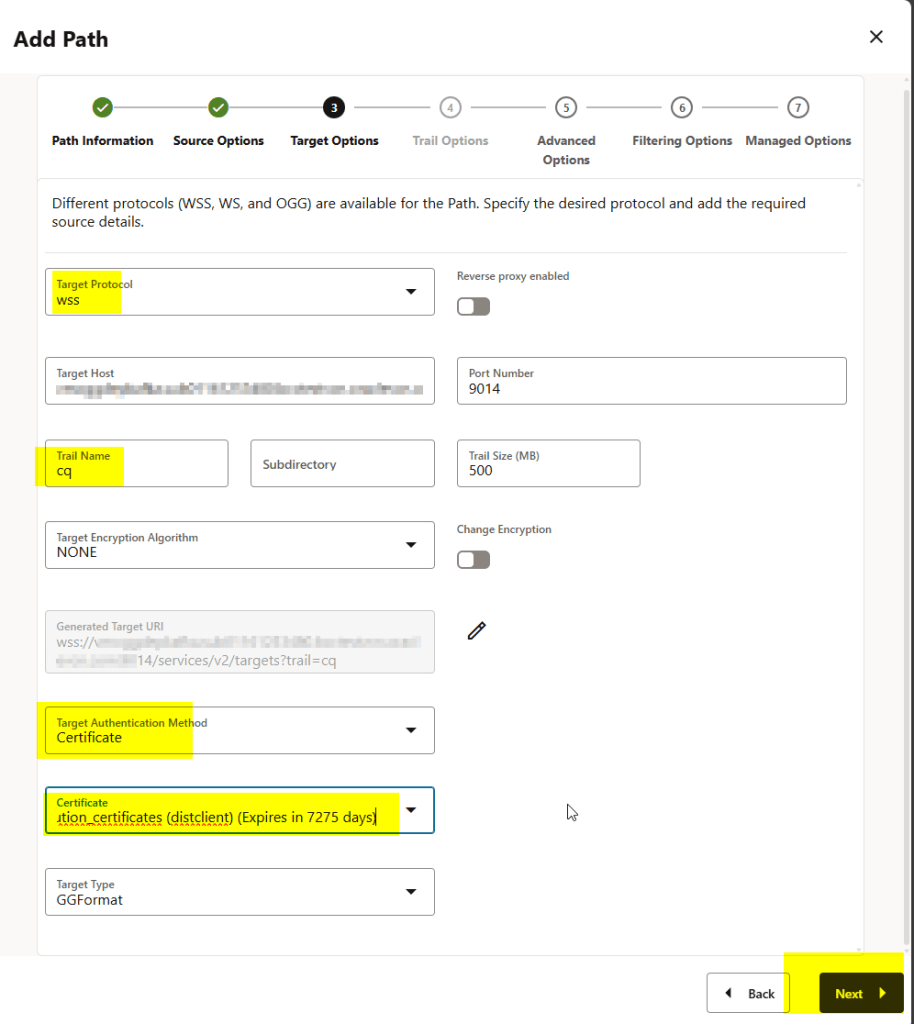
Once you have configured the client certificates, follow the same process but choose the target authentication method as certificate:
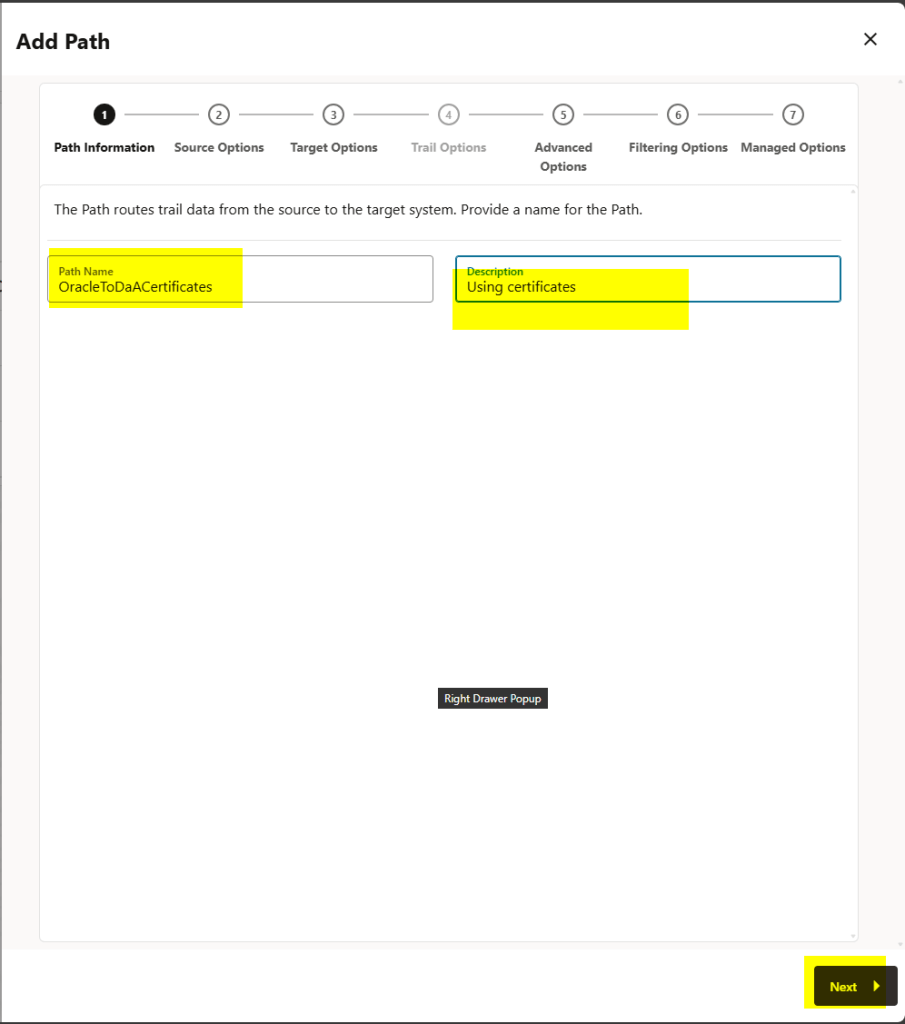
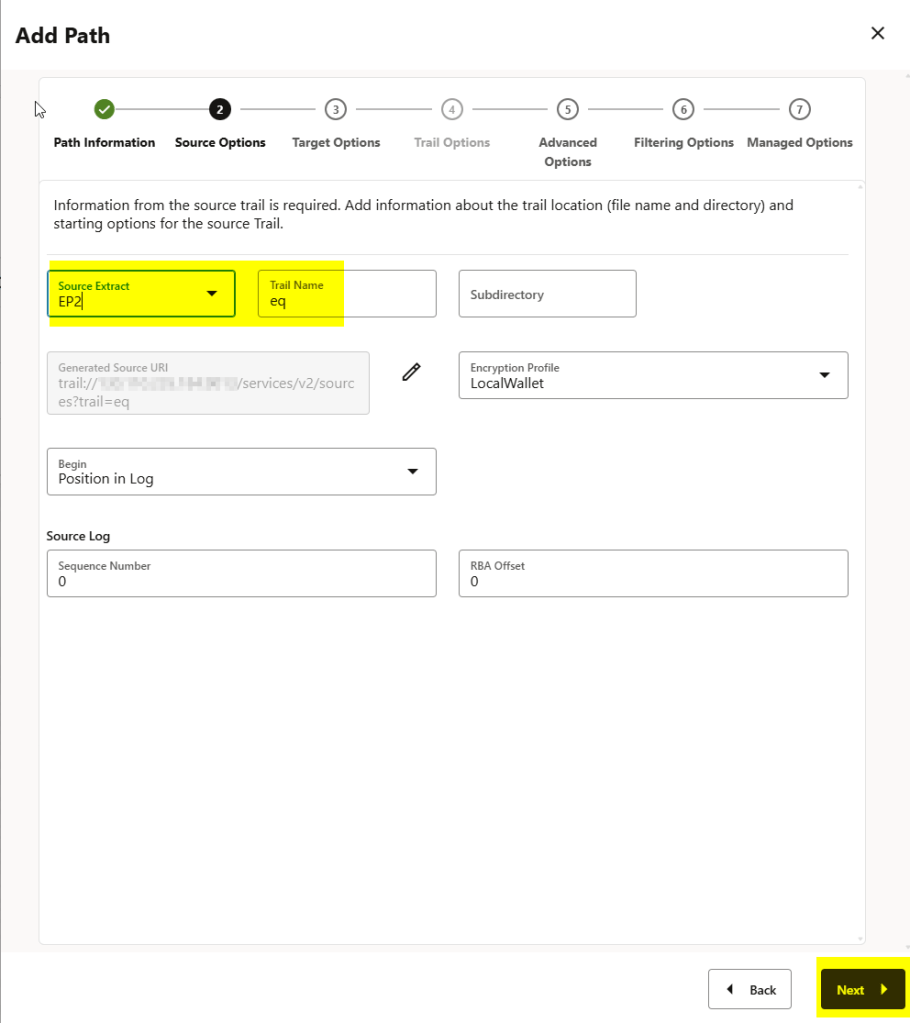
You can see below that the target authentication method is certificate and I have chosen the distribution_certificates here:
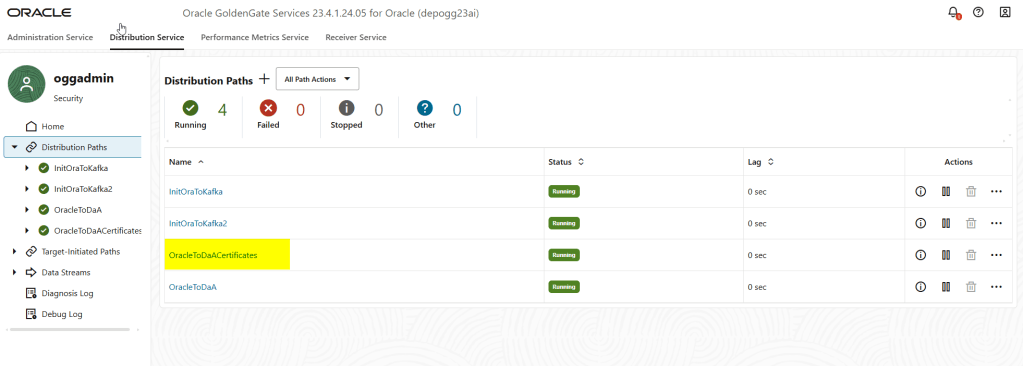
The distribution path has been created successfully in my source deployment:
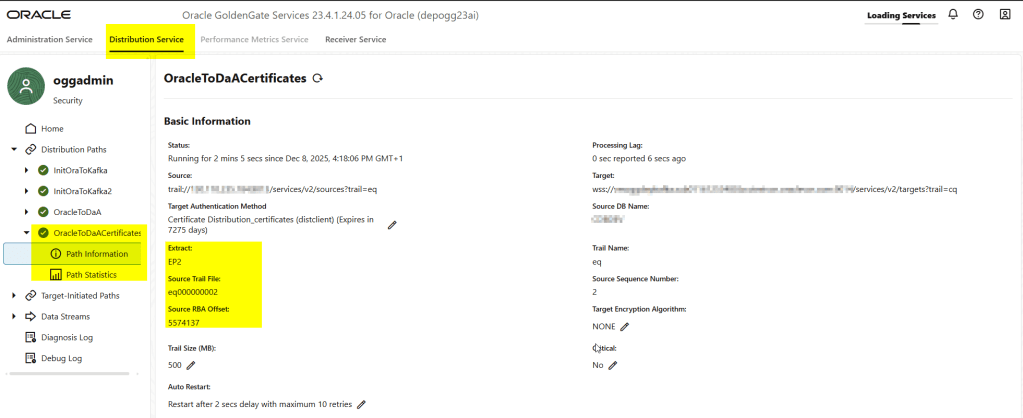
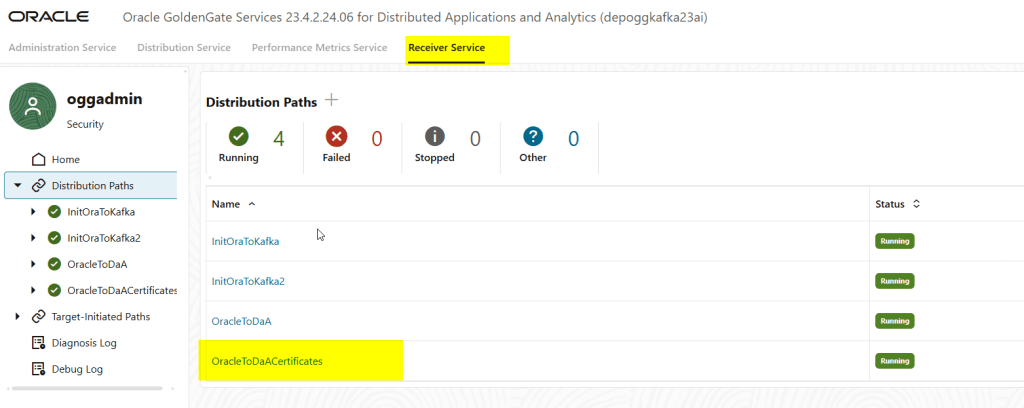
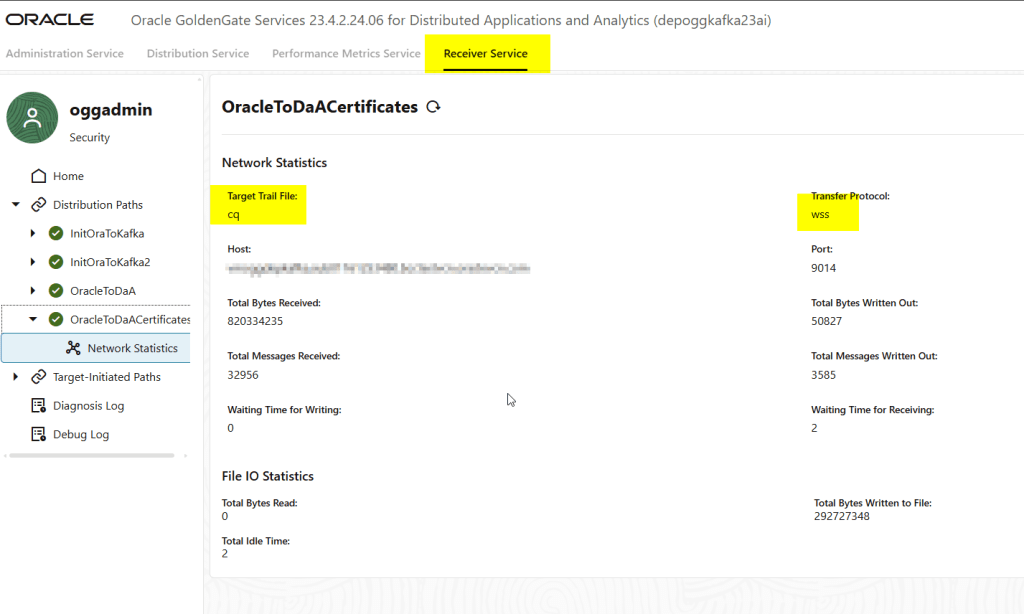
And in the target deployment, I am able to see it in the receiver service:
Wrapping Up: Best Practices for Secure GoldenGate Deployments
GoldenGate Microservices Architecture gives us a cleaner, more secure, and more flexible way to move data across deployments. The Distribution and Receiver Services replace the old Data Pump and network layers with a design that is easier to automate, easier to secure, and far more cloud friendly.
In this post we explored two secure authentication methods. USERIDALIAS offers a simple password based workflow, while certificate based authentication provides strong TLS security for environments that require strict control. Both methods are fully supported in GoldenGate 23/26ai and work seamlessly across Oracle, Big Data/Analytics deployments.
If you are planning new GoldenGate projects in 23/26ai, the Microservices Architecture is not just recommended, it is the only supported architecture for new deployments. Mastering Distribution and Receiver Services is essential for designing secure, scalable replication topologies both on-premises and in OCI.
In future posts I will go deeper into advanced topics such as OAuth authentication, using AdminClient for automation and other stuffs!
If you have specific scenarios or architectures you want me to cover, feel free to leave a comment. I am always happy to explore real-world GoldenGate challenges.





 DatabaseVerse: Journey into the World of Databases
Leave a comment