

When people hear Exadata in OCI, the first reaction is usually “so it’s all the same thing, right?” Not quite. Oracle actually offers several flavors of Exadata in the cloud. There’s ExaDB-D, the dedicated system most enterprises already know. Then there’s the new ExaDB-XS, a cloud-native Exascale service built for elasticity and multitenancy. And if you want the cloud control plane but keep the hardware on-premises, you have ExaDB-C@C (Exadata Cloud@Customer).
All of them share the same Exadata DNA, but the way you scale, pay, and manage databases can feel very different. Think of it as owning your own jet versus paying only for the flights you take. In this post, we’ll focus on ExaDB-D and ExaDB-XS, breaking down their differences so you know which one fits your workload.
- Understanding the Architecture
- Pricing and Cost Models Explained
- Scaling and Resource Limits in Action
- Choosing the Right Fit for Your Workload
- Real-World Cost Comparison (Example)
- Wrapping Up: The Exadata Journey Ahead
Understanding the Architecture
At the core, both ExaDB-D and ExaDB-XS run on Exadata hardware, so you still get Smart Scan, storage offload, and all the performance goodies. But the way the service is packaged and delivered is very different.
ExaDB-D (Dedicated Infrastructure):
This is the classic Exadata Cloud model: you get a dedicated Exadata rack (quarter, half, or full) inside Oracle Cloud. You carve it up into VM clusters and decide how many ECPUs (on X11) or OCPUs (on earlier generations) each cluster gets. The control plane is Oracle Cloud, but the underlying system is yours alone and that “dedicated” aspect becomes a key difference when compared to ExaDB-XS.
Scaling here is independent and online across the three main resource dimensions:
- CPU (ECPUs/OCPUs): You can scale up or down online without interruption, at least you scale down CPU to zero 😉
- Memory: Scaling requires a rolling restart of the cluster nodes.
- Storage: Scales online, but requires a rebalance at the ASM level (automatic, but worth planning for).
These operations don’t depend on each other, which means you can, for example, add OCPU/ECPUs without touching memory or storage. That independence is very different from ExaDB-XS, where compute and storage elasticity follow a different cloud-native model.
ExaDB-XS (Exascale Infrastructure):
You don’t deal with racks or storage servers (aka Infrastructure). Exadata is reimagined as a cloud-native, multi-tenant compute and storage fabric, where you interact with VM clusters and storage vaults. Each VM cluster lets you scale enabled ECPUs per VM (even down to zero), while Oracle manages the assigned capacity behind the scenes.
The major architectural differentiators are memory, which scales with enabled ECPUs and storage:
- With Oracle Database 23ai, ExaDB-XS introduces Exascale Smart Storage. The database accesses storage directly via a Storage Vault, eliminating the need for ASM, simplifying storage management, and allowing online storage scaling with a single command.
- With Oracle Database 19c, ExaDB-XS uses Exascale Block Storage, which still relies on ASM and disk group allocation.
This difference makes ExaDB-XS feel far more cloud-native, especially when paired with features like per-PDB backups, per-PDB Data Guard, and thin cloning every two minutes, although this is because Oracle 23ai features mostly.
There is a nice figure about the architecture difference between 19c vs 23ai on Exascale infrastructure in the official doc here: https://docs.oracle.com/en-us/iaas/exadb-xs/doc/overview-exadb-xs-service.html
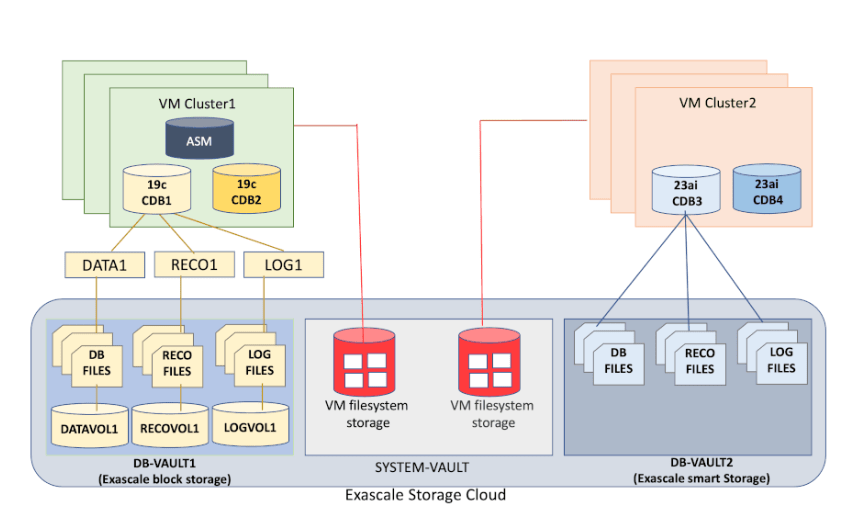
BTW, both are mutually exclusive that means:
- You cannot provision within the same VM cluster both Oracle Database 23ai using Exascale Smart Storage and Oracle Database 19c using Exascale block storage.
- An ExaDB-XS VM cluster configured with Exascale Smart Storage cannot share a storage Vault with another ExaDB-XS VM cluster that uses the Exascale block storage.
ExaDB-C@C (Cloud@Customer):
For completeness: there’s also ExaDB-C@C, which is basically ExaDB-D but physically installed in your datacenter. It gives you the same cloud control plane and automation, but the hardware lives behind your firewall. Useful if regulations don’t let you go all-in on public cloud. We won’t dive deep into it here, but it’s good to keep in mind as the third option.
Pricing and Cost Models Explained
Both services share the same Exadata DNA, but the way you pay for them reflects their architecture.
ExaDB-D (Dedicated Infrastructure):
When you provision ExaDB-D, you are essentially renting a slice of a dedicated Exadata rack in OCI (quarter, half, or full). That comes with some important billing implications:
- Infrastructure: The moment you provision the Exadata infrastructure, billing starts. This charge is fixed whether or not you create any VM clusters. Even an “empty” infrastructure still incurs cost.
- VM Clusters and Compute: Inside the infrastructure, you create VM clusters. Here you decide how many ECPUs (on X11) or OCPUs (on earlier generations) to enable. Those enabled cores are billed on top of the infrastructure. You can scale cores up and down online, even to zero, which stops CPU billing, but infrastructure charges continue.
- Storage: Storage capacity is tied to the infrastructure. Expanding storage is billed accordingly and handled online by ASM rebalance.
This makes ExaDB-D predictable in cost but less elastic. Even if you scale compute to zero, the infrastructure bill remains. Think of it as leasing an office building: the rent (infrastructure) is always due, but you can decide how many desks (VM cluster cores) are occupied at any given time.
ExaDB-XS (Exascale Infrastructure):
With ExaDB-XS, you don’t provision a dedicated Exadata rack. Instead, you consume a cloud-native pool of compute and storage resources. This means billing works differently:
- Infrastructure: There is no separate “infrastructure” object to pay for like in ExaDB-D. What you see and manage are VM clusters. Each VM cluster has a small 48-hour minimum billing period when created, but after that, usage is purely consumption-based.
- Compute (ECPUs): You define how many enabled ECPUs per VM you want. Only these enabled cores are billed, at a per-second rate (with a 1-minute minimum). You can scale enabled ECPUs down to zero, which stops compute billing entirely.
- Reserved ECPUs: You can also provision reserved ECPUs, which are physically allocated to your VM but not billed until you enable them, although they mentioned licences only, I’m not sure 100% that there is at least an extra cost to “reserved ecpus”, I will try to get more info about this, but anyways… Reserved ECPUs let you scale up quickly without downtime. If you need to go beyond your reserved limit, Oracle may need to reallocate VMs in the backend, which can involve a rolling restart.
- Storage Vault: Database storage is independent of compute. You scale it online and are billed for the amount allocated. With 23ai, this storage is the Exascale Smart Storage Vault; with 19c, it’s Exascale Block Storage.
This makes ExaDB-XS a more cloud-native option in how resources are managed, but both XS and D support full elasticity when combined with Oracle Dynamic Scaling (ODyS). With ODyS, you can automatically scale enabled cores up or down across VM clusters, keeping performance aligned with workload demand. The main difference is that in ExaDB-D, infrastructure (not CPU) costs remain constant, while in ExaDB-XS compute and storage billing adjust dynamically based on what’s in use.
If you’re interested in how ODyS and ODCC automates this process in real time, check out my others posts:
Scaling and Resource Limits in Action
| Aspect | ExaDB-D (Dedicated Infrastructure) | ExaDB-XS (Exascale Infrastructure) |
|---|---|---|
| CPU (per cluster) | Online scaling of OCPUs (older gens) or ECPUs (X11). Can scale to zero to stop CPU billing, but infra cost continues. | Enabled ECPUs: billed and active, scale per second, down to zero. Reserved ECPUs: allocated but not billed until enabled, used for fast scale-up. |
| Memory (per cluster) | Independent of CPU. Scaling requires a rolling restart. | Auto-scales with total ECPUs (enabled + reserved). Formula: 2.75 GB per total ECPU. Cannot scale memory independently. |
| Storage (DATA) | Independent of CPU/memory. Expands online, ASM handles rebalance. | 23ai: Smart Storage Vault, direct access, no ASM, online scaling. 19c: Block Storage, requires ASM |
| Minimum Size (per cluster) | Quarter Rack X11M: ~84 ECPUs, ~1.3 TB memory, ~28 TB usable storage | VM cluster: 8 ECPUs, ~22 GB memory, 220 GB VM filesystem, 300 GB Storage Vault. |
| Maximum Size (per cluster) | Bounded by the provisioned infrastructure. A full rack X11M provides 8 DB servers and 14 storage servers, thousands of cores (up to ~3,072), ~11 TB aggregate memory, and petabyte-scale raw storage (flash + disk). With multi-rack configs, a single cluster can scale to 32 DB servers and 64 storage servers. | VM cluster: 200 ECPUs, ~550 GB memory, 2 TB VM filesystem, 100 TB Storage Vault. Up to 10 VMs per cluster. |
| System / Multi-Cluster Limits | Multiple VM clusters can coexist in the same ExaDB-D infrastructure. Overall system can scale to 32 DB servers and 64 storage servers. | At the time of writing, Oracle has not published a hard limit on the number of VM clusters you can create per tenancy, at least I haven’t found it |
| Scaling Model | Independent knobs: CPU, memory, and storage scale separately. | Coupled model: memory tied to total ECPUs, storage managed via Vault. Elastic, but less independent. |
Choosing the Right Fit for Your Workload
Both services run on the same Exadata foundation, but the choice between ExaDB-D and ExaDB-XS depends on your workload profile, elasticity needs, and size requirements.
ExaDB-D (Dedicated):
- Best when you need isolation at the infrastructure level for compliance or governance.
- Fits large, consolidated enterprise estates with predictable workloads.
- Lets you scale CPU, memory, and storage independently.
- Supports much larger footprints than XS: multi-rack ExaDB-D can scale to 32 DB servers, 64 storage servers, and petabytes of storage.
- Even if you scale VM clusters to zero cores, the infrastructure billing continues, since you are leasing that rack slice.
ExaDB-XS (Exascale):
- Best for elastic, variable workloads where billing should follow actual usage.
- Lets you scale enabled ECPUs down to zero and stop compute billing entirely (after the initial 48-hour minimum).
- Has defined cluster limits: 200 ECPUs, ~550 GB memory, and 100 TB Storage Vault per VM cluster, with up to 10 VMs in a cluster.
- Unlocks Exascale Smart Storage when using Oracle Database 23ai, simplifying storage management and scaling.
Rule of thumb:
- Choose ExaDB-XS if your workloads are elastic, variable, and fit within the 200 ECPU / 100 TB Vault limits per VM Cluster. It gives you true pay-as-you-go economics and, if you run Oracle Database 23ai, you can leverage Exascale Smart Storage for simplified storage management and higher agility (no ASM, direct access to the Vault, online scaling).
- Thin cloning? of well, if you are in Oracle 23ai, this is a really game changer in ExaDB-XS. Check my blog about it if you want to know more:
- Choose ExaDB-D if you need larger capacity, stricter isolation, or independent scaling knobs, or if your estate simply grows beyond XS limits. ExaDB-D is also the natural choice if you want the predictability of dedicated infrastructure or if your databases are larger than what XS supports.
Once we understand how each model scales, the next natural question is: what does that flexibility actually cost? Let’s look at a simple scenario
Real-World Cost Comparison (Example)
Understanding which service fits your workload is one thing, but cost often seals the deal. To keep this practical, let’s look at a simple example using Oracle’s public list prices for Exadata Database Service (as published on Oracle Exadata Database Service Pricing).
Scenario
- 10 CDBs, total size under 100 TB
- Continuous average compute: 48 ECPUs (24×7 for a 30-day month)
- Storage allocated: 50 TB in ExaDB-XS (Vault)
- Database version: Oracle 23ai
List prices (as of early 2025)
Double check at official site: https://www.oracle.com/cloud/costestimator.html
ExaDB-XS
| Component | Basis | Monthly Cost (approx.) |
|---|---|---|
| Compute | 48 ECPUs × 24 h × 30 days × $0.336 | $11,612 |
| Storage Vault | 50 TB × 1,000 GB/TB × $0.1156 | $5,780 |
| Total (ExaDB-XS) | $17,392 / month |
Storage is billed separately per allocated GB; compute billing stops when you scale to 0 ECPUs (after the 48-hour minimum period).
ExaDB-D (Quarter Rack X11M)
| Component | Basis | Monthly Cost (approx.) |
|---|---|---|
| Infrastructure | Fixed monthly charge | $10,800 |
| Compute | 48 ECPUs × 24 h × 30 days × $0.336 | $11,612 |
| Storage | Included in infrastructure | — |
| Total (ExaDB-D) | $22,412 / month |
Scaling VM clusters to zero stops compute billing, but infrastructure cost continues.
Summary
| Service | Approx. Monthly Cost | Key Cost Drivers |
|---|---|---|
| ExaDB-XS | $17.4 k | Pay-as-you-go compute and per-GB Vault billing. |
| ExaDB-D | $22.4 k | Fixed infra “rack rent” plus compute; storage included. |
Result: In this steady 48-ECPU / 50-TB month, ExaDB-XS is about 22 % cheaper mainly because it avoids the fixed infrastructure rent and charges Vault storage separately.
Note: Prices above are Oracle’s public list prices as of early 2025 and may vary by region, contract, or future updates. Always check the current rates in the Exadata Database Service Pricing or your tenancy’s price sheet before planning or budgeting.
Wrapping Up: The Exadata Journey Ahead
Both ExaDB-D and ExaDB-XS share the same Exadata DNA: extreme performance, smart storage, and the reliability that Oracle databases have always been known for. The real difference lies in how you consume that power.
ExaDB-D gives you dedicated infrastructure, predictable performance, and full control over CPU, memory, and storage scaling. It’s ideal for large, consolidated estates or workloads that demand strict isolation and consistency.
ExaDB-XS, on the other hand, brings that same Exadata performance into a cloud-native world, where elasticity, simplicity, and cost efficiency take the lead. Combined with Oracle Database 23ai and Exascale Smart Storage, it offers a new way to scale without friction.
At the end of the day, it’s not about which one is “better”. It’s about which one fits your workload, your size, and your operational style. The great part? You can move between them as your needs evolve and that’s the beauty of the Exadata journey in OCI.



 DatabaseVerse: Journey into the World of Databases
Leave a comment