

I’m quite familiar with Exadata platforms, having been lucky enough to work on several projects over the past five years helping customers migrate their on-premises database workloads to the cloud. Most of these have been to Exadata Cloud at Customer (ExaDB-C@C) and Exadata on Dedicated Infrastructure (previously ExaCS, now ExaDB-D).
When I first heard about Exascale (Oracle Exadata Database Service on Exascale Infrastructure, or ExaDB-XS) I was impressed, but also a bit disappointed. Why? Because it’s currently only available for Oracle 23ai databases, and not many customers have moved to 23ai yet. Still, I was eager to get my hands on it.
I don’t have a client running Exascale yet, but luckily I have access to an environment I can experiment with. Before diving in, let’s make sure we understand what Exascale is and how it differs from what we already know.
Exascale, the future!
Exascale is Oracle’s newest deployment option for Exadata Database Service. ExaDB-XS offers a cloud service experience similar to Exadata Database Service on Dedicated Infrastructure, but with greater flexibility. You can start with a small virtual machine (VM) cluster and scale as your needs grow. Oracle manages all the physical infrastructure in a shared, multitenant service model.
At its core, Exascale is the next-generation architecture of Oracle Exadata. It improves storage efficiency, simplifies database provisioning, and combines the extreme performance of Exadata smart software with the cost and elasticity benefits of modern clouds.
Storage in Exascale works differently from ExaDB-C@C or ExaDB-D. Database files reside in an Oracle Exadata Exascale Storage Vault, which delivers high-performance and scalable smart storage. You can scale storage online with a single command, and it’s available for immediate use. Oracle handles all storage allocation and management.
The architecture includes:
- A single Exascale Vault for database storage.
- A set of VMs running on Oracle-managed multitenant physical database servers.
- VM file systems, centrally hosted by Oracle.
- A virtual cloud network (VCN) providing client and backup connectivity.
The basic consumption unit in ExaDB-XS is the VM cluster. VM file systems are hosted on shared storage fully managed by Oracle, making VM portability seamless. Oracle can migrate VMs across physical servers for maintenance or failure recovery, and you can scale vertically by adjusting the number of ECPUs (btw ODyS is available on Exascale as well). Memory scales automatically with total ECPUs.
Key VM cluster facts:
- Minimum ECPUs per VM: 8
- Scale in increments of 4 ECPUs up to 200 per VM (current limit, check for updates as you know everything in the cloud changes quickly)
- You can reserve additional ECPUs to allow scaling without restarts
- Without reserved ECPUs, scaling may trigger a rolling restart depending on availability
Summary table:
| Minimum VM Cluster Size | Maximum VM Cluster Size | |
| Number of VMs in the VM Cluster | 1 | 10 |
| ECPUs per VM | 8 | 200 |
| File systsem storage per VM | 220GB | 2TB |
| Exascale Vault storage per VM cluster | 300GB | 100TB |
VM clusters scale quickly:
- Enable only a subset of total ECPUs and expand on demand.
- Scale memory at 2.75 GB per total ECPU.
- Perform hot VM additions or removals.
- Scale VM storage (restart required).
- Scale database storage online without downtime.
Database Storage Vault Minimum Capacity
The minimum vault storage per VM cluster is 300 GB, but 50 GB is reserved for ACFS. That leaves 250 GB for databases, so always account for this when sizing.
Why Exascale stands out
Cloning a PDB is easy in Oracle, but the real challenge comes from the limitations that follow. Oracle has introduced several features over the years to try to reduce these restrictions, but none have been perfect.
In ExaDB-D and ExaDB-C@C, for example, you can create a SPARSE disk group, which works but limits your storage sizing and still leaves issues such as the parent database being forced into read-only mode.
Another option is ACFS, which allows the parent database to stay in read-write mode. Unfortunately, performance often degrades over time in this setup, and Smart Scan is not supported.
With Exascale, these limitations appear to be solved. The new architecture provides a cleaner and more efficient way to handle PDB cloning, making it a much more practical choice for production environments.
From ASM to Vault: A new approach to storage
For over two decades, Automatic Storage Management (ASM) was at the heart of Exadata storage. It managed extent mapping efficiently, but came with limitations:
- Resizing diskgroups was complex, often requiring manual rebalancing
- In virtual cluster setups, storage space was rigidly partitioned among ASM disk groups
- Thin cloning forced compromises, either read-only parents or degraded performance
- Redundancy required inflexible configurations and didn’t solve space partitioning issues
Exascale reimagines this with a modern storage architecture:
- The storage software now runs inside each Exadata cell, think “cellcli” operations embedded in the cells
- There’s no need to install and manage ASM on compute nodes; storage logic is distributed and redundant across cells
- Databases still use extent mapping, but maps reside in the cell software, with cached copies on the compute nodes for low latency
- Storage pools replace ASM disk groups. Instead of diskgroups and griddisks, you define “pool disks” and “storage pools”, a cleaner, more flexible model that avoids compartmentalization issues
This architectural change simplifies storage management dramatically, and lays the foundation for features like fast thin clones, elastic scaling, and better redundancy, all without requiring ASM.
Hands-On with Exascale: First Demo
This demo is just an introduction to Exascale. I plan to create more blogs focusing on the cloning feature, which is quite exciting. Just a heads up… it is fast, so stay tuned for the next posts
For now, let’s take a look at my demo environment so you can see what I’m working with. Here’s the setup:
Oracle Exadata Database Service on Exascale Infrastructure
Resource allocation
- Reserved ECPUs: 0
- Enabled ECPUs: 16
- VM cluster: 2 VM
- Memory: 44 GB
- Total VM storage: 440 GB
Exascale database storage
- Vault: exaxsdb_xxxvault
- Storage capacity (free/total): 293 GB / 700 GB
With that in place, let’s connect to one of the VMs and see what’s inside.

The first thing you’ll notice when connecting to the VM is that there is no ASM process running. That’s because in Exascale the storage logic lives in the cells, and compute nodes interact with the Vault instead of ASM diskgroups.
To confirm this, let’s look at the Oracle Clusterware resources:
crsctl stat res -t
--------------------------------------------------------------------------------
Name           Target  State        Server                   State details
--------------------------------------------------------------------------------
Local Resources
--------------------------------------------------------------------------------
ora.9eb7xxxx.vexxxx.acfs
               ONLINE  ONLINE       exaxs1-abc             mounted on /var/opt/
                                                                                 oracle/dbaas_acfs,ST
                                                                                 ABLE
               ONLINE  ONLINE       exaxs2-def             mounted on /var/opt/
                                                                                 oracle/dbaas_acfs,ST
                                                                                 ABLE
ora.LISTENER.lsnr
               ONLINE  ONLINE       exaxs1-abc             STABLE
               ONLINE  ONLINE       exaxs2-def             STABLE
ora.acfsrm
               ONLINE  ONLINE       exaxs1-abc             STABLE
               ONLINE  ONLINE       exaxs2-def             STABLE
ora.ccmb
               ONLINE  ONLINE       exaxs1-abc             STABLE
               ONLINE  ONLINE       exaxs2-def             STABLE
ora.chad
               ONLINE  ONLINE       exaxs1-abc             STABLE
               ONLINE  ONLINE       exaxs2-def             STABLE
ora.net1.network
               ONLINE  ONLINE       exaxs1-abc             STABLE
               ONLINE  ONLINE       exaxs2-def             STABLE
ora.ons
               ONLINE  ONLINE       exaxs1-abc             STABLE
               ONLINE  ONLINE       exaxs2-def             STABLE
--------------------------------------------------------------------------------
Cluster Resources
--------------------------------------------------------------------------------
ora.LISTENER_SCAN1.lsnr
      1        ONLINE  ONLINE       exaxs1-abc             STABLE
ora.LISTENER_SCAN2.lsnr
      1        ONLINE  ONLINE       exaxs2-def             STABLE
ora.LISTENER_SCAN3.lsnr
      1        ONLINE  ONLINE       exaxs1-abc             STABLE
ora.cdb01.cdb01_pdb1.paas.oracle.com.svc
      1        ONLINE  ONLINE       exaxs2-def             STABLE
      2        ONLINE  ONLINE       exaxs1-abc             STABLE
ora.cdb01.db
      1        ONLINE  ONLINE       exaxs2-def             Open,HOME=/u02/app/o
                                                             racle/product/23.0.0
                                                             .0/dbhome_1,STABLE
      2        ONLINE  ONLINE       exaxs1-abc             Open,HOME=/u02/app/o
                                                             racle/product/23.0.0
                                                             .0/dbhome_1,STABLE
ora.cdb01.pdb1.pdb
      1        ONLINE  ONLINE       exaxs1-abc             READ WRITE,STABLE
      2        ONLINE  ONLINE       exaxs2-def             READ WRITE,STABLE
ora.cdb01.tol01.pdb
      1        ONLINE  ONLINE       exaxs1-abc             READ WRITE,STABLE
      2        OFFLINE OFFLINE                               STABLE
ora.cdb01.tol02_child.pdb
      1        OFFLINE OFFLINE                               STABLE
      2        OFFLINE OFFLINE                               STABLE
ora.cdb02.cdb02_pdb1.paas.oracle.com.svc
      1        ONLINE  ONLINE       exaxs2-def             STABLE
      2        ONLINE  ONLINE       exaxs1-abc             STABLE
ora.cdb02.db
      1        ONLINE  ONLINE       exaxs2-def             Open,HOME=/u02/app/o
                                                             racle/product/23.0.0
                                                             .0/dbhome_1,STABLE
      2        ONLINE  ONLINE       exaxs1-abc             Open,HOME=/u02/app/o
                                                             racle/product/23.0.0
                                                             .0/dbhome_1,STABLE
ora.cdb02.pdb1.pdb
      1        ONLINE  ONLINE       exaxs2-def             READ WRITE,STABLE
      3        ONLINE  ONLINE       exaxs1-abc             READ WRITE,STABLE
ora.cdp1.cdp
      1        ONLINE  ONLINE       exaxs1-abc             STABLE
ora.cdp2.cdp
      1        ONLINE  ONLINE       exaxs2-def             STABLE
ora.cdp3.cdp
      1        ONLINE  ONLINE       exaxs1-abc             STABLE
ora.cvu
      1        ONLINE  ONLINE       exaxs2-def             STABLE
ora.exaxs1-abc.vip
      1        ONLINE  ONLINE       exaxs1-abc             STABLE
ora.exaxs2-def.vip
      1        ONLINE  ONLINE       exaxs2-def             STABLE
ora.scan1.vip
      1        ONLINE  ONLINE       exaxs1-abc             STABLE
ora.scan2.vip
      1        ONLINE  ONLINE       exaxs2-def             STABLE
ora.scan3.vip
      1        ONLINE  ONLINE       exaxs1-abc             STABLE
--------------------------------------------------------------------------------
You’ll see the usual listeners, networks, and database services, but no ora.asm resource. This is a clear sign that ASM has been removed from the compute layer.
Next, let’s check the cluster registry and voting disk locations:
ocrcheck
Status of Oracle Cluster Registry is as follows :
         Version                  :          4
         Total space (kbytes)     :     569748
         Used space (kbytes)      :      85128
         Available space (kbytes) :     484620
         ID                       :  330121174
         Device/File Name         : @9eB7XXX/EXAXSXXXX-C8701D639XXXXXX20F317B343B4/data.ocr
                                    Device/File integrity check succeeded

                                    Device/File not configured

                                    Device/File not configured

                                    Device/File not configured

                                    Device/File not configured

         Cluster registry integrity check succeeded

         Logical corruption check bypassed due to non-privileged user

[grid@exaxs1-XXXX~]$ crsctl query css votedisk
##  STATE    File Universal Id                File Name Disk group
--  -----    -----------------                --------- ---------
 1. ONLINE   75198913b15b4fc9bf1ab15a27eff1f6 (@9eB7XXXX/EXAXSXXX-C8701D639DXXXXX20F317B343B4/vfile1) []
Located 1 voting disk(s).
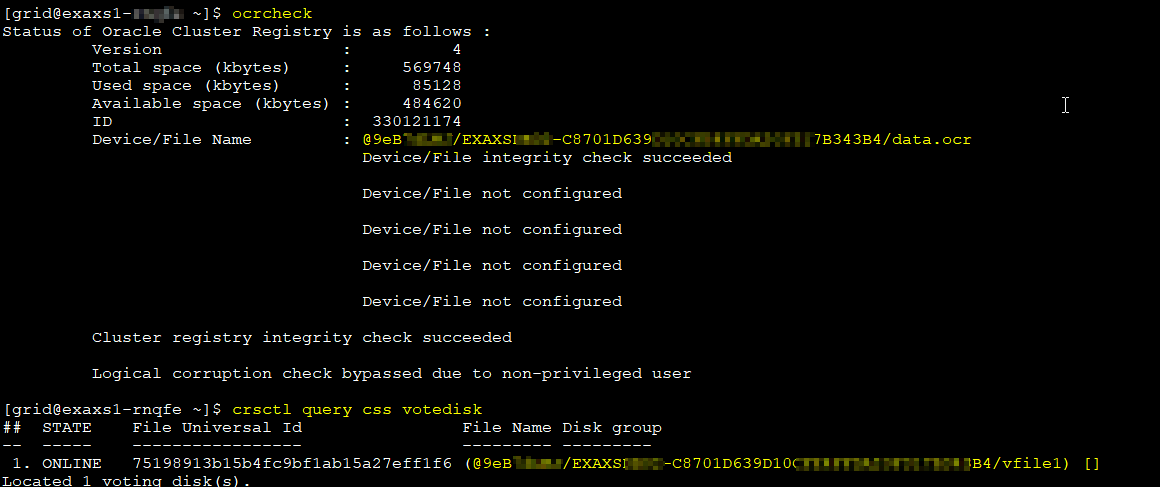
The output confirms that the voting files are stored in the Vault rather than ASM storage. This aligns with the new architecture and shows how tightly integrated Vault is in the Exascale environment.
Looking inside the database
db_create_file_dest and db_recovery_file_dest are pointed to the vault as you can see!

We can also list the datafiles as well to double check:
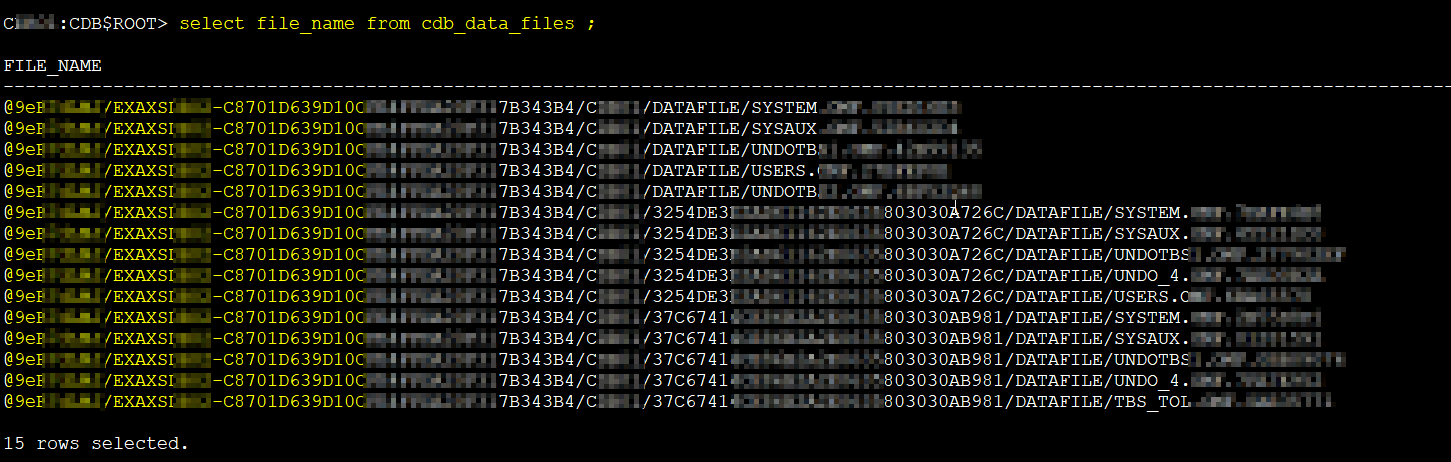
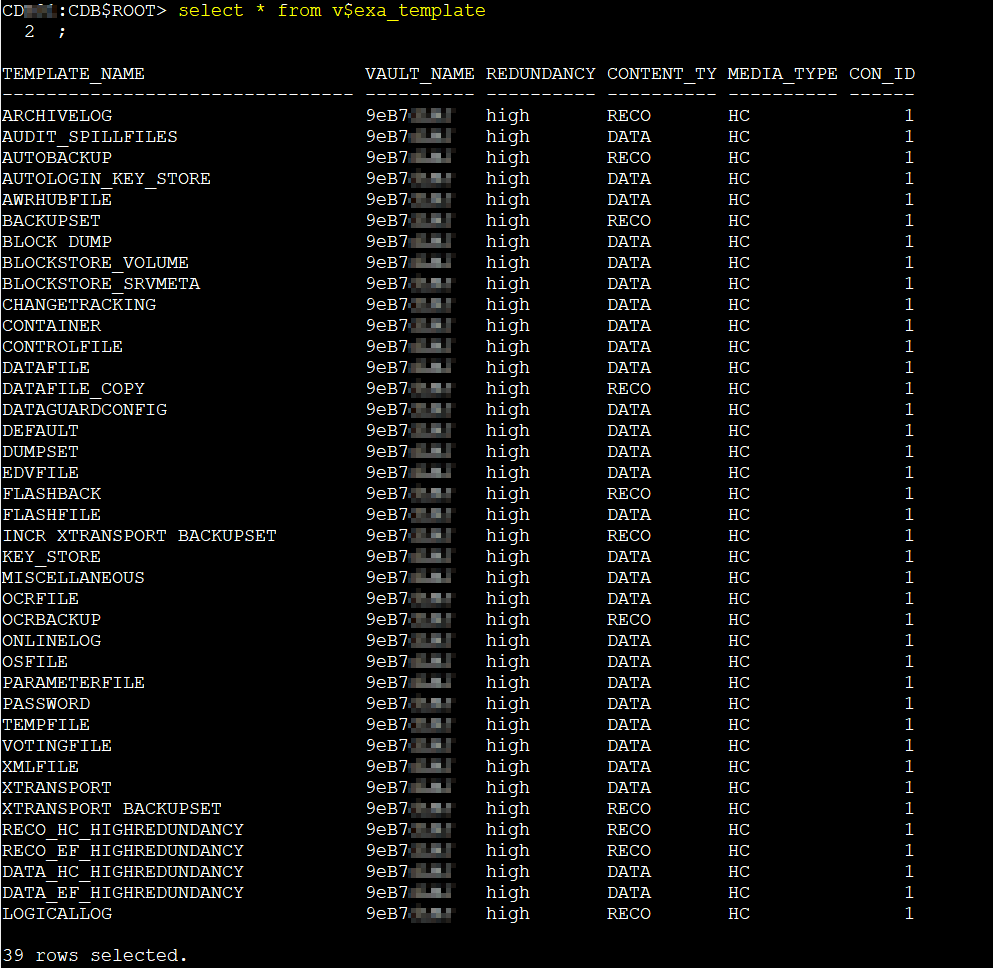
BTW, Oracle has even introduced new dynamic performance views for this architecture:
V$EXA_FILE– information about database files in ExascaleV$EXA_TEMPLATE– details on Exascale templatesV$EXA_VAULT– vault-level information
Here’s an example of checking the vault name, path, redundancy, and content type from V$EXA_FILE:
col vault_name for a10
col full_path for a135
col content_type for a10
col media_type for a10
col redundancy for a10
select vault_name, full_path,  redundancy, content_type, media_type, round(size_in_bytes/1024/1024,2) size_in_MB, round(space_used/1024/1024,2) space_used_MB from v$exa_file;

select * from v$exa_template
select vault_name, round((HC_SPACE_USED/1024/1024/1024)/3,2) hc_space_used_GB, round(((HC_SPACE_PROV-HC_SPACE_USED)/1024/1024/1024)/3,2) hc_space_free_GB, round((HC_SPACE_PROV/1024/1024/1024)/3,2) hc_space_prov_GBHC_IOPS_PROV from v$exa_vault;

Working with XSH
Outside of the database, you can also interact with the Vault using the xsh tool. This utility lets you list, copy, remove, and inspect files in the Vault directly from the command line.
For example, to list the contents of the Vault:
[oracle@exaxs1-xxxx ~]$ xsh

cat
clone
cp
dd
ls
man
od
rm
scrub
snap
strings
template
touch
trace
wallet
xattr
version
chacl
mv

Enter 'xsh man <command>' or 'xsh man -e <command>' for details
E.g., Enter 'xsh man dd' or 'xsh man -e dd'
Enter 'xsh man man' to see other options accepted by 'xsh man'
with xsh ls @vault where @vault is your vault name, you can take a look what is inside:
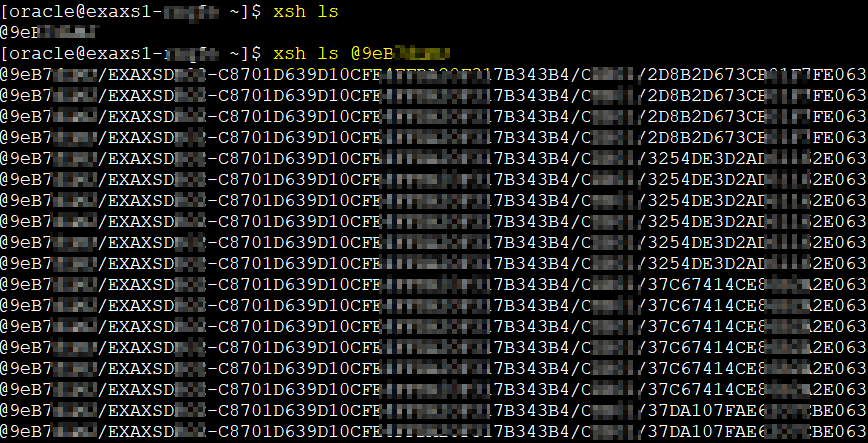
Add the --detail flag and you’ll get extra information, similar to what you see in V$EXA_VAULT. You can also inspect a single file in detail:

You can also see individual details for files in the vault as follow:
xsh ls file --detail

This direct Vault access is useful for advanced administration and troubleshooting, and it gives DBAs a new way to explore the storage layer without relying on ASM commands.
Wrapping up
Exascale is more than just another Exadata service option. It’s a rethinking of how Exadata can be delivered, managed, and scaled in the cloud. By removing ASM from the compute layer, introducing the Vault-based storage model, and addressing long-standing cloning limitations, Oracle has created a platform that feels lighter, more flexible, and better aligned with modern database demands.
This post has only scratched the surface. In the coming weeks I’ll dive deeper into one of the features I’m most excited about: PDB cloning in Exascale, and show how it works in practice, including performance observations
So stay tuned. The next chapter in this Exascale journey is coming soon, and if you’ve ever battled with the quirks of PDB cloning before, you’ll want to see this.





 DatabaseVerse: Journey into the World of Databases
Leave a comment