
About a year ago, I published a blog post on vector search in Oracle 23ai. At that time, I wasn’t aware of the ONNX format or how it could be used to bring machine learning models into the database. That realization came later, and ever since, I’ve been thinking: “I need to write a follow-up post to cover this!”
Well… the time has finally come.
- What is ONNX?
- Setting up
- Installing OML4Py (Server-Side)
- Installing OML4Py (Client-Side)
- Importing the Model with OML4Py
- Let’s test the model!
- So What’s the catch?
- Bottom line?
- Wrapping Up: Then vs Now
Missed the first post on vector similarity search in Oracle 23ai?
Practical Guide to Vector Similarity Search for Movie Recommendations in Oracle 23ai
TL;DR: I used a BERT model in Python to embed movie reviews from an IMDB dataset. The database was simply storing the vectors, all the embedding happened externally.
But what if we could do all of that inside the database?
In this post, I’ll show you how to do exactly that: embed your data directly from within Oracle Database 23ai using a Hugging Face model, ONNX, and OML4Py, no external model server, no extra pipelines, no Python running “outside”.
Before we dive in, though, let’s cover the foundation of all this: ONNX.
What is ONNX?
ONNX (Open Neural Network Exchange) is an open format designed to represent machine learning models in a portable, standardized way. It was originally created by Microsoft and Facebook to make it easier to move models between different frameworks. For example, you can train a model in PyTorch or TensorFlow and export it as ONNX for inference somewhere else.
ONNX models are lightweight, framework-agnostic, and runtime-friendly. That makes them perfect for deployment, especially when you want to embed them in systems that don’t run Python, like… Oracle Database.
Starting with Oracle 23ai, you can import ONNX models directly into the database using DBMS_VECTOR, or through a higher-level interface using OML4Py, which can even download and convert Hugging Face models automatically.
So if you’ve ever wished you could call a transformer model in SQL… my friend your wish just came true.
Setting up
In this new approach, I don’t need to embed data outside the database like I did in the previous blog. This time, everything happens inside the database: embedding, inference, and vector generation.
To do that, I’m using Python 3.12 along with OML4Py, Oracle’s official Python interface for machine learning inside the database. It plays a central role in Oracle 23ai when it comes to working with ONNX models, vector embeddings, and in-database AI workflows.
OML4Py lets you:
- Run Python code inside Oracle Database (embedded Python engine)
- Train, score, and explain models without moving data
- Import and use ONNX models, including Hugging Face transformers
- Generate vectors directly from SQL using the
VECTOR_EMBEDDING(...)operator - Integrate with APEX, REST APIs, or any SQL-driven application
Although OML4Py has been around for a while, Oracle 23ai really brings it to life for AI use cases. In particular, the ONNXPipeline utility allows you to download, wrap, quantize, and register a model in the database, all with just a few lines of Python.
To get started, we need to install OML4Py both server-side and client-side.
Installing OML4Py (Server-Side)
Before we can use Python and ONNX models inside the database, we need to make sure OML4Py is installed and enabled on the server side.
Oracle 23ai includes a bundled Python environment under $ORACLE_HOME/python, and the OML4Py infrastructure is delivered with the database software, but it’s not installed by default. We need to run a few scripts as a DBA to initialize it.
Here’s what I did:
Install perl-Env package:
Before installing OMLP4 in the database, make sure that perl-Env package is installed:
rpm -qa perl-Env
In case it’s not there for any reason, then:
sudo dnf install perl-Env
Set environment variables
Make sure the environment is pointing to Oracle’s bundled Python and set your environment variables:
export ORACLE_HOME=<ORACLE_HOME PATH>
export PYTHONHOME=$ORACLE_HOME/python
export PATH=$PYTHONHOME/bin:$ORACLE_HOME/bin:$PATH
export LD_LIBRARY_PATH=$PYTHONHOME/lib:$ORACLE_HOME/lib:$LD_LIBRARY_PATH
We need to install OMLP4 in the CDB$ROOT, so make sure you are there before running on PDB.
sqlplus / as sysdba
show con_name
And just run the following:
spool install_root.txt
@$ORACLE_HOME/oml4py/server/pyqcfg.sql SYSAUX TEMP
spool off;
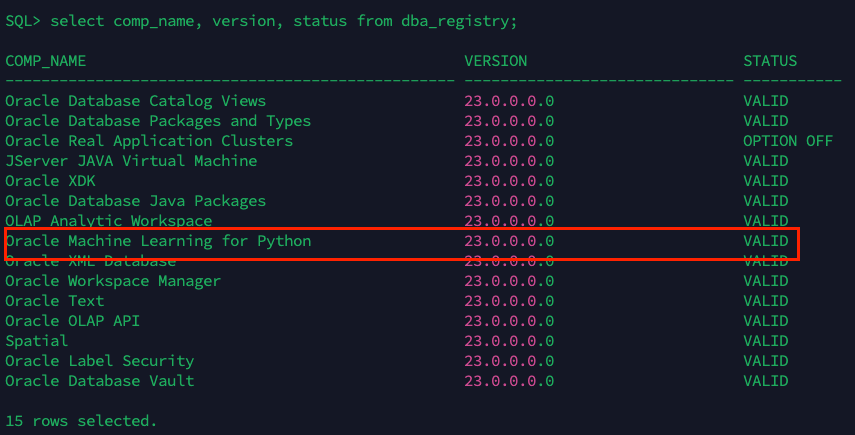
If everything has finished well, you will see a new component in the dba_registry and it should be VALID:
Now, we need to do the installation in the PDB we want as follow:
sqlplus / as sysdba
alter session set container = PDBX;

spool install_pdb.txt
@$ORACLE_HOME/oml4py/server/pyqcfg.sql SYSAUX TEMP
spool off;
You can take a look to the installation as well as follow:
SELECT * FROM sys.pyq_config;

That’s it! this creates the necessary system components like PYQSYS, PYQ_CONFIG, and enables the embedded Python runtime for that PDB.
Next up: installing the OML4Py client so we can interact with the database from our Python environment using ONNXPipeline.
Installing OML4Py (Client-Side)
Now that the server-side installation is complete, we can set up the client-side OML4Py environment. This is what lets us use the ONNXPipeline utility to download, convert, and upload models into Oracle Database, all from Python.
For this demo, I’m using Python 3.12 installed via pyenv, but the same process works with any compatible Python setup.
I have upgraded pip as follow:
python3.12 -m pip install --upgrade pip
OML4Py requires the presence of the perl-Env as mentioned early but also the following for client setup: libffi-devel, openssl, openssl-devel, tk-devel, xz-devel, zlib-devel, bzip2-devel, readline-devel, libuuid-devel and ncurses-devel libraries.
Install these packages as sudo or root user:
sudo dnf install perl-Env libffi-devel openssl openssl-devel tk-devel xz-devel zlib-devel bzip2-devel readline-devel libuuid-devel ncurses-devel
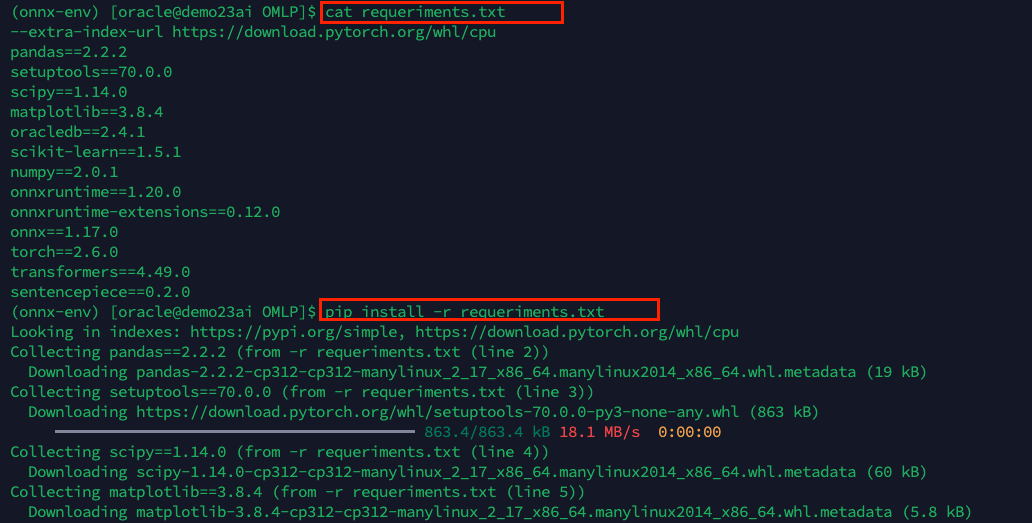
also, for your python setup of OMLPY client you will need the following python libraries:
--extra-index-url https://download.pytorch.org/whl/cpu
pandas==2.2.2
setuptools==70.0.0
scipy==1.14.0
matplotlib==3.8.4
oracledb==2.4.1
scikit-learn==1.5.1
numpy==2.0.1
onnxruntime==1.20.0
onnxruntime-extensions==0.12.0
onnx==1.17.0
torch==2.6.0
transformers==4.49.0
sentencepiece==0.2.0
you can create a requeriments.txt file as follow and install the packages running the pip command:
pip install -r requeriments.txt
Download the OML4Py client installer
Oracle does not publish OML4Py to PyPI. You need to download it from the official Oracle download page: Oracle Machine Learning for Python Downloads.
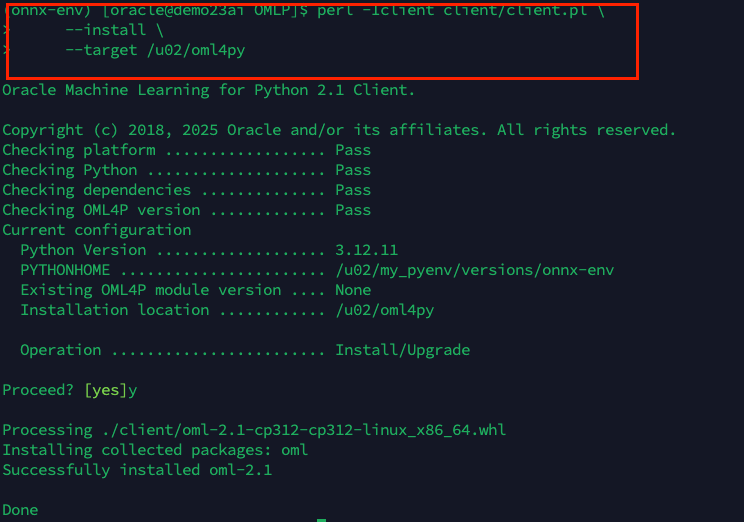
Look for the OML4Py Client for Linux x86-64 (or your platform), and download the ZIP file. Then extract it and proceed with the installation as follow:
perl -Iclient client/client.pl \
     --install \
     --target /path
After installation, I added this to my environment:
export PYTHONPATH=/u02/oml4py
You can also put that in your .bashrc or .bash_profile to make it persistent.
Verify the installation
Now run a quick test:
python3.12 -c "import oml; print(oml.__version__)"

If you see 2.1 or above, you’re ready to go.
Creating the User and Connecting from Python
To keep things clean and isolated, I created a dedicated user for the demo:
CREATE USER oml_user IDENTIFIED BY "*******";
GRANT DB_DEVELOPER_ROLE TO oml_user;
GRANT CREATE SESSION TO oml_user;
ALTER USER oml_user DEFAULT TABLESPACE users QUOTA UNLIMITED ON users;
This user has everything needed to connect, register ONNX models, and use vector functions like VECTOR_EMBEDDING(...).
I prefer not to hardcode connection details in my Python scripts. Instead, I created a simple db_config.json file:
{
  "user": "your_username",
  "password": "your_password",
  "host": "your_host_or_ip",
  "port": 1521,
  "service_name": "your_pdb_service"
}
This makes it easy to swap environments or share scripts without exposing sensitive info.. although this is a demo =)
Importing the Model with OML4Py
Here’s the python script I used to load the Hugging Face model into the database:
import json
import oracledb
import oml
from oml.utils import ONNXPipeline, ONNXPipelineConfig, MiningFunction

# Load credentials
with open("db_config.json") as f:
    db_config = json.load(f)


# Connect using config values
oml.connect(
    user=db_config["user"],
    password=db_config["password"],
    host=db_config["host"],
    port=db_config["port"],
    service_name=db_config["service_name"]
)

print("Connected:", oml.isconnected())

# Create ONNX config and upload model
cfg = ONNXPipelineConfig.from_template(
    "text",
    max_seq_length=384,
    quantize_model=True,
    distance_metrics=["COSINE"]
)

pipeline = ONNXPipeline("sentence-transformers/all-MiniLM-L6-v2", config=cfg, function=MiningFunction.EMBEDDING)
pipeline.export2db("MINILM_L6_QINT8")
This downloads the model from Hugging Face, wraps it with tokenizer and post-processing, quantizes it, and registers it inside the Oracle Database as MINILM_L6_QINT8.
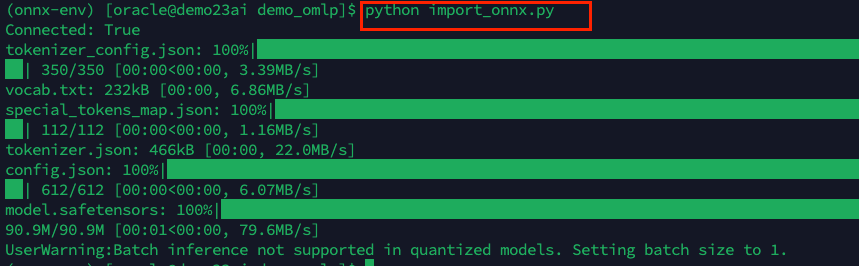
After the script runs, I checked the model just reviewing the dba_mining_models:
select owner, model_name, mining_function, algorithm, creation_date, model_size from dba_mining_models;

The model appears under the OML_USER schema and is now available for inference!
Let’s test the model!
Here’s a quick test using the VECTOR_EMBEDDING operator:
set long 20000
SELECT VECTOR_EMBEDDING(OML_USER.MINILM_L6_QINT8 USING 'Oracle 23ai is awesome' as DATA) AS embedding from dual;
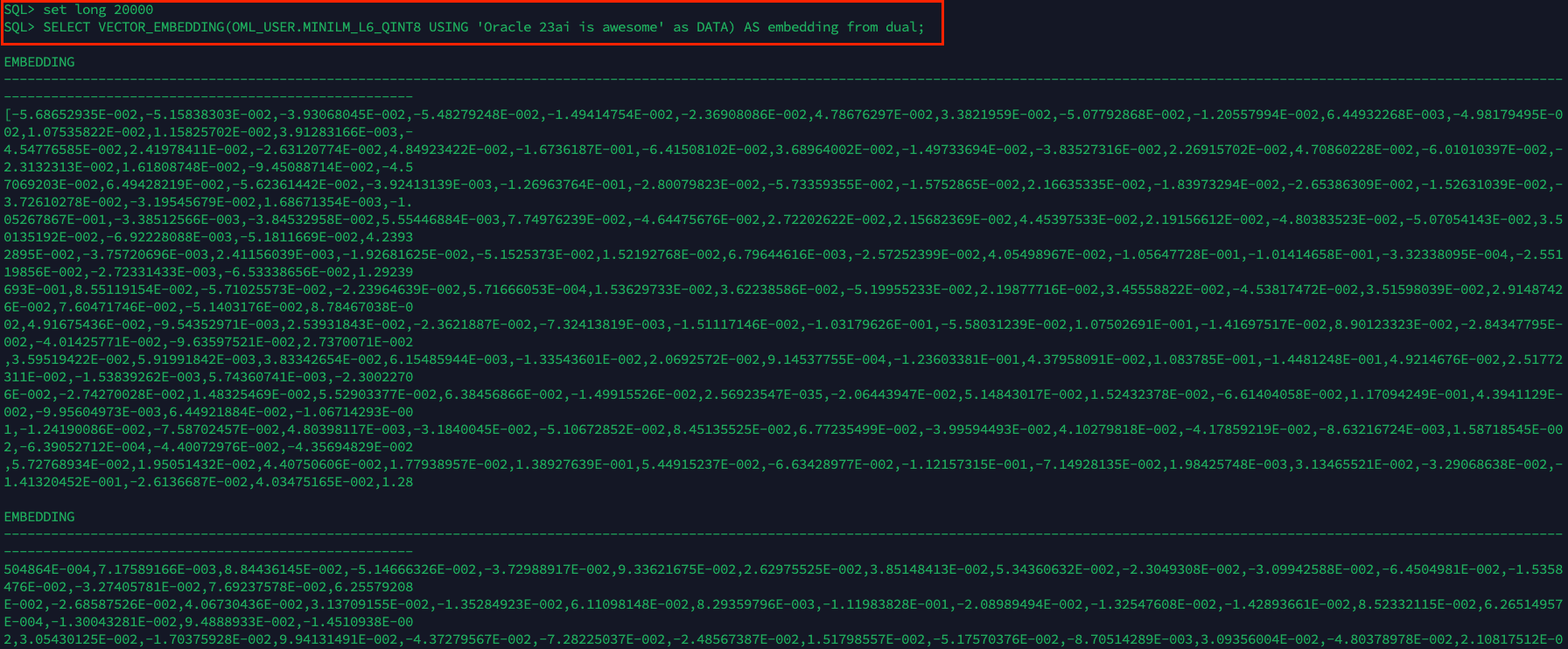
And just like that: the model works!
No external Python running inference. No need to ship text data out of the database. Everything happens inside the Oracle engine, natively.
So What’s the catch?
As powerful as it is to run Hugging Face models inside Oracle, it’s not magic. There are a few caveats to be aware of when embedding models directly in the database:
1. Model size and complexity
Oracle supports importing ONNX models, including transformer-based architectures. But not every model is practical for in-database inference, even on powerful infrastructure like Exadata.
While Exadata gives you faster CPUs, more memory, and optimized I/O, the fact remains: large models like full BERT or GPT-2 are resource-intensive and generally not suited for in-DB execution. These models often require more memory than a typical ONNX runtime inside the DB session is tuned for, and their inference latency can be too high to make sense within SQL workflows.
The sweet spot remains lightweight models like
MiniLM,DistilBERT, ormpnet, they strike the right balance between accuracy and performance, even when running on Exadata nodes.
2. Inference speed
Even with quantization, running inference inside the database is typically slower than running on a GPU outside. Batch inference is limited (especially for quantized models), and there’s some overhead per row.
You trade speed for simplicity, governance, and proximity to the data.
3. Deployment friction
While using OML4Py is much simpler than wiring up a REST API or model server, you still need:
- Server-side installation of OML4Py
- Privileges and roles (
DB_DEVELOPER_ROLE,CREATE MINING MODEL, etc.) - Python 3.12 and the OML4Py client set up properly
It’s not complex, as you’ve seen, but it’s also not zero-touch
4. ONNX conversion quirks
Some Hugging Face models don’t export cleanly to ONNX. And not all preprocessing steps (like tokenizers with special logic) convert easily. You may need to test and validate the pipeline carefully, especially if building your own models.
Luckily,
ONNXPipelinein OML4Py handles most of this for popular text embedding models, but it’s still worth noting.
5. Limited real-time scalability (for now)
If you’re thinking of deploying massive-scale vector inference (for example, 10,000 QPS real-time API traffic), a dedicated inference service with GPUs will definitely perform better. Oracle’s vector support shines when embedding is part of a broader data pipeline or analytical workflow, but it’s not optimized for ultra-low-latency edge inference.
Bottom line?
Doing inference inside the database is not always faster, but I think (this is my personal opinion) it is:
- More secure
- More integrated
- Easier to govern
- Closer to your data
And for many use cases, especially internal apps, analytics, and vector search, that’s exactly what you should probably need.
Wrapping Up: Then vs Now
In my first blog, I demonstrated how to use vector similarity search in Oracle 23ai by generating embeddings in Python using a BERT model. I stored those vectors in the database and used SQL to perform similarity queries. It worked, and it was a great way to showcase Oracle’s vector search capabilities.
But everything happened outside the database.
The model lived in a separate Python environment. The text had to be preprocessed and embedded manually. And the database’s role was limited to storing and searching vectors, not generating them.
This time, the approach is completely different.
With Oracle 23ai, ONNX, and OML4Py, I’m running the entire pipeline inside the database. From loading the model to generating embeddings with a single SQL call, it’s all happening natively. No data leaves the database. No extra scripts or batch jobs needed.
Here’s how it compares:
| Feature | Before (external) | Now (in-database) |
|---|---|---|
| Model location | Python runtime | Oracle 23ai |
| Embedding logic | Hugging Face in Python | VECTOR_EMBEDDING(...) |
| Data movement | Push to database | No movement |
| Integration | Manual | Fully native |
| Security | External environment | Governed in the database |
This isn’t just about convenience. It’s about simplicity, security, and better alignment with enterprise data pipelines. Embedding models directly into Oracle 23ai lets you build smarter, leaner, and more maintainable solutions.
Of course, this approach has some trade-offs. Running inference inside the database isn’t meant to replace high-throughput GPU inference services. You won’t get ultra-low latency or support for massive transformer models. But if you need simplicity, security, and integration with your data and SQL workflows, this is a game-changer.
So, what do you think? Would you use this approach in your environment?
Drop a comment and share your experience, I’d love to hear how you’re using Oracle 23ai, ONNX, and vector search in your world.



 DatabaseVerse: Journey into the World of Databases
Leave a comment