

Oracle has introduced numerous features in 23ai, with a significant focus on developers—don’t you agree?
I certainly think so! Let’s take a look at some of the things Oracle has done to enhance the developer experience in this release:
- AI Vector Search: This feature enables fast similarity searches on both structured and unstructured data by utilizing vectors. It allows developers to integrate AI capabilities into applications without requiring specialized AI expertise.
- JSON Relational Duality: Developers can now access and update data as either JSON documents or relational tables, providing flexibility in data handling and simplifying application development.
- Related post:
- Operational Property Graphs in SQL: This addition allows developers to build real-time graph analysis applications directly within the Oracle Database, leveraging its security, high availability, and performance features.
- Microservice Support: Oracle Database 23ai introduces new functionalities to simplify the implementation of cross-service transactions, enhancing support for microservices architectures.
- Lock-Free Reservations: This feature allows applications to reserve part of a value in a column without locking the row, improving concurrency and performance in transactional applications.
- Kafka APIs for Transactional Event Queues (TxEventQ): Developers can now run Kafka applications directly against the Oracle Database with minimal code changes, facilitating easier integration and migration.
- Boolean Data Type: Oracle Database now supports the ISO SQL standard-compliant Boolean data type, enabling the storage of true and false values in tables and the use of Boolean expressions in SQL statements.
- Direct Joins for UPDATE and DELETE Statements: Developers can now join the target table in UPDATE and DELETE statements to other tables using the FROM clause, simplifying complex queries and enhancing readability.
- GROUP BY Column Alias: The ability to use column aliases or SELECT item positions in GROUP BY clauses improves query readability and maintainability.
- IF [NOT] EXISTS Syntax: This enhancement allows for conditional DDL operations, reducing the need for pre-checks and simplifying script development.
These features collectively aim to simplify application development, enhance performance, and provide greater flexibility in data handling within Oracle Database 23ai. I’ve already covered some of these in my blog, with more posts coming soon—so stay tuned!
But this post is about something I believe is equally interesting and useful; the DBMS_DEVELOPER package.
This powerful tool allows developers to retrieve and manage database object definitions efficiently. In this post, we’ll delve into the DBMS_DEVELOPER package, with a particular focus on its GET_METADATA function. We’ll explore how you can leverage it to simplify the extraction of object metadata within your applications.
DBMS_DEVELOPER
NOTE
- DBMS_DEVELOPER package has been introduced in Oracle 23ai release 23.7!
The DBMS_DEVELOPER package currently has only one function: GET_METADATA. This function retrieves detailed metadata about database objects, making it a valuable tool for developers.
Advantages of DBMS_DEVELOPER
- Performance: Metadata retrieval is incredibly fast, taking just a few milliseconds.
- Simplicity: The package leverages JSON instead of XML, providing a cleaner and more developer-friendly output.
- Flexibility: The function works for any database object where the user has read permissions, ensuring accessibility while maintaining security.
Permissions Required for Using DBMS_DEVELOPER
The DBMS_DEVELOPER functions execute with invoker rights. This means:
- General Users: You can access metadata for a database object only if you have the necessary authorization to “describe” the object. Without this, an error will be raised, and no metadata will be returned.
- DBAs and Users with System Privileges: Users with privileges such as
SELECT ANY TABLE,READ ANY TABLE, orSELECT ANY VIEWcan callDBMS_DEVELOPER.GET_METADATAon any table, index, or view in the database without explicit grants.
Object-Specific Privileges
For users without system privileges, here’s what is required:
- Tables and Views:
SELECTorREADprivileges on the table or view. - Indexes:
SELECTorREADprivileges on the table on which the index is defined. - Synonyms:
SELECTorREADprivileges on the synonym.
For objects in your own schema, no additional privileges are needed. However, to describe objects in another schema, you’ll need at least SELECT privileges on those objects.
GET_METADATA Function
How Does It Work?
The GET_METADATA function retrieves metadata for a database object by accepting the following parameters:
name: The object name or its synonym. If the name is case-sensitive, it must match the data dictionary exactly.object_type: Specifies the type of object (e.g., table, view, index).schema: Defaults to the current user’s schema but is case-sensitive.etag: A unique identifier for the document’s version.
The output is a JSON document containing the metadata. The level of detail in the output can be controlled using the level parameter.
Input Parameter: level
The level parameter determines the amount of metadata returned and supports the following values:
BASIC: Provides essential information.TYPICAL(default): Includes additional details about the object.ALL: Returns the most comprehensive metadata.
Understanding the etag Parameter
- The
etagis a unique identifier for a specific version of the metadata document. - If the provided
etagmatches the current version, the function returns an empty document. - If the
etagdoes not match, the function returns the updated metadata along with the new embeddedetag.
Syntax of DBMS_DEVELOPER.GET_METADATA
Here is the basic syntax:
DBMS_DEVELOPER.GET_METADATA (
name            IN VARCHAR2,
schema          IN VARCHAR2 DEFAULT NULL,
object_type     IN VARCHAR2 DEFAULT NULL,
level           IN VARCHAR2 DEFAULT 'TYPICAL'
etag            IN RAW      DEFAULT NULL)
RETURN JSON;
Practical examples of DBMS_DEVELOPER.GET_METADATA
Here’s a relational model for a basic streaming movie app. The tables and relationships are designed to include constraints that showcase the capabilities of DBMS_DEVELOPER.GET_METADATA:
CREATE TABLE genres (
    genre_id   NUMBER GENERATED BY DEFAULT AS IDENTITY PRIMARY KEY,
    name       VARCHAR2(100) NOT NULL UNIQUE
);

CREATE TABLE movies (
    movie_id       NUMBER GENERATED BY DEFAULT AS IDENTITY PRIMARY KEY,
    title          VARCHAR2(255) NOT NULL,
    release_year   NUMBER(4),
    genre_id       NUMBER NOT NULL,
    CONSTRAINT fk_genre FOREIGN KEY (genre_id) REFERENCES genres(genre_id)
);

CREATE INDEX idx_movies_title ON movies(title);

CREATE TABLE actors (
    actor_id    NUMBER GENERATED BY DEFAULT AS IDENTITY PRIMARY KEY,
    first_name  VARCHAR2(100) NOT NULL,
    last_name   VARCHAR2(100) NOT NULL,
    birth_year  NUMBER(4)
);

CREATE INDEX idx_actors_last_name ON actors(last_name);

CREATE TABLE movie_actors (
    movie_id   NUMBER NOT NULL,
    actor_id   NUMBER NOT NULL,
    role       VARCHAR2(255),
    PRIMARY KEY (movie_id, actor_id),
    CONSTRAINT fk_movie FOREIGN KEY (movie_id) REFERENCES movies(movie_id),
    CONSTRAINT fk_actor FOREIGN KEY (actor_id) REFERENCES actors(actor_id)
);

CREATE TABLE users (
    user_id    NUMBER GENERATED BY DEFAULT AS IDENTITY PRIMARY KEY,
    username   VARCHAR2(100) NOT NULL UNIQUE,
    email      VARCHAR2(255) NOT NULL UNIQUE,
    password   VARCHAR2(255) NOT NULL
);

CREATE TABLE watchlist (
    watchlist_id   NUMBER GENERATED BY DEFAULT AS IDENTITY PRIMARY KEY,
    user_id        NUMBER NOT NULL,
    movie_id       NUMBER NOT NULL,
    added_date     DATE DEFAULT SYSDATE,
    CONSTRAINT fk_watchlist_user FOREIGN KEY (user_id) REFERENCES users(user_id),
    CONSTRAINT fk_watchlist_movie FOREIGN KEY (movie_id) REFERENCES movies(movie_id)
);


 CREATE INDEX idx_watchlist_user_movie ON watchlist(user_id, movie_id);
Ok, so these objects were created in a schema I have called “DEMO”, let’s see how we can retrieve the info. I will connect with the demo user:
select DBMS_DEVELOPER.GET_METADATA(object_type => 'TABLE', name => 'GENRES', level => 'BASIC');

set linesize 250
set pagesize 500
set long 32767
set longchunksize 32767
select DBMS_DEVELOPER.GET_METADATA(object_type => 'TABLE', name => 'GENRES', level => 'BASIC');
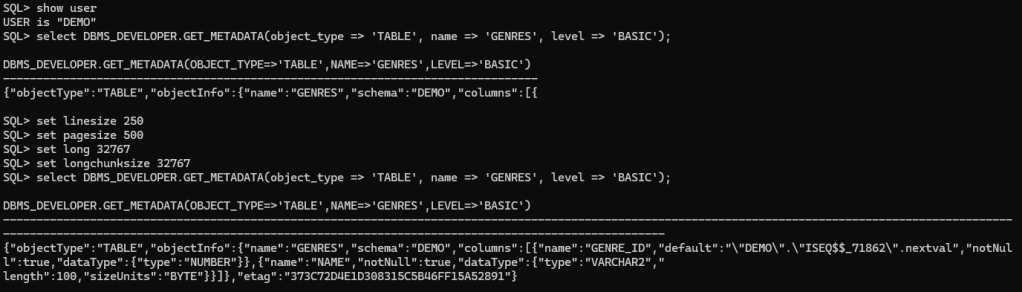
So, as you can see above, the information is not show “pretty”, the function return a JSON so let’s make it pretty using the JSON functions, shall we?
SELECT JSON_SERIALIZE(DBMS_DEVELOPER.GET_METADATA(object_type => 'TABLE', name => 'GENRES', level => 'BASIC') PRETTY);
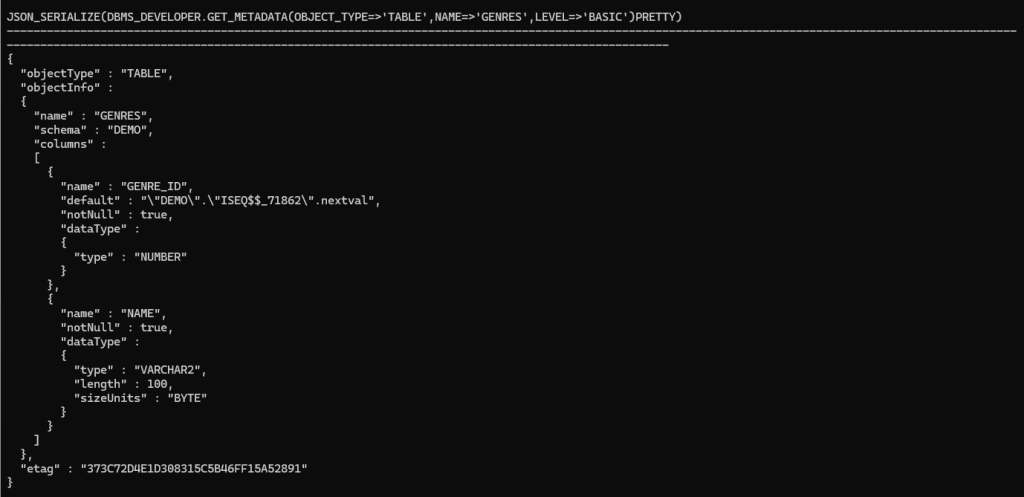
Great!, looks better and readable!
Let’s try to change the Level to TYPICAL:
SELECT JSON_SERIALIZE(DBMS_DEVELOPER.GET_METADATA(object_type => 'TABLE', name => 'GENRES', level => 'TYPICAL') PRETTY);
I’m pasting the whole output as text
{
  "objectType" : "TABLE",
  "objectInfo" :
  {
    "name" : "GENRES",
    "schema" : "DEMO",
    "columns" :
    [
      {
        "name" : "GENRE_ID",
        "default" : "\"DEMO\".\"ISEQ$$_71862\".nextval",
        "notNull" : true,
        "dataType" :
        {
          "type" : "NUMBER"
        },
        "isPk" : true,
        "isUk" : true,
        "isFk" : false
      },
      {
        "name" : "NAME",
        "notNull" : true,
        "dataType" :
        {
          "type" : "VARCHAR2",
          "length" : 100,
          "sizeUnits" : "BYTE"
        },
        "isPk" : false,
        "isUk" : true,
        "isFk" : false
      }
    ],
    "hasBeenAnalyzed" : false,
    "indexes" :
    [
      {
        "name" : "SYS_C008567",
        "indexType" : "NORMAL",
        "uniqueness" : "UNIQUE",
        "status" : "VALID",
        "hasBeenAnalyzed" : false,
        "columns" :
        [
          {
            "name" : "GENRE_ID"
          }
        ]
      },
      {
        "name" : "SYS_C008568",
        "indexType" : "NORMAL",
        "uniqueness" : "UNIQUE",
        "status" : "VALID",
        "hasBeenAnalyzed" : false,
        "columns" :
        [
          {
            "name" : "NAME"
          }
        ]
      }
    ],
    "constraints" :
    [
      {
        "name" : "SYS_C008565",
        "constraintType" : "CHECK - NOT NULL",
        "searchCondition" : "\"GENRE_ID\" IS NOT NULL",
        "columns" :
        [
          {
            "name" : "GENRE_ID"
          }
        ],
        "status" : "ENABLE",
        "deferrable" : false,
        "validated" : "VALIDATED",
        "sysGeneratedName" : true
      },
      {
        "name" : "SYS_C008566",
        "constraintType" : "CHECK - NOT NULL",
        "searchCondition" : "\"NAME\" IS NOT NULL",
        "columns" :
        [
          {
            "name" : "NAME"
          }
        ],
        "status" : "ENABLE",
        "deferrable" : false,
        "validated" : "VALIDATED",
        "sysGeneratedName" : true
      },
      {
        "name" : "SYS_C008567",
        "constraintType" : "PRIMARY KEY",
        "columns" :
        [
          {
            "name" : "GENRE_ID"
          }
        ],
        "status" : "ENABLE",
        "deferrable" : false,
        "validated" : "VALIDATED",
        "sysGeneratedName" : true
      },
      {
        "name" : "SYS_C008568",
        "constraintType" : "UNIQUE",
        "columns" :
        [
          {
            "name" : "NAME"
          }
        ],
        "status" : "ENABLE",
        "deferrable" : false,
        "validated" : "VALIDATED",
        "sysGeneratedName" : true
      }
    ]
  },
  "etag" : "92E32E032084158D0ECAAEEDED6FC81C"
}
And Finally, let’s see the “ALL” level:
SELECT JSON_SERIALIZE(DBMS_DEVELOPER.GET_METADATA(object_type => 'TABLE', name => 'GENRES', level => 'ALL') PRETTY);
{
  "objectType" : "TABLE",
  "objectInfo" :
  {
    "name" : "GENRES",
    "schema" : "DEMO",
    "columns" :
    [
      {
        "name" : "GENRE_ID",
        "default" : "\"DEMO\".\"ISEQ$$_71862\".nextval",
        "notNull" : true,
        "dataType" :
        {
          "type" : "NUMBER"
        },
        "isPk" : true,
        "isUk" : true,
        "isFk" : false,
        "hiddenColumn" : false
      },
      {
        "name" : "NAME",
        "notNull" : true,
        "dataType" :
        {
          "type" : "VARCHAR2",
          "length" : 100,
          "sizeUnits" : "BYTE"
        },
        "isPk" : false,
        "isUk" : true,
        "isFk" : false,
        "hiddenColumn" : false
      }
    ],
    "hasBeenAnalyzed" : false,
    "indexes" :
    [
      {
        "name" : "SYS_C008567",
        "indexType" : "NORMAL",
        "uniqueness" : "UNIQUE",
        "status" : "VALID",
        "hasBeenAnalyzed" : false,
        "columns" :
        [
          {
            "name" : "GENRE_ID"
          }
        ],
        "compression" : "DISABLED",
        "segmentCreated" : "NO",
        "visiblilty" : "VISIBLE",
        "toBeDropped" : false
      },
      {
        "name" : "SYS_C008568",
        "indexType" : "NORMAL",
        "uniqueness" : "UNIQUE",
        "status" : "VALID",
        "hasBeenAnalyzed" : false,
        "columns" :
        [
          {
            "name" : "NAME"
          }
        ],
        "compression" : "DISABLED",
        "segmentCreated" : "NO",
        "visiblilty" : "VISIBLE",
        "toBeDropped" : false
      }
    ],
    "constraints" :
    [
      {
        "name" : "SYS_C008565",
        "constraintType" : "CHECK - NOT NULL",
        "searchCondition" : "\"GENRE_ID\" IS NOT NULL",
        "columns" :
        [
          {
            "name" : "GENRE_ID"
          }
        ],
        "status" : "ENABLE",
        "deferrable" : false,
        "validated" : "VALIDATED",
        "sysGeneratedName" : true
      },
      {
        "name" : "SYS_C008566",
        "constraintType" : "CHECK - NOT NULL",
        "searchCondition" : "\"NAME\" IS NOT NULL",
        "columns" :
        [
          {
            "name" : "NAME"
          }
        ],
        "status" : "ENABLE",
        "deferrable" : false,
        "validated" : "VALIDATED",
        "sysGeneratedName" : true
      },
      {
        "name" : "SYS_C008567",
        "constraintType" : "PRIMARY KEY",
        "columns" :
        [
          {
            "name" : "GENRE_ID"
          }
        ],
        "status" : "ENABLE",
        "deferrable" : false,
        "validated" : "VALIDATED",
        "sysGeneratedName" : true
      },
      {
        "name" : "SYS_C008568",
        "constraintType" : "UNIQUE",
        "columns" :
        [
          {
            "name" : "NAME"
          }
        ],
        "status" : "ENABLE",
        "deferrable" : false,
        "validated" : "VALIDATED",
        "sysGeneratedName" : true
      }
    ],
    "segmentCreated" : "NO",
    "inMemory" : "DISABLED",
    "compression" : "DISABLED"
  },
  "etag" : "61D3E180BE0EB1B57CBA3703C89610E6"
}
Nice, isn’t it?
We can also retrieve information from indexes as follow:
SELECT JSON_SERIALIZE(DBMS_DEVELOPER.GET_METADATA(object_type => 'INDEX', name => 'IDX_MOVIES_TITLE', level => 'ALL') PRETTY);
{
  "objectType" : "INDEX",
  "objectInfo" :
  {
    "indexType" : "NORMAL",
    "visiblilty" : "VISIBLE",
    "columns" :
    [
      {
        "name" : "TITLE",
        "notNull" : true,
        "dataType" :
        {
          "type" : "VARCHAR2",
          "length" : 255,
          "sizeUnits" : "BYTE"
        },
        "isPk" : false,
        "isUk" : false,
        "isFk" : false,
        "hiddenColumn" : false
      }
    ],
    "uniqueness" : "NONUNIQUE",
    "numRows" : 0,
    "Owner" : "DEMO",
    "toBeDropped" : false,
    "lastAnalyzed" : "2025-01-27T10:15:41",
    "sampleSize" : 0,
    "segmentCreated" : "NO",
    "distinctKeys" : 0,
    "name" : "IDX_MOVIES_TITLE",
    "status" : "VALID",
    "compression" : "DISABLED",
    "tableName" : "MOVIES"
  },
  "etag" : "1183CC13AA3AD581FE02CF8182C04E30"
}
A great feature is that metadata can be retrieved even when level and object_type are not explicitly specified
The object_type is determine by the object of the name, and the level by default is typical. Let’s see an example:
SELECT JSON_SERIALIZE(DBMS_DEVELOPER.GET_METADATA(name => 'GENRES') PRETTY);
{
  "objectType" : "TABLE",
  "objectInfo" :
  {
    "name" : "GENRES",
    "schema" : "DEMO",
    "columns" :
    [
      {
        "name" : "GENRE_ID",
        "default" : "\"DEMO\".\"ISEQ$$_71862\".nextval",
        "notNull" : true,
        "dataType" :
        {
          "type" : "NUMBER"
        },
        "isPk" : true,
        "isUk" : true,
        "isFk" : false
      },
      {
        "name" : "NAME",
        "notNull" : true,
        "dataType" :
        {
          "type" : "VARCHAR2",
          "length" : 100,
          "sizeUnits" : "BYTE"
        },
        "isPk" : false,
        "isUk" : true,
        "isFk" : false
      }
    ],
    "hasBeenAnalyzed" : false,
    "indexes" :
    [
      {
        "name" : "SYS_C008567",
        "indexType" : "NORMAL",
        "uniqueness" : "UNIQUE",
        "status" : "VALID",
        "hasBeenAnalyzed" : false,
        "columns" :
        [
          {
            "name" : "GENRE_ID"
          }
        ]
      },
      {
        "name" : "SYS_C008568",
        "indexType" : "NORMAL",
        "uniqueness" : "UNIQUE",
        "status" : "VALID",
        "hasBeenAnalyzed" : false,
        "columns" :
        [
          {
            "name" : "NAME"
          }
        ]
      }
    ],
    "constraints" :
    [
      {
        "name" : "SYS_C008565",
        "constraintType" : "CHECK - NOT NULL",
        "searchCondition" : "\"GENRE_ID\" IS NOT NULL",
        "columns" :
        [
          {
            "name" : "GENRE_ID"
          }
        ],
        "status" : "ENABLE",
        "deferrable" : false,
        "validated" : "VALIDATED",
        "sysGeneratedName" : true
      },
      {
        "name" : "SYS_C008566",
        "constraintType" : "CHECK - NOT NULL",
        "searchCondition" : "\"NAME\" IS NOT NULL",
        "columns" :
        [
          {
            "name" : "NAME"
          }
        ],
        "status" : "ENABLE",
        "deferrable" : false,
        "validated" : "VALIDATED",
        "sysGeneratedName" : true
      },
      {
        "name" : "SYS_C008567",
        "constraintType" : "PRIMARY KEY",
        "columns" :
        [
          {
            "name" : "GENRE_ID"
          }
        ],
        "status" : "ENABLE",
        "deferrable" : false,
        "validated" : "VALIDATED",
        "sysGeneratedName" : true
      },
      {
        "name" : "SYS_C008568",
        "constraintType" : "UNIQUE",
        "columns" :
        [
          {
            "name" : "NAME"
          }
        ],
        "status" : "ENABLE",
        "deferrable" : false,
        "validated" : "VALIDATED",
        "sysGeneratedName" : true
      }
    ]
  },
  "etag" : "92E32E032084158D0ECAAEEDED6FC81C"
}
Summary of fields for each level and object type
Object type TABLE
| FIELDS | LEVELS | ||||
|---|---|---|---|---|---|
| BASIC | TYPICAL | ALL | |||
| name | ✔ | ✔ | ✔ | ||
| schema | ✔ | ✔ | ✔ | ||
| columns | ✔ | ✔ | ✔ | ||
| lastAnalyzed | ✔ | ✔ | |||
| hasBeenAnalyzed | ✔ | ✔ | |||
| numRows | ✔ | ✔ | |||
| sampleSize | ✔ | ✔ | |||
| avgRowLen | ✔ | ✔ | |||
| indexes | ✔ | ✔ | |||
| constraints | ✔ | ✔ | |||
| annotations | ✔ | ✔ | |||
| segmentCreated | ✔ | ||||
| inMemory | ✔ | ||||
| compression | ✔ | ||||
Object type INDEX
| Fields | LEVELS | ||||
|---|---|---|---|---|---|
| BASIC | TYPICAL | ALL | |||
| name | ✔ | ✔ | ✔ | ||
| indexType | ✔ | ✔ | ✔ | ||
| Owner | ✔ | ✔ | ✔ | ||
| tableName | ✔ | ✔ | ✔ | ||
| status | ✔ | ✔ | ✔ | ||
| columns | ✔ | ✔ | ✔ | ||
| uniqueness | ✔ | ✔ | |||
| funcIdxStatus | ✔ | ✔ | |||
| hasBeenAnalyzed | ✔ | ✔ | |||
| lastAnalyzed | ✔ | ✔ | |||
| numRows | ✔ | ✔ | |||
| sampleSize | ✔ | ✔ | |||
| annotations | ✔ | ✔ | |||
| distinctKeys | ✔ | ||||
| compression | ✔ | ||||
| segmentCreated | ✔ | ||||
| visiblilty | ✔ | ||||
| toBeDropped | ✔ | ||||
Object type VIEW
| Fields | LEVELS | ||||
|---|---|---|---|---|---|
| BASIC | TYPICAL | ALL | |||
| name | ✔ | ✔ | ✔ | ||
| schema | ✔ | ✔ | ✔ | ||
| columns | ✔ | ✔ | ✔ | ||
| readOnly | ✔ | ✔ | |||
| dualityView | ✔ | ✔ | |||
| constraints | ✔ | ✔ | |||
| annotations | ✔ | ✔ | |||
| editioningView | ✔ | ||||
Sub-Object Type: columns
| Fields | Levels | |||
|---|---|---|---|---|
| BASIC | TYPICAL | ALL | ||
| name | ✔ | ✔ | ✔ | |
| default | ✔ | ✔ | ✔ | |
| notNull | ✔ | ✔ | ✔ | |
| dataType | type | ✔ | ✔ | ✔ |
| precision | ||||
| scale | ||||
| length | ||||
| sizeUnits | ||||
| fractionalSecondsPrecision | ||||
| yearPrecision | ||||
| dayPrecision | ||||
| size | ||||
| isPk | ✔ | ✔ | ||
| isUk | ✔ | ✔ | ||
| isFk | ✔ | ✔ | ||
| domain | name | ✔ | ✔ | |
| type | ||||
| display | ||||
| order | ||||
| annotations | ||||
| annotations | ✔ | ✔ | ||
| numDistinct | ✔ | |||
| lowValue | ✔ | |||
| highValue | ✔ | |||
| density | ✔ | |||
| avgColLen | ✔ | |||
| hiddenColumn | ✔ | |||
Sub-Object Type: constraints
| Fields | ||||
|---|---|---|---|---|
| BASIC | TYPICAL | ALL | ||
| name | ✔ | ✔ | ||
| constraintType | ✔ | ✔ | ||
| searchCondition | ✔ | ✔ | ||
| columns | name | ✔ | ✔ | |
| referencedConstraintName | ✔ | ✔ | ||
| referencedTable | ✔ | ✔ | ||
| Action | ✔ | ✔ | ||
| referencedOwner | ✔ | ✔ | ||
| referencedColumns | name | ✔ | ✔ | |
| status | ✔ | ✔ | ||
| deferrable | ✔ | ✔ | ||
| validated | ✔ | ✔ | ||
| sysGeneratedName | ✔ | ✔ |
As you can see, this is useful to get details about metadata in a better format that you can programmatically check quickly; also, performance is better than using the “OLD” DBMS_METADATA package.
You want to check it out more yourself, this is the official doc: DBMS_DEVELOPER
Conclusion
In conclusion, Oracle Database 23ai has made significant strides in enhancing the developer experience through its innovative features and tools. The introduction of the DBMS_DEVELOPER package, particularly the GET_METADATA function, provides a powerful and efficient means for developers to access and manage database object metadata. The simplicity of the JSON output format combined with flexible retrieval options makes it an invaluable asset for application development.
With improvements like AI Vector Search, JSON relational duality, and better microservice support, with features like DBMS_DEVELOPER.GET_METADATA, Oracle is empowering developers to build agile and dynamic applications more efficiently. These enhancements, coupled with the ability to seamlessly retrieve metadata, empower developers to build robust applications with greater confidence and efficiency. As Oracle continues to evolve its database offerings, it’s an exciting time for developers to harness these tools and features to create innovative solutions. Stay tuned for more insights and practical guides as we explore the full potential of Oracle Database 23ai!




 DatabaseVerse: Journey into the World of Databases
Leave a comment