

Online table redefinition was introduced in Oracle 9i (yep, it is not something new) as part of the database availability features and has evolved with each subsequent version. The online reorganization and redefinition feature in Oracle Database provides administrators with great flexibility to significantly reduce or eliminate application downtime required for making changes to database objects. The main benefits are:
- Modify the physical attributes of tables and transform both the data and the structure of the tables, allowing users full access to the data during the process.
- Improve data availability, query performance, response times, and disk space utilization, all critical aspects in a mission-critical environment.
- Make application upgrade processes simpler, safer, and faster
With these benefits in mind, it’s clear that online table redefinition is a game-changer for minimizing downtime and enhancing database flexibility. In this post, I’ll focus specifically on how this feature works in Oracle 19c and 23ai . Keep in mind that some of the functionality and techniques discussed here may not be available or behave differently in earlier versions of Oracle Database.
Now, let’s dive into the mechanics of online table redefinition, including the use of DBMS_REDEFINITION and SQL commands like ALTER TABLE, to see how this feature enables uninterrupted access while transforming your database objects.
- Online redefinition – How does it works?
- Online redefinition – use cases
- DBMS_REDEFINITION – Restrictions
- DBMS_REDEFINITION – Access and privileges
- DEMO
- Conclusion
Online redefinition – How does it works?

During the online redefinition of a table, the table remains accessible for all read and write operations. This allows administrators to initiate the redefinition process during an application upgrade and periodically synchronize the interim table to include recent changes from the original table, thereby reducing the time required for the final redefinition step.
Additionally, administrators can validate and use the data in the interim table before completing the process, making the transition smoother.
The switch to the newly redefined table is under the administrator’s control, and this process is quick and independent of the size or complexity of the table.
The online reorganization process can be carried out using the DBMS_REDEFINITION package with all the things mentioned before (sync, interim table, etc.) or with SQL commands such as ALTER TABLE and INDEX with “less flexibility,” but still ONLINE and simple.
Online redefinition – use cases
- Converting LONG/LONG RAW columns to BasicFile or SecureFile LOBs (CLOB, BLOB): Facilitates the transition from legacy data types to more efficient LOB storage options.
- Upgrading BasicFile LOBs to SecureFile LOBs (or vice versa): Enhances storage efficiency and performance by adopting the appropriate LOB storage type.
- Modifying storage parameters for a table or cluster: Optimizes space utilization and performance through tailored storage settings.
- Adding, modifying, or dropping columns: Allows schema evolution by introducing new columns, altering existing ones, or removing unnecessary columns.
- Changing the partitioning structure: Adapts to evolving workload requirements by reorganizing table partitions.
- Altering the physical properties of individual partitions or subpartitions: Includes actions such as moving partitions to different tablespaces within the same schema to optimize storage and performance.
- Converting between heap-organized tables and Index-Organized Tables (IOTs): Provides flexibility in table organization to meet specific application needs.
- Transforming nonpartitioned tables to partitioned tables and vice versa: Enhances manageability and performance by reorganizing table structures.
- Reorganizing tables to eliminate fragmentation: Reclaims space and improves performance by defragmenting tables.
- Enabling rollback of table redefinition: Allows reverting to the original table definition after redefinition, preserving any DML changes made during the process.
- Compressing or changing compression types: Applies or modifies compression settings for tables, partitions, index keys, or LOB columns to optimize storage and performance.
- Restarting redefinition after failure: If an online table redefinition fails, you can often correct the underlying issue and restart the process from where it stopped.
DBMS_REDEFINITION – Restrictions
When performing online table redefinition, it’s important to be aware of certain restrictions to ensure a smooth process:
- Primary Key Constraints: If redefinition is based on primary keys or pseudo-primary keys, the new table must retain the same key columns.
- Index-Organized Tables (IOTs): Redefinition using rowids is not permitted for IOTs.
- Materialized View Logs: Post-redefinition, any dependent materialized views require a complete refresh, unless the
refresh_dep_mviewsparameter is set to ‘Y’ during redefinition. - Replication Restrictions: In n-way master replication setups, horizontal or vertical subsetting and column transformations are not allowed during redefinition.
- Overflow Tables: The overflow segment of an IOT cannot be redefined independently.
- Flashback Data Archive: Tables with Flashback Data Archive enabled cannot undergo online redefinition, nor can it be enabled for the interim table.
- LONG and LONG RAW Columns: These must be converted to CLOBs or BLOBs, respectively, during redefinition.
- Parallel Execution: Redefinition of LONG to LOB can be parallelized if the LOB resides in a locally managed tablespace with Automatic Segment Space Management (ASSM) enabled, and there’s a direct mapping from one LONG column to one LOB column.
- Schema Restrictions: Tables in the SYS and SYSTEM schemas, as well as temporary tables, cannot be redefined online.
- Row Subsetting: Redefinition cannot be applied to a subset of rows within a table.
- Column Mapping Expressions: Only simple deterministic expressions, sequences, and
SYSDATEare permitted in column mappings; subqueries are disallowed. - NOT NULL Constraints: New columns added during redefinition should not have
NOT NULLconstraints until the process is complete. - Referential Constraints: No referential constraints should exist between the original and interim tables.
- NOLOGGING Operations: Redefinition cannot be performed with NOLOGGING.
- Materialized View Logs and Queue Tables: Only physical property changes are allowed; no subsetting or column transformations.
- Nested Tables: Partitions containing nested tables cannot be redefined online.
- VARRAY to Nested Table Conversion: Conversion is allowed using the
CASToperator; however, converting a nested table to a VARRAY is not supported. - Sequences in Column Mapping: When sequences are used in column mappings, the
orderby_colsparameter must beNULL. - Virtual Private Database (VPD) Policies: If
copy_vpd_optis set toDBMS_REDEFINITION.CONS_VPD_AUTO, the column mapping must beNULLor'*',and no VPD policies should exist on the interim table. - Reference Partitioning: Concurrent redefinition of related tables via reference partitioning in separate sessions is not allowed.
- Object and XMLType Tables: Redefinition can lead to dangling REFs in other tables with REF columns pointing to the redefined table.
- Oracle Label Security (OLS): Tables utilizing OLS cannot be redefined online.
- Fine-Grained Access Control: Tables with fine-grained access control are ineligible for online redefinition.
- Oracle Real Application Security: Tables employing Oracle Real Application Security cannot undergo online redefinition.
DBMS_REDEFINITION – Access and privileges
To perform online table redefinition using the DBMS_REDEFINITION package in Oracle Database 19c/23ai, specific privileges are required:
- Execute Privilege: Users must have the
EXECUTEprivilege on theDBMS_REDEFINITIONpackage. This privilege is included in theEXECUTE_CATALOG_ROLE. - Privileges for Redefining Tables in the User’s Own Schema:
CREATE TABLECREATE MATERIALIZED VIEWCREATE TRIGGER(necessary for executing theCOPY_TABLE_DEPENDENTSprocedure)
- Privileges for Redefining Tables in Other Schemas:
CREATE ANY TABLEALTER ANY TABLEDROP ANY TABLELOCK ANY TABLESELECT ANY TABLE- Additional privileges for executing
COPY_TABLE_DEPENDENTSon tables in other schemas:CREATE ANY TRIGGERCREATE ANY INDEX
These privileges ensure that users have the necessary permissions to redefine tables within their own schema or across different schemas, facilitating the online redefinition process.
DEMO
Alright, enough talking theory! Let’s dive in and get our hands dirty!
For this demo I will use Oracle 19c multitenant database, and these are the testing scenarios:
- Transform a nonpartitioned table with a LONG column to partitioned using DBMS_REDEFINITION
- Transform a nonpartitioned table without LONG column to partitioned using DBMS_REDEFINITION (if you continue reading you will notice why is that so)
- ALTER a table using ALTER TABLE…MOVE and ALTER TABLE…MODIFY
Transform a nonpartitioned table with a LONG column to partitioned using DBMS_REDEFINITION
First, lets create a table like this:
CREATE TABLE test.my_table1 (
    id      NUMBER PRIMARY KEY,
    v_text  VARCHAR2(30),
    v_date DATE,
    v_lob1  CLOB,
    v_long  LONG
) TABLESPACE TBS_EXAMPLE_COMP
LOB (v_lob1) STORE AS (TABLESPACE TBS_EXAMPLE_COMP)
;
CREATE INDEX test.my_index1 ON test.my_table1(v_date) tablespace TBS_EXAMPLE_COMP;

The table, as you can see, has a LONG column. We will partition this table and transform this LONG column to a LOB (CLOB). If the column was LONG RAW, then we should transform it to a BLOB.
I have loaded my_table1 with 1 million records. Now, let’s create the INTERIM table, which will be my goal: a partitioned table:
CREATE TABLE test.my_table1_interim (
    id      NUMBER PRIMARY KEY,
    v_text  VARCHAR2(30),
    v_date DATE,
	v_lob1  CLOB,
    v_lob2  CLOB
)
LOB (v_lob1) STORE AS (TABLESPACE TBS_EXAMPLE_COMP),
LOB (v_lob2) STORE AS (TABLESPACE TBS_EXAMPLE_COMP)
PARTITION BY RANGE(v_date)(
	PARTITION my_table1_interin2022 VALUES LESS THAN (TO_DATE('01-JAN-2022','DD-MON-YYYY')) TABLESPACE TBS_EXAMPLE_COMP,
    PARTITION my_table1_interin2023 VALUES LESS THAN (TO_DATE('01-JAN-2023','DD-MON-YYYY')) TABLESPACE TBS_EXAMPLE_COMP,
	PARTITION my_table1_interin2024 VALUES LESS THAN (TO_DATE('01-JAN-2024','DD-MON-YYYY')) TABLESPACE TBS_EXAMPLE_COMP,
	PARTITION my_table1_interin2025 VALUES LESS THAN (TO_DATE('01-JAN-2025','DD-MON-YYYY')) TABLESPACE TBS_EXAMPLE_COMP
    )
;
The Interim table, as you can see, is partitioned by range using the v_date column, and instead of a LONG column, we have a CLOB (v_lob2) column.
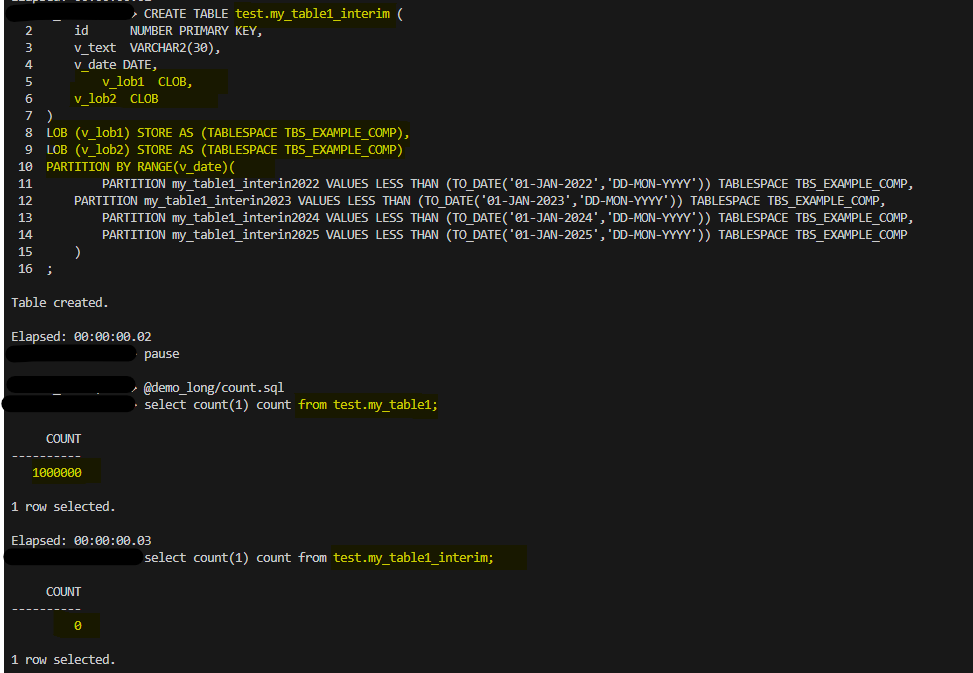
So, I have created my interim table, and as you can see in the screenshot above, it is empty. I haven’t created any additional index; I will comment more about that later.

Now, we will run the DBMS_REDEFINITION.CAN_REDEF_TABLE procedure; this procedure determines if a given table can be redefined online. This is the first step of the online redefinition process. If the table is not a candidate for online redefinition, an error message is raised.
SET SERVEROUTPUT ON
BEGIN
  DBMS_REDEFINITION.CAN_REDEF_TABLE(
    uname        => 'test',
    tname        =>'my_table1',
    options_flag => DBMS_REDEFINITION.CONS_USE_PK);
END;
/
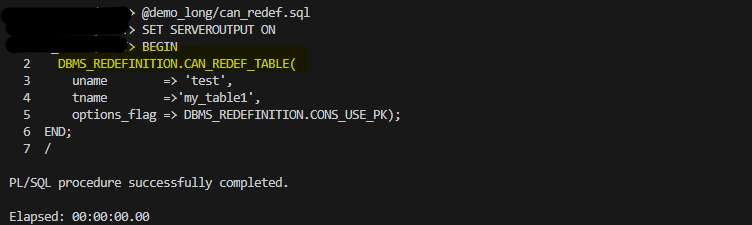
Output is okay, let’s start with the redefinition; in this case, we will run the DBMS_REDEFINITION.START_REDEF_TABLE:
BEGIN
  DBMS_REDEFINITION.START_REDEF_TABLE(
    uname        => 'test',
    orig_table   => 'my_table1',
    int_table    => 'my_table1_interim',
    col_mapping  => 'id id, v_text v_text, v_date v_date, v_lob1 v_lob1, to_lob(v_long) v_lob2',
    options_flag => DBMS_REDEFINITION.CONS_USE_PK,
    enable_rollback => TRUE);
END;
/
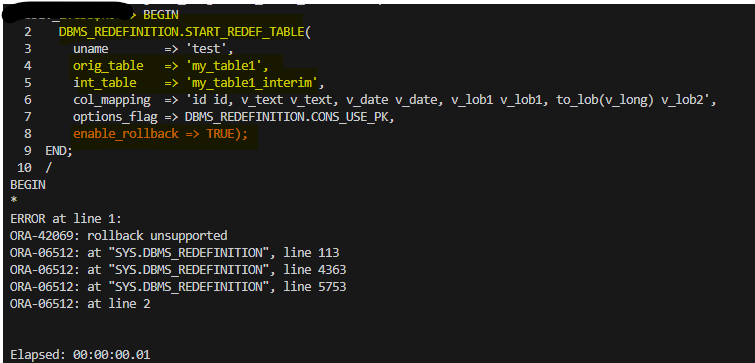
Wait, what? Rollback is not supported? This is because we have a LONG column; rollback is not supported when we are transforming this kind of column. Let’s proceed with ENABLED_ROLLBACK => FALSE (that is the default).
BEGIN
  DBMS_REDEFINITION.START_REDEF_TABLE(
    uname        => 'test',
    orig_table   => 'my_table1',
    int_table    => 'my_table1_interim',
    col_mapping  => 'id id, v_text v_text, v_date v_date, v_lob1 v_lob1, to_lob(v_long) v_lob2',
    options_flag => DBMS_REDEFINITION.CONS_USE_PK,
    enable_rollback => FALSE);
END;
/
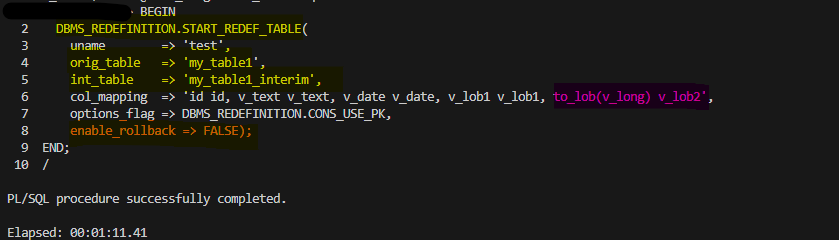
As you can see above, no errors! Keep in mind that I’m evolving the LONG column, so in the col_mapping options I’m converting the column using the TO_LOB() function like this TO_LOB(V_LONG).
Now that my initial part has finished, we have the same number of records in the original and interim table. Of course, this is a static scenario; there is no real activity going on here. If there were, then all the DML operations happening on my original table would also be registered in the materialized view associated, and then we can sync our tables using the SYNC_INTERIM_TABLE procedure.

In a real scenario, you will need to execute the SYNC_INTERIM_TABLE multiple times to keep your original table and your INTERIM table in sync, or almost in sync, until the final step.
BEGIN
  DBMS_REDEFINITION.SYNC_INTERIM_TABLE(
    uname      => 'test',
    orig_table => 'my_table1',
    int_table  => 'my_table1_interim');
END;
/
Next step will be to copy the dependencies; for that, we will use the DBMS_REDEFINITION.COPY_TABLE_DEPENDENTS as follows:
SET SERVEROUTPUT ON
DECLARE
num_errors PLS_INTEGER;
BEGIN
  DBMS_REDEFINITION.COPY_TABLE_DEPENDENTS(
    uname            => 'test',
    orig_table       => 'my_table1',
    int_table        => 'my_table1_interim',
    copy_indexes     => DBMS_REDEFINITION.CONS_ORIG_PARAMS,
    copy_triggers    => TRUE,
    copy_constraints => TRUE,
    copy_privileges  => TRUE,
    ignore_errors    => TRUE,
    num_errors       => num_errors);

    DBMS_OUTPUT.PUT_LINE('num_errors: ' || num_errors);
END;
/
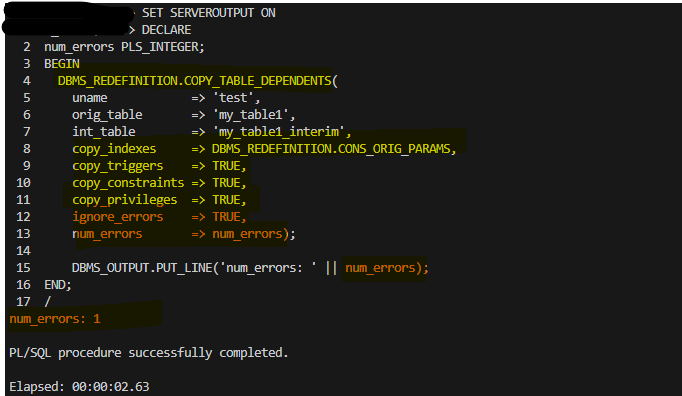
So, after execution, I got an error; however, the procedure was completed as ignore_errors is set to TRUE. In a real scenario, it would be better to set this parameter to FALSE so you can capture what is going on. As this is an example, I have set it to TRUE. Anyway, we want to know what the issue is, so let’s check it.
To take a look to the errors we can review the DBA_REDEFINITION_ERRORS:
SET LONG  8000
SET PAGES 8000
COL OBJECT_OWNER FOR A30
COL OBJECT_NAME FOR A30
COL OBJECT_TYPE FOR A30
COL BASE_TABLE_NAME FOR A30
COLUMN DDL_TXT HEADING 'DDL That Caused Error' FORMAT A120
SET ECHO ON
SELECT OBJECT_OWNER, OBJECT_NAME, OBJECT_TYPE, BASE_TABLE_NAME, DDL_TXT FROM  DBA_REDEFINITION_ERRORS;

Error shows that it couldn’t add/copy the constraint from the original table to the interim; this is expected because when I created my partitioned interim table, I defined a primary key, so the constraint is already there, so we are good to go.
I have inserted more records into my original table just for demonstration until we move forward to the final step:
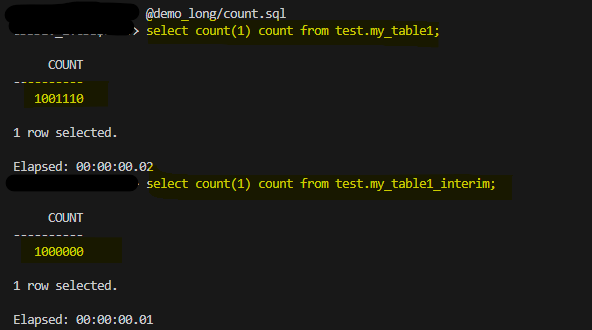
Before running the final step, you should probably run the DBMS_REDEFINITION.SYNC_INTERIM_TABLE to sync your tables; otherwise, the final step can take more time, as internally the FINISH_REDEF_TABLE will sync your table. Take into consideration that the FINISH_REDEF_TABLE locks the original table briefly during the transition.
I won’t execute the SYNC so you can see what I just mentioned before:
BEGIN
  DBMS_REDEFINITION.FINISH_REDEF_TABLE(
    uname        => 'test',
    orig_table   => 'my_table1',
    int_table    => 'my_table1_interim');
END;
/

My tables are in sync in the redefinition is completed! let’s check it:

As you can see above, my table is partitioned and my “original” old table is still there so I can do some checking before dropping it. Take into consideration that we couldn’t enable the rollback due to the LONG column transformation, so I can’t roll back at least using the DBMS_REDEFINITION procedure. In the next example, we will take a look at how that works.
Note: MY_INDEX1 in my interim table was created when the copy dependencies were executed. However, the index has been created as a GLOBAL non-partitioned index; this is expected behavior as the copy dependency procedure takes into consideration the storage option of the original index. If you want to create the index as a local partitioned one, then you will need to create it manually and change the copy_indexes to 0 in the copy dependency step. Setting this parameter to 0 tells the copy dependencies to ignore the indexes from your original table, so make sure to double-check that you are creating all the indexes you need.
DBMS_REDEFINITION – ENABLED_ROLLBACK = TRUE
In this example, we will do the same thing; I will just recreate the original table without the LONG column so we can see how the rollback works!
drop table test.my_table1 purge;
CREATE TABLE test.my_table1 (
    id      NUMBER PRIMARY KEY,
    v_text  VARCHAR2(30),
    v_date DATE,
    v_lob1  CLOB
) TABLESPACE TBS_EXAMPLE_COMP
LOB (v_lob1) STORE AS (TABLESPACE TBS_EXAMPLE_COMP)
;
CREATE INDEX test.my_index1 ON test.my_table1(v_date) tablespace TBS_EXAMPLE_COMP;


drop table test.my_table1_interim purge;
CREATE TABLE test.my_table1_interim (
    id      NUMBER PRIMARY KEY,
    v_text  VARCHAR2(30),
    v_date DATE,
	v_lob1  CLOB
)
LOB (v_lob1) STORE AS (TABLESPACE TBS_EXAMPLE_COMP),
PARTITION BY RANGE(v_date)(
	PARTITION my_table1_interin2022 VALUES LESS THAN (TO_DATE('01-JAN-2022','DD-MON-YYYY')) TABLESPACE TBS_EXAMPLE_COMP,
    PARTITION my_table1_interin2023 VALUES LESS THAN (TO_DATE('01-JAN-2023','DD-MON-YYYY')) TABLESPACE TBS_EXAMPLE_COMP,
	PARTITION my_table1_interin2024 VALUES LESS THAN (TO_DATE('01-JAN-2024','DD-MON-YYYY')) TABLESPACE TBS_EXAMPLE_COMP,
	PARTITION my_table1_interin2025 VALUES LESS THAN (TO_DATE('01-JAN-2025','DD-MON-YYYY')) TABLESPACE TBS_EXAMPLE_COMP
    )
;

I have loaded 1 million records in my original table, and as we did in the previous demo, we should execute the CAN_REDEF_TABLE to verify if we can redefine the table online.
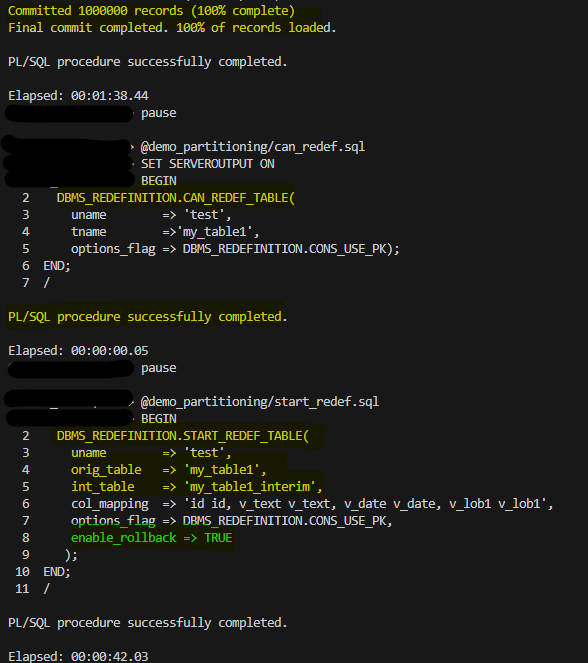
As you can see above, ENABLE_ROLLBACK is set to TRUE and I was able to start the REDEF with no errors!
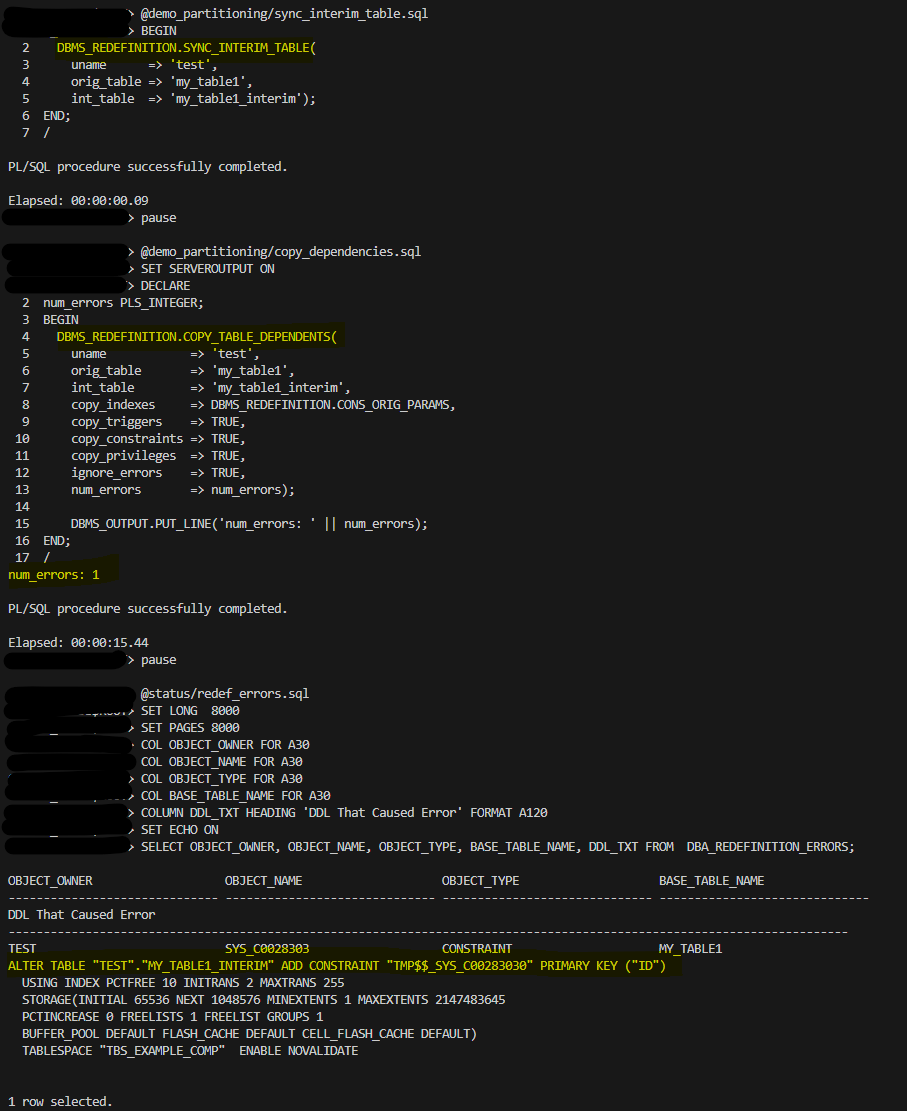
We have synced our tables, copied the dependencies, and as we saw previously, it failed when adding the constraint to the interim table; this was added when the table was created. We can ignore this error and continue.
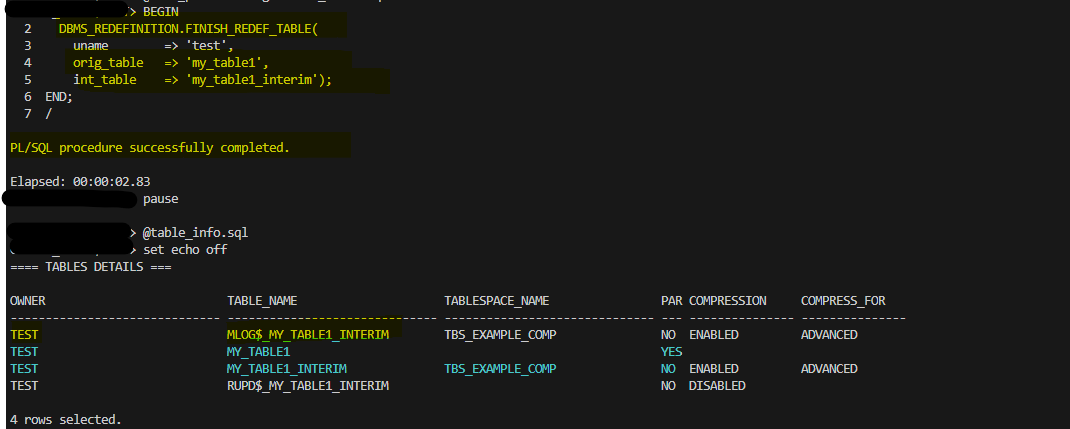
Finally, I have completed the redefinition; my_table1 is now partitioned, but if you take a look at the screenshot above, the materialized view is still there.
So, as I had set to TRUE the ENABLED_ROLLBACK before, all DMLs happening on my partitioned table now are being tracked by the MV as if I have enabled redefinition again, but now from my partitioned table to the non-partitioned, so I can switch back if I need to! Let’s see:
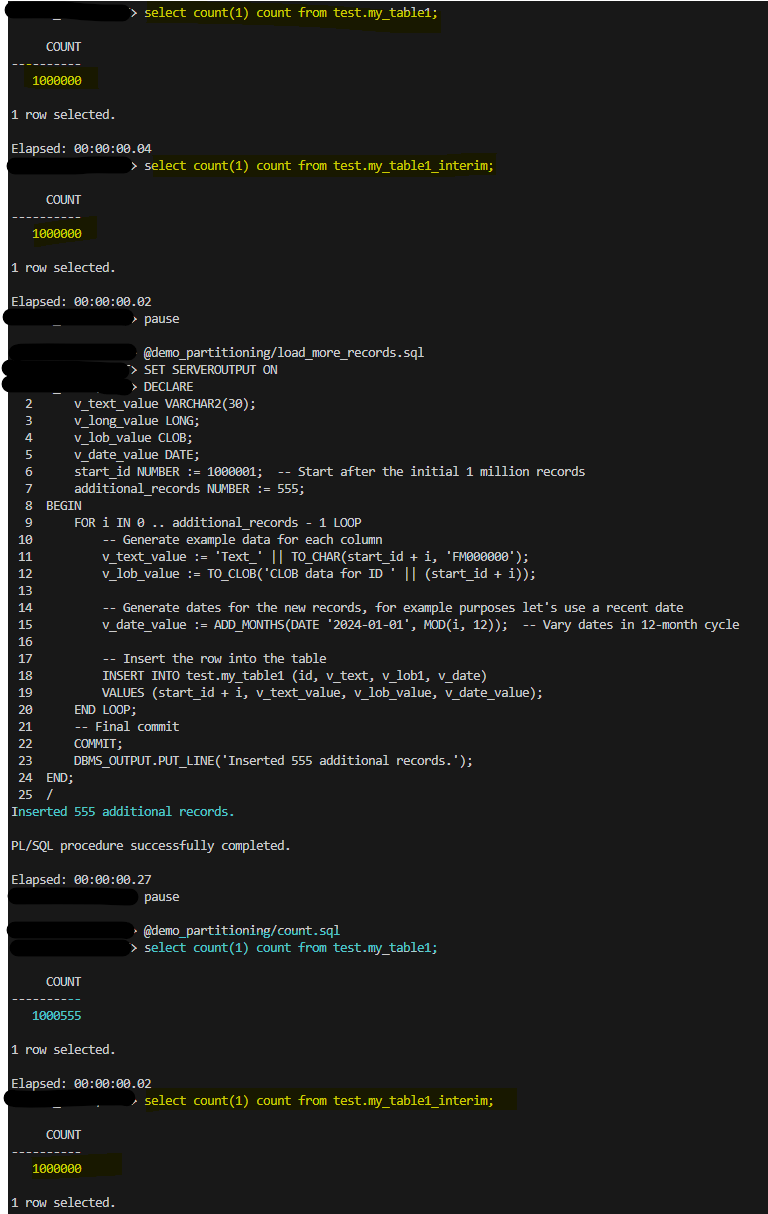
Ok, let’s talk about the example above. My tables are in sync, with the same number of records. Then, I inserted 555 new records into my partitioned table, and the non-partitioned table still has the same number of records.
Let’s take a look to the MV now:

As I mentioned before, the MV is tracking all the DML operations happening on my partitioned table; let’s run the SYNC operation now:

SYNC operation got completed and voila! our tables are in sync again
Ok, then we have the powerful rollback… if performance is not good for whatever reason… we need to rollback quickly:
BEGIN
  DBMS_REDEFINITION.ROLLBACK(
    uname      => 'test',
    orig_table => 'my_table1',
    int_table  => 'my_table1_interim');
END;
/
and…yes!
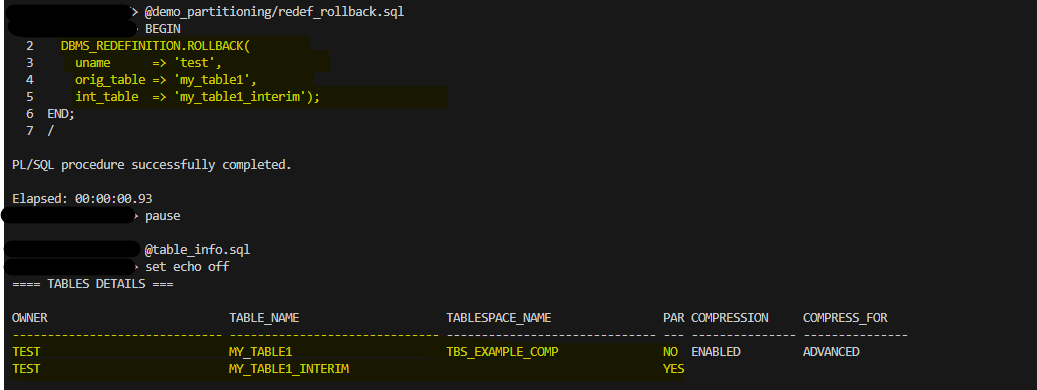
I was able to roll back really quickly; my_table1 is the original one before the redefinition, and I haven’t lost any track of it. So whatever happened INSERT, DELETE, UPDATE on the partitioned table is there—no data loss!
At this point If we want to switch back again we can’t, we will need to start the process again, just FYI!
ALTER a table using ALTER TABLE…MOVE and ALTER TABLE…MODIFY
You can apply some transformations to your table online without using DBMS_REDEFINITION; it is much simpler. However, keep in mind that there is no quick rollback.
So, this is our current table, non-partitioned and without compression:

We can apply advanced compression online to the table as follow:
ALTER TABLE TEST.MY_TABLE1 MOVE ONLINE ROW STORE COMPRESS ADVANCED;
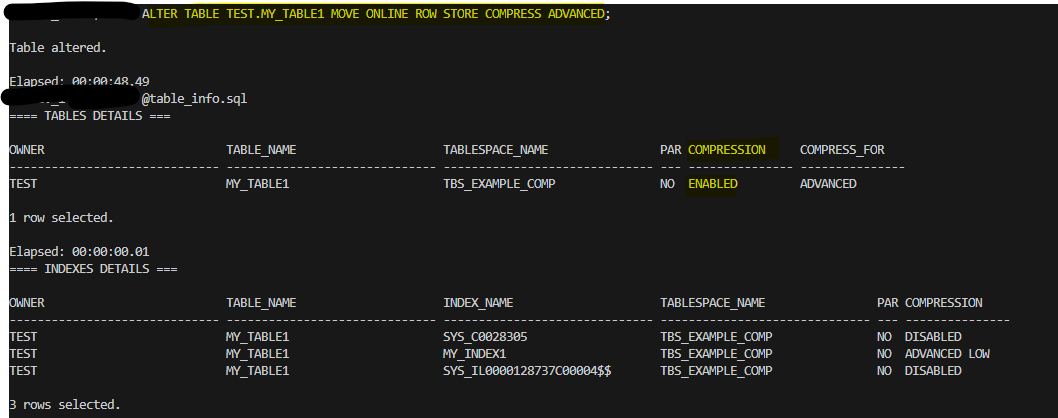
If we have some performance degradation issues and our table is really big… bad news! We will need to wait until the move without compress operation completes.
We can partition our table online as well.
ALTER TABLE TEST.MY_TABLE1 MODIFY
  PARTITION BY RANGE(v_date)(
  PARTITION my_table1_interin2022 VALUES LESS THAN (TO_DATE('01-JAN-2022','DD-MON-YYYY')) TABLESPACE TBS_EXAMPLE_COMP,
  PARTITION my_table1_interin2023 VALUES LESS THAN (TO_DATE('01-JAN-2023','DD-MON-YYYY')) TABLESPACE TBS_EXAMPLE_COMP,
  PARTITION my_table1_interin2024 VALUES LESS THAN (TO_DATE('01-JAN-2024','DD-MON-YYYY')) TABLESPACE TBS_EXAMPLE_COMP,
  PARTITION my_table1_interin2025 VALUES LESS THAN (TO_DATE('01-JAN-2025','DD-MON-YYYY')) TABLESPACE TBS_EXAMPLE_COMP
)
ONLINE PARALLEL 4
UPDATE INDEXES (
   TEST.MY_INDEX1 LOCAL
);
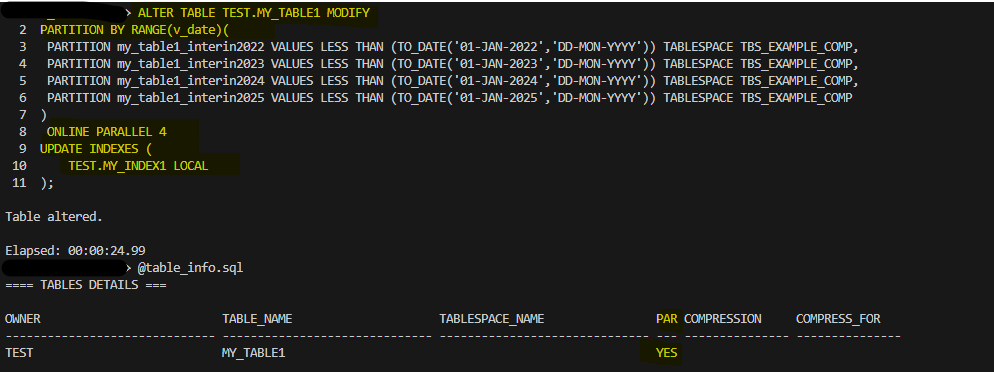
As you can see, I was able to partition my table online and also specify if I wanted to partition my index as local in the same shot and with parallel.
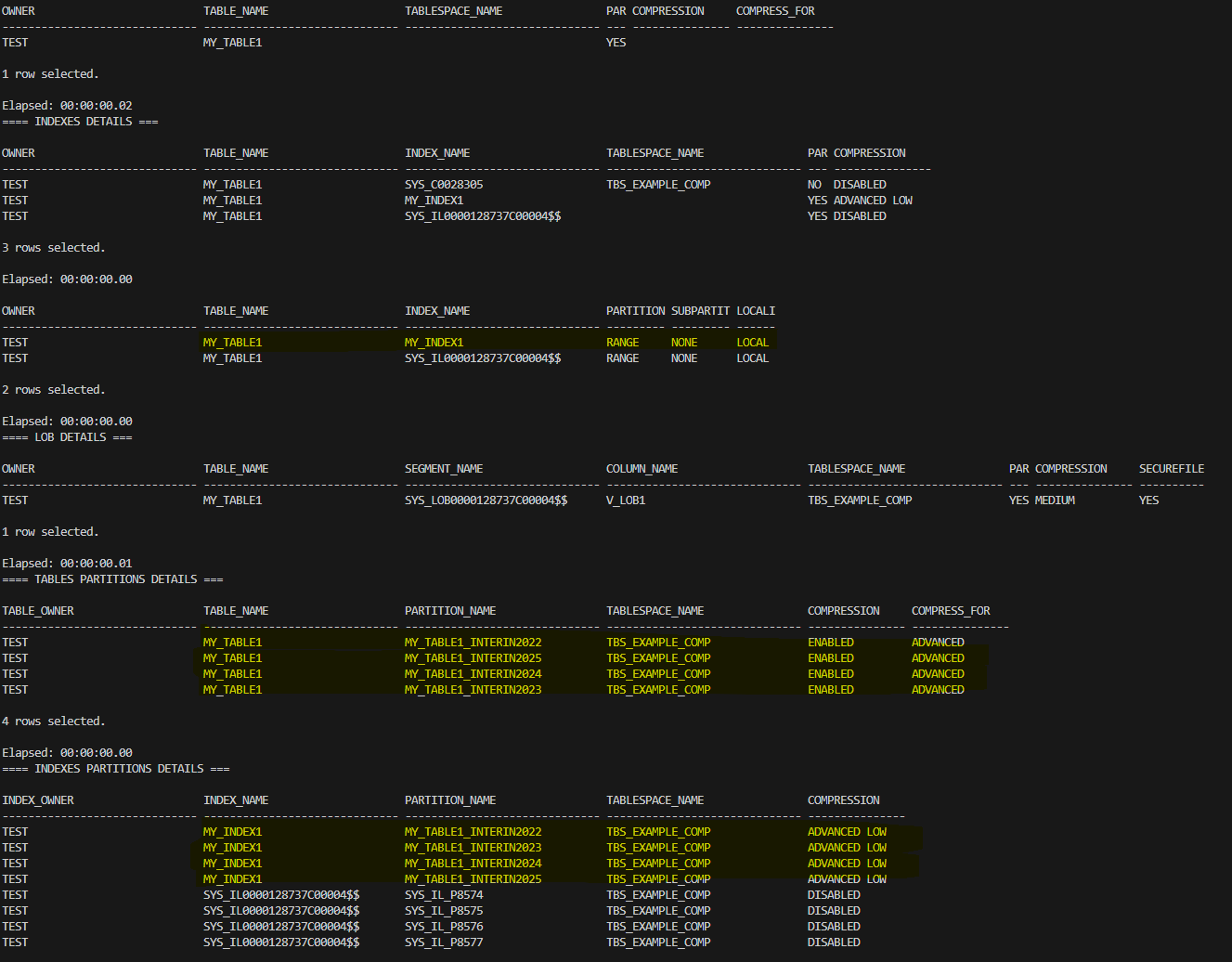
For small tables, it may be a good idea to use ALTER TABLE with the ONLINE clause, but for large ones, you should probably pick DBMS_REDEFINITION. You will need to analyze each case, and if a quick rollback is important, then DBMS_REDEFINITION is definitely a better choice; just keep in mind that if you are evolving a LONG column, there is no quick rollback in any case.
Conclusion
In conclusion, online table redefinition in Oracle Database is a powerful feature that significantly enhances database administrators’ ability to manage and evolve database structures with minimal downtime.
By leveraging the DBMS_REDEFINITION package and SQL commands, administrators can modify table structures, improve performance, and adapt to changing business needs without interrupting user access. The numerous benefits—such as increased data availability, improved query performance, and streamlined application upgrades—make online redefinition an indispensable tool in today’s fast-paced environments.
However, understanding the associated restrictions and the specific use cases where online redefinition excels is crucial for success. Through careful planning and execution, database professionals can take full advantage of this feature, ensuring seamless transitions and maximum operational efficiency as they adapt to the ever-evolving demands of data management.
As we move forward, mastering online table redefinition will be essential for harnessing the full potential of Oracle Database and maintaining optimal performance in mission-critical applications.




 DatabaseVerse: Journey into the World of Databases
Leave a comment