

Oracle Database 23ai is the next long-term support release of Oracle Database. It includes over 300 new features with a focus on artificial intelligence (AI) and developer productivity and I wanted to focus in this last part.
Developers and DBAs are all too familiar with this topic: privileges. How many times have we come across an ORA-00942 table or view does not exist? Hundreds? Thousands? If I had a dollar for every time I’ve seen this error in my life as a DBA, I’d probably be rolling in cash. But hey, let’s stay focused on the topic!
- Schema-level privileges
- Demo/LAB
- Granting a Schema Privilege
- View schema privileges granted to the user
- Revoking a Schema Privilege
- Can we grant schema privileges on SYS schema?
- Considerations
- Conclusion
Schema-level privileges
On 23ai, Oracle has introduced a feature that simplifies the privilege management process, it is now pretty easier to secure the access of the database objects.
System privileges can now be granted at the schema level! but, what does this mean? well… previously developers/DBAs had the following options:
- Grant individual privileges on each table and view in the application schema (more secure)
Although, this option is more secure, it can be quite challenging to deal with it. Any change in the application schema, such as adding new tables, views, etc., you should give privileges to the users that need it. Otherwise, guess what? ORA-00942, yup.
- Grant ANY privileges: Select ANY table, update ANY table, delete ANY table… (less secure)
This alternative option of granting ANY privileges, despite its convenience, is subpar from a security standpoint as it provides the user with the capability to access and manipulate data from every table in the database. In the event of a compromise of this user account, the entire database could be at risk of exploitation.
What we have now on Oracle 23ai? If you GRANT SELECT ANY TABLE ON SCHEMA ABC TO XYZ that user can see all the tables and views in the ABC schema and only in the ABC schema but there is more! If a new table is added to the ABC schema, then XYZ will be able to see it immediately, no extra step!
Let’s get our hand dirty now and do some demo, shall we?
Demo/LAB
This is my setup: Oracle Database 23ai CDB with one PDB
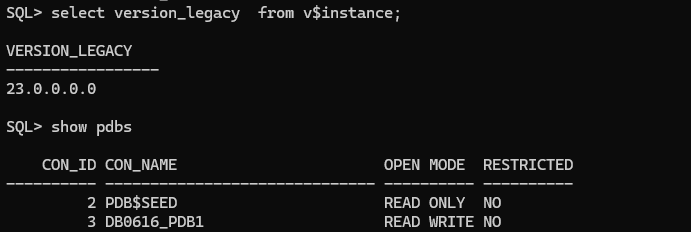
I will created the following users on my PDB DB0616_PDB1
- APP_TEST: Application Schema Owner
- TEST_USER: User to demonstrate access to the application schema
--DEMO TABLESPACE
CREATE TABLESPACE TBS_APP DATAFILE size 100m AUTOEXTEND ON MAXSIZE UNLIMITED;

--SCHEMA APPLICATION OWNER
CREATE USER APP_TEST NO AUTHENTICATION DEFAULT TABLESPACE TBS_APP;
GRANT CREATE SESSION, CREATE TABLE TO APP_TEST;
ALTER USER APP_TEST QUOTA UNLIMITED ON TBS_APP;

--TEST USER
CREATE USER TEST_USER IDENTIFIED BY "****";
GRANT CREATE SESSION TO TEST_USER;

set linesize 250
col username for a20
col default_tablespace for a15
SELECT username, account_status, default_tablespace, temporary_tablespace, authentication_type FROM dba_users WHERE username in ('APP_TEST','TEST_USER');

If you take a look to the AUTHENTICATION_TYPE column on the DBA_USERS you can see that for APP_TEST user it says NONE. That’s because I have created the schema application owner user with NO AUTHENTICATION. This is not a new feature as it was introduced in Oracle 18c, as APP_TEST is the schema application owner that will hold applications objects (tables, views, procedures, PL/SQL etc.) we don’t want to connect with it, there are many reasons:
- If we can access the application schema, all security measures are bypassed, granting unrestricted access to the schema objects. This could lead to unauthorized viewing, manipulation, and compromise of the data within the schema objects.
- The principle of never connecting to application schemas is a crucial aspect of security design.
- You may need to rotate the password of application schemas and that can lead to application outage
Anyway, security is a huge topic. I just wanted to explain what AUTHENTICATION_TYPE is; let’s get back to the point. I will create some objects in the APP_TEST schema:
CREATE TABLE APP_TEST.T1 AS SELECT * FROM DBA_OBJECTS;
CREATE TABLE APP_TEST.T2 AS SELECT * FROM DBA_TABLES;
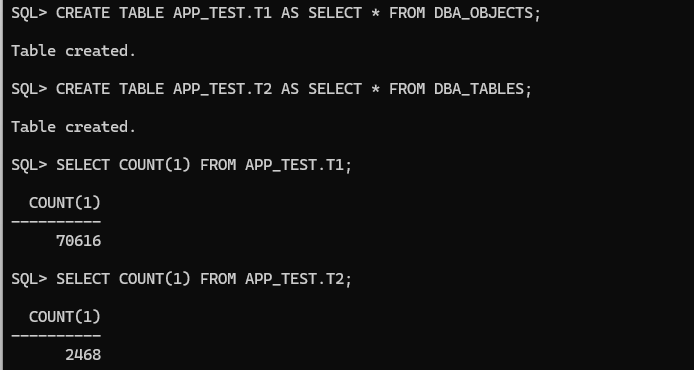
Now, let’s connect with the TEST_USER and see if we can access the T1 and T2 table from APP_TEST schema:

As you can see above, that is expected and we are familiar with that error, so, in this case what we used to do in the past is the following:
GRANT SELECT ON APP_TEST.T1 TO TEST_USER;
GRANT SELECT ON APP_TEST.T2 TO TEST_USER;
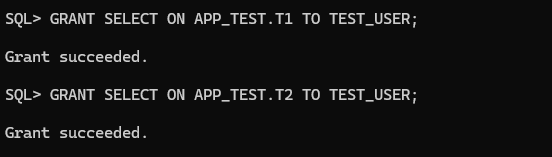
Now, we are able to select the tables with the TEST_USER
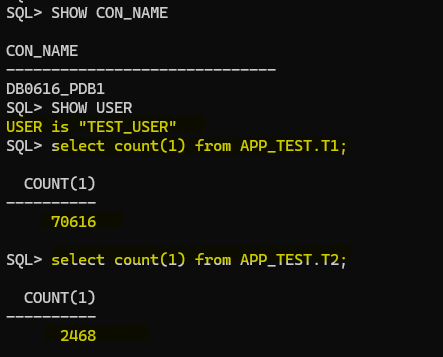
But, what is the problem with this? we are giving granular access to the tables, let’s add a new table in the APP_TEST schema:
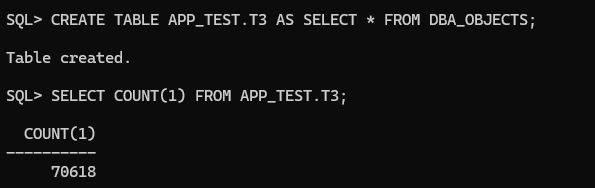

So, the new table is there but TEST_USER does not have the SELECT privilege yet, and this will happen if more changes are introduced in the APP_TEST schema.
Granting a Schema Privilege
Before proceeding, let’s do some cleaning. Let’s revoke the privilege we granted before and then use the new approach!
To revoke the privileges we just granted previously:
REVOKE SELECT ON APP_TEST.T1 FROM TEST_USER;
REVOKE SELECT ON APP_TEST.T2 FROM TEST_USER;
Now, to grant the privileges using new approach:
GRANT SELECT ANY TABLE ON SCHEMA APP_TEST TO TEST_USER;

Let’s see if TEST_USER can do select for all existing tables in the APP_TEST schema now:

Great, let’s create a new table in the APP_TEST schema and check if TEST_USER can do select without doing anything else:
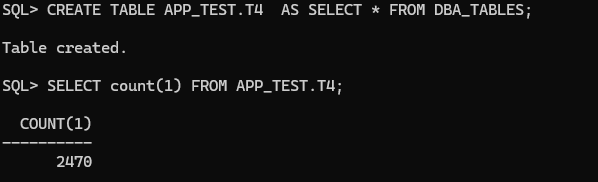
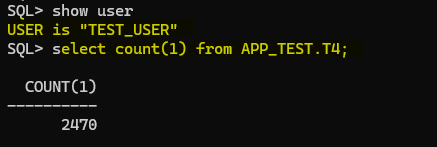
Connected as TEST_USER I’m able to SELECT the new table immediately after it was created! This is pretty nice
View schema privileges granted to the user
If you want to check quickly which schema privileges the user has granted you can query the USER_SCHEMA_PRIVS and SESSION_SCHEMA_PRIVS data dictionary views, example:
col username for a20
col privilege for a30
col schema for a20
SELECT username, privilege, schema, admin_option FROM USER_SCHEMA_PRIVS;

col privilege for a30
col schema for a20
SELECT * FROM SESSION_SCHEMA_PRIVS;
Revoking a Schema Privilege
To revoke schema privileges to a user ensure what privileges you want to revoke first, as an administrator you can query the DBA_SCHEMA_PRIVS, example:
col grantee for a20
col privilege for a30
colu schema for a15
SELECT grantee, privilege, schema  FROM DBA_SCHEMA_PRIVS
WHERE GRANTEE='TEST_USER';

To revoke schema privilege from TEST_USER:
REVOKE SELECT ANY TABLE ON SCHEMA APP_TEST FROM TEST_USER;

If we connect as TEST_USER and check again we are not able to SELECT the tables from APP_TEST schema:
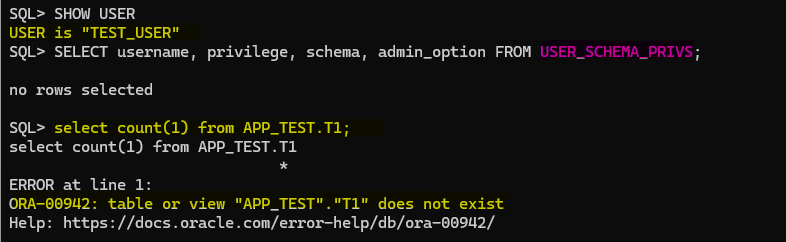
Can we grant schema privileges on SYS schema?
Fortunately, we dodged that bullet, phew!

Considerations
- We have seen that schema privileges can simplify the administration and make it easier but on another hand, the approach is against the principle of least privilege (
PoLP), if for some reasons we want to give permission in a granular way example: GRANT SELECT ANY TABLE ON SCHEMA APP_TEST TO TEST_USER EXCLUDING CARD_DETAILS that’s not possible nowadays, in that case we should move forward with the old approach and grant theSELECTon tables we just want theTEST_USERtoSELECTfrom theAPP_TESTschema, hopefully, that kind of feature will be introduced later on, who knows! - The schema privileges can be granted to, and revoked from, users and roles.
- Many administrative and system privileges cannot be used in schema privilege grants The following administrative privileges are excluded from schema privilege grants:
SYSDBA, SYSOPER, SYSASM, SYSBACKUP,SYSDG, SYSKM, you can find more information here: System Privileges Excluded from Schema Privileges
Conclusion
Oracle Database 23ai introduces a significant feature that simplifies the privilege management process, focusing on schema-level privileges. This enhancement allows for the granting of system privileges at the schema level, resulting in an easier way to manage.
While the new schema-level privileges streamline administration and access control, it is essential to acknowledge that this method may deviate from the principle of least privilege (PoLP). As a result, certain granular permissions, such as excluding specific objects (tables, views, PL/SQL, etc.), from a privilege grant, are not currently supported. Despite these considerations, schema privileges present a promising advancement in Oracle Database 23ai, offering improved accessibility and security for database objects.




 DatabaseVerse: Journey into the World of Databases
Leave a comment