

This is my 23rd post in this blog, so why don’t we talk about Oracle 23ai?
Since 23ai was announced as generally available: Announcing Oracle Database 23ai : General Availability I have been quite curious about a new feature called True Cache and this is what I’m going to cover, or try to do my best in this post.
What is Oracle True Cache?
Oracle True Cache is an in-memory, read-only cache in front of an Oracle database, which means that it is quite different from what we used to know as Result Cache. In the “past,” to improve performance of applications, Oracle introduced Result Cache, which is basically an area of memory either in the SGA or client application memory that stores the results of a database query or PL/SQL function result cache, storing values returned by those functions. The cached rows are shared across SQL statements and sessions unless they become stale.
But what is the differences then? well, True Cache it is a read-only replica of the primary database… Oh wait a minute? like an Oracle Active Data Guard? Kind of… it is pretty similar actually except that it’s mostly diskless.
How it works?
- An application directs queries to
True Cacheeither manually or semi-automatically via theOracle JDBC diver. - A
True Cacheinstance satisfies queries by using data that it caches for the database application services that it handles. - When the data isn’t in the cache or when a cache miss occurs,
True Cachefetches the data from the primary database. - When a
True Cacheinstance first starts, in addition to fetching blocks during cache miss, it also fetches surrounding blocks in large chunks to warm up. - After a block is cached, it’s updated automatically through redo apply from a primary database, usually with a sub-second lag. This is similar to how a real-time redo apply happens in an
Oracle Data Guardconfiguration. The primary database redo blocks are continuously sent to theTrue Cachestandby redo log files by theLGWRprocess on the primary database instance inASYNCmode. - If multiple
True Cachesexist and serve the same database application service, the listener automatically distributes and load balances sessions to each cache. - A query to
True Cachereturns only committed data, and the data is always consistent. The committed data is as recent as the redo apply lag. - Like all caches, the
True Cachedata might not be the most current data as it exists in the primary database.
What are the Benefits of Oracle True Cache
Oracle True Cache automatically keeps the most frequently accessed data in the cache, and it keeps the cache consistent with the primary database, it also caches all Oracle database objects and data types, including JSON!
- Improves scalability and performance by
offloading queriesfrom the primary database. - Reduces application response time and network latency by deploying
True Cachecloser to the application. This especially benefits situations where a database is in a different location than the application due to data residency requirements. - Creates a large, in-memory storage area by dividing data across multiple
True Caches. The total size of the cached data across all True Caches can be much larger than it would be for a single primary database or cache. - Automatically maintains the cache contents.
- Simplifies development and maintenance by being transparent to the application.
Demo/Lab
For the demo I will use the Oracle Live Lab that is available here: Title Improve application performance with True Cache
You can launch the lab infra in your own tenant in OCI or use the option to launch the lab in the Oracle Live Lab tenant that you will have for some period of time and you can extend a couple of times.
Anyway, regardless of the option you choose, you will have an instance running 3 containers. Two of them will use the Oracle 23ai images and will start the primary and True Cache instance database, and the last one will be an Oracle Linux with the application. In summary:
- Oracle Primary database Container (prod)
- Oracle True Cache Container (truedb)
- Client App Container (appclient)

Load some sampling data into the primary database
My lab is running, as you can see above. Let’s connect to the primary container (prod) and see what we have there:
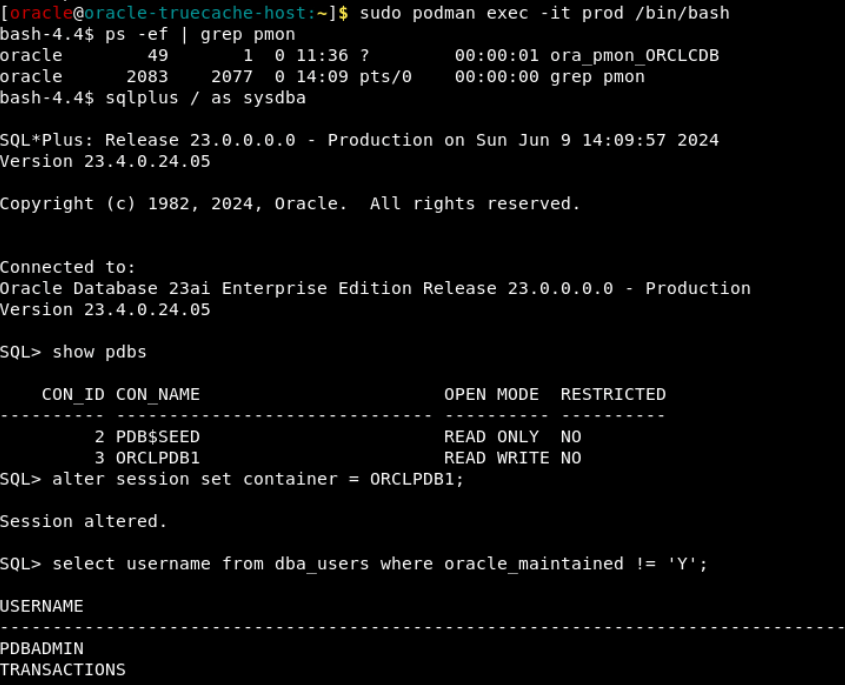
I have a PDB ORCLPDB1, and there is one schema with some data loaded, the schema name is: TRANSACTIONS

If you have the data loaded, just proceed with the following section. In case you have launched the lab and you don’t see the schema or the data is not loaded, you can use the scripts that are available in the /home/oracle.
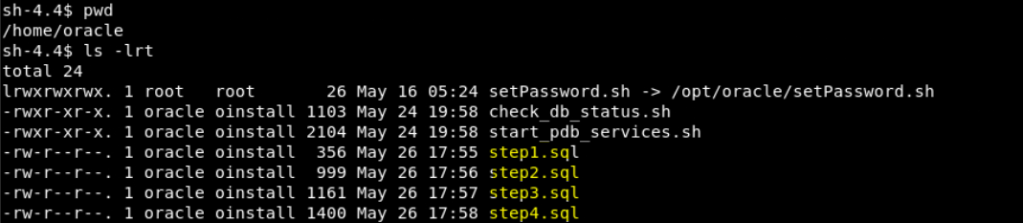
You should follow the following sequence:
Connect as sysdba user and then connect to the PDB and run the scripts as follow:
ALTER SESSION SET CONTAINER = PDBx;
@step1.sql
The first script will create the TRANSACTIONS user schema with the require privileges
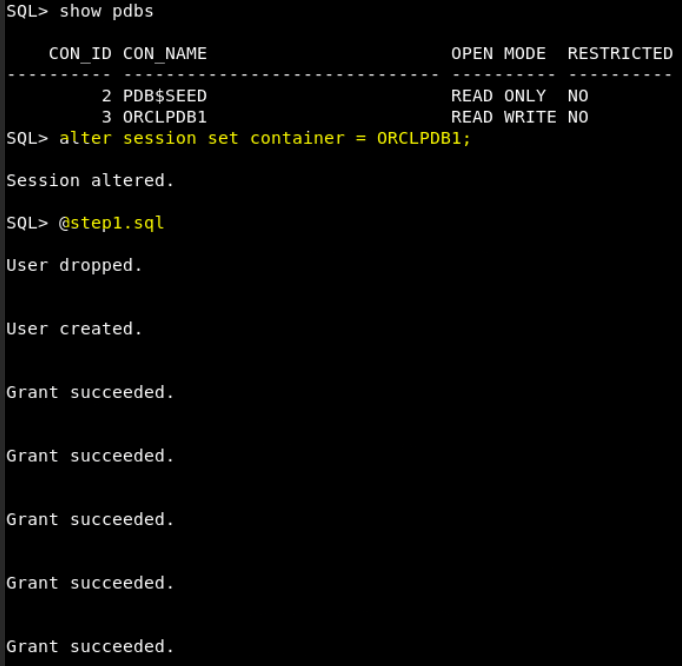
Before proceeding with the next steps, you will need to log in as the TRANSACTIONS user in the PDB. Alternatively, you can execute an ALTER SESSION SET CURRENT SCHEMA. For simplicity, I choose the second option:
ALTER SESSION SET CURRENT SCHEMA = TRANSACTIONS;
@step2.sql
@step3.sql

Finally, let’s load the data using the step4.sql script as TRANSACIONS user:

Great!, we are done
What about the True Cache Database?
So, we have successfully loaded data in our primary database, let’s take a look to the True Cache database just to make sure everything is in there, right?
If we take a look at the primary database parameter log_archive_dest_2, we will be able to see some information about the True Cache database.

We can see the host, port and service, and some parameters about the configuration and the ROLE. We don’t see the usual here like: PHYSICAL_STANDBY. It says TRUE_CACHE instead.
Let’s connect to the True Cache database and check that, and see also if the TRANSACTIONS schema is there.
I have connected to the container and look, the open_mode is READ ONLY WITH APPLY, this is an ADG (Active Data Guard) but the DATABASE_ROLE is TRUE CACHE

What about the schema we have created in the primary?

Schema objects are there, the True Cache database is in sync with the primary! Let’s proceed with some testing now
Use True Cache through JDBC
The objective to this part of the demo is demonstrate the differences in performance between primary and True cache database
Considerations:
- The application maintains one logical connection by using the single database application service name of the primary database, and the
JDBCthin driver maintains two physical connections. This is available for Oracle Database 23c and later. - The read/write split between the primary and
True Cachedatabase instances is controlled by the app through special calls to flag the logical connection as read-only or read-write. This mode is only forJDBC-based applications.
Let’s access to the app container:
Once you are inside the container, go to the /stage directory

You will see some directories, first let’s access to the BasicApp directory.
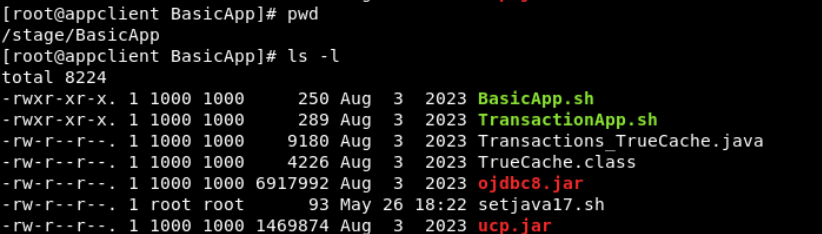
We can test the connection using the BasicApp.sh script, but let’s take a look first:
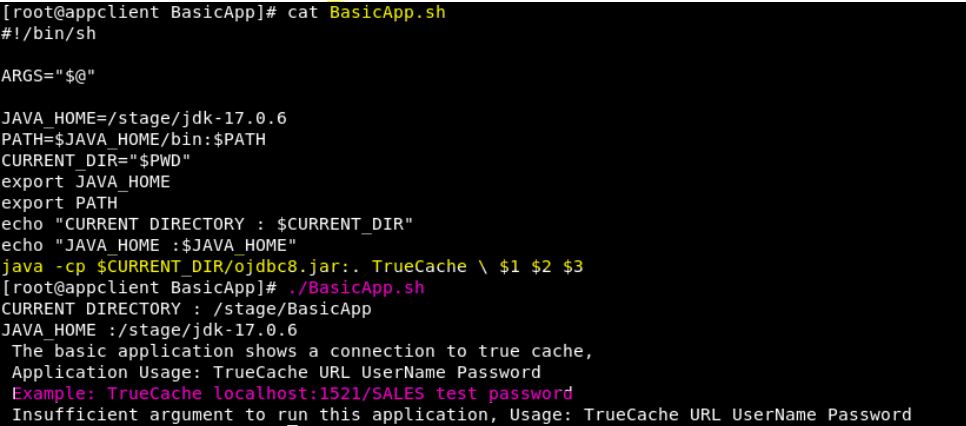
As you can see above, the script ask for the connection details, let’s provide them and see:
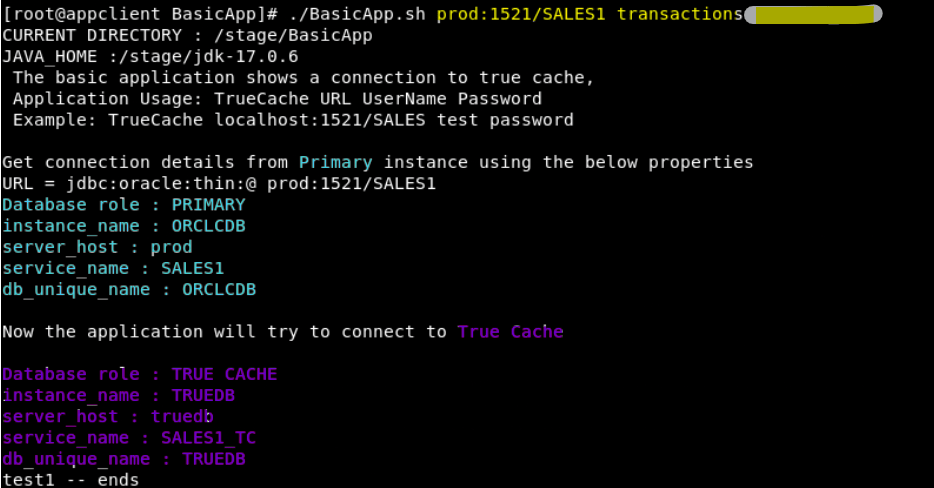
I have provided the host:port/service_name, username, and password. As you can see above, the connection went well to the primary and True Cache database. Let’s run the app now using the TransactionApp.sh, but we will use the script inside another directory: /stage/clientapp because the one in the BasicApp does’t work.
The TransactionApp.sh script will run the application for 2 minutes and 50 threads (users) against the primary instance database and then will do the same in the True Cache instance database
So, in the directory /stage/clientapp run the TransactionApp.sh. You don’t need to provide the host:port/service_name username and password in this case as they are already in the script. If that is not the case, you can add them, but make sure to add the flag as well. The flag is to tell the app to connect first to the primary (flag = false) and then to the True Cache database (flag = true).

./TransactionApp.sh

As you can see above, there is an improvement while using True Cache in transactions per second and read-only operations. Let’s modify the script and run the test with more users and more minutes as well.
I have created a V2 version and I will run this test using 250 users and the duration will be 5 minutes.

Let’s run it:
./TransactionApp_v2.sh

In this second test we can see a huge improvement, around 206% better performance in the True Cache database for read-only operations.
Conclusion
In this post, we delved into the realm of Oracle 23ai and its remarkable new feature, True Cache. We learned that True Cache stands as an in-memory, read-only replica of the primary database, serving as an innovative solution to enhance application performance. The distinct architecture of True Cache distinguishes it from conventional memory caching methodologies.
Our comprehensive exploration unfolded the inner workings of True Cache, elucidating how it efficiently fulfills queries and actively maintains cache consistency with the primary database. This exposition highlighted the benefits of True Cache, including enhanced scalability and reduced application response time, particularly advantageous for applications operating across geographically dispersed databases.
Furthermore, we embarked on a practical demonstration, utilizing the Oracle Live Lab to load data into the primary database and inspect the synchronization with the True Cache database. Leveraging JDBC connectivity, we conducted performance tests, affirming the impactful improvements in read-only operations within the True Cache database.
Through this journey, we have gained a profound understanding of True Cache and its pivotal role in augmenting the performance and scalability of Oracle 23ai. This sophisticated feature has tremendous potential to revolutionize the landscape of database caching and elevate the efficiency of enterprise applications.




 DatabaseVerse: Journey into the World of Databases
Leave a comment