

Hello everyone, in this post I will talk about a feature that was introduced in Oracle 12.1.0.2, I think it’s the kind of feature that most people do not know about. So why not talk a little bit more and see what it is, shall we?
- CREATE PLUGGABLE DATABASE….STANDBYS=NONE, what is this?
- Applicable scenarios or possible reasons?
- Demo Lab
- Wrapping it Up!
CREATE PLUGGABLE DATABASE….STANDBYS=NONE, what is this?
Prior to release 12.1.0.2, adding a pluggable database in the primary of a Data Guard configuration required that all files associated with the new PDB be in place, accessible, in the correct state, and in the expected location on the physical standby for redo apply to continue operations normally, otherwise you will see that your DR configuration will break after running the CREATE PLUGGABLE DATABASE command.
In 12.1.0.2, the CREATE PLUGGABLE DATABASE statement introduced a a new clause, STANDBYS=NONE, which defers file instantiation on the standby, allowing the physical standby database to continue to protect existing pluggable databases. The affected PDB cannot be opened with the files in the OFFLINE/RECOVER state, but other PDBs not in this state can be opened Read/Only with Active Data Guard.
Applicable scenarios or possible reasons?
That’s great… but what is the point of all of this? I can mention a couple of examples, but there might be other scenarios when this comes in handy as well:
- Perform a remote
PDBclone on aCDBthat is protected by a Data Guard configuration - Plug a
PDBin a existingCDBthat is protected by a Data Guard configuration - Create a
PDBthat will be part of a test or short-live and it will be dropped relatively quickly, thereby does not need to be protected by Data Guard. - Storage for the new
PDBon the standby environment is not immediately available - In some cases, the newly added
PDBdoes not require a higher level of data protection that comes with having a physical standby database and can be permanently disabled, although Oracle MAA team does not recommend this “subset standby” architecture where somePDBsin the same CDB have different HA SLAs. - etc…
Demo Lab
- This demo will be perform on Oracle 19c version multitenant database protected by Data Guard with 1 physical standby. The
CDBhas aPDBonly. - I have another
CDBwith aPDBthat is not protected by Data Guard. The purpose of thisCDBis to be the source to perform the clone operation. - Both
CDBshave TDE configured
If you have doubts about to perform these operations you can take a look to a previous post: Master Oracle TDE: PDB Unplug, Plug, and Clone Demos in 19c
Primary – Protected by Data Guard:

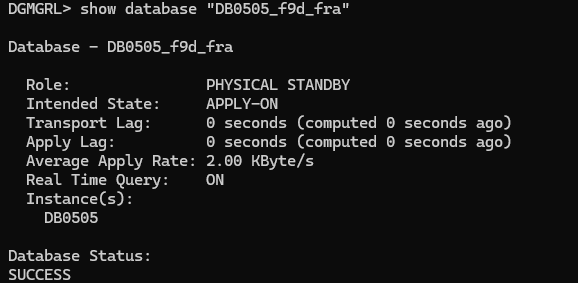
Source CDB – purpose to serve as a clone

I will test the following scenarios:
- Remote clone a
PDBwith theSTANDBYS=NONEclause (deferredPDB) - Switchover and failover operations when there is a
PDBonRECOVERstate (deferredPDB) - How to recover a deferred
PDBon the standby site
Remote clone a PDB with the STANDBYS=NONE clause (deferred PDB)
So, the first thing we are going to do is create a new pluggable database using a remote clone with the STANDBYS=NONE clause and see how it looks
To create a new pluggable database using remote clone, we will simply execute the following command in our primary database:
CREATE PLUGGABLE DATABASE PDBNEW FROM PDBTEST@SRC_PDBTEST TEMPFILE REUSE KEYSTORE IDENTIFIED BY "***" STANDBYS=NONE;

Great, so our PDB is created, let’s take a look to the alert log in the standby site:
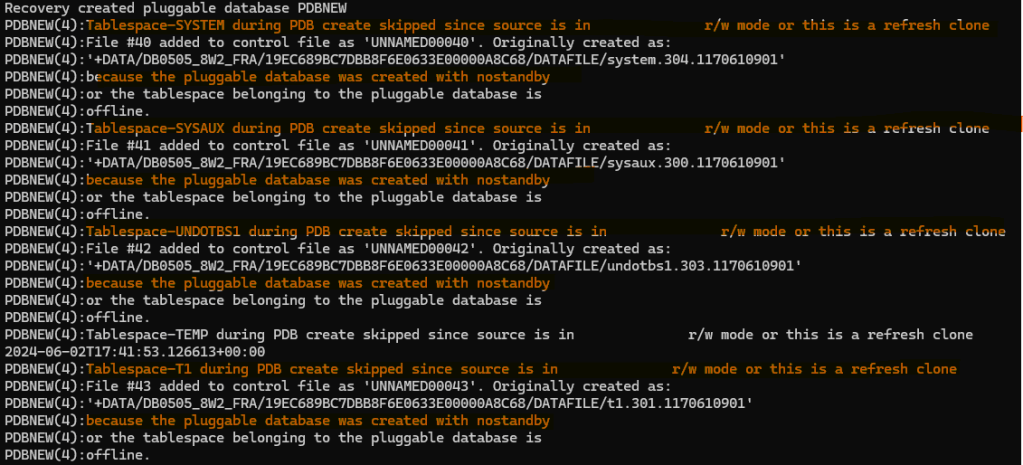
On the DR site if we take a look to the recovery_status it says: DISABLED

However, our DR configuration is good, no errors:

In summary, we have created the definition of our new PDB in the standby site, and recovery has been disabled for that PDB as datafiles do not exist, at least yet. This is giving us a benefit to maintain the rest of the PDB protected by our Data Guard and the possibility to sync the new PDB later if we want to protect it as well.
Switchover and failover operations when there is a PDB on RECOVER state (deferred PDB)
Can we perform a switchover/failover operation? This is a great question, right? Let’s see
First, let’s validate our configuration:

No lag and configuration is good. Let’s do a switchover.
To execute the Switchover operation execute the following in the DG Broker:
SWITCHOVER TO "xxx";
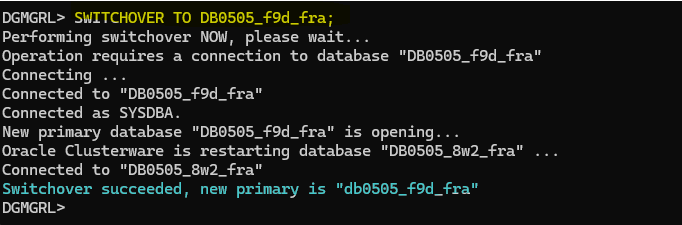
Switchover has completed successfully, that’s pretty nice
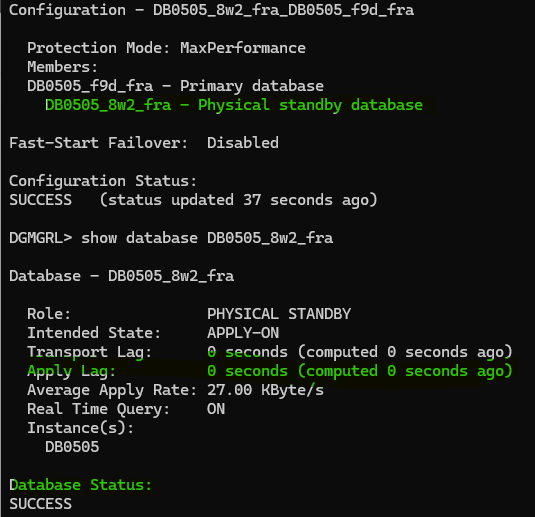
Configuration looks good, however, take into consideration that we won’t be able to open the PDBNEW as we haven’t recovered it yet. Deferred state is only helping us to continue protecting the other PDBs in the DR configuration, and we can still perform switchover operations.

What about failover? Well, let’s try and see:

Validation is good and we are ready to go.
To execute the failover operation execute the following in the DG Broker:
FAILOVER TO "xxx";

Failover operation has completed without issues!
So, we haven’t found any issues to perform switchover and failover operations. I will reinstate the other database so I will have the configuration as it was originally so I can move forward with the last part!
To reinstate the database just execute in the DG Broker the following command:
REINSTATE DATABASE "XXX";
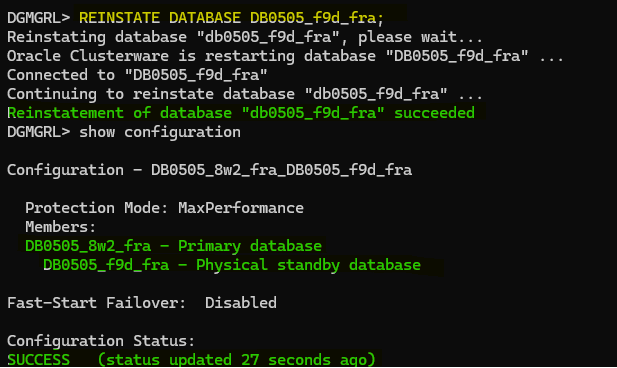
We are good to go!
How to recover the PDB on the standby
So, how can we recover this PDB on the standby database and protect our entire CDB in the Data Guard configuration?
As I mentioned before, we have TDE configured here, so before performing the recovery part, we need to copy the TDE keystore so that we will have the encryption keys for our new PDB. Otherwise, we won’t be able to sync our primary and DR.

I have copied the wallet to the DR and force the database to open it again so it can load the encryption keys including the new one:

Let’s perform the recovery now.
To perform the recovery we will use RMAN and restore our PDB from service:
run{
allocate channel disk1 device type disk;
allocate channel disk2 device type disk;
set newname for pluggable database PDBNEW to new;
restore pluggable database PDBNEW from service DB0505_8w2_fra section size 4g;
}

Let’s stop the redo apply:
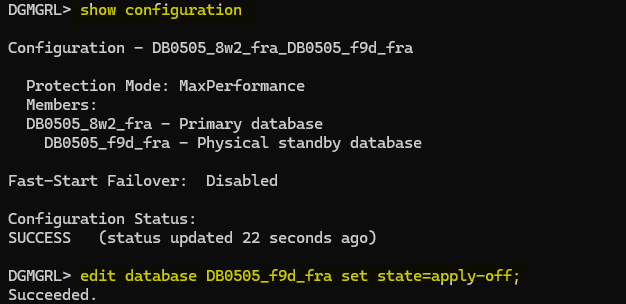
Now, let’s connect to RMAN on the standby database and switch the pluggable database files to the ones just restored:
switch pluggable database PDBNEW to copy;
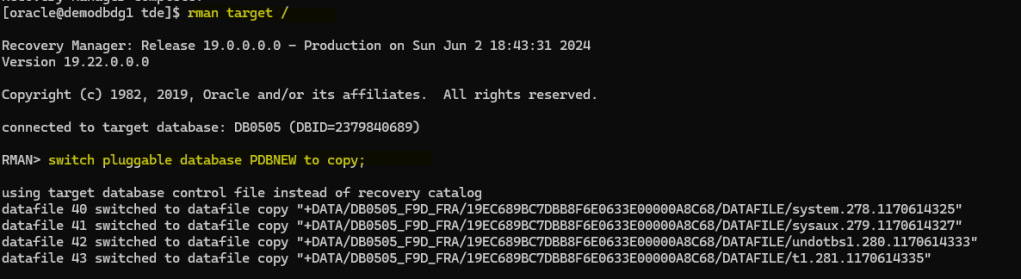
Let’s restart the standby CDB database, mount it and enable the recovery to the PDB. On the standby:
shutdown immediate;
startup mount;
alter session set container = PDBNEW;
alter pluggable database enable recovery;

Let’s start redo apply for the physical standby database in the DG Broker:
edit database DB0505_f9d_fra set state=apply-on;

DR configuration is ok and physical standby is sync, let’s take a look to the recovey status again for all the PDBs in the standby:

Great!, all the PDBs are now protected by the Data Guard!
Wrapping it Up!
It’s fascinating to explore the feature introduced in Oracle 12.1.0.2 where the CREATE PLUGGABLE DATABASE statement now includes the STANDBYS=NONE clause, offering the option to defer file instantiation on the standby. This “innovative” (we are in 23c!) feature allows the standby database to continue protecting existing pluggable databases, opening up possibilities for various scenarios and use cases.
The detailed demo and scenarios provide valuable insights into the practical application of this feature within a multitenant database environment protected by Data Guard. From remote PDB cloning to switchover and failover operations, as well as the recovery process for the deferred PDB on the standby, this post offers a comprehensive understanding of leveraging STANDBYS=NONE.
Understanding the implications and benefits of using STANDBYS=NONE can undoubtedly enhance database administrators’ ability to make informed decisions and optimize the Data Guard configurations. This feature opens up new opportunities while maintaining the integrity and protection of pluggable databases in various scenarios, making it a valuable addition to Oracle’s database management capabilities.
Did you know about this feature? what do you think about it? let me know in the comments!




 DatabaseVerse: Journey into the World of Databases
Leave a comment