

In my previous post Implementing Oracle Transparent Data Encryption (TDE), I talk about how to implement TDE in Oracle, and it is quite easy. But what’s next? How to deal with it? In this post, I will talk about how to perform different maintenance activities on keystores, how to manage the TDE master encryption key, and other things. Take into consideration that this post will be focus on software keystore password, I will post about Oracle Key Vault in the future so stay in touch!
First thing you should be aware of, many of these operations require access to a keystore password, for both TDE wallets and external keystores.
In some cases, a keystore depends on an auto-login TDE wallet before the operation can succeed and in others cases some keystore operations that require the keystore password cannot be performed when the auto-login keystore is open, this can be quite confusing and also might you think that you can cause some kind of issue, downtime etc. In any case this post can be useful for you but make sure to do your own test before approaching anything in a real environment.
Let’s start!
- Changing the password of a password-protected software Keystore?
- Backing Up Password-Protected TDE Wallets
- Rekeying the TDE Master Encryption Key
- Creating TDE Master Encryption Keys for Later Use – Better for DG setup
- Conclusion
Changing the password of a password-protected software Keystore?
Everything that is protected by a password should be changed in the future, and we all know that it is best practice to change the password of your password-protected software keystore. You will probably need to do this as per the security policies in your company, or because of compliance guidelines or any other security requirements. But how to do it?
Well, it is quite simple actually, you will be force to specify the keywords WITH BACKUP in the clause, that will force you to make a backup of the current keystore. This operation does not cause any downtime, TDE operations such as encryption and decryption will continue to work normally!
ADMINISTER KEY MANAGEMENT ALTER KEYSTORE PASSWORD
[FORCE KEYSTORE]
IDENTIFIED BY
old_password SET new_password
WITH BACKUP [USING 'backup_identifier'];
FORCE KEYSTOREtemporarily opens the password-protectedTDEwallet for this operation. You must open theTDEwallet for this operation.old_passwordis the current keystore password that you want to change.new_passwordis the new password that you will set for the keystore.WITH BACKUPcreates a backup of the current keystore before the password is changed. You must include this clause.backup_identifierspecifies an optional identifier string for the backup that is created. This identifier is appended to the named keystore file (for example,ewallet_time_stamp_emp_key_backupidentifier.p12).

I have specified the date in the identifier but Oracle automatically adds the timestamp, so there’s no need to do that, just give it a name.
I have a Dataguard configured how to approach it?
Well, that’s a good question and the answer is simple…at least in this particular case.
You are changing your password-protected software keystore only, that means the password that is needed to open the wallet and get access to the keys only. It won’t affect your DR configuration, however, you should keep things simple, that means use the same password for both environments instead of having a different password for wallets in both sides. To have a homogeneous environment, you can perform the same operation in the DR database to match the password or just copy the wallet to the DR server, that’s it!
Let’s take a look to our DG config and also check if we can open the keystore manually using the old password!
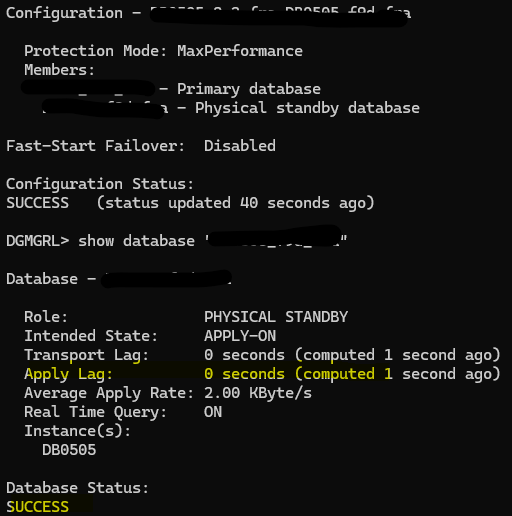
DR is in sync, let’s open the wallet now

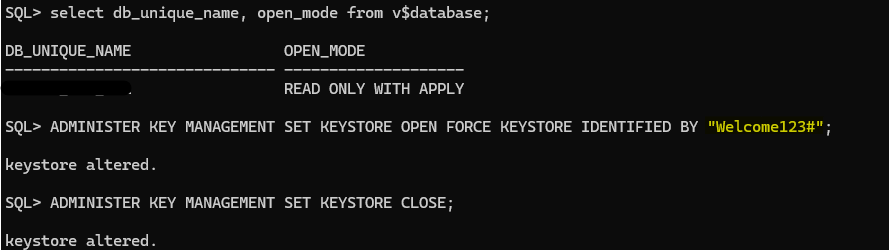
Using new password it does not work, using old one still working. This proves that we are just changing the password for our protected external wallets, keys inside those file remains same, that is the reason why DR still in sync, content has not changed. I will copy wallet from primary to DR so both have same password and continue with next example!
Backing Up Password-Protected TDE Wallets
You must back up password-protected TDE wallets, as per the security policy and requirements of your site. We have seen in the previous example that before changing the password Oracle forced you to create a backup and it also added a prefixes of the backup TDETDE wallet name as we have saw previously.
After you complete the backup operation, the keys in the original TDE wallet are marked as “backed up”. You can check the status of keys querying the V$ENCRYPTION_WALLET data dictionary view.
ADMINISTER KEY MANAGEMENT BACKUP KEYSTORE USING 'identifier'
FORCE KEYSTORE
IDENTIFIED BY TDE_wallet_password;
Take into consideration that in this demo I have included FORCE KEYSTORE because I have an autologin configured.

If FORCE KEYSTORE is not specified and autologin is being used then it will failed as you can see:

I can open the wallet manually and perform the backup but that will be two commands and then I need to open the autologin… 3 commands, FORCE KEYSTORE is doing that for me in one shot and it will leave the autologin open once is done, quite handy!
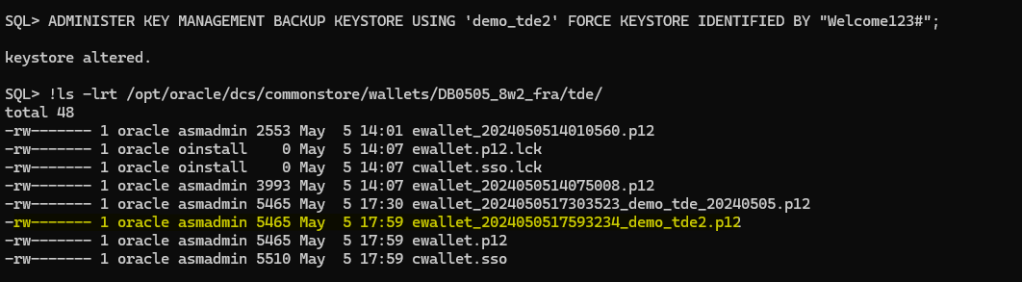
Notice that the column FULLY_BACKUP and the V$ENCRYPTION_WALLET is set to YES once a backup operation is done and it will remain like that unless you modify a key or a secret later, the modifications that you make do not exist in the previously backup-up copy, in that case Oracle will change the value to NO, that means you should take another backup to consider those changes with a backup copy.
Rekeying the TDE Master Encryption Key
You can rekey the TDE Master Encryption Key anytime you want as per of security policies of the organization or maybe because your keys has been compromised. Rekey operation deactivates the previous TDE master encryption key.
Oracle Database uses a unified TDE Master Encryption Key for both TDE column encryption and TDE tablespace encryption, that means if you rekey the TDE master encryption key for TDE column encryption, the TDE Master Encryption Key for TDE tablespace encryption also is rekeyed or vice versa.
If both the auto-login and the password-based keystores are present in the configured location (as set in the sqlnet.ora file), then when you rekey the TDE master encryption key, a TDE master encryption key is added to both the auto-login and password-based keystores. If the auto-login keystore is in use in a location that is different from that of the password-based keystore, then you must re-create the auto-login keystore.
NOTE: Do not attempt to perform a rekey operation of the master key concurrently with an online tablespace rekey operation, make sure to check if there is an operation going on first. A status of REKEYING means that the corresponding tablespace is still being rekeyed.
SELECT TS#,ENCRYPTIONALG,STATUS FROM V$ENCRYPTED_TABLESPACES;
To rekey the TDE master encryption key you can use the following syntax:
ADMINISTER KEY MANAGEMENT SET [ENCRYPTION] KEY
[FORCE KEYSTORE]
[USING TAG 'tag_name']
IDENTIFIED BY [EXTERNAL STORE | keystore_password]
[WITH BACKUP [USING 'backup_identifier']];
Example:
ADMINISTER KEY MANAGEMENT SET KEY FORCE KEYSTORE IDENTIFIED BY "XX" WITH BACKUP USING 'demo_rekey';

If we take a look to the V$ENCRYPTION_KEYS we can see that a new key has been added and activated automatically in our container CDB$ROOT in this case.

Great, but, what happens if my database is protected by a Dataguard?
If that is the case, this operation will affect your recovery process. This is because a new key has been created and activated. However, that key does not replicate to the other side. You need to do that manually by copying your wallet. Let’s check our DR config.

If we take a look in the alert in our DR database we are able to see the whole detail:

Let’s copy the wallet from the primary database and try to sync our DR again:

Let’s start the recovery process now:

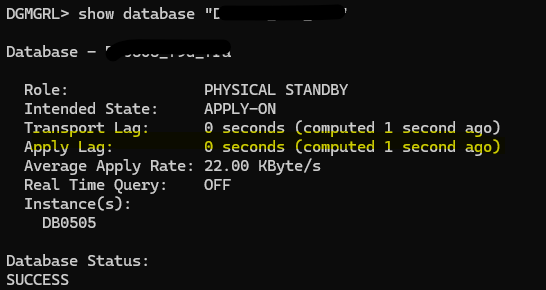
DR database is in sync again:

Be careful before performing this kind of task. There are better ways to do it if you want to minimize the impact on your DR. Let’s see how…
Creating TDE Master Encryption Keys for Later Use – Better for DG setup
You can create a TDE master encryption key that can be activated at a later date, this is especially useful when you have database that is protected with Dataguard and you want to avoid affecting your Dataguard replication as we have saw previously. This method is also useful in a multitenant environment when you must re-create the TDE master encryption keys. The CREATE KEY clause enables you to use a single SQL statement to generate a new TDE master encryption key for all of the PDBs within a multitenant environment.
To create a new TDE Master Encryption Key you must have ADMINISTER KEY MANAGEMENT or SYSKM privilege. The syntax is as follow:
ADMINISTER KEY MANAGEMENT CREATE KEY [USING TAG 'tag']
[FORCE KEYSTORE]
IDENTIFIED BY EXTERNAL STORE | keystore_password
WITH BACKUP [USING 'backup_identifier'];
tagis the associated attribute and information that you define. Enclose this setting in single quotation marks (‘ ‘).FORCE KEYSTOREtemporarily opens the password-protectedTDEwallet for this operation. You must open the TDE wallet for this operation.IDENTIFIED BYcan be one of the following settings:EXTERNAL STOREuses the keystore password stored in the external store to perform the keystore operation.keystore_passwordis the mandatory keystore password that you used when you created the original keystore. It is case sensitive.
WITH BACKUPbacks up theTDEmaster encryption key in the same location as the key, as identified by theWRL_PARAMETERcolumn of theV$ENCRYPTION_WALLETview. You do not need to back up auto-login or local auto-login software keystores.
Let’s create a new key:
ADMINISTER KEY MANAGEMENT CREATE KEY USING TAG 'demo_new_key' FORCE KEYSTORE IDENTIFIED BY "Welcome123#" WITH BACKUP USING 'demo_new_key';

We have a new key created, let’s take a look in the primary and DR how it looks:
Primary:

DR:

Our DR does not know that a new key has been created, however, replication is working fine (see screenshot below) as the key is not activated yet, take a look that the column ACTIVATION_TIME is null and also con_id = 0, it is not associated to any of the PDBs or CDB$ROOT.

So, before activate the key, let’s copy our wallet from primary to DR, otherwise we will reproduce the issue and DR recovery process will stop due to missing new key and we don’t want that, that is the whole point avoid issue in our DR.
I have copied the wallet to the DR but I’m not able to see the new key yet. This is an expected behavior. If we have copied our wallet, it is not necessary to open it to see the new key in our DR. That is taken care of automatically for the database. However, I found this interesting to share so you can get the whole picture. Let’s do that:

Let’s force the open of our wallet in the DR now:
ADMINISTER KEY MANAGEMENT SET KEYSTORE OPEN FORCE KEYSTORE IDENTIFIED BY "xx";
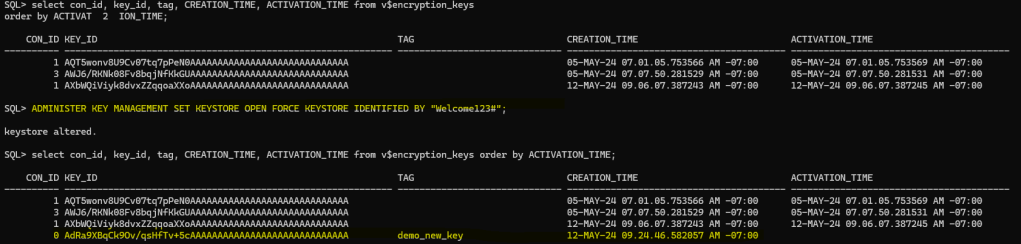
As you can see above, new key is shown now. Let’s activate the key in our primary database and see how DR is not affected now.
To activate the new key we need to execute the following command:
ADMINISTER KEY MANAGEMENT USE KEY 'key_id' USING TAG 'demo_new_key' FORCE KEYSTORE IDENTIFIED BY "xx" WITH BACKUP USING 'use_new_key';

Great, new key has been activated and we can see that in the view V$ENCRYPTION_KEYS

DR is in sync and working as expected:


As you can see, for our DR this operation has been seamless and the replication did not suffer any interruption, quite important to maintain your DR configuration unaffected.
Conclusion
We delved into the details of Oracle Transparent Data Encryption (TDE). We not only looked at how to use TDE in Oracle, but also explained the subsequent maintenance activities necessary to manage TDE keystores effectively.
As always, do not forget to back up password-protected TDE wallets, although Oracle Database will force you to do so before doing some operations on keys or secrets, etc.
Be careful and take into consideration databases protected by Dataguard before executing any operation, as you can impact the recovery process. An example of this is rekeying the TDE Master Encryption Key or creating and activating a new one in the same command. For minimal impact, create a TDE Master Encryption Key without activating it, copy the wallet to the secondary site, and then activate it.
And finally, get familiar with TDE as it has become another essential task for Oracle Database Administrators, and it is important to understand how it works while ensuring seamless continuity of operations.




 DatabaseVerse: Journey into the World of Databases
Leave a reply to Master Oracle TDE: PDB Unplug, Plug, and Clone Demos in 19c – DatabaseVerse: Journey into the World of Databases Cancel reply