
- So, What is TDE?
- Do I need to change my code after implementing TDE?
- Benefits?
- TDE Types
- Great!, How do I implement TDE, then?
- How to disable TDE?
- Backup you wallet!
- Conclusion
Before digging into Oracle Transparent Data Encryption (TDE) we need to know what it is
So, What is TDE?
TDE enables you to encrypt sensitive data that you store in tables, tablespaces and even database backups, This helps you protect sensitive data contained in your database, such as credit card numbers or Social Security numbers as example.
Do I need to change my code after implementing TDE?
No, you don’t! That’s the key advantage of TDE: you don’t need to touch anything as it is “transparent” for your applications. After the data is encrypted, this data is transparently decrypted for authorized users or applications when they access the data. TDE helps protect data stored on media (data at rest) in the event that storage media or data file is stolen.
To prevent unauthorized decryption, TDE stores the encryption keys in a security module that is external to the database. These mechanisms are: TDE Wallets, External KeyStore (Oracle Key Vault, OCI Key Management Service (KMS)) and keystores, which is the generic term for both TDE wallets and external keystores.
Benefits?
- Sensitive data is encrypted and therefore safe in the event that the storage media or data file is stolen
- Using
TDEhelps you address security-related regulatory compliance issues - No applications/code changes, database manages the data encryption and decryption
- You can encrypt data with zero downtime on production systems or you can encrypt offline during maintenance periods
TDE Types
TDE offers two ways of encrypt sensitive data, at the column level or the tablespace level
- Column level: You can encrypt sensitive data in application table columns
- Tablespace Level: Encrypt all of the data that is store in a tablespace
Tablespace level is commonly use because it is easier to implement and you don’t need to perform granular analysis of each table column to determine the columns that need encryption.
Take into consideration that BFILE data is not encrypted due to the fact that this data is physically located in an operating system file, not in the database tablespace.
Great!, How do I implement TDE, then?
To configure TDE you must perform a one time setup before you create keystore and encrypt data. You should set the static parameter WALLET_ROOT and the dynamic parameter TDE_CONFIGURATION to designate the location and type of keystore that you plan to use.
- WALLET_ROOT parameter specifies the top directory for many different software keystores (
TDE, Oracle Enterprise User Security (EUS), TLS). ForTDE, the directory for automated discovery is WALLET_ROOT/tde. - TDE_CONFIGURATION parameter specifies the type of keystore (
software keystore or Oracle Key Vault). When you set the type of keystore and perform the creation Oracle database creates a directory within theWALLET_ROOTlocation for the keystore type.- Example: If you set
TDE_CONFIGURATIONtoFILE, Oracle database created aTDEwallet in WALLET_ROOT/tde location. To use Oracle Key Vault, install the Oracle Key Vault client software into WALLET_ROOT/okv and set theTDE_CONFIGURATIONtoOKV.
- Example: If you set
Note: In previous releases, The SQLNET.ENCRYPTION_WALLET_LOCATION parameter was used to define the keystore directory location. This parameter has been deprecated. Oracle recommends that you use the WALLET_ROOT static initialization parameter and TDE_CONFIGURATION dynamic initialization parameter instead.
WALLET_ROOT
Set the WALLET_ROOT static parameter for the wallet directory and restart the instances:
alter system set wallet_root='/opt/oracle/dcs/commonstore/wallets/nocdb19c/wallet' scope=spfile sid='*';

TDE_CONFIGURATION
Set the TDE_CONFIGURATION parameter to specify the TDE wallet type. In this demo we will use FILE instead of OKV
ALTER SYSTEM SET TDE_CONFIGURATION="KEYSTORE_CONFIGURATION=FILE" SCOPE=both sid='*';
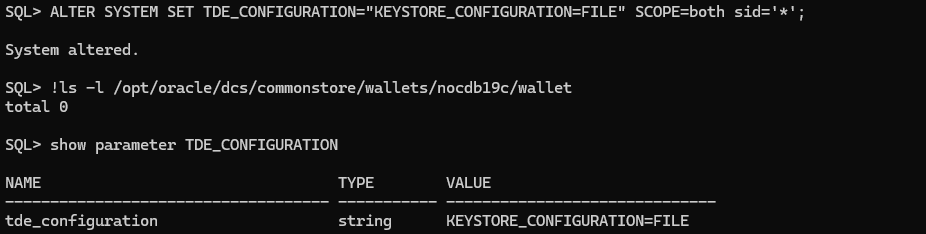
TDE Wallets
There are three different types of TDE wallets: password-protected, auto-login and local auto-login TDE wallets
Creating a Password-Protected Software Keystore
A password-protected software keystore requires a password, which is used to protect the TDE master keys.
As we already set the WALLET_ROOT and TDE_CONFIGURATION we just need to perform the ADMINISTER KEY MANAGEMENT CREATE KEYSTORE command to create the wallet. We can do this with an user with ADMINISTER KEY MANAGEMENT or SYSKM privilege:
ADMINISTER KEY MANAGEMENT CREATE KEYSTORE IDENTIFIED BY "xxx";

As you can see above, /tde directory was created automatically under WALLET_ROOT and a ewallet.p12 file was created, that’s our TDE wallet protected by password
Creating an Auto-Login or a Local Auto-Login Software Keystore
As an alternative to password-protected keystores, you can create either an auto-login or local auto-login software keystore. Both of these keystores have system-generated passwords and are PKCS#12-based files. The auto-login software keystore can be opened from different computers, while the local auto-login software keystore can only be opened from the computer on which it was created. Both types are derived from password-protected software keystores and can be created without requiring database downtime.
ADMINISTER KEY MANAGEMENT CREATE AUTO_LOGIN KEYSTORE FROM KEYSTORE IDENTIFIED BY "xxx";

As you can see above cwallet.sso file has been created, that’s the autologin. By default, if LOCAL is not specified then auto login file can be accessible by other computers.
Take into consideration that if you have a RAC database and LOCAL is specified, only the node that has created the autologin file will be able to open it. In a RAC environment, for simplicity, it is better not to specify the LOCAL keyword. Otherwise, you will need to create multiple cwallet.sso files for each node that contains the same credentials.
Set Master Key encryption
Before performing some encryption we should create/set our master key encryption as we still don’t have one

Let’s do that:
ADMINISTER KEY MANAGEMENT SET KEY FORCE KEYSTORE IDENTIFIED BY "xxx" WITH BACKUP ;

Now, let’s take a look to the status of the encryption wallet and keys:

great!, now we can proceed with next steps
Encrypting a Tablespace Online
Ok, so we have our TDE configured, let’s encrypt a tablespace online but before that let’s see what we have right now:
select TABLESPACE_NAME, ENCRYPTED from DBA_TABLESPACES;

select TS#, ENCRYPTIONALG, ENCRYPTEDTS, ENCRYPTEDKEY, MASTERKEYID, KEY_VERSION, STATUS from V$ENCRYPTED_TABLESPACES;

So, we have couple of tablespaces but any of those are encrypted yet, this is obvious as I have just enabled TDE in the database.
Let’s encrypt the TABLESPACE_TDE_DEMO online
ALTER TABLESPACE TABLESPACE_TDE_DEMO ENCRYPTION ONLINE ENCRYPT;

If you don’t specify the encrypt algorithm to encrypt tablespaces in Oracle 19c, by default will be use AES128. Oracle has release a patch 30398099 to change the database default algorithm from AES128 to either AES192 or AES256. Patch 30398099 has been integrated into the April 2021 RU for Oracle Database release 19c (19.11), so that this functionality is available without extra patches. To set the parameter, this is an example:
ALTER SYSTEM SET "_TABLESPACE_ENCRYPTION_DEFAULT_ALGORITHM" = 'AES256' SCOPE = BOTH SID = '*';
You can specify more parameters when encrypting tablespaces online
ALTER TABLESPACE XX ENCRYPTION ONLINE USING 'AES192' ENCRYPT FILE_NAME_CONVERT = ('xxx.dbf', 'xx.dbf');
In this example:
ENCRYPTION ONLINE USING ‘AES192’ ENCRYPTsets the statement to encrypt the tablespaceXXwhile it is online and assigns it theAES192encryption algorithm. If you omit theUSING algorithmclause, then the default algorithm,AES128, is used as mentioned before. For theSYSTEMtablespace, you can use theENCRYPTclause to encrypt the tablespace, but you cannot specify an encryption algorithm because it is encrypted with the existing database key the first time. After encrypting theSYSTEMtablespace, use theREKEYclause to specify the algorithm.FILE_NAME_CONVERTspecifies one or more pairs of data files that are associated with the tablespace. The first name in the pair is an existing data file, and the second name is for the encrypted version of this data file, which will be created after theALTER TABLESPACEstatement successfully executes. If the tablespace has more than one data file, then you must process them all in this statement. Note the following:- Separate each file name with a comma, including multiple pairs of files. For example: FILE_NAME_CONVERT = (‘users1.dbf’, ‘users1_enc.dbf’, ‘users2.dbf’, ‘users2_enc.dbf’)
- You can specify directory paths in the
FILE_NAME_CONVERTclause. For example, the following clause converts and moves the matching files of the tablespace from thedbsdirectory to thedbs/encdirectory: FILE_NAME_CONVERT = (‘dbs’, ‘dbs/enc’) - The
FILE_NAME_CONVERTclause recognizes patterns. The following example converts the data filesusers_1.dbfandusers_2.dbftousers_enc1.dbfandusers_enc2.dbf: FILE_NAME_CONVERT = (‘users’, ‘users_enc’) - In an Oracle Data Guard environment, include the name of the standby database data file in the
FILE_NAME_CONVERTsettings. - If you are using Oracle-managed file mode, then the new file name is internally assigned, so this file name should not affect your site’s file-naming standards. If you are using non-Oracle-managed file mode and if you omit the
FILE_NAME_CONVERTclause, then Oracle Database internally assigns an auxiliary file name, and then later renames it back to the original name. This enables the encryption process to use the name that you had originally given the file to be encrypted. The renaming operation is effectively creating another copy of the file, hence it is slower than explicitly including theFILE_NAME_CONVERTclause. For better performance, include theFILE_NAME_CONVERTclause. - You can find the data files for a tablespace by querying the
V$DATAFILEorV$DATAFILE_HEADERdynamic views.
$ORACLE_HOME/dbsdirectory. If the data files are located there, then you do not have to specify a path.
So, what Oracle does is basically creating a copy of the datafiles and then encrypting then, once that is done it switch the datafiles to the new ones that are encrypting… so make sure to have extra room when you are going to do a online encryption of your tablespaces.
This is an alert log example:

How to disable TDE?
Why would you like to do that? It is not possible to remove TDE once implemented, even if there are no encrypted objects in the database, the TDE wallet has to be present in the wallet location. It does not cause any harm.
Deleting the TDE wallet will not disable TDE. Once the TDE wallet is configured, the wallet should never be deleted or recreated.
NOTE: If the wallet or its password is lost, then there is no way to recover the encrypted data. There is no back door, the database has to be recreated.
Backup you wallet!
Once you have implemented TDE there are two things you must do:
- Custody the TDE password wallet
- Perform backups of your wallet frequently… trust me, you don’t want to lose it and don’t have a backup of it…
Conclusion
Oracle Transparent Data Encryption (TDE) offers an efficient and streamlined approach to safeguarding sensitive data within Oracle databases. By enabling seamless encryption of data at rest, TDE ensures that even in the event of media or data file theft, the stored information remains secure. Moreover, TDE presents several key benefits, including compliance with security-related regulations, data encryption without impacting existing applications, and the flexibility to encrypt data either at the column level or the tablespace level. The latter is particularly noteworthy for its ease of implementation and avoidance of the need for granular analysis.
It’s important to note that once TDE is implemented, it cannot be disabled. The TDE wallet must be retained and backed up frequently to avoid data loss, as a lost wallet or password leads to irrecoverable encrypted data, necessitating database recreation. This emphasizes the criticality of maintaining TDE wallets and ensuring their security.
Overall, the implementation of Oracle Transparent Data Encryption is a pivotal step in enhancing the security of Oracle databases, strengthening regulatory compliance, and safeguarding sensitive information from unauthorized access. It is imperative for organizations to carefully manage their TDE implementation, including the custody and preservation of TDE wallets, to mitigate the risk of data loss and ensure the robust protection of encrypted data.




 DatabaseVerse: Journey into the World of Databases
Leave a comment