
You know Exadata Cloud at Customer (ExaDB-C@C)/Exadata Database Service (ExaDB-D) is something really big. Having better performance for your Oracle database outside of these engineered systems is, I would say, not possible… maybe? Let’s see in the future, but right now there is nothing better.
In ExaDB-C@C/ExaDB-D you can scale up and down the VM Clusters resources but there is something important about this:
Although you can scale your infra buying extra compute nodes and storage cell, once you have it you can use it all, but OCPU is different…
Per-Second Billing for OCPU Usage
Per-second billing means that OCPU usage is billed by the second, with a minimum usage period of 1 minute. And… most important: Oracle doesn’t stop billing when a VM or VM Cluster is stopped. To stop billing for a VM Cluster, lower the OCPU count to zero.
So, you are billed for what you are using but there is a important downside of this compared with Autonomous Database.
In Autonomous Database you can enable the autoscaling feature: Compute and storage scale up and down independently in response to transient changes in workload, up to 3X base-provisioned resources, and with no downtime… In ExaDB-C@C/ExaDB-D there is not such feature in the console to enable it… so
Customers are saying this: “My OCPUs are like overeager guests at a party – they show up early and linger late, draining my wallet! Any tips to save some cash?”
If you scale up your OCPUs and you are not really use them you will be billed the 100% of that, so what can you do to save money?
ODyS (Oracle Dynamic Scaling)
Oracle has release a tool called ODyS (Oracle Dynamic Scaling) that is a engine tool to automate the scale-up/scale down based on CPU load or scheduling for ExaDB-D/ExaDB-C@C
When Oracle Dynamicscaling is running, if your workload requires additional CPUs the database system automatically will uses the resources without any manual intervention required.
but, How Oracle DynamicScaling Works?
Oracle DynamicScaling can be executed as standalone executable or as daemon on one or more ExaDB-D compute nodes or ExaDB-C@C VM Cluster nodes.
By default DynamicScaling is monitoring the CPUs with very limited host impact and if the load goes over the Maximum CPU threshold (“–maxthreshold”) for an interval of time (“–interval”), it will automatically scale-up the OCPU by a factor (“–ocpu”) till a maximum limit (“–maxocpu”). If the load goes under the Minimum CPU threshold (“–minthreshold”) for an interval of time (“–interval”) scale down will be executed util the minimum limit (“–minocpu”) of ocpu. If a valid cluster filesystem (ACFS) is provided, DynamicScaling will consider the load of all nodes (where DynamicScaling is running) and it will perform a scale-UP/DOWN based on the cluster node load (average/max).
An example will be something like this:
./dynamicscaling.bin --db-system-id <DB system OCID> |--cloud-vm-cluster-id <cloud VM cluster OCID> |--vm-cluster-id <VM cluster OCID> --ociregion <DB System region> \
--tenancy-id <tenancy OCID> \
--user-id <user OCID> \
--keyfingerprint <user keyfingerprint> \
--privatekey <user privatekey> \
--interval 300 \
--maxthreshold 80 \
--minthreshold 60 \
--maxocpu 96 \
--minocpu 22 \
--ociregion eu-frankfurt-1 \
--acfs /acfs01/.dynamicscaling
--scheduling 'Saturday:0-23:28;Sunday:0-23:28'"
You can configure ODyS to start at boot time or even make it a cluster HA resource so you could leverage to Oracle Clusteware to manage it (this is the recommended configuration from Oracle).
Installation
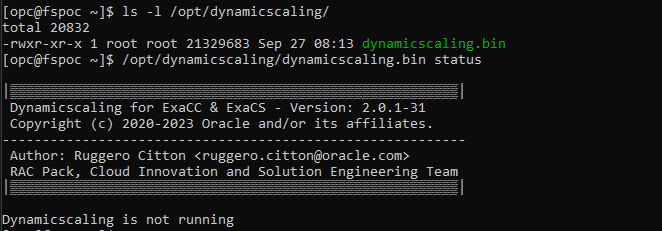
To install ODyS, you can just download the RPM version available for your system from the official note and execute as sudo or root:
rpm -i Dynamicscaling-2.0.1-X.el7.x86_64.rpm

DEMO
getOCPU
I have installed ODyS in a VM cluster with 3 nodes. I have made all the previous configurations, and I have created a script to make my life easier. In this example, I will call the getocpu function through the script. The syntax for getocpu is as follows:
Usage:
dynamicscaling.bin getocpu --ocicli [--auth <instance_principal|resource_principal>]
                           --db-system-id <DB system OCID> |--cloud-vm-cluster-id <cloud VM cluster OCID> |--vm-cluster-id <VM cluster OCID>
                          [--ociprofile <oci profile name>]
dynamicscaling.bin getocpu OPTIONS
  --ocicli               OCI client usage
  --auth                 OCI client resource principal authentication
  --db-system-id         Database system OCID
  --cloud-vm-cluster-id  Cloud VM cluster OCID (ExaDB-D systems)
  --vm-cluster-id        VM cluster OCID (ExaCC systems)
  --ociprofile           OCI profile name from '$HOME/.oci/config' (Default: 'DEFAULT')
This is the output:

In summary my current system/VM Cluster has allocated 6 OCPUs (2 CPUs per VM), the minimum OCPU per VM is 2.
Enabling ODyS
ODyS supports REST API or OCI CLI with Instance/Resource Principals. However, Instance/Resource Principals Authentication is not supported on ExaDB-C@C yet. In order to use ODyS, I will need to use the REST APIs as my infrastructure DEMO is an ExaDB-C@C. I will need some additional parameters:
- –tenancy-id Tenancy OCID
- –user-id User OCID
- –keyfingerprint User key Finger Print
- –privatekey User private key path
and this will be my scaling OCPU configuration parameters:
- –minocpu: 6
- –maxocpu: 12
- –interval: 180
- –acfs: so it can be cluster aware
- –loadtype: max (it will check the max cpu usage
You can find more information about parameters in the official note:
(ODyS) Oracle Dynamic Scaling engine – Scale-up and Scale-down automation utility for OCI DB System (ExaCS/ExaC@C) (Doc ID 2719916.1)
Let’s continue and enable ODyS:
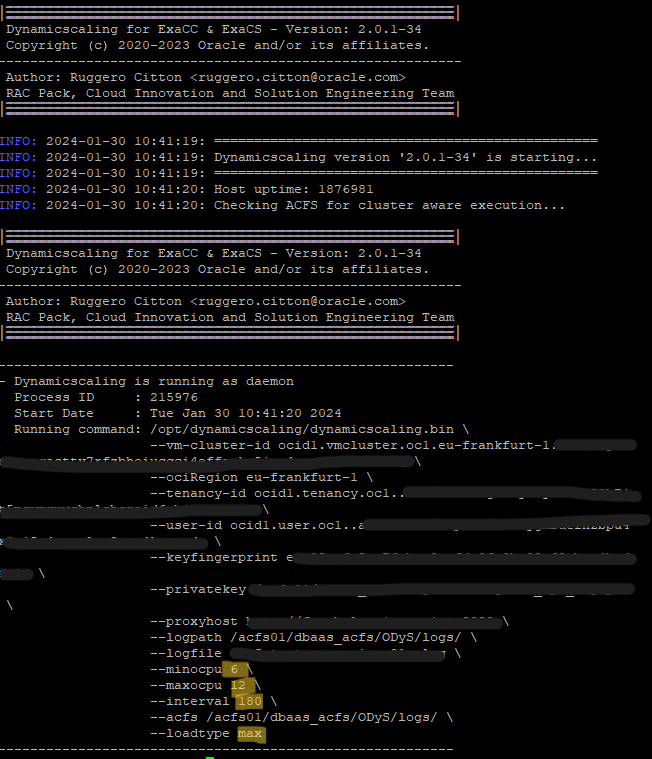
ODyS is enabled and running in my 3 VMs and as you can see all parameters are set.
Stressing my system
What’s next? I want to stress my system and see if ODyS will do its work, right? that means scale my VM Cluster OCPUs.
To stress my system I have configured swingbench, you can read more about this on a previous post: Swingbench – load generator, how to use it?
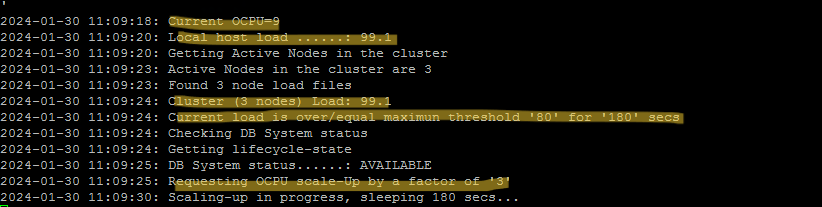
After running my stress, the load starts to go up in my VMs, ODyS is checking the load every 180 seconds as that is the interval I have defined. ODyS is measuring the load on my 3 VMs nodes as it is running on all of them, and there is an ACFS, which means that it is cluster aware.
My threshold for CPU Load is 60%-80%. If the CPU load is within the threshold, then it is okay; ODyS will not take any action. However, if the CPU load is under or over the threshold, then ODyS will scale up/down the OCPUs, considering the OCPU factor, which is 3, because this is a 3-node configuration.
So…

My VM Cluster has scaled OCPUs from 6 to 9, ODyS is doing its job! Let’s continue to stress my system and voila!
Load is 99.1% so is over maximum threshold of 80% again for 180 secs, another scale-up operation in place:
At this point I have stopped swingbench once scaling-up has completed. Let’s see what ODyS is doing now:

ODyS is checking the load and something interesting happened:

Load is 43.1%, under 60-80% threshold but scale-down operation is not done, instead you can see a message:
Scaling-Down currently not possible, waiting '2024-01-30 13:09:25', 120 minutes after latest scale-Up time done by host 'XXXX'
Why did this happen? It’s quite simple, the tool is programmed that way, and this is what Oracle says in the note:
While we immediately scale up the OCPUs in the event of high CPU utilization, we don’t immediately drop the OCPUs should the load drop and CPU utilization drops below the target range. If the load is fluctuating we don’t want to drop the OCPU on every dip in load as that will lead to more situations where the CPU is below target and service levels could be affected. Dynamicscaling will prevent the system from scaling down immediately. Rather, it will wait 120 minutes before lowering the OCPUs. This delay only takes effect after the CPU utilization has stabilized into the target range.

The advantage of the grace period allows the workload to get into a steady state, mitigating unnecessary scaling operations ensuring enough head room. As it’s a costly operation to scale up and down and takes about 5mins for a request to complete and stability and performance should not be compromised
It makes sense but… I think we should have an option available in case we want to override this default behavior, however there is not such feature yet.
So, at this point if you are certain about how the CPU usage will be, you can scale down the OCPUs using the ODyS setOCPU function, like I did. But of course, because this was a DEMO, for a system I will leave it as it is and allow ODyS to continue working dynamically.
setOCPU
Syntax for setOCPU function:
Usage:
dynamicscaling.bin setocpu --db-system-id <DB system OCID> |--cloud-vm-cluster-id <cloud VM cluster OCID> |--vm-cluster-id <VM cluster OCID> --ociregion <DB System region>
                           --tenancy-id <tenancy OCID>
                           --user-id <user OCID>
                           --keyfingerprint <key finger print>
                           --privatekey <private key path>
                           --ocpu <OCPU Number>
                          [--cacert <cert file path>]
                          [--shape <system shape>]
                          [--nodecount <system node count>]
                          [--proxyhost <host> --proxyport <port> [--proxyid <user ID> --proxypass <password file>]]
                          [--logfile <log file name>]
                          [--logpath <log file path>]

dynamicscaling.bin setocpu OPTIONS
  --db-system-id         Database system OCID
  --cloud-vm-cluster-id  Cloud VM cluster OCID (ExaDB-D systems)
  --vm-cluster-id        VM cluster OCID (ExaDB-C@C systems)
  --tenancy-id           Tenancy OCID
  --user-id              User OCID
  --keyfingerprint       User key Finger Print
  --privatekey           User private key path
  --cacert               Alternate CA public key
  --ociregion            OCI System Region
  --shape                System Shape
  --nodecount            System nodecount (ExaDB-C@C X8M/X9M/X10M)
  --proxyHost            HTTP proxy server
  --proxyPort            HTTP proxy server port (Default: 80)
  --proxyId              HTTP proxy server username
  --proxyPass            HTTP proxy server password file
  --ocpu                 OCPU number
  --logfile              Log file name (Default: dynamicscaling.log)
  --logpath
Output:

cpu_count of databases
Ok, my CPU is dynamically scaling now but what is happening on my databases?
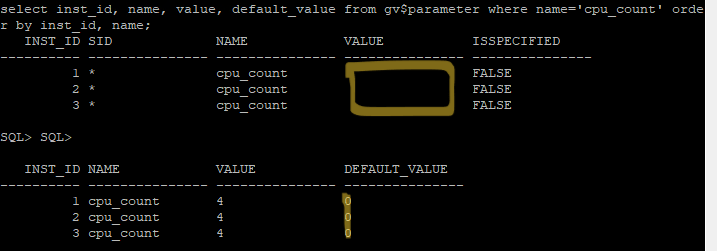
This is an interesting topic as well. You must evaluate carefully the instance caging. In an ExaDB-D/ExaDB-C@C, you will have a lot of databases running; this is the purpose of Exadata, consolidating workloads. Having CPU_COUNT=0 or not set in your databases will follow the CPU scale operations, but if you set CPU_COUNT, it won’t. If you require such behavior, then you will need to configure (ODCC) Dynamic CPU Count. I have created a post about it here: ODCC: The missing piece in your Oracle CPU scaling strategy
In this DEMO my database’s CPU_COUNT is not set, so it is detecting the CPU scale up/down and adjusting the parameter dynamically:

Conclusion
By making use of ODyS, users can effectively manage and optimize their OCPU usage in response to workload variations, enabling them to save costs and maintain optimal performance. The impact of ODyS on database CPU_COUNT is something you should review carefully if you are using instance caging as you will need to change the parameter in the databases manually, otherwise you can automate this using ODCC.
If you want to save money and avoid manual interventions, consider using ODyS and ODCC as optional but desirable. It will depend on your configuration.
Reference
(ODyS) Oracle Dynamic Scaling engine – Scale-up and Scale-down automation utility for OCI DB System (ExaCS/ExaC@C) (Doc ID 2719916.1)





 DatabaseVerse: Journey into the World of Databases
Leave a comment