
ORACLE_SID is one of the common database environment variables that everyone is aware of, at least in the Oracle world. It is well-known by developers and heavily used in bash scripts.
I have seen many use cases when databases are migrated from single instance to Oracle RAC architecture with two or more instances running now, or just migrating from non-CDB to CDB architecture and many questions came out:
- How do Oracle clients connect to the databases?
- How do applications connect to the databases?
- How do my batches connect to the databases?
- Is the application running on the same server as the database? (We all know that this is a bad practice, but we also know that it sometimes happens.)
So, with changes in the database architecture it is quite normal to assume that changes are coming in the application layer as well, right?
Well, that is not the always the case, in fact it is quite common that application will remain same, if something is working why change it?
So, we need to find out all possible answers to these questions, understand how the clients, applications, batches are connected to the database to do what they have to do.
Let’s assume we have an application and database running on the same host
I have set my ORACLE_HOME and ORACLE_SID
I can connect using the following command:
sqlplus myUser/MyPass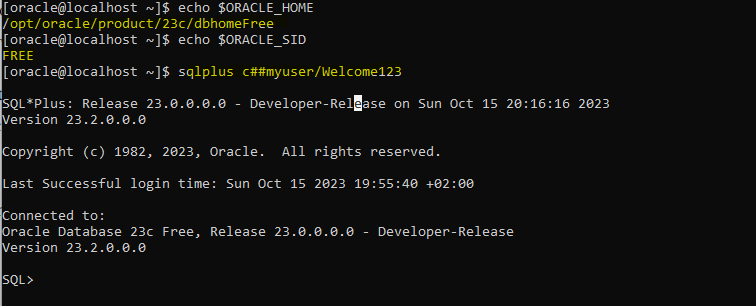
As you can see it is connecting without issue
What happen if my database is migrated to an Oracle RAC architecture with two or more instances?
There is no more FREE instance , I will have FREEn, for example if my database is now an Oracle RAC with two instance running I will have:
FREE1 running on node 1
FREE2 running on node 2
So, I can change my ORACLE_SID environment and set one of them (FREE1 or FREE2) and I will connect to the corresponding instance, the problem with that is that RAC is a High Availability Architecture and I’m not using it, if the instance is not available for whatever reason my connection will fail.
Instead, I will prefer to connect to a SERVICE_NAME, same happens if I have migrated my database from non-CDB to CDB architecture, I will need to connect to my PDB instead (btw it is possible to connect to a PDB using a SERVICE_NAME as SID but I won’t talk about it in this post)
The are many other reasons about using SERVICE_NAME instead of ORACLE_SID, for example in a Dataguard configuration, but again I don’t want to make it more complicate it, I will talk about that later in another post at some point.
So, let’s continue with the example, my app need to connect to my database but it only work locally and it can’t use a TNS entry because it is quite old, only work using ORACLE_SID, how can I connect to a SERVICE_NAME?
Fortunately there is an option, phew!
And here is when TWO_TASK variable came to the picture
If we want to be able to connect to a remote database or a database on the same machine but using SQLNet we can set the TWO_TASK variable like this:
TWO_TASK = tns entry
example:
TWO_TASK = MyDatabase
Where MyDatabase is my TNS connection string. The setting of TWO_TASK overrides the ORACLE_SID variable if set. Also, the connection is not “local”, it will use SQLNet to connect remotely using the TCP/IP protocol.
Let’s see an example, I have created the following entry in my tnsnames.ora file:
MyDatabase =
  (DESCRIPTION =
    (ADDRESS = (PROTOCOL = TCP)(HOST = localhost)(PORT = 1521))
    (CONNECT_DATA =
      (SERVER = DEDICATED)
      (SERVICE_NAME = FREE)
    )
  )
I will run two tests and check how my connection is established in the database.
1 – Using ORACLE_SID variable:

2 – Using TWO_TASK:

As you can see, when I used ORACLE_SID, the connection was made locally using the beq protocol. Immediately after, I set the TWO_TASK variable without unsetting ORACLE_SID. TWO_TASK overrides it and the connection was made using the TCP protocol. I didn’t have to pass the TNS entry.
I hope this example was clear to understand how to use the TWO_TASK variable. It can come in very handy for cases where an outdated application can’t utilize a TNS entry and relies solely on ORACLE_SID. By employing the TWO_TASK variable, it allows for connections to SERVICE_NAMES via SQLNet and TCP/IP protocol.




 DatabaseVerse: Journey into the World of Databases
Leave a comment