
Hi everyone, in the previous post Oracle Fleet Patching and Provisioning – Part 1, I delved into how Oracle Fleet Patching and Provisioning (FPP) works. However, I focused on the provisioning part, where I created a GI and two Oracle Homes images, and successfully provisioned an Oracle Restart and two Oracle Homes with different patch levels.
In this post, I’m going to focus on creating databases and patching. Let’s continue!
Oracle Fleet Patching and Provisioning (FPP) allows you to easily patch multiple databases with just one command but there are different approaches, let’s talk about them.
If you are familiar with patching, you will probably hear about in place/out of place patching methods, if not high level steps are:
in-place patching:
- Stage the latest opatch and patch bundle on the server (e.g. latest Release Update)
- Stop the databases (downtime starts)
- Update opatch
- Apply the patch
- Restart the databases (downtime ends)
- Run datapatch
The downtime window must be large enough to accommodate the patching operation and its rollback in case of any problems.
Out-of-place patching:
- Prepare a new Oracle Home which contains the required patches
- Stop the databases (all, or one at the time)
- Restart the databases in the new Oracle Home
- Run datapatch
When applying patches, it is recommended to use “out-of-place patching”. This method allows you to schedule separate downtime windows for each database and provides flexibility for easier rollback. However, implementing out-of-place patching may require some additional preparation and installation steps before the actual patching process.
FPP implements out-of-place patching and understands the configuration details of the databases. It can also undo a patching operation by rolling back to the original oracle home. This capability reduces the risk of maintenance. Also, the process can be restarted if a failure occurs during the patch procedure, the operator simply corrects the problem then can reissues the patch command. It will resume where it left off.
Let’s get down to business! No more chit-chat, let’s dive right in!
DEMO
Provision the database using the standard template
So, I have the following command to create a database:
rhpctl add database -workingcopy  WC_db_previous_FPPC  \
  -dbname fpplive1_site1 -datafileDestination DATA -dbtype SINGLE \
  -sudouser opc -sudopath /bin/sudo
Database creation completed without issues, I have logged into the target server fppc and as you can see below in the screenshot the DB version es 19.17:

Okay, I have an Oracle database created on version 19.17, and I also have another Oracle home without any database running on it, version is 19.19. I’m going to use FPP to patch the database using the out-of-place method.
Patch the database
Couple of things to mention:
- FPP knows where my working copies are, so I don’t need to pass the target nodes.
- I need to tell to FPP which are my working copies: source working copy (19.17) and target working copy (19.19).
- Along with these two parameters, you can pass a list of databases (by default all the databases hosted in the source working copy are patched).
- FPP detects automatically the type of deployment (cluster or single node), type of database (RAC, RAC One Node or Single Instance), missing patches on the target working copy, etc.
- If the database is in RAC mode, FPP relocates gracefully the services and move one instance at the time to the new home, then runs datapatch at the end. Again, this is achieved with a single line of code through FPP.
Ok great, most important thing and useful thing to know:
We can use -eval flag to evaluate the basic requirements before executing the actual patching, this will check Oracle homes versions , owners and groups of the Oracle Homes and other basic checks.
It is a good idea and best practice to run it hours or days before the intervention, so you can have some time to fix any possible issue.
Let’s run the command:
rhpctl move database -sourcewc  WC_db_previous_FPPC \
-patchedwc WC_db_current_FPPC -dbname fpplive1_site1 \
-sudouser opc -sudopath /bin/sudo -eval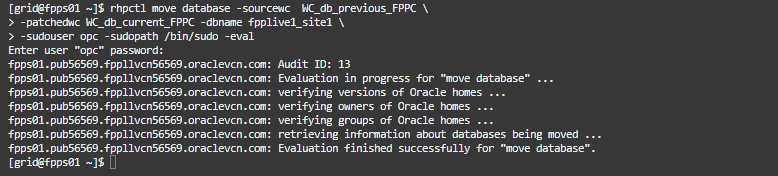
As per output everything looks ok, so let’s do the patching
rhpctl move database -sourcewc  WC_db_previous_FPPC \
-patchedwc WC_db_current_FPPC -dbname fpplive1_site1 \
-sudouser opc -sudopath /bin/sudo
Great, patching completes, FPP moved the database from 19.17 Oracle Home to the 19.19 and then applied the datapatch. Let’s check the path level in the database:
set lines 220
select PATCH_ID, PATCH_UID, STATUS, DESCRIPTION from DBA_REGISTRY_SQLPATCH;
Sure thing! The database is totally rocking at 19.19 version! 🎉
As a conclusion with FPP’s implementation of out-of-place patching, the patching operation becomes more manageable. FPP understands the configuration details of the databases and can undo a patching operation by rolling back to the original Oracle home, reducing the risk of maintenance. Additionally, any failures during the patch procedure can be corrected, and the process can be resumed seamlessly.
Overall, the patching process using FPP proved to be straightforward and efficient. While there may be some complexity in certain cases, the outlined steps and FPP’s capabilities greatly simplify the patching procedure.
References:
FPP – Introduction and Technical Overview




 DatabaseVerse: Journey into the World of Databases
Leave a comment