

Oracle Dataguard is the solution that ensures high availability, data protection, and disaster recovery for Oracle Databases. When Oracle Multitenant was introduced in 12c long time ago the database architecture changed unlocking new capabilities, facilitating consolidation and lifecycles of the databases. Still, there were some limitations related to Data Guard specifically when you have more than on PDB on your CDB.
In short, customers were not able to switchover/failover a specific PDB in the CDB as the Data Guard configuration is protecting the whole CDB. That’s not a big deal if you have done a good job consolidating databases that are related and dependent on each other for some business reason. So, if something goes wrong, you just switchover or failover your entire CDB to the secondary site and continue to give services to your customer. But what if that is not the case?
Well, if only one PDB is affected, then you will need to switchover your entire CDB, impacting perhaps other applications not related and affecting different SLAs. So, Oracle knew about this and has added a new feature known as Oracle Data Guard per Pluggable Database or just DGPDB. This new feature for Data Guard, of course, is only available for Multitenant, as non-CDB architecture is desupported.
The new feature has been introduced in 21c with the July 2022 release update (21.7) and onwards. It allows the customer to implement the traditional per-CDB Data Guard architecture and now the more flexible per-PDB Data Guard, where each PDB is configured, maintained, and switchover over independently.
- Traditional per-CDB architecture
- New per-PDB architecture
- Does it make sense? what are the benefits?
- Restrictions of Data Guard per Pluggable Database
- Seting up DGPDB
- Enable archivelog, force logging, flashback
- Network connectivity and TNS entries
- Establish a Passwordless Connection using a Wallet
- Create DG config for source and target database
- Establish the Connection Between Configurations
- Prepare PDB for DG config!
- Restore/Copy datafiles from PDB source in target CDB
- Export/import TDE keys
- Start redo transport!
- Switchover pluggable PDB
- Failover pluggable PDB
Let’s put some images to close this intro and make it simple
Traditional per-CDB architecture

When a CDB is in a traditional Data Guard configuration, one CDB is primary, and one CDB is standby. Consequently, every PDB in the primary CDB will also be primary, and every PDB in the standby CDB will also be standby. When the CDB transitions to a new role, all the PDBs transition simultaneously.
New per-PDB architecture

In the new possible configuration architecture Data Guard protects individual PDBs rather than the whole CDB.
That means a DGPDB configuration will have two primary CDBs instead of one primary CDB and one standby CDB. Each CDB will contain PDBs open read-write (eventually protected by a target PDB on the remote CDB) and mounted PDBs protecting the corresponding PDBs in the remote CDB.
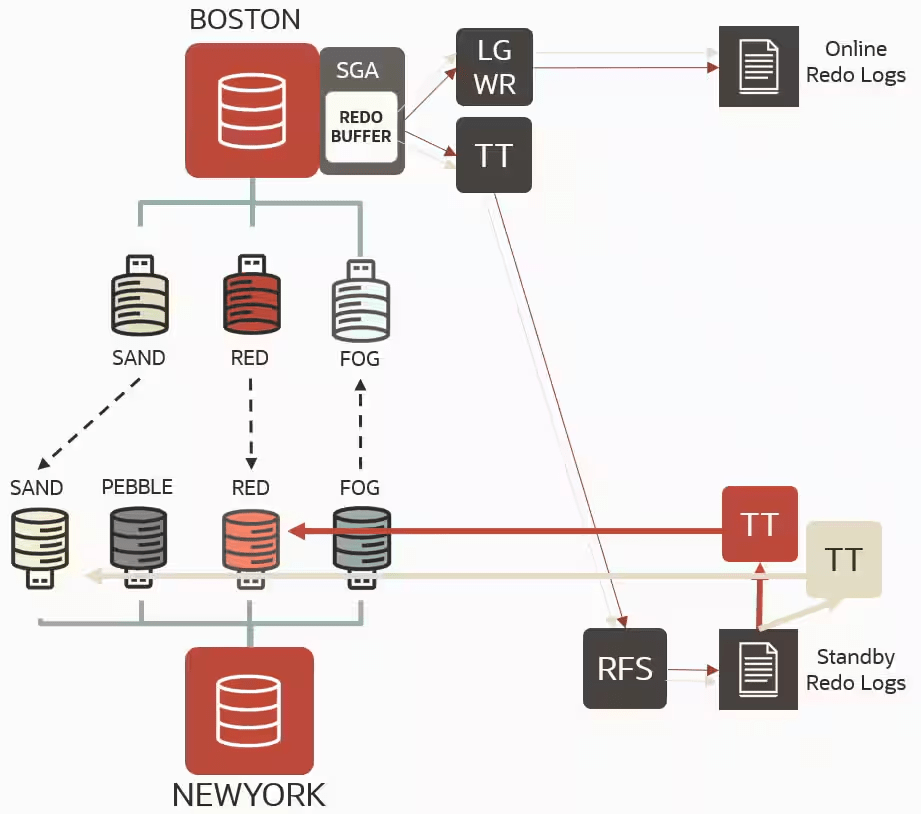
DGPDB uses the same redo transport services architecture as traditional Data Guard. In the primary instance, the log writer process (LGWR) writes the redo information of the whole CDB to the online redo logs (ORLs). The ASYNC transport process (TTnn) then sends this information to the remote CDB where the target PDBs reside. The receiver process (RFS) writes the redo received from the primary to the standby redo logs (SRLs). Up to this point, the transfer mechanism remains the same as traditional Data Guard and provides the exact gap resolution mechanism.
There is a single apply process per PDB (TTnn), filtering and applying the relevant data. Recovery can be initiated and stopped at the PDB level.
Does it make sense? what are the benefits?
Of course it makes sense but what about the benefits and use cases?. Having Data Guard protection at the PDB level enables customers to independently switch over or fail over a PDB to the remote site, offering some advantages, for example:
- Planned Maintenance and Workload Rebalance:
- Drain one CDB for maintenance by switching over one PDB at the time.
- Rebalance the workload by switching over individual PDBs.
- Sick PDB Protection:
- Failover a single PDB in a failed state without impacting the whole CDB.
- Single PDB Disaster Recovery Tests:
- Exercise regular disaster recovery tests one application at a time.
- Speeding up role transition:
- No need to switchover/failover a full CDB
- The role transition for a single PDB is significantly faster than doing the same at the CDB level.
Restrictions of Data Guard per Pluggable Database
Not everything is rose colour, and there are some restrictions. A DGPDB configuration does not support the following:
- Snapshot standby databases, far sync instances, and bystander standbys.
- Maximum availability and maximum protection modes.
- Rolling upgrades using the
DBMS_ROLLINGpackage. - A source CDB cannot have more than one target CDB and a target CDB cannot have more than one source CDB.
- Oracle GoldenGate as part of a configuration that provides support for DG PDB configurations.
- Starting with Oracle GoldenGate 23ai for Oracle Database 23ai, a PDB can be the source for DGPDB and Oracle GoldenGate per-PDB Extract, simultaneously. When the corresponding DGPDB goes through a role transition to become the new primary, Oracle GoldenGate per-PDB Extract seamlessly migrates to the new source PDB.
- Reference: Oracle Goldengae 23ai – Oracle: Supported Data Types, Objects, and Operations for DDL and DML
- Downstream data capture for Oracle GoldenGate.
- Data Guard broker external destinations.
- Data Guard broker functionality for Zero Data Loss Recovery Appliance (ZDLRA).
- Backups to ZDLRA.
- Application containers
Seting up DGPDB
So, first thing we should have are are two primary CDBs, I have them already created:
- CDB1: DBTEST
- PDB: PDB1
- CDB2: DB0721
- PDB: DB0721_PDB1
SQL> select name from v$database;

NAME
---------
DBTEST

SQL> show pdbs

    CON_ID CON_NAME                       OPEN MODE  RESTRICTED
---------- ------------------------------ ---------- ----------
         2 PDB$SEED                       READ ONLY  NO
         3 PDB1                           READ WRITE NO
SQL> select name from v$database;

NAME
---------
DB0721

SQL> show pdbs

    CON_ID CON_NAME                       OPEN MODE  RESTRICTED
---------- ------------------------------ ---------- ----------
         2 PDB$SEED                       READ ONLY  NO
         3 DB0721_PDB1                    READ WRITE NO
I want to create a DGPDB configuration for my PDB1 from CDB1: DBTEST to CDB2: DB0721
Enable archivelog, force logging, flashback
We need to make sure that archive log mode, force logging are enable in both CDBs, I will also enabled flashback for testing purpose (failover…etc), let’s check it and configure it:
col FORCE_LOGGING for a5
set lines 300 pages 100
select name,open_mode,LOG_MODE,FORCE_LOGGING,FLASHBACK_ON,DB_UNIQUE_NAME from gv$database;


Configure any required parameter in both CDBs, make sure to specific the correct path for the dg broker config file, that path should exist:
ALTER DATABASE FORCE LOGGING;
ALTER DATABASE FLASHBACK ON;
alter system set log_archive_dest_1='LOCATION=USE_DB_RECOVERY_FILE_DEST VALID_FOR=(ALL_LOGFILES,ALL_ROLES)' scope=both sid='*';
alter system set dg_broker_config_file1='+DATA/DBUNIQUE_NAME/XX/XX.dat' scope=both sid='*';
alter system set dg_broker_config_file2='+DATA/DBUNIQUE_NAME/XX/XX.dat' scope=both sid='*';
alter system set standby_file_management = AUTO scope = both;
alter system set dg_broker_start=TRUE scope=both sid='*';
CDB1:

CDB2:

Network connectivity and TNS entries
Make sure to check that there is connectivity between both databases. In this case, I must ensure that I can connect using port 1521 bidirectionally, and I have configured the TNS entries as well.


Establish a Passwordless Connection using a Wallet
Yep, this seems to be some kind of limitation. If we think about it, we have two different databases with different DBIDs, etc. Somehow, even if the SYSDBA/SYSDG user you are using to connect remotely has the same password on both sides, the connection fails. So, in order to allow remote connections, you will need to create a wallet and set up the credentials on both nodes. Let’s do that:
--Create wallet
mkstore -wrl /opt/oracle/dcs/commonstore/wallets/XXX/dgpdb -create

--create and add the credential to the wallet for CDB1
mkstore -wrl /opt/oracle/dcs/commonstore/wallets/XXX/dgpdb -createCredential <connect_identier_CDB1> 'sys'

--create and add the credential to the wallet for CDB2
mkstore -wrl /opt/oracle/dcs/commonstore/wallets/XXX/dgpdb -createCredential <connect_identier_CDB2> 'sys'

--list credentials
mkstore -wrl /opt/oracle/dcs/commonstore/wallets/XXX/dgpdb -listCredential

Repeat steps in the second host or just copy the wallet to the secondary site in the correct path

NOTE: Keep in mind that as you will need to connect using a TNS entry or EZConnect, the credential that you need to create in the wallet needs to have the same name as the TNS entry for each database. Otherwise, the remote connection will fail.
Make sure to add the wallet location in the sqlnet.ora file and the SQLNET.WALLET_OVERRIDE = TRUE
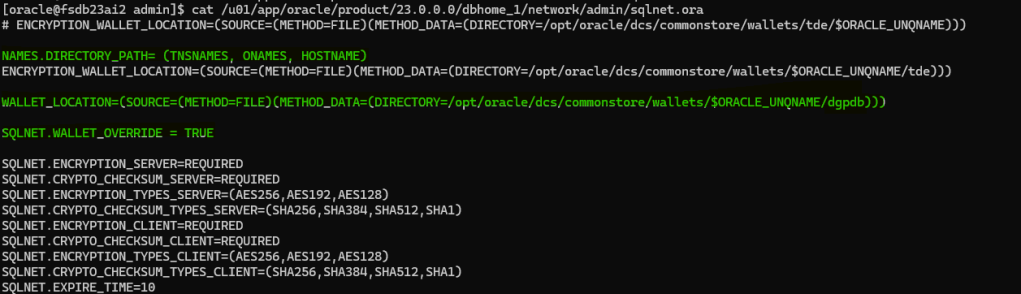
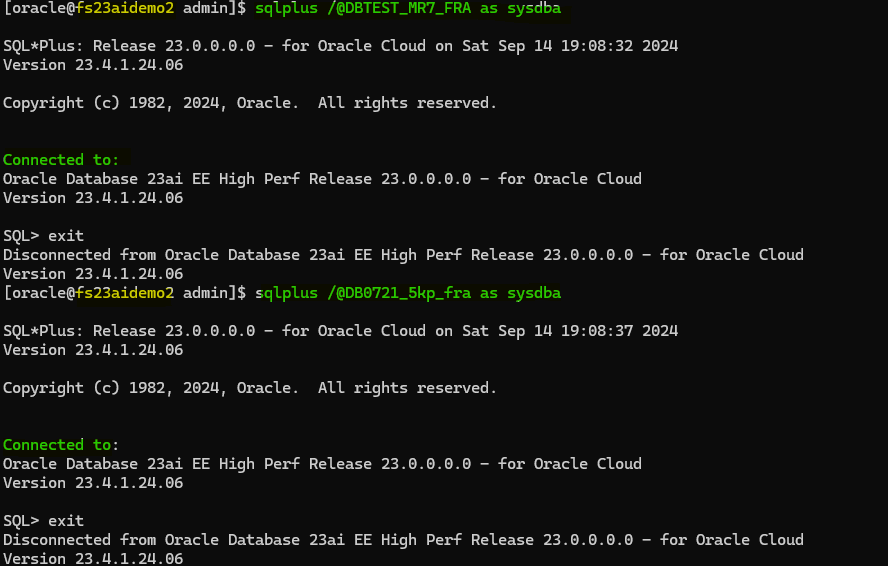
At this point it is important to make sure and check that credentials are working and connection is successfully established.
sqlplus /@<connect_identier_CDB1> as sysdba
sqlplus /@<connect_identier_CDB2> as sysdba

Create DG config for source and target database
Connect to the source and target container database using the wallet and create a configuration using DG Command Line Interface (DGMGRL). This is the same as for a normal Oracle Data Guard configuration. The only difference is that we have to do this for both CDBs, as both are primary databases.
--CDB1
dgmgrl /@DB0721_5kp_fra
CREATE CONFIGURATION "DB0721_5kp_fra" AS PRIMARY DATABASE IS "DB0721_5kp_fra" CONNECT IDENTIFIER IS "DB0721_5kp_fra";

--CDB2

dgmgrl /@DBTEST_mr7_fra
CREATE CONFIGURATION "DBTEST_mr7_fra" AS PRIMARY DATABASE IS "DBTEST_mr7_fra" CONNECT IDENTIFIER IS "DBTEST_mr7_fra";
Establish the Connection Between Configurations
Now, this is kind of different from what we normally do (such as adding a standby database, for example). In this case, we will connect to the source container database and establish a connection with the target database.
dgmgrl /@DBTEST_mr7_fra
add configuration DB0721_5kp_fra connect identifier is DB0721_5kp_fra;
show configuration verbose;
enable configuration all;
Prepare PDB for DG config!
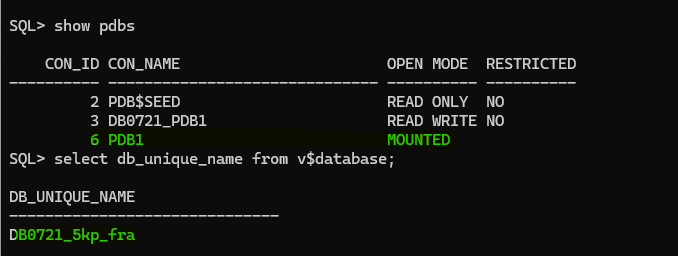
At this point, it is important to make sure that PDBs are open. Previously, in 21c, we had to do a couple of things manually before adding the PDB, but that is not the case anymore. In 23ai, Oracle has simplified the process and introduced a new command EDIT CONFIGURATION PREPARE DGPDB. This command assumes that the source container database and target container database configurations have been configured and are enabled.
DGMGRL> EDIT CONFIGURATION PREPARE DGPDB;
Enter password for DGPDB_INT account at DBTEST_mr7_fra:
Enter password for DGPDB_INT account at DB0721_5kp_fra:

Prepared Data Guard for Pluggable Database at DB0721_5kp_fra.

Prepared Data Guard for Pluggable Database at DBTEST_mr7_fra.
If we take a look at the alerts of both databases, we will see which commands were executed for us:


now, let’s proceed and configure the Oracle DG PDB level protection for the source PDB in the target CDB container
[oracle@fsdb23ai2 admin]$ dgmgrl /@DBTEST_mr7_fra
DGMGRL for Linux: Release 23.0.0.0.0 - for Oracle Cloud on Sat Sep 14 20:50:51 2024
Version 23.4.1.24.06

Copyright (c) 1982, 2024, Oracle and/or its affiliates.  All rights reserved.

Welcome to DGMGRL, type "help" for information.
Connected to "DBTEST_mr7_fra"
Connected as SYSDBA.
DGMGRL> ADD PLUGGABLE DATABASE PDB1 AT DB0721_5kp_fra SOURCE IS PDB1 AT DBTEST_mr7_fra PDBFILENAMECONVERT IS "'+DATA/DBTEST_MR7_FRA','+DATA/DB0721_5KP_FRA'" 'keystore IDENTIFIED BY "*****"';

Restore/Copy datafiles from PDB source in target CDB
Now, we need to restore/recover the PDB datafiles in the target CDB. We can use RMAN, SCP, DBMS_FILE_TRANSFER, but first we need to identify which datafile to copy/restore example:
set linesize 250
col name for a120
select file#, name from v$datafile  where con_id=3;

I will use RMAN for the purpose of this demo:
rman target sys@DBTEST_mr7_fra auxiliary sys@DB0721_5kp_fra
run {
allocate channel ch1 type disk;
backup as copy reuse datafile 8,9,10,12,14 auxiliary format NEW;
}
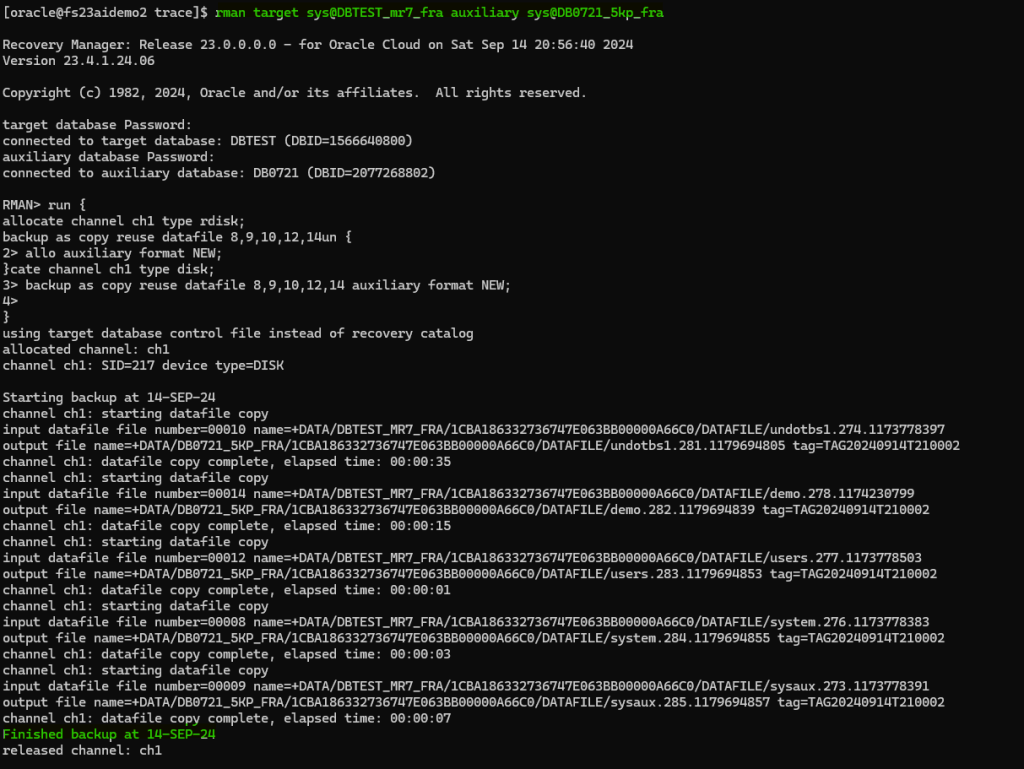
I need to rename the datafiles in the target PDB. The target filename can be obtained from the RMAN output logs, example in this case:
output file name=+DATA/DB0721_5KP_FRA/1CBA186332736747E063BB00000A66C0/DATAFILE/undotbs1.281.1179694805
output file name=+DATA/DB0721_5KP_FRA/1CBA186332736747E063BB00000A66C0/DATAFILE/demo.282.1179694839
output file name=+DATA/DB0721_5KP_FRA/1CBA186332736747E063BB00000A66C0/DATAFILE/users.283.1179694853
output file name=+DATA/DB0721_5KP_FRA/1CBA186332736747E063BB00000A66C0/DATAFILE/system.284.1179694855
output file name=+DATA/DB0721_5KP_FRA/1CBA186332736747E063BB00000A66C0/DATAFILE/sysaux.285.1179694857
So, this is the command example:
alter database rename file '+DATA/MUST_RENAME_THIS_DATAFILE_8.4294967295.4294967295' to '+DATA/DB0721_5KP_FRA/1CBA186332736747E063BB00000A66C0/DATAFILE/system.284.1179694855';
alter database rename file '+DATA/MUST_RENAME_THIS_DATAFILE_9.4294967295.4294967295' to '+DATA/DB0721_5KP_FRA/1CBA186332736747E063BB00000A66C0/DATAFILE/sysaux.285.1179694857';
alter database rename file '+DATA/MUST_RENAME_THIS_DATAFILE_10.4294967295.4294967295' to '+DATA/DB0721_5KP_FRA/1CBA186332736747E063BB00000A66C0/DATAFILE/undotbs1.281.1179694805';
alter database rename file '+DATA/MUST_RENAME_THIS_DATAFILE_12.4294967295.4294967295' to '+DATA/DB0721_5KP_FRA/1CBA186332736747E063BB00000A66C0/DATAFILE/users.283.1179694853';
alter database rename file '+DATA/MUST_RENAME_THIS_DATAFILE_14.4294967295.4294967295' to '+DATA/DB0721_5KP_FRA/1CBA186332736747E063BB00000A66C0/DATAFILE/demo.282.1179694839';
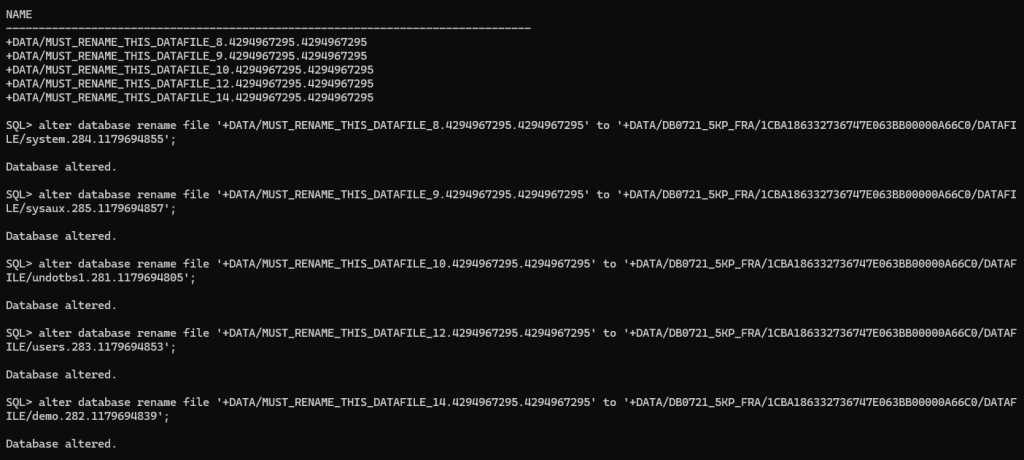
SQL> select name from v$datafile;

NAME
------------------------------------------------------------------------------------------------------------------------
+DATA/DB0721_5KP_FRA/1CBA186332736747E063BB00000A66C0/DATAFILE/system.284.1179694855
+DATA/DB0721_5KP_FRA/1CBA186332736747E063BB00000A66C0/DATAFILE/sysaux.285.1179694857
+DATA/DB0721_5KP_FRA/1CBA186332736747E063BB00000A66C0/DATAFILE/undotbs1.281.1179694805
+DATA/DB0721_5KP_FRA/1CBA186332736747E063BB00000A66C0/DATAFILE/users.283.1179694853
+DATA/DB0721_5KP_FRA/1CBA186332736747E063BB00000A66C0/DATAFILE/demo.282.1179694839

As you can see above everything looks good.
Export/import TDE keys
TDE is configured in my source and target CDBs. Therefore, I need to copy the wallet key for both the CDB and PDB into the target CDB/PDB for which we are setting up DG configuration. Let’s do that.
First, let’s take a look
SET LINESIZE 200
COLUMN wrl_parameter FORMAT A60
select * from v$encryption_wallet;

Let’s export the keys from the source CDB and PDB, to export from the CDB connect to the root container and execute:
ADMINISTER KEY MANAGEMENT EXPORT ENCRYPTION KEYS WITH SECRET "export_secret" TO '/tmp/CDB_DBTEST_key' FORCE KEYSTORE IDENTIFIED BY "*******";
then, connect to the PDB and export the key from the source PDB:
alter session set container = PDB_XX;
ADMINISTER KEY MANAGEMENT EXPORT ENCRYPTION KEYS WITH SECRET "export_secret" TO '/tmp/CDB_DBTEST_PDB1_key' FORCE KEYSTORE IDENTIFIED BY "*****";
Example for both commands:

Copy the encryption keys on target server and import it into the target database as follow:
ADMINISTER KEY MANAGEMENT IMPORT KEYS WITH SECRET "export_secret" FROM '/tmp/CDB_DBTEST_key' force keystore IDENTIFIED BY "*****" WITH BACKUP;
alter session set container = PDB_XX;
ADMINISTER KEY MANAGEMENT IMPORT KEYS WITH SECRET "export_secret" FROM '/tmp/CDB_DBTEST_PDB1_key' force keystore IDENTIFIED BY "*****" WITH BACKUP;
After import check the encryption keys:
set linesize 250
col activating_dbname for a15
col activating_pdbname for a15
col creation_time for a40
col activation_time for a40
select con_id, key_id, activating_dbname, activating_pdbname, creation_time, activation_time from  v$encryption_keys order by creation_time;

Standby Redo Logs (SRLs)
Unfortunately, the prepare EDIT CONFIGURATION PREPARE DGPDB does not create the SRLs in the target database. I think that it would be great, so we have to do it manually instead, so the PDB can receive redo from the source.
NOTE: You need to create the standby logs in the PDB, so make sure to connect to the PDB. If you create the standby logs in the CDB$ROOT in the target, it will not work. The VALIDATE PLUGGABLE DATABASE PDB_X at CDB_TARGET_X will tell you if SRLs have been detected; more on that below. Also, make sure to create the SRLs in the source PDB once you have done switchover, there is a limitation that won’t allow you to create it beforehand
ALTER SESSION SET CONTAINER = PDB1;
select group#,thread#,bytes from v$standby_log;

ALTER DATABASE ADD STANDBY LOGFILE thread 1 size 1024m;
ALTER DATABASE ADD STANDBY LOGFILE thread 1 size 1024m;
ALTER DATABASE ADD STANDBY LOGFILE thread 1 size 1024m;
If you have an RAC environment, make sure to create the SRLs accordingly, considering every thread. In this case, both databases are single instance. Also, make sure you have created the standby log files with the correct size.

Start redo transport!
Finally, let’s start to redo transport and cross our fingers, connect to the DG broker in order to do that:
dgmgrl /@DBTEST_mr7_fra
EDIT PLUGGABLE DATABASE PDB1 AT DB0721_5kp_fra SET STATE='APPLY-ON';
enable configuration all;

To check the config for PDB transport and apply lag execute the following command:
--show pluggable database PDB_X AT CDB_TARGET_X;
show pluggable database PDB1 AT DB0721_5kp_fra

You can also see more information executing the following commands:
SHOW ALL PLUGGABLE DATABASE AT CDB_SOURCE_X;
SHOW ALL PLUGGABLE DATABASE AT CDB_TARGET_X;
VALIDATE PLUGGABLE DATABASE PDB_X at CDB_TARGET_X;
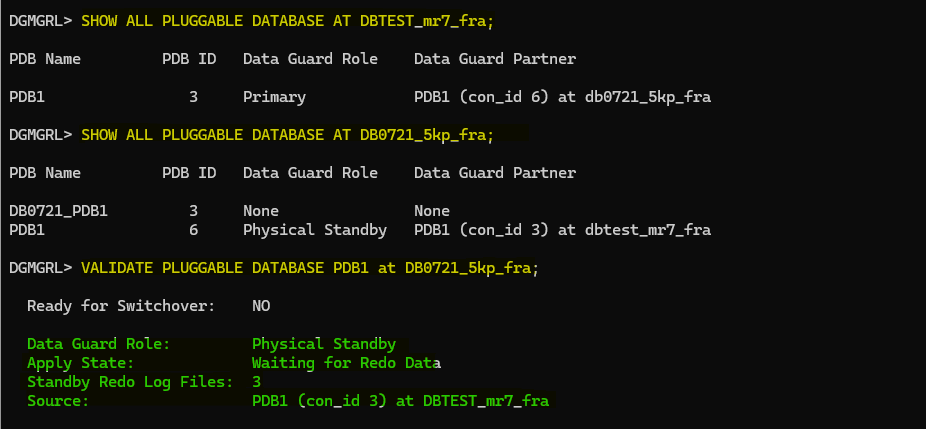
As I mentioned earlier, the VALIDATE PLUGGABLE DATABASE PDB_X at CDB_TARGET_X will tell you if SRLs have been detected. However, it does not check if the size is correct, so keep that in mind. Otherwise, you will find some gaps or lag due to that.
You can open the PDB in read-only mode and still have the redo applying, so you can benefit from real-time queries as well. Let’s open the PDB in the target CDB and take a look:


Switchover pluggable PDB
We are in the interesting part now, let’s perform a switchover operation for the PDB, again this won’t affect the whole container, just the PDB.
We will connect to the DG broker and perform the operation, but we need to make sure that PDB is ready for switchover, let’s take a look using the VALIDATE PLUGGABLE DATABASE command:
validate pluggable database PDB1 AT DB0721_5kp_fra;

PDB is ready for switchover, let’s do it!
switchover to pluggable database PDB1 AT DB0721_5kp_fra;
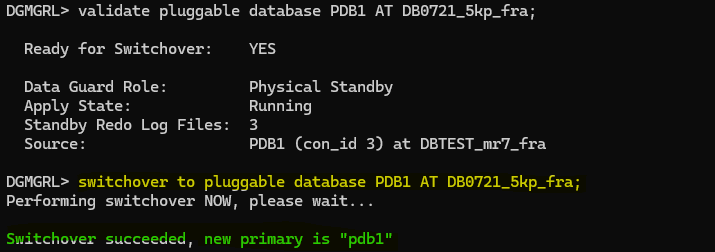
Great, now let’s take a look to the config:
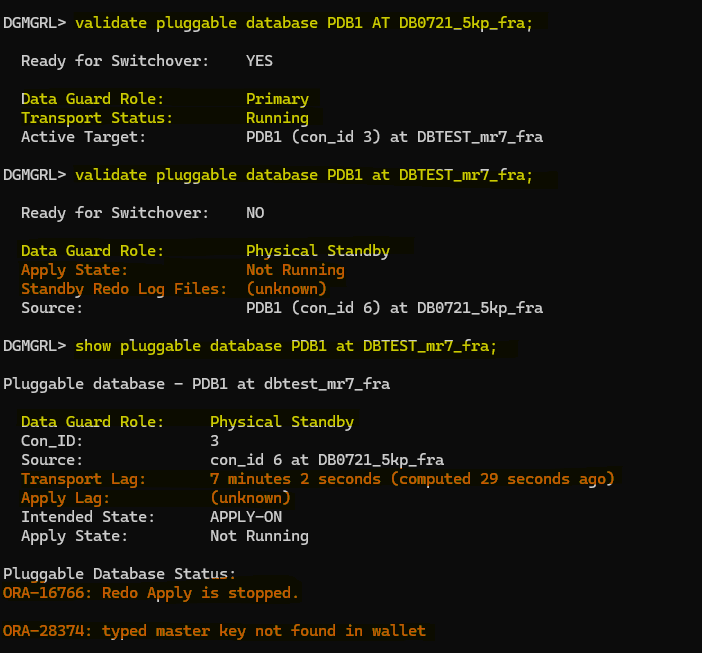
So, redo is stopped in our target PDB, and it also mentioned that we have an ora error: ORA-28374: typed master key not found in wallet
And this is true, remember that we have exported encryption keys from CDB1 DBTEST and it’s PDB1 to the target CDB DB0721_5kp_fra, now that we have done the switchover and we have the encryption key for PDB1 but we don’t have the encryption key for the CDB2 DB0721_5kp_fra, so we need to export the key and import it in the CDB1 DBTEST.
Also, we don’t have any SRLs created in the PDB1 from CDB DBTEST, we need to create them as well, before performing the switchover I tried to do it but it failed as follow:

But anyway, lets export/import the encryption key and try to create the SRLs again and see:
To export the encryption key in the CDB$ROOT on CDB DB071:
ADMINISTER KEY MANAGEMENT EXPORT ENCRYPTION KEYS WITH SECRET "****" TO '/tmp/CDB_DB0721_key' FORCE KEYSTORE IDENTIFIED BY "****";

I have copied the encryption key from the host where DB071 is running to the target host where DBTEST is running and import the key as follow:
ADMINISTER KEY MANAGEMENT IMPORT KEYS WITH SECRET "****" FROM '/tmp/CDB_DB0721_key' force keystore IDENTIFIED BY "****" WITH BACKUP;

Now, let’s create the SRLs in the PDB1 on CDB DBTEST
ALTER SESSION SET CONTAINER = PDB1;
select group#,thread#,bytes from v$standby_log;

ALTER DATABASE ADD STANDBY LOGFILE thread 1 size 1024m;
ALTER DATABASE ADD STANDBY LOGFILE thread 1 size 1024m;
ALTER DATABASE ADD STANDBY LOGFILE thread 1 size 1024m;

As you can see above, now it have allowed me to create them without any issue or ORA-27497: operation is not permitted inside a pluggable database, it is a shame that we can’t do it beforehand… another limitation
Let’s start the redo and see if everything looks good now:
DGMGRL> edit pluggable database PDB1 at DBTEST_mr7_fra set state=apply-on;


So, everything is working as expected now!
Failover pluggable PDB
During failover, the target PDB is changed to the source role. If the original source container database and other PDBs are functioning correctly, the PDB must be reinstated (this is the reason we have enabled flashback before!) as a target PDB before applying redo from the new source PDB.
To perform the failover you will need to execute the following command:
failover to pluggable database PDB_X AT CDB_TARGET_X;
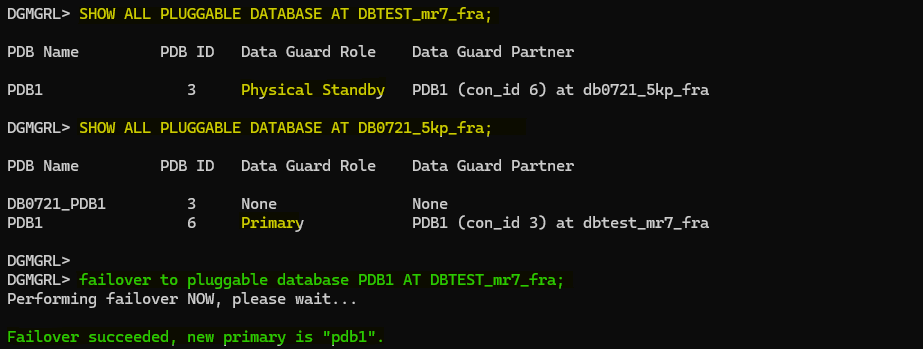
Failover has finished successfully and if we take a look to the other PDB we will find that we will need to reinstate it:

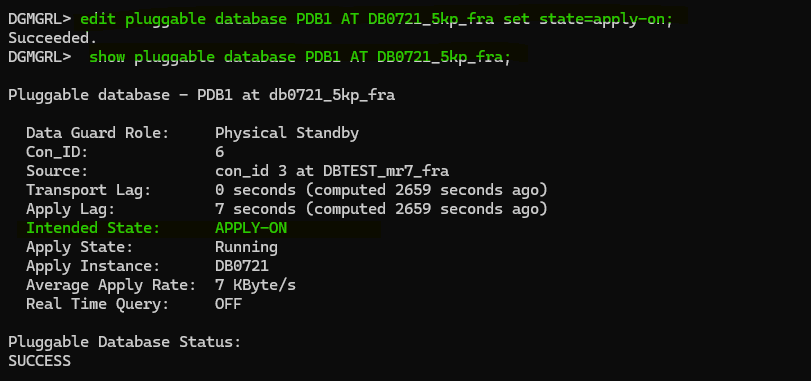
To reinstate the PDB we just need to start the redo apply again in that is:
edit pluggable database PDB_X AT CDB_X set state=apply-on;

Conclusion
The introduction of Oracle Data Guard per Pluggable Database (DGPDB) brings some new features to Oracle Multitenant databases, offering a flexible and granular approach to data protection and disaster recovery. It provides the ability to configure, maintain, and switchover each PDB independently. However, there are a few limitations, and it seems to be a little bit more complex.
After the first switchover/failover, you will need to make sure you have standby logs created in your PDB to avoid any gaps/lags. If you have TDE configured, then make sure to have the encryption keys from the source CDB and PDB into the target PDB, and the target CDB into the source CDB to avoid a possible ORA-28374: typed master key not found in wallet error.
Although, it seems to be a good approach with all the current limitations in place, maybe it is not a good idea to have this kind of configuration in a production environment. It would be easier just to continue with the traditional Oracle Dataguard per CDB architecture until Oracle releases new features, removes some important limitations, and continues to improve it, as I know they will do soon.





 DatabaseVerse: Journey into the World of Databases
Leave a comment