
I have found some interesting things about initialization parameters in a multitenant architecture that I wanted to share. You may probably know or maybe you think that It is quite obvious in some cases but at the end there are different behaviors depending of the parameter.
I will describe just couple of them and how they behave, at the end it is a good practice to analyze every change you want or need to perform in a database, let’s get started!
First thing to know is that I’m going to use Oracle 23c Free for this testing purpose, although some of them I had also tested in Oracle 19c Enterprise Edition.
LAB ENVIRONMENT
- Oracle Database 23c Free
CDB:FREEPDBs:PDBFREE1DATABAVERSE
PARAMETERS SAMPLING TEST
Parameters sampling test for this post will be:
db_files
DB_FILES
Introduction
The db_files parameter value is the maximum number of files, subject to operating system constraints, of course, that your database can have. It is good practice to monitor if your database is reaching this threshold and increase the value accordingly in a maintenance window to avoid any possible incidents in the future (not being able to add more data files due to space constraints is just one example).
Also, this parameter is very important when you are in multitenant architecture because you need to take into consideration all the PDBs that are part of the CDB.
TESTING
So, let’s see my current setup and parameters value right now:
set linesize 250
col pdb_name for a15
col name for a10
col value for a10
col display_value for a10
col description for a30
SELECT nvl(pdb.name, 'CDB$ROOT') pdb_name,  sp.name, sp.value, sp.display_value, sp.ISSES_MODIFIABLE, sp.ISSYS_MODIFIABLE, sp.ISPDB_MODIFIABLE, sp.ISINSTANCE_MODIFIABLE, sp.DESCRIPTION
FROM v$system_parameter sp LEFT JOIN v$pdbs pdb on sp.con_id=pdb.con_id
WHERE sp.name in ('db_files','open_links','sga_target')
ORDER BY sp.name, pdb_name;

In the screen above, the value for db_files is set to 200. This value is only set in the CDB$ROOT. Let’s modify that value and reduce it so we can conduct some testing.
Changing this parameter will require restart of the database instance to take effect as you can see in the column ISSYS_MODIFIABLE value is FALSE
So, I will connect to my CDB$ROOT and execute the following command:
alter system set db_files = 25 container = current scope=spfile;

If we take a look again we should be able to see the new value set:

Now, we have the parameter set to 25, let’s see how many data files we have in our current CDB:
SELECT pdb_name, SUM(num_files) num_files
FROM
(
SELECT nvl(pdb.name, 'CDB$ROOT') pdb_name, count(*) num_files
FROM cdb_data_files cdf LEFT JOIN v$pdbs pdb on cdf.con_id=pdb.con_id
group by pdb_name
UNION ALL
SELECT nvl(pdb.name, 'CDB$ROOT') pdb_name, count(*) num_files
FROM cdb_temp_files cdf LEFT JOIN v$pdbs pdb on cdf.con_id=pdb.con_id
group by pdb_name)
group by pdb_name
order by pdb_name;

So, I have 16 files (that include datafiles and tempfiles) but wait… I don’t see any file from my PDB$SEED, it is not even listed there.
select is OK, and actually this is expected behavior. If required, you can include results from PDB$SEED by setting hidden parameter "_EXCLUDE_SEED_CDB_VIEW" = FALSE.
As I want to make sure that I’m taking everything into consideration for db_files, let’s set the parameter at session level and run the select again:
ALTER SESSION SET "_EXCLUDE_SEED_CDB_VIEW" = FALSE;
SELECT pdb_name, SUM(num_files) num_files
FROM
(
SELECT nvl(pdb.name, 'CDB$ROOT') pdb_name, count(*) num_files
FROM cdb_data_files cdf LEFT JOIN v$pdbs pdb on cdf.con_id=pdb.con_id
group by pdb_name
UNION ALL
SELECT nvl(pdb.name, 'CDB$ROOT') pdb_name, count(*) num_files
FROM cdb_temp_files cdf LEFT JOIN v$pdbs pdb on cdf.con_id=pdb.con_id
group by pdb_name)
group by pdb_name
order by pdb_name;
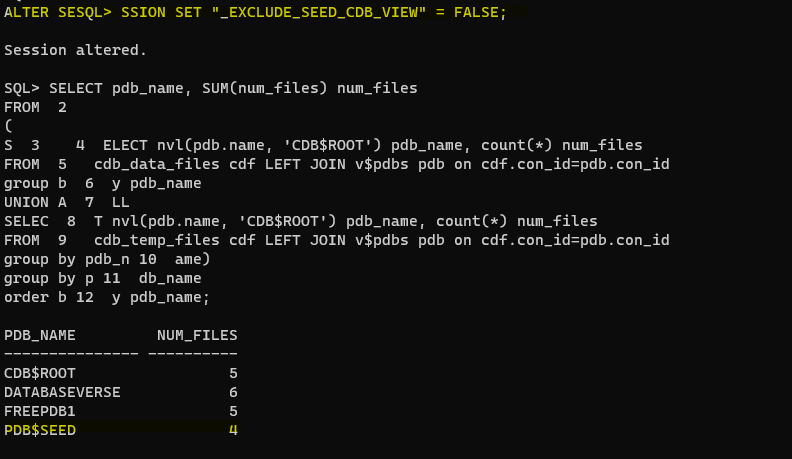
Good, now we have 20 files in total.
Let’s connect to the DATABASEVERSE PDB and create a new tablespace and add some datafiles in it.
I have created a test_tablespace with 4 datafiles without any issue:

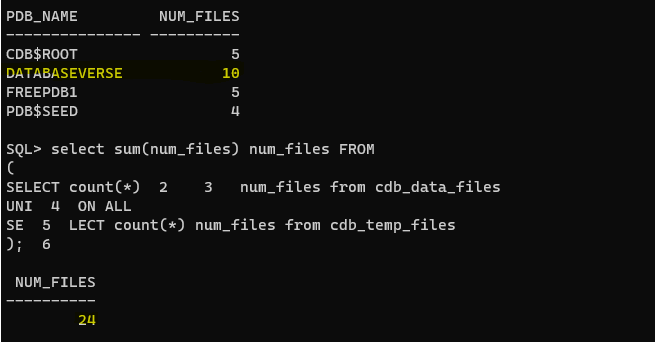
I’m close to the threshold of 25 db_files, let’s try to add more:
So, couple of interesting thing happened…
I was able to add more datafiles as looks like PDB$SEED files are not taking into consideration in the equation, let’s check the total:

Total says: 29, let’s set the hidden parameter to the default value and check again:
ALTER SESSION SET "_EXCLUDE_SEED_CDB_VIEW" = TRUE;
and voila! this is it, db_files does not count PDB$SEED files into consideration (you probably knew or maybe not!)

db_files is a global parameter as you can see it takes into consideration all the files from all the PDBs except PDB$SEED as we saw before, however, you can set this parameter at PDB level as well. Let’s see how it works.
First let’s change the db_files as below:
- at
CDBlevel = 30 - at
PDBlevelDATABASEVERSE= 35
Is this possible? Can we set the value in the PDB higher than the CDB? let’s find out.
I have set the parameter and restart the database instance:
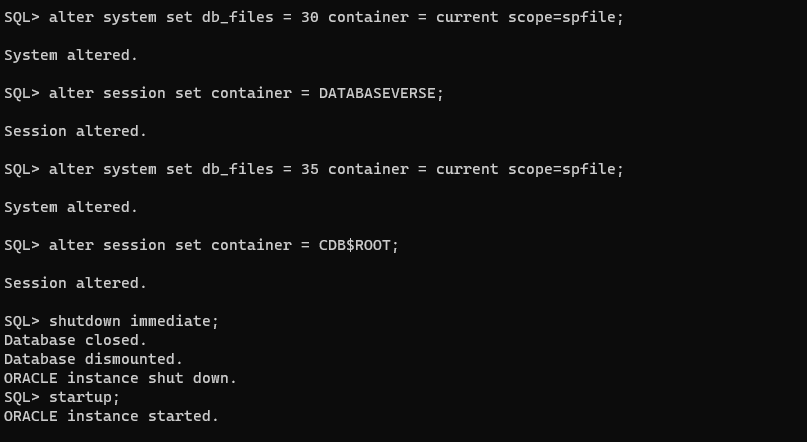
Let’s check the value after the change:

As you can see, I was able to set the value higher in the DATABASEVERSE PDB than the CDB$ROOT, but let’s see how this will behave. Let’s connect to the PDB and add more datafiles:
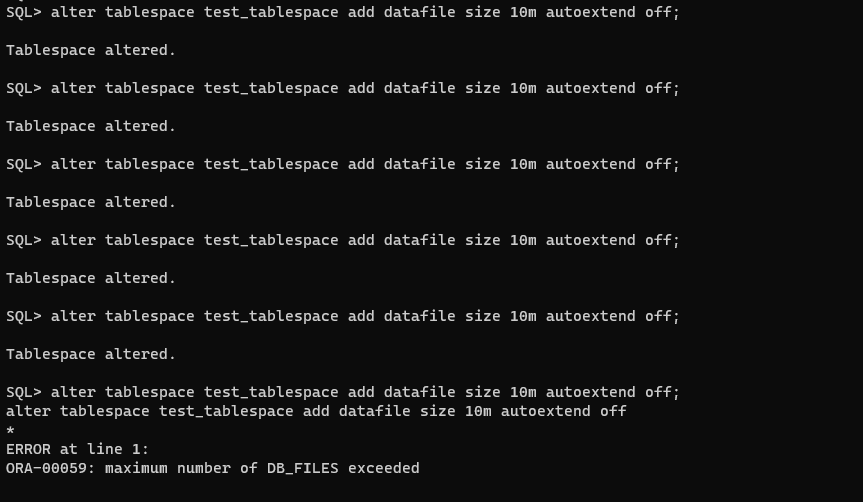
So, I was able to add only 5 new data files until I got the ORA error indicating that I had reached the maximum. Let’s check how many data files I have in total per PDB and in the CDB:

So, it is clear that even if you set the db_file values higher in your PDB, it will be ignored, as the CDB value has some kind of priority.
Let’s do one more example:
- at
CDBlevel = 32 - at
PDBlevelDATABASEVERSE= 22
So, I have changed the parameters values:

Let’s connect to the DATABASEVERSE PDB and add more datafiles:

As you can see above, I was able to add only two datafiles, so it seems that in this particular case my PDB is taking into consideration the value I set before.
Conclusion
The db_files parameter value has some considerations that you may be aware of:
- If you don’t set the
db_filesvalue atPDBlevel, then the value will be inherited from theCDB. - If you set the
db_filesvalue atPDBlevel higher than the one set in theCDB, it will be ignored, as theCDBhas some kind of precedence/priority over thePDB. - If you set the
db_filesvalue atPDBlevel to be less than or equal to the one set in theCDB, it will be taken into consideration over the one set in theCDB.
Although you can control how many db_files your PDBs can have, I think it is better to set the value at the CDB level only. This is of course my personal opinion but I will give you one simple reason: it will be easier to monitor if your CDB is reaching the maximum number of files instead of monitoring each individual PDB… my two cents.
Stay tuned as I will release the next part soon that will be focus in the open_links parameter. I just advance you… it’s behave different.




 DatabaseVerse: Journey into the World of Databases
Leave a comment